
AI Video Editor for UGC: Swap Outfits, Backgrounds, Products
I used Gemini Omni 1.2 Flash as an AI video editor on real UGC: outfit, background, claymation, captions and product swaps. Prompts, costs, gotchas.

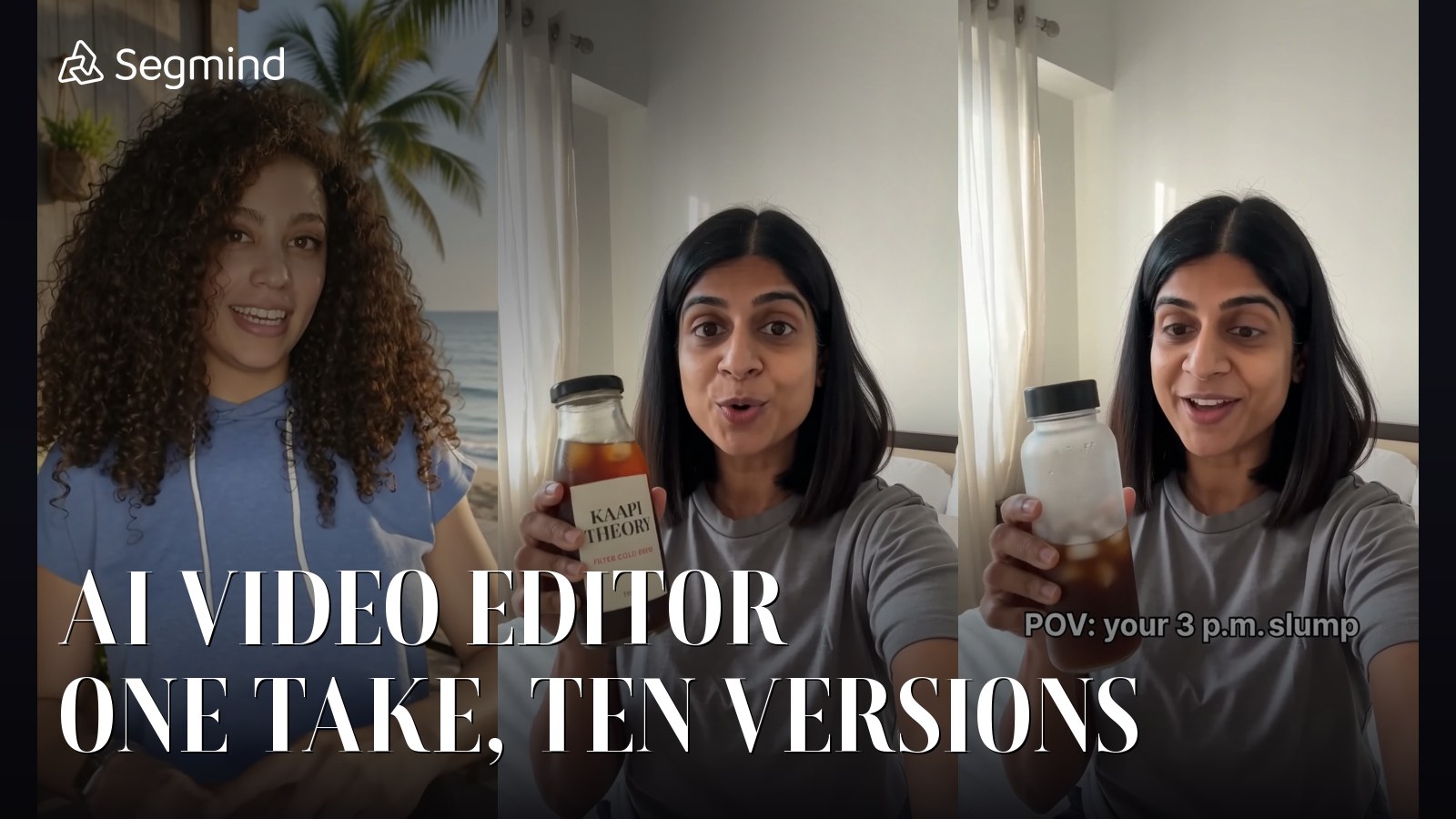
"AI video editor" is one of the most searched AI terms in India and worldwide, and most results are timeline tools with a few AI filters bolted on. What creators and performance marketers actually want is simpler: take one good take and make ten versions of it without reshooting.
I tested exactly that with the video-edit API in Google's Gemini Omni 1.2 Flash on Segmind. I used a real 8-second creator clip and ran separate single-change edits: outfit, background, relight, claymation, captions and a product in her hand. Because the performance comes from the source, the result keeps every gesture, expression and lip movement.
- Full review: Gemini Omni 1.2 Flash tested
- AI animation and motion graphics explainers (coming 9 Nov)
- AI chart animation for data videos (coming 10 Nov)
- Hindi AI video: Diwali greetings and translation (coming 6 Nov)
- AI video editing on real UGC footage (you are here)
- AI product videos from one packshot (coming 8 Nov)
The source and five versions
The source: real creator footage, Mixkit #42323, 8 s, 9:16.
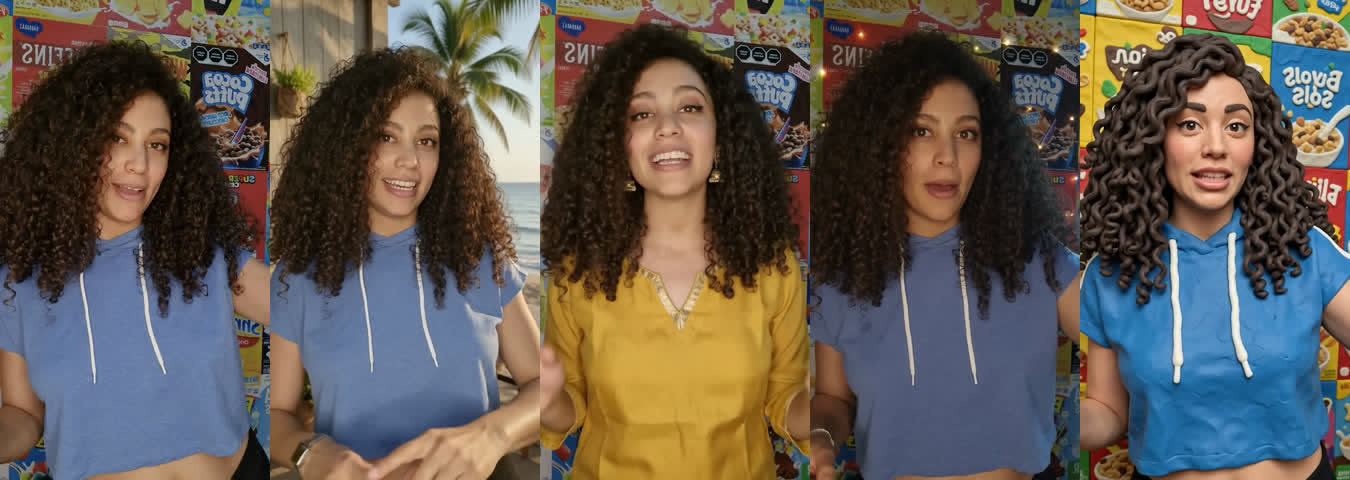
Same moment at t = 3 s: source, background swap, wardrobe swap, relight, claymation. Each was a separate video-edit call at about $0.67.
1. Outfit swap
ParametersAPI: video-edit | video: Mixkit #42323 | resolution: 720p | cost: $0.67 | time: 69 s
AI outfit change: the kurta and jhumkas move with her; performance, background and framing unchanged.
Excellent. The kurta drapes and moves with every gesture, the jhumkas swing, and nothing else changed. For seasonal or festive variants of the same creator take, this is a reshoot you no longer need.
2. Background swap, no masking
ParametersAPI: video-edit | video: Mixkit #42323 | resolution: 720p | cost: $0.67 | time: 66 s
AI background change: beach café composite with hair edges and gestures intact.
A clean composite: her hair edges, gestures and expressions stayed intact and the light on her matched the sunny scene. My first attempt was blocked, which I explain below.
3. Claymation restyle
ParametersAPI: video-edit | video: Mixkit #42323 | resolution: 720p | cost: $0.68 | time: 80 s
Claymation restyle of real footage: gestures, mouth and timing preserved.
A convincing clay look with her gestures, mouth and timing preserved, and the brand text on the boxes turned to nonsense as asked. The face reads a bit more doll-like than clay in close frames. Relighting worked too, but subtly: the room got warmer and darker, but the blue rim light I asked for barely showed.
4. Captions and a product in her hand
For these two I switched to a logo-free stand-in clip (more on why below).
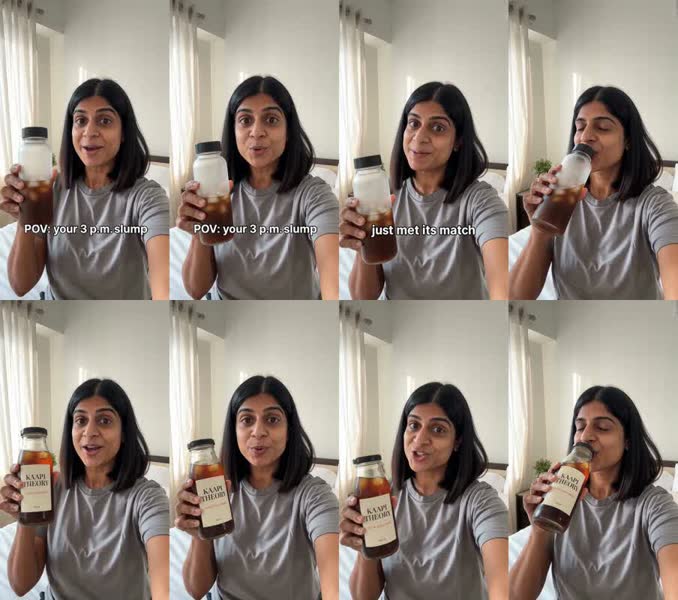
Top: timed captions. Bottom: a product swapped into her hand. Both on a logo-free stand-in clip generated with Seedance 2.0 Fast.
ParametersAPI: video-edit | video: logo-free stand-in | reference_images: [packshot] | resolution: 720p | cost: $0.67 | time: 85 s
AI product swap in video: the label stays readable through the shake and the sip.
The label stayed readable through the shake and the sip, and her grip and scale looked natural. The captions edit was just as clean: both captions spelled exactly, timed to the two halves of the clip, with performance and voice untouched.
ParametersAPI: video-edit | video: logo-free stand-in | resolution: 720p | cost: $0.67 | time: 75 s
AI captions on UGC: both captions spelled exactly and timed to each half.
The gotcha: real brand logos get blocked
My first background swap, and both caption and product-swap attempts on the original footage, were refused with a copyright or recitation block. The prompts named no brand. The trigger was the real cereal-box logos in the source, and a second clip full of branded cosmetics was blocked the same way.
- For background swaps, adding "the new background has no text, signs, logos or packaging anywhere" got it through on retry.
- For captions and product swaps, use footage without third-party logos. The same edits passed first time on a logo-free clip.
- Refused requests are not billed, but they cost you a round trip. Pre-check customer footage for logos.
My rules for AI video editing with Omni
- Change one thing per call. Start with "Change only the..."
- List everything to keep: "Keep her face, hair, every gesture, expression, lip movement, the background, the lighting and the framing exactly the same."
- Use a reference image for products and say "copied exactly from the reference and kept readable when she holds it up".
- Keep the source to 15 seconds or less. Duration and aspect ratio follow the source.
- Budget for edits: about $0.083 per second at 720p and 65 to 136 seconds per call, a little more than generation.
The code
import requests

r = requests.post(
    "https://api.segmind.com/v1/gemini-omni-1.2-flash-video-edit",
    headers={"x-api-key": "YOUR_SEGMIND_API_KEY"},
    json={
        "video": "https://your-cdn.com/creator-take.mp4",   # 15 s max
        "prompt": "Change only her outfit: ... Keep her face, hair, every gesture, expression, "
                  "lip movement, the background, the lighting and the framing exactly the same.",
        "reference_images": [],   # optional, e.g. a product shot for a swap
    },
)
r.raise_for_status()
open("edit.mp4", "wb").write(r.content)   # duration and aspect ratio follow the source
Full parameters are on the Gemini Omni 1.2 Flash video-edit page.
FAQ
Can AI change clothes in a video?
Yes. One Gemini Omni 1.2 Flash video-edit call swapped a hoodie for a kurta that moved naturally with every gesture, for about $0.67 on an 8-second clip.
Can AI change the background of a video without a green screen?
Yes. It replaced a room with a beach café and kept hair edges and gestures intact. Say the new background has no text or logos.
Why was my AI video edit blocked?
The copyright filter fires on source footage with real brand logos or packaging, even if your prompt names no brand. Use logo-free footage.
Can I put my product into an existing UGC video?
Yes, with a reference image of the product. The label stayed readable through the shake and the sip in my test.
Try Gemini Omni 1.2 Flash video-edit on Segmind and turn one creator take into ten variants.
Test notes: all tests ran on 05 Nov 2026 on Segmind. KAAPI THEORY and the generated people are fictional. Real footage is free-licence stock from Mixkit. Input images were made with Nano Banana Pro. Every Omni output carries SynthID and C2PA.