
Gemini Omni 1.2 Flash: Google's New Gemini Video API Tested
I ran 20 tests on Google's Gemini Omni 1.2 Flash video API. What it does best, where it breaks, Omni vs Seedance, costs and code.

Google's newest Gemini video model, Gemini Omni 1.2 Flash, is live on Segmind as six video APIs: text-to-video, image-to-video, reference-to-video, video-edit, refine and upscale. Before we switched it on, I spent a day running 20 tests across four rounds. It cost me $16.17 in credits, and every call finished in 28 to 136 seconds.
I did not want a "look how pretty" launch post. I wanted to know where this Gemini video API earns a place in a real production pipeline, where it breaks, and when I would still send a job to Seedance. This is the overview. Each use case has its own deep dive with every prompt, output and cost, linked below.
Short version: Omni 1.2 Flash is the most instruction-exact video model I have tested. It is brilliant at explainers, typography, chart animation and single-change edits to real footage. It is not a cinematic, photoreal-people model.
- Full review: Gemini Omni 1.2 Flash tested (you are here)
- AI animation and motion graphics explainers (coming 9 Nov)
- AI chart animation for data videos (coming 10 Nov)
- Hindi AI video: Diwali greetings and translation (coming 6 Nov)
- AI video editing on real UGC footage (coming 7 Nov)
- AI product videos from one packshot (coming 8 Nov)
The scorecard after 20 tests
| Strong: build on these | Usable: with care | Weak: route elsewhere |
|---|---|---|
| Flow-diagram explainers with labels | Localisation edits (one label missed) | Plotting values without a last frame |
| Kinetic typography, including Devanagari | Relighting (works, but subtle) | Cinematic ads and photoreal people from scratch |
| Chart animation from a finished last frame | Ad variants (background swaps drift) | Refine (switched off at launch) |
| Wardrobe, background and claymation edits on real footage | Maps with 4+ labelled stops | Footage with real brand logos (copyright filter) |
| Product videos with text callouts | Upscale (real detail, high cost) |
Six Gemini video APIs, one model family
Passing a field a slug does not take returns a 400 that names the right slug, so it pays to know the limits up front.
| Slug | What it does | Limits I hit |
|---|---|---|
| gemini-omni-1.2-flash-text-to-video | Video plus native audio from a prompt | 3 to 15 s |
| gemini-omni-1.2-flash-image-to-video | Animates a first_frame_image, optional last_frame_image | 3 to 15 s; 3 to 10 s with a last frame |
| gemini-omni-1.2-flash-reference-to-video | New scene that keeps 1 to 10 reference_images consistent, cited as <IMAGE_REF_0>, <IMAGE_REF_1> | 3 to 10 s |
| gemini-omni-1.2-flash-video-edit | Add, remove, swap or restyle inside a source video | Source up to 15 s; duration and aspect ratio follow the source |
| gemini-omni-1.2-flash-refine | Follow-up prompt on a recent Omni video via previous_interaction_id | Returned "not available yet" in my tests |
| gemini-omni-1.2-flash-upscale | 360p to 720p/1080p, 720p to 1080p/4K, 1080p to 4K | Source up to 15 s; 16:9 or 9:16 |
Shared parameters: resolution (360p, 720p default, 1080p, 4k), aspect_ratio (16:9 default or 9:16), duration in whole seconds (default 5) and seed. Every output carries native audio at no extra charge, plus SynthID and C2PA provenance.
The best result of the day
If you watch one clip, make it this one: a flat 2D explainer of a UPI payment, generated from text alone. Every label, the ₹500 token and the closing banner came out exactly as written, for $0.74 in 45 seconds. The prompt and the rest of my explainer tests are in AI animation for explainers.
Gemini Omni 1.2 Flash text-to-video: UPI payment explainer, 16:9, 720p, 10 s.
What it is great at, in one line each
- Explainers and motion graphics: labelled boxes, maps and claymation that follow ordered beats. Read the deep dive.
- Data videos: lands exactly on a finished chart you supply, but cannot plot numbers on its own. Read the deep dive.
- Hindi and festive content: writes Devanagari stroke by stroke and localises a finished explainer in one call. Read the deep dive.
- Editing real footage: outfit, background, product and caption edits that keep the original performance. Read the deep dive.
- Product videos: a single packshot becomes a callout video with the label kept readable. Read the deep dive.
Where it falls short
- Photoreal people from scratch. Identity holds across shots, but motion reads floaty and faces sit below Seedance. Real-person likenesses and celebrity names are blocked.
- Counting past three. A map with four tagged stops duplicated three labels and misplaced an icon.
- About one instruction in four gets skipped, usually a background change or a final camera move. Plan for a QA pass and the odd re-roll.
- Plotting data. Given numbers in the prompt, it put points at the wrong heights.
- Refine was switched off at launch. Send the previous output to video-edit with your follow-up instead.
- Real brand logos in source footage trigger a copyright block on edits that add text or a product.
Omni or Seedance? How I route jobs now
| Job | I use | Why |
|---|---|---|
| Explainers, diagrams, typography | Omni | Every label exact, steps in order |
| Chart and infographic animation | Omni, with a finished last frame | Locks the layout and lands exactly |
| Stylised looks: claymation, flat 2D, paper collage | Omni | Consistent styles |
| Product features with text callouts, no people | Omni | Callouts land in order; product stays on-model |
| Single-change edits to real footage | Omni | Performance comes from the source |
| Fast drafts and agent iteration loops | Omni | About 20 to 70 s per call; $0.026/s at 360p |
| Photoreal people, acting, lip-synced UGC from scratch | Seedance | More natural faces and motion |
| Cinematic brand films and hero ads | Seedance | Better camera language, grading and physics |
| Action, sports, physics-heavy motion | Seedance | More natural weight and inertia |
My prompting playbook
- Quote every on-screen word in single quotes and end with "every word spelled exactly as given, no other text".
- Give beats in order: "first X appears, then Y, then Z; finally..."
- Name the medium: "flat 2D motion graphics", "claymation with visible thumbprints, 12 fps". Stylised beats photoreal.
- Lock what must not move: "Locked-off camera. The title, labels and numbers never move or change."
- Pin the ending with
last_frame_imagewhenever the end state matters. - For edits, change one thing per call and list everything to keep.
- Script the sound with one cue per beat. Audio is free.
- Fix a seed once you like a draft so higher-resolution re-runs follow it.
What it costs and how long it takes
These are the costs I was actually billed, read from the cost header on each response. Aspect ratio does not change the price, and refused requests are not charged.
| Call | What I paid | Typical time |
|---|---|---|
| text-to-video, 360p | about $0.026/s (8 s = $0.21) | 20 to 30 s |
| text, image or reference-to-video, 720p | about $0.075/s (8 s = $0.60, 10 s = $0.74, 12 s = $0.89) | 40 to 70 s |
| video-edit, 720p | about $0.083/s (8 s = $0.67, 12 s = $1.00) | 65 to 136 s |
| video-edit, 360p | about $0.029/s | about 70 s |
| upscale, 360p to 1080p | about $0.074 per output second (8 s = $0.59) | about 70 s |
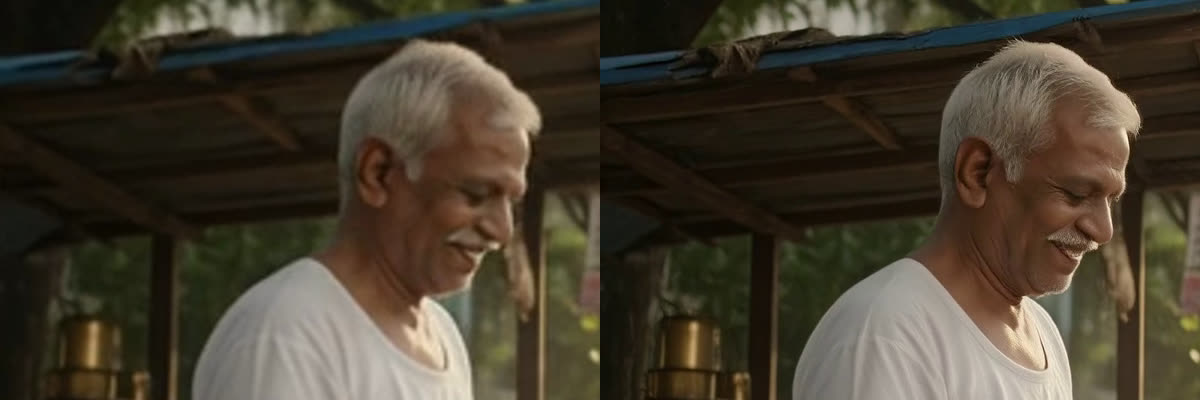
Same frame, same crop: the 360p draft stretched (left) versus the Omni 1080p upscale (right).
The upscaler adds real detail to hair, skin and edges with no change to content or motion, but it cost nearly three times the 360p draft. My workflow: iterate at 360p, fix the seed on the winner, then re-render at 720p or 1080p, or upscale only the final cut.
Developer quick start
All six endpoints take JSON and accept media as a public URL, a data URI or raw base64.
import requests

r = requests.post(
    "https://api.segmind.com/v1/gemini-omni-1.2-flash-text-to-video",
    headers={"x-api-key": "YOUR_SEGMIND_API_KEY"},
    json={
        "prompt": "Clean flat 2D motion-graphics explainer titled 'HOW A UPI PAYMENT WORKS'... "
                  "First the title appears, then five labelled boxes appear left to right... "
                  "All text spelled exactly as given, no other text.",
        "aspect_ratio": "16:9",   # or "9:16" for Reels and Shorts
        "resolution": "720p",     # 360p for cheap drafts
        "duration": 10,           # 3 to 15 s
        "seed": 7802,
    },
)
r.raise_for_status()
open("explainer.mp4", "wb").write(r.content)   # video with native audio
print("cost:", r.headers.get("X-Cost"))
Errors worth knowing: 400 covers bad input, a field the slug does not take, an out-of-range duration and safety or copyright blocks; 406 means you are out of credits; 429 is a rate limit, so back off and retry; 500 is a provider fault, so retry. For long or 1080p+ jobs, use our async endpoint and poll.
FAQ
What is Gemini Omni 1.2 Flash?
Google's Gemini video model for fast, instruction-exact generation and editing. On Segmind it is six APIs: text-to-video, image-to-video, reference-to-video, video-edit, refine and upscale, all with native audio.
How much does the Gemini Omni 1.2 Flash API cost?
In my tests, about $0.026 per second at 360p, about $0.075 per second at 720p and about $0.083 per second for 720p edits. Audio is included and refused requests are not billed.
Is Gemini Omni 1.2 Flash better than Seedance?
For text, diagrams, charts and edits to existing footage, yes. For photoreal people, cinematic brand films and physics-heavy action, Seedance 2.0 is still clearly ahead.
How long does a Gemini Omni 1.2 Flash video take?
Most calls finished in 40 to 90 seconds. 360p drafts took 20 to 30 seconds and the slowest edit took 136 seconds.
My take
Gemini Omni 1.2 Flash is not trying to be the prettiest video model. It is the most obedient one. If your job has words on screen, an order of steps, a chart, or a real performance you want to keep while changing one thing, it is fast, cheap and remarkably exact. If your job is a face that has to feel real or a hero film that has to feel expensive, keep using Seedance.
Try Gemini Omni 1.2 Flash on Segmind. It is available via API with no setup required, alongside Seedance and 500+ other models on the same key.
Test notes: all tests ran on 05 Nov 2026 on Segmind. KAAPI THEORY and the generated people are fictional. Real footage is free-licence stock from Mixkit. Input images were made with Nano Banana Pro. Every Omni output carries SynthID and C2PA.