
HeyGen Avatar 6 Guide: Real API Tests, Costs and Gotchas
HeyGen Avatar 6 guide: 9 real API tests on Segmind across photo, presenter and mascot modes, with exact costs and the gestures that miss.

HeyGen Avatar 6 landed on November 17, and two days later I had already burned through nine renders of it on Segmind. I wanted to answer one question that the launch posts skip: if you are a developer or a marketing team calling it from an API, what do you actually get back, what does it cost to the cent, and where does it still slip?
This guide covers all three HeyGen Avatar 6 endpoints on Segmind (photo, stock presenter and animated character), with every input, script and parameter I used, the measured bill for each clip, and frame-by-frame checks of whether the gestures land on the words they are supposed to. Some do, beautifully. A couple do not, and I will show you exactly which.
What is HeyGen Avatar 6?
HeyGen Avatar 6 is HeyGen's newest talking-avatar model. You give it a face (a photo, a stock presenter, or a short clip of a cartoon character) plus speech (a typed script or an audio file), and it renders a lip-synced video of that face performing the words. The headline change from earlier HeyGen avatars is that the motion is driven by what is being said: the model reads the speech and decides when to count, point, wave or lean in, instead of looping a canned idle animation.
HeyGen's technical report calls it "84.4% indistinguishable from real footage". It is worth knowing what that number is. In a side-by-side test, raters picked the Avatar 6 clip as the real one 42.2% of the time, where 50% would mean they could not tell at all. 84.4% is that 42.2% expressed against the 50% ceiling. That is still a strong result, and Avatar 6 also placed first in New Measure's early Avatar Arena results, but it is not "84% of people were fooled". The arena clips were also short, almost all under 35 seconds, which is one reason I ran a longer one myself.
On Segmind, HeyGen Avatar 6 ships as three separate endpoints:
| Endpoint | Face comes from | Speech | Best for |
|---|---|---|---|
| heygen-avatar-6-image-to-video | One photo of a person or character | Script + stock voice, or your own audio | Founder updates, UGC-style ads, localized spokesperson clips |
| heygen-avatar-6-identity-to-video | A HeyGen public presenter look (by ID) | Script (look's own voice or a stock voice), or audio | Courses, explainers, help content without any face of your own |
| heygen-avatar-6-reference-to-video | A 2s+ clip of an animated or illustrated character | Script + stock voice, or audio | Brand mascots, kids' content, cartoon hosts |
All three share the same controls: tier (standard or turbo), resolution (1080p or 2k), motion_prompt (up to 1,200 characters of gesture direction), motion_expressiveness (default or less), and a script of up to 5,000 characters. There is no duration parameter. The clip runs as long as the speech.
HeyGen Avatar 6 pricing on Segmind
Billing is per second of output video, whole seconds, fraction dropped. These are the published rates from the model pages:
| Tier | Resolution | Your own audio | Script (photo and character endpoints) |
|---|---|---|---|
| standard | 1080p | $0.1058/s | $0.1103/s |
| standard | 2k | $0.1534/s | $0.1579/s |
| turbo | 1080p | $0.0529/s | $0.0574/s |
| turbo | 2k | $0.0926/s | $0.0970/s |
On the stock-presenter endpoint, a script costs the same as audio. On the photo and character endpoints, a script adds about $0.0044 per second for the HeyGen voice that reads it.
I checked every bill against these rates. Eight of my nine clips matched the table exactly once the duration was floored to whole seconds: a 20.32 second clip billed as 20 seconds, a 19.40 second clip as 19, and so on. The one exception was the 2K stock-presenter clip, which billed $0.1543 per second against a published $0.1534, a 0.6% difference that looks like two transposed digits in the price table. It is a rounding error in dollars, but if you are building a cost estimator, measure your own 2K bill rather than hardcoding the table.
My test setup
I generated three original inputs: a fictional skincare founder (a 9:16 Nano Banana 2 photo), a fictional warehouse safety trainer (16:9), and an original cartoon otter mascot called Ollie, which I animated into a 5 second reference clip with Seedance 2.0 Mini. For the stock-presenter test I used one of HeyGen's public looks. Then I fired nine renders across the three endpoints, two at a time, and reviewed every clip by transcribing it with word-level timestamps and pulling frames at the exact moment each cue word was spoken.
| # | Test | Endpoint | Output | Billed | Render time |
|---|---|---|---|---|---|
| 1 | Skincare UGC ad, standard | photo | 20s, 1072x1920 | $2.21 | 99s |
| 2 | Same ad, turbo | photo | 20s, 1072x1920 | $1.15 | 104s |
| 3 | Same ad in Spanish | photo | 22s, 1072x1920 | $2.43 | 149s |
| 4 | Safety trainer, default motion | photo | 19s, 1920x1072 | $2.10 | 125s |
| 5 | Safety trainer, motion less | photo | 19s, 1920x1072 | $2.10 | 122s |
| 6 | 48s finance lesson, 1080p | presenter | 48s, 1920x1080 | $5.08 | 293s |
| 7 | Lesson opening, 2K | presenter | 12s, 2560x1440 | $1.85 | 161s |
| 8 | Otter mascot | character | 13s, 1920x1072 | $1.43 | 115s |
| 9 | Trainer, own audio file | photo | 4s, 1920x1072 | $0.42 | 42s |
Total for the nine HeyGen Avatar 6 clips: $18.76. Every output was H.264 at 25 fps with 48 kHz stereo AAC. The videos embedded below are web re-encodes of those files (downscaled except for the 2K clip). The originals run up to 30 Mbps (the 20 second vertical clip was 77 MB), so plan to transcode before you serve them.
Use case 1: a UGC-style skincare ad from one photo
Marketing teams are the obvious first customer here. Selfie-style talking videos are the backbone of paid social, and they are expensive to shoot in volume. I wanted to see whether one still photo could carry a 20 second vertical ad with a three-step list, which is exactly the kind of script where context-aware gestures should shine.
Reference image
reference_image
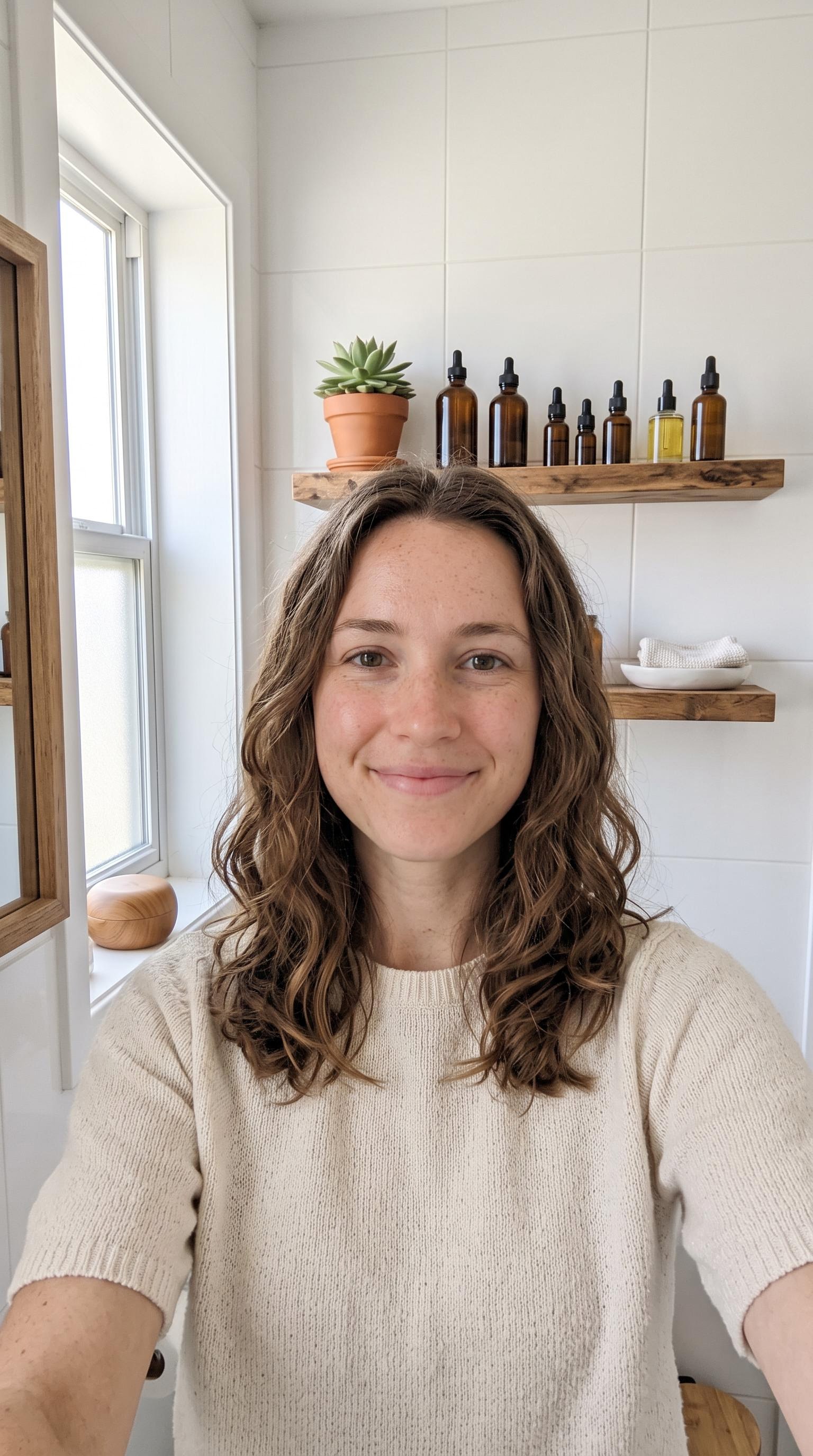
The only visual input: one 9:16 photo of a fictional founder, generated with Nano Banana 2.
Motion promptCasual selfie-video energy, talking straight to the phone camera. Hold up one finger on 'First', two fingers on 'Second', three fingers on 'third'. Gently press fingertips to one cheek on 'pressed in'. Smile and give a small shrug on 'That's it'.
Parametersreference_image: in-mkt.jpg | voice_id: 4270665fc47f44aa989c093bb3dc2b99 | tier: standard | resolution: 1080p | voice: stock female (4270665f...)
HeyGen Avatar 6 Image to Video, standard tier, 1080p. 20 seconds, billed $2.21.
This is a genuinely usable ad. The face holds its identity for the whole clip, the freckles and hair stay put, and the mouth shapes match the words. The output kept the photo's own proportions (1072x1920), so a 9:16 photo gives you a 9:16 video with no cropping. Some of the gestures are excellent. "First" gets one raised finger exactly on the word, and "pressed in" gets fingertips pressed to the cheek at 12.3 seconds, right as the phrase is spoken.
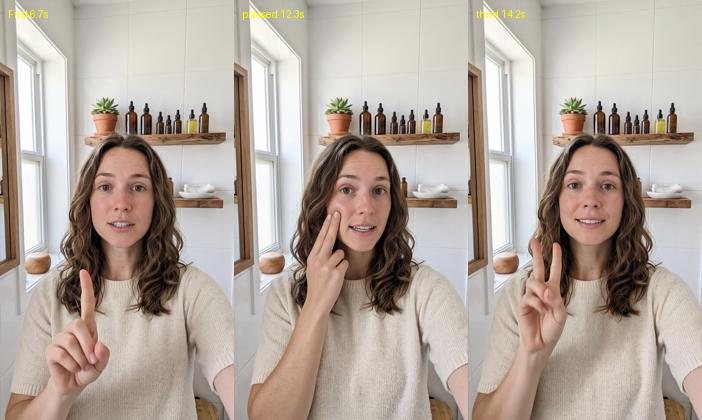
Frames pulled at the moment each cue word is spoken: 'First' (one finger), 'pressed' (fingertips to cheek), 'third' (two fingers, not three).
The counting is where it slipped. On "Second" she is still mid-transition, then two fingers appear on "two drops", and on "third" she is still holding up two. My guess is that the word "two" in "two drops" pulled the gesture, and the model never got back on count. If your script mixes ordinal steps with other numbers, either keep the numbers apart or accept that the count may be off by one.
Turbo vs standard: half the price, same face
Turbo is half the price of standard at 1080p, and HeyGen describes it as the faster option for drafts. I re-ran test 1 at turbo with nothing else changed.
Motion promptCasual selfie-video energy, talking straight to the phone camera. Hold up one finger on 'First', two fingers on 'Second', three fingers on 'third'. Gently press fingertips to one cheek on 'pressed in'. Smile and give a small shrug on 'That's it'.
Parametersreference_image: in-mkt.jpg | voice_id: 4270665fc47f44aa989c093bb3dc2b99 | tier: turbo | resolution: 1080p | voice: stock female (4270665f...)
HeyGen Avatar 6 Image to Video, turbo tier, 1080p. Same script and photo, billed $1.15.
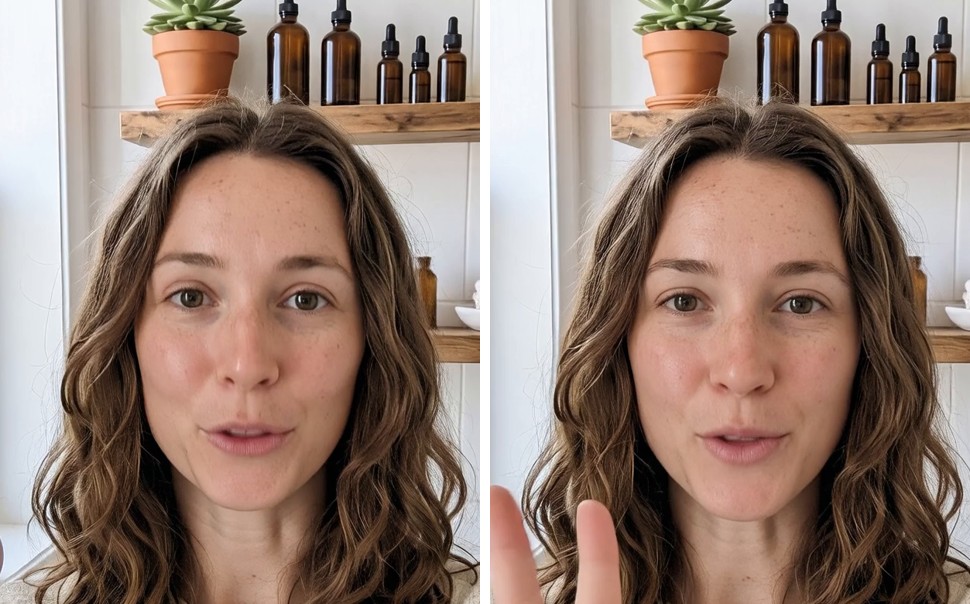
Same frame time (5.0s). Left: standard. Right: turbo. Skin and hair detail are indistinguishable.
Three things surprised me. First, turbo was not faster for me: 104 seconds against 99 for standard, on the same 20 second clip. Second, image quality was a dead heat. I measured fine detail on the face across five frames and turbo actually scored fractionally higher. The voice track was the same length too, because the stock voice reads the script identically on both tiers. Third, the difference showed up in the choreography. Turbo held up two fingers on "First" as well as on "third", so it got the count wrong more often than standard. My read: turbo is a real 48% saving for anything where precise gesture timing does not matter, and standard is worth it when the script leans on counting or pointing.
Use case 2: localizing the same ad into Spanish
The second marketing job is localization: same face, same offer, new market. The photo endpoint takes a language code, so I translated the script, kept the same English stock voice, and set language to es.
Motion promptCasual selfie-video energy, talking straight to the phone camera. Hold up one finger on 'Primero', two fingers on 'Segundo', three fingers on 'tercero'. Gently press fingertips to one cheek on 'presionando'. Smile and give a small shrug on 'Eso es todo'.
Parametersreference_image: in-mkt.jpg | voice_id: 4270665fc47f44aa989c093bb3dc2b99 | language: es | tier: standard | resolution: 1080p | voice: stock female (4270665f...)
HeyGen Avatar 6 Image to Video speaking Spanish from the same photo. 22 seconds, billed $2.43.
Transcribing the result in Spanish gave back my script almost word for word, so the stock voice handled the language switch cleanly and the lip sync followed. The identity and setting match test 1 exactly, which is what you want for a localized campaign. The counting problem carried over though: "Primero" got two fingers this time, and so did "tercero". Spanish ran two seconds longer than English for the same content, and since cost follows duration, that added $0.22. Budget a little extra for languages that run longer than English.
Use case 3: training video for frontline teams
Corporate training is where talking-head video gets made at the highest volume and the lowest budget. I wrote a 19 second shift-start safety briefing with three directional cues (look down, look up, check your vest) and gave the model a motion prompt that ties a gesture to each one.
Reference image
reference_image

One 16:9 photo of a fictional trainer, waist up, in a working warehouse.
Motion promptFirm but friendly trainer delivery. Point down toward the floor on 'look down', point up toward the racks on 'look up', tap the front of the vest with one hand on 'check your vest'. Hold up three fingers on 'Three checks'.
Parametersreference_image: in-trainer.jpg | voice_id: 049413e41c334753984c294d694afb5c | tier: standard | resolution: 1080p | motion_expressiveness: default | voice: stock male (049413e4...)
HeyGen Avatar 6 Image to Video, safety briefing, default motion. 19 seconds, billed $2.10.
This one is a harder test than the skincare ad, because the face fills much less of the frame. It still held up well. Three fingers go up on "three checks", the hand goes up toward the racks on "look up", and the hand comes to the vest on "check your vest". The miss: on "look down" he raises his hand instead of pointing at the floor. Upward motion seems to be the model's default emphasis gesture, and the downward cue lost out to it.
Then I ran the identical request with motion_expressiveness set to less, the setting HeyGen recommends for formal, corporate reads.
Motion promptFirm but friendly trainer delivery. Point down toward the floor on 'look down', point up toward the racks on 'look up', tap the front of the vest with one hand on 'check your vest'. Hold up three fingers on 'Three checks'.
Parametersreference_image: in-trainer.jpg | voice_id: 049413e41c334753984c294d694afb5c | tier: standard | resolution: 1080p | motion_expressiveness: less | voice: stock male (049413e4...)
HeyGen Avatar 6 Image to Video, same briefing with motion_expressiveness less. Billed $2.10.
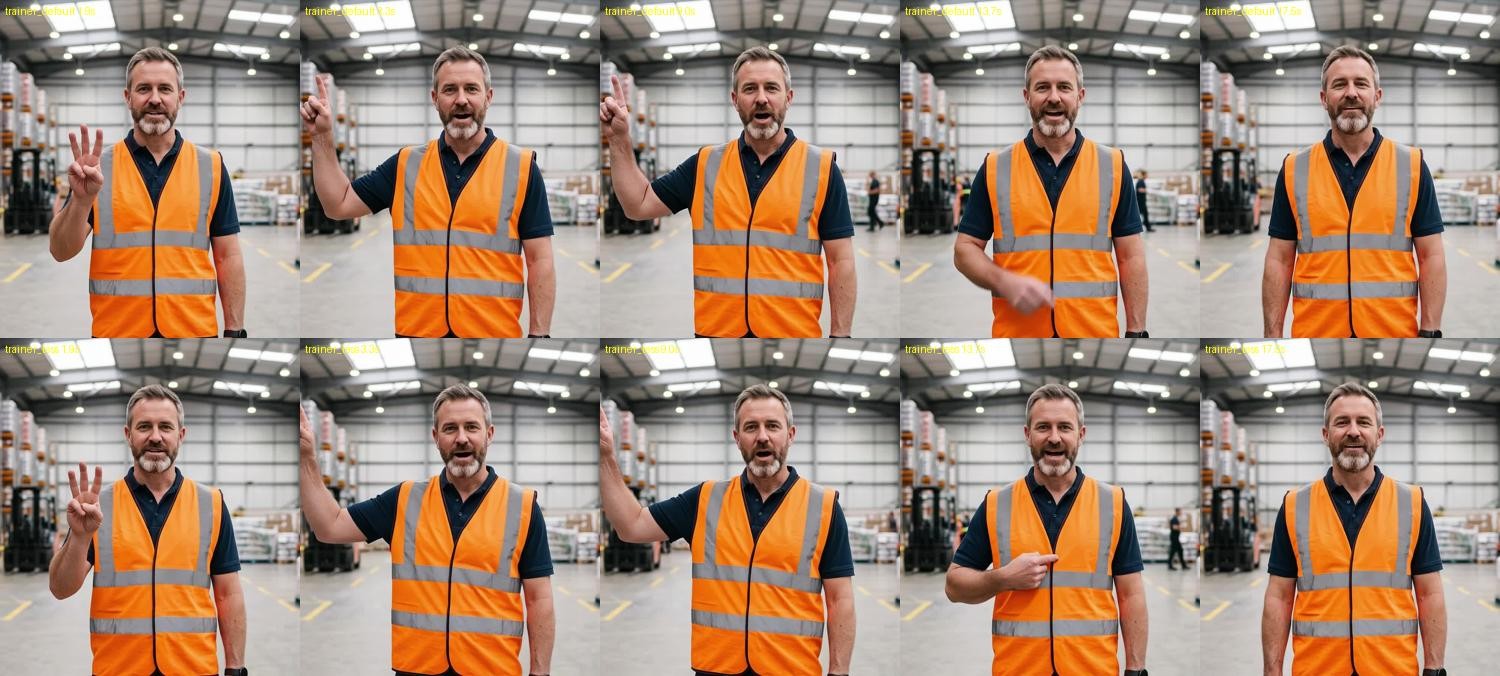
Top: default. Bottom: less. Same timestamps (1.9s, 3.3s, 9.0s, 13.7s, 17.5s). The choreography is nearly identical.
This is the most useful finding in the whole test for anyone building a pipeline. The two renders perform almost the same gestures at the same timestamps: three fingers at 1.9 seconds, hand up at 3.3 and 9.0, the same still pose at the end. Measured as frame-to-frame motion, "less" was only about 11% calmer than default. The gestures are mostly decided by the script and the motion prompt, and "less" just softens them a little. If you need a genuinely still presenter, say so in the motion prompt as well ("hands clasped, small nods only"). Do not count on the expressiveness setting alone.
Use case 4: a full course lesson with a stock presenter
Course creators and edtech teams often have no on-camera talent at all. The identity endpoint covers that: you pick one of HeyGen's public presenter looks by avatar_id, type the lesson, and leave voice_id empty to use the look's own voice. This is also where I tested length, since the arena benchmark mostly used clips under 35 seconds. I wrote a 48 second personal-finance lesson with no motion prompt at all.
Parametersavatar_id: 51753ef612cc482cb46084c3165e1d20 | tier: standard | resolution: 1080p | aspect_ratio: 16:9
HeyGen Avatar 6 Identity to Video, a 48 second lesson in one render. Billed $5.08.
It came back as one continuous 48 second take. I ran scene-cut detection over it and found zero cuts, and the presenter at 47 seconds is the same person as at 0.5 seconds. Even without a motion prompt, the model added gestures that fit: a wave on "Welcome back to module two" and two fingers on "two thousand for needs". The transcript matched my script word for word, numbers included. This was also the slowest render at 293 seconds, so for long lessons, use the async API (more on that below) rather than holding a connection open.
Then I rendered the first 12 seconds of the same lesson at 2K to see what the extra $0.05 per second buys.
Parametersavatar_id: 51753ef612cc482cb46084c3165e1d20 | tier: standard | resolution: 2k | aspect_ratio: 16:9
HeyGen Avatar 6 Identity to Video at 2K (2560x1440). 12 seconds, billed $1.85.
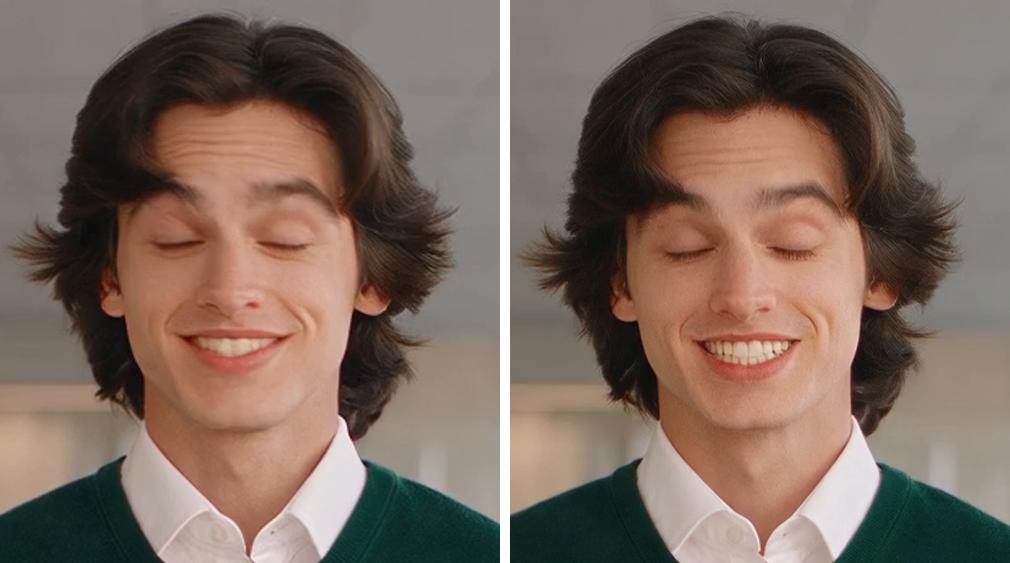
Same moment (2.0s) from two separate renders. Left: 1080p. Right: 2K. Note the identical blink and smile.
The 2K tier delivered 2560x1440. That matches the figure HeyGen gives for its own app, not the 2880x1620 it quotes for its model API, so do not plan around the larger size. On the face, 2K measured about 1.8 times the fine detail of 1080p, and it is visible in the hair and teeth. Look at the comparison again, though: two independent renders, and the presenter blinks and smiles at exactly the same moment. Together with the training A/B, that tells me the performance is driven almost entirely by the speech. You can draft at 1080p turbo and expect the final render to move the same way.
Use case 5: a talking brand mascot
The character endpoint is the most interesting of the three for brands with a mascot. It learns the character from a short reference clip (at least 2 seconds, and it must be animated or illustrated) plus an optional still. I gave it my 5 second Ollie clip and the original still.
Reference video
reference_video
Reference image
reference_image
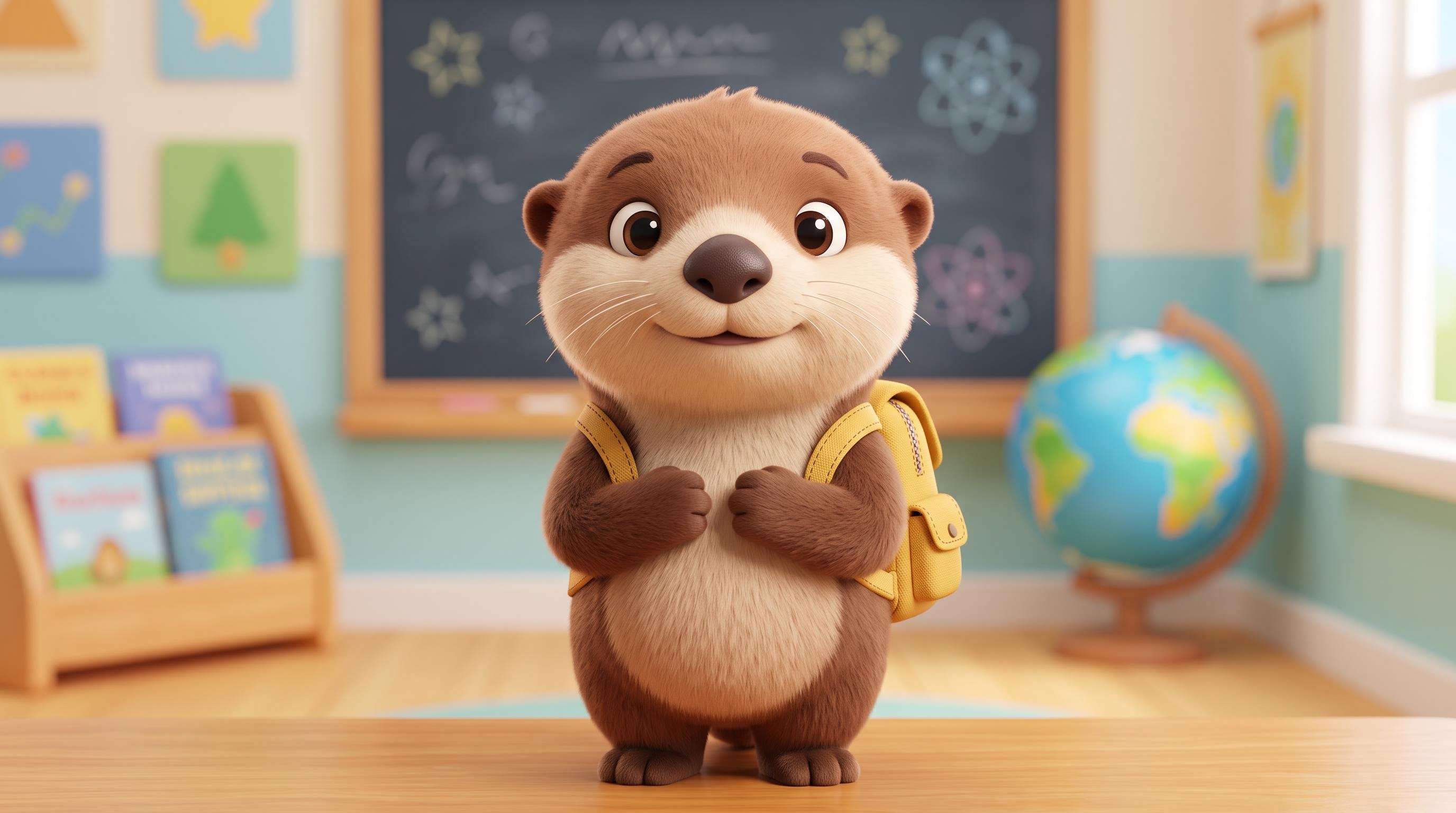
Inputs: a 5s Seedance 2.0 Mini clip of Ollie (left) and the Nano Banana 2 still it started from (right).
Motion promptWave one paw at the camera on 'Hi friends'. Press both paws together on 'hold hands'. Pat under one arm on 'under their arm'. Count on the paw on 'One, two, three'. Cheerful, bouncy expression, small natural head movements, keep both paws visible.
Parametersreference_video: in-mascot-ref.mp4 | reference_image: in-mascot.jpg | voice_id: c30ecab014cb4a8d816d07f6b2b625c8 | tier: standard | resolution: 1080p | voice: stock (c30ecab0...)
HeyGen Avatar 6 Reference to Video, original otter mascot. 13 seconds, billed $1.43.
Ollie stayed fully on model for all 13 seconds: same fur, same backpack, same proportions. The mouth animates with the voice in a way that suits a cartoon. Three of the four directed gestures landed: a wave on "Hi friends", paws pressed together on "hold hands", and a paw tucked under the arm on "under their arm". The fourth, counting on "one, two, three", did not happen. Ollie just kept his paws folded, which may be down to the character design (short paws, no visible fingers) more than the model. If your mascot needs to count, give it hands that can.
I also checked the guardrail. Sending the real-person clip from test 1 as a reference_video was refused after about 43 seconds with a clear message that videos of real people are not accepted on this endpoint, and it billed nothing.
Bring your own voice: the audio path
Every endpoint can lip-sync to an audio file instead of a script. That matters if you already have a voiceover, a cloned voice, or a TTS pipeline you like. I generated a 5 second line with Segmind's HeyGen Voice TTS (it billed $0.0125) and sent the file to the photo endpoint with no script and no motion prompt.
Parametersreference_image: in-trainer.jpg | audio: in-trainer-vo.mp3 | tier: standard | resolution: 1080p
HeyGen Avatar 6 Image to Video driven by an audio file. Billed $0.42 at the audio rate.
Two things stood out. The bill used the cheaper audio rate ($0.1058 per second against $0.1103 for a script), as documented. And the trainer still held up three fingers on "three safety checks", with no script to read. The gestures come from the speech itself, so the audio path does not lose the context-aware motion.
Developer guide: calling HeyGen Avatar 6 from Python
Each endpoint takes a JSON body and returns the MP4. Here is the photo endpoint, the one most teams will start with:
import requests

resp = requests.post(
    "https://api.segmind.com/v1/heygen-avatar-6-image-to-video",
    headers={"x-api-key": "YOUR_API_KEY"},
    json={
        "reference_image": "https://your-bucket.example.com/presenter.jpg",
        "script": "We shipped three things this month. First, the panels fold flat.",
        "voice_id": "4270665fc47f44aa989c093bb3dc2b99",
        "motion_prompt": "Hold up one finger on 'First'.",
        "tier": "standard",        # or "turbo" for half the price
        "resolution": "1080p",     # or "2k"
    },
    timeout=900,
)
resp.raise_for_status()
open("avatar.mp4", "wb").write(resp.content)
print("billed:", resp.headers.get("x-cost"))
My renders took between 42 and 293 seconds, and the longer the speech, the longer the wait. For anything over about 30 seconds of speech, use the async route instead: POST the same body to https://api.segmind.com/v2/heygen-avatar-6-image-to-video, take the request_id it returns, and poll /v2/requests/{request_id}/status until it completes. The model pages have full examples for photo, stock presenter and character inputs.
The validation errors I hit were all fast, clear and free:
| What I sent | What came back |
|---|---|
A script with no voice_id (photo endpoint) | 400: 'voice_id' is required with 'script' |
Both script and audio | 400: Send either 'audio' or a 'script' to speak, not both |
A made-up avatar_id | 400: Avatar ... was not found |
A real person as reference_video | 400 after ~43s: must show an animated or illustrated character |
Two practical notes. Stock voices are referenced by ID, so pick one per presenter and keep it fixed across a campaign. And the photo endpoint keeps the shape of your photo unless you set output_width and output_height, so crop the photo to the frame you want before you send it.
Honest assessment
What it does very well. Identity and realism held up in every clip, from a tight selfie to a waist-up shot in a busy warehouse to a 48 second single take. Lip sync matched the words in both English and Spanish. And the performance is consistent: the same script gives you nearly the same gestures, which makes it far easier to draft cheaply and finalize once.
Where it slips. Gesture timing is good, but it is not precise choreography. Counting drifted in all three skincare renders, a "look down" cue was played upward, and the cartoon character skipped its count entirely. motion_expressiveness: less is a light touch, not a different performance. Turbo saves money, not time.
Best fit: spokesperson ads, localized variants, training and course content, and mascot clips where natural delivery matters more than frame-accurate gestures. Not a fit: anything where a specific hand gesture on a specific word is non-negotiable, unless you are willing to re-render and check.
FAQ
What is HeyGen Avatar 6 used for?
Turning a photo, a stock presenter or a cartoon character into a lip-synced talking video from a script or audio file. Common uses are product explainers, social ads, training videos, course lessons, localized spokesperson clips and brand mascots.
How much does HeyGen Avatar 6 cost on Segmind?
It bills per whole second of output. Standard 1080p is $0.1058 to $0.1103 per second, and turbo 1080p is $0.0529 to $0.0574. My 20 second ad cost $2.21 on standard and $1.15 on turbo.
Can I use my own photo with HeyGen Avatar 6?
Yes, on the image-to-video endpoint: one clear, front-facing photo. The identity endpoint only accepts HeyGen's public looks, and the reference endpoint only accepts animated or illustrated characters.
Is HeyGen Avatar 6 turbo worth it?
For drafts and volume, yes. In my test it cost 48% less with the same image quality, but it was not faster and it missed more gesture cues than standard.
How long can a HeyGen Avatar 6 video be?
There is no fixed limit. The clip runs as long as the speech, up to a 5,000 character script. My 48 second lesson came back as one continuous take in about five minutes.
Does HeyGen Avatar 6 support other languages?
Yes. I set language to es, kept the same stock voice I used in English, and got clean Spanish with matching lip sync. Translated scripts may run longer, which raises the cost.
Conclusion
HeyGen Avatar 6 is the first avatar model I have tested that I would hand to a marketing team without a long list of caveats. One photo gave me a convincing vertical ad and a Spanish version of it. A stock look delivered a clean 48 second lesson in one take. And an original mascot stayed on model while it talked. The gestures are smart but not exact, so check your counting scripts before you ship them. For $18.76 I got nine finished clips across three endpoints, which is the best argument for trying it yourself.
Try HeyGen Avatar 6 Image to Video on Segmind, or start from a stock presenter with Identity to Video. It is available by API with no setup required.