
Seedream 5.5 vs 5.0 Pro: About a Third of the Price, Is It Better?
Seedream 5.5 vs 5.0 Pro on 14 tests: 5.5 costs about a third at 2K and runs twice as fast, but 5.0 Pro follows style prompts more literally.

Seedream 5.5 landed on Segmind this week at a price that made me look twice. A 2K image costs $0.037. The same 2K image on Seedream 5.0 Pro costs $0.107. At the 1K tier it is $0.021 against $0.053. On paper that is the newer model at roughly a third of the price, and a newer model at a third of the price usually means a catch somewhere.
So I ran both models on the same 14 tests: 8 text-to-image prompts, a transparent sticker, a recolour, two and three reference blends, a six reference flat lay and a three round edit chain. That came to 37 billed generations and $2.55, and every single bill matched the published price to the seventh decimal. Here is what 5.0 Pro's nearly threefold price does and does not buy you.
Seedream 5.5 vs 5.0 Pro pricing, measured
Both models publish a flat per-image rate by tier plus a fee for reference images. I read the rates from each model's llms.txt page on Segmind and then checked them against the x-cost header on every response. Nothing drifted.
| Charge | Seedream 5.5 | Seedream 5.0 Pro |
|---|---|---|
| Output image, lowest tier | $0.021164 (1K or 1.5K) | $0.05343705 (1K) |
| Output image, 2K | $0.037037 | $0.1068741 |
| Reference images | $0.0084656 each, every one billed | $0.00356247 each, first one free |
| Max reference images | 10 | 10 |
| Tiers | 1K, 1.5K, 2K | 1K, 2K |
Rates from each model's llms.txt on Segmind, confirmed by the x-cost header on all 37 fires, 11 Nov 2026.
The 1K catch: compare 1.5K, not 1K
The headline $0.021 vs $0.053 at 1K is not an apples-to-apples number, because the two models mean different things by 1K. At 3:2, Seedream 5.5's 1K returned 1248x832, about 1.04 megapixels. Seedream 5.0 Pro's 1K returned 1776x1184, about 2.10 megapixels, twice as many pixels.
The fix costs nothing. Seedream 5.5 has a 1.5K tier billed at the same $0.021164 as its 1K, and at 3:2 it returned 1824x1216, about 2.22 megapixels. So the fair comparison is 5.5 at 1.5K against 5.0 Pro at 1K: slightly more pixels for 40% of the price. If you are moving to 5.5 for cost, set size to 1.5K and never use 1K unless you want thumbnails.
| Setting (3:2) | Pixels | Price | Per megapixel |
|---|---|---|---|
| Seedream 5.5, 1K | 1248x832 (1.04 MP) | $0.0212 | $0.0204 |
| Seedream 5.5, 1.5K | 1824x1216 (2.22 MP) | $0.0212 | $0.0095 |
| Seedream 5.0 Pro, 1K | 1776x1184 (2.10 MP) | $0.0534 | $0.0254 |
| Seedream 5.5, 2K | 2496x1664 (4.15 MP) | $0.0370 | $0.0089 |
| Seedream 5.0 Pro, 2K | 2496x1664 (4.15 MP) | $0.1069 | $0.0257 |
Measured output sizes from this test run. At 2K both models return identical dimensions.
The reference image catch, and where 5.0 Pro gets cheaper
Each reference image costs $0.0085 on 5.5 and $0.0036 on 5.0 Pro, so a reference-heavy job narrows the gap. There is a second detail the price table hides. Seedream 5.0 Pro's page says "each additional reference image", and it means it: my one-reference edit on 5.0 Pro billed exactly $0.1068741, the same as a plain text-to-image call. Two references billed $0.11043657 and three billed $0.11399904. The first reference is free. On Seedream 5.5 every reference bills, so a one-reference edit at 2K cost $0.0455026.
Put those together and the two models cross over at the lower tier. With six references, 5.5 at 1.5K should cost $0.07196 and 5.0 Pro at 1K should cost $0.07125. I ran that exact job to check. The bills came back at $0.0719576 and $0.0712494: 5.0 Pro is cheaper by seven hundredths of a cent from six references up. At 2K the crossover never arrives, because the base price gap is too wide. Even at the 10 reference maximum, 5.5 costs $0.1217 against $0.1389.
| References | 5.5 at 1.5K | 5.0 Pro at 1K | 5.5 at 2K | 5.0 Pro at 2K |
|---|---|---|---|---|
| 0 | $0.0212 | $0.0534 | $0.0370 | $0.1069 |
| 1 | $0.0296 | $0.0534 | $0.0455 | $0.1069 |
| 3 | $0.0466 | $0.0606 | $0.0624 | $0.1140 |
| 6 | $0.0720 | $0.0712 | $0.0878 | $0.1247 |
| 10 | $0.1058 | $0.0855 | $0.1217 | $0.1389 |
Cost per image by reference count. The 1, 3 and 6 reference rows were billed in this run; the rest follow from the published rates. Bold means 5.0 Pro is cheaper.
So the rule is simple. At 2K, 5.5 is always cheaper. At the lower tier, 5.5 is cheaper up to five references, and 5.0 Pro wins at six or more. Very few production jobs send six references, but moodboard and product-composite pipelines do.
Speed: 5.5 is two to six times faster
This was the biggest practical difference in the whole run. Across 13 text-to-image fires, Seedream 5.5 averaged 27.5 seconds (18 to 37). Seedream 5.0 Pro averaged 63.2 seconds across 12 (45 to 84). Reference edits widened the gap: 5.5 averaged 22.6 seconds over 6 edits while 5.0 Pro averaged 130.5 seconds, and its slowest edit took 185 seconds. If you are running an interactive editor where a person waits on each round, that is the difference between usable and not.
How I tested
Same prompt, same aspect ratio, same tier, PNG output on both. Seedream 5.5 ran with background: opaque except on the transparency test. Neither model exposes a seed, so every result is one take. On the two prompts where 5.5 lost on instruction following, I ran a second take on both models to check it was not bad luck. I read every output at full size, including every glyph of rendered text.
One parameter difference to know before you switch: the reference field is reference_images on 5.5 and image_input on 5.0 Pro.
Text-to-image: 8 head-to-head tests
1. Photoreal scene
Parameters size: 2K | aspect_ratio: 3:2 | output_format: png
Seedream 5.5 ($0.037, 37 s)

Seedream 5.0 Pro ($0.107, 59 s)

Same prompt at 2K, 3:2. 5.5 shows the potter's face; 5.0 Pro crops her at the chin but gets the light direction right.
Both look like real photographs, with believable clay slip, dust in the light and shelves of mugs. Seedream 5.5 gave the better frame: her face, her concentration, light raking across her hair. But it put the window on the right when I asked for light from the left. Seedream 5.0 Pro lit it from the left as asked, then cropped her head off at the chin. Call it a tie: 5.5 for the picture, 5.0 Pro for the brief.
2. Product shot with a closed label
Parameters size: 2K | aspect_ratio: 3:4 | output_format: png
Seedream 5.5
Seedream 5.0 Pro
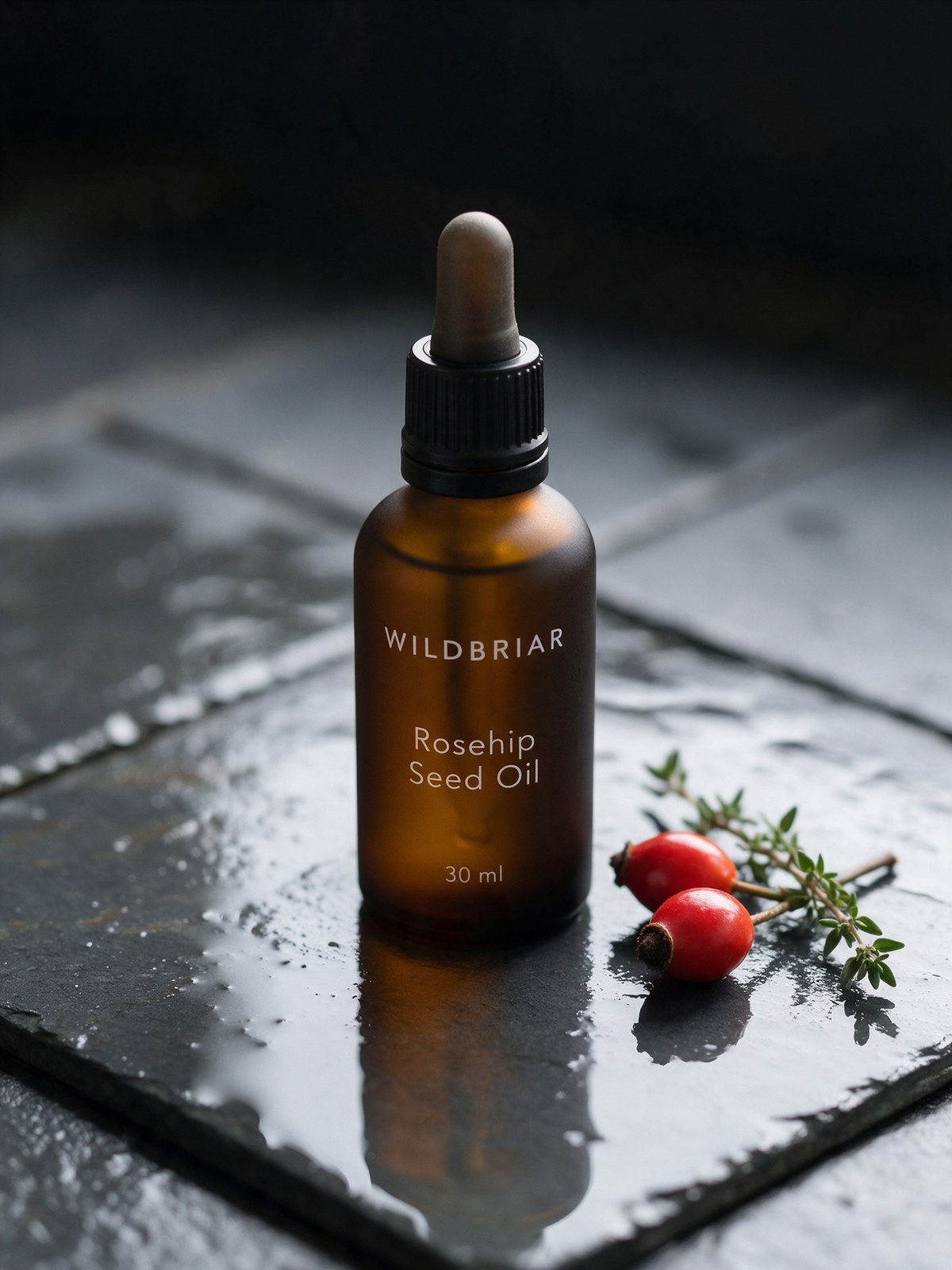
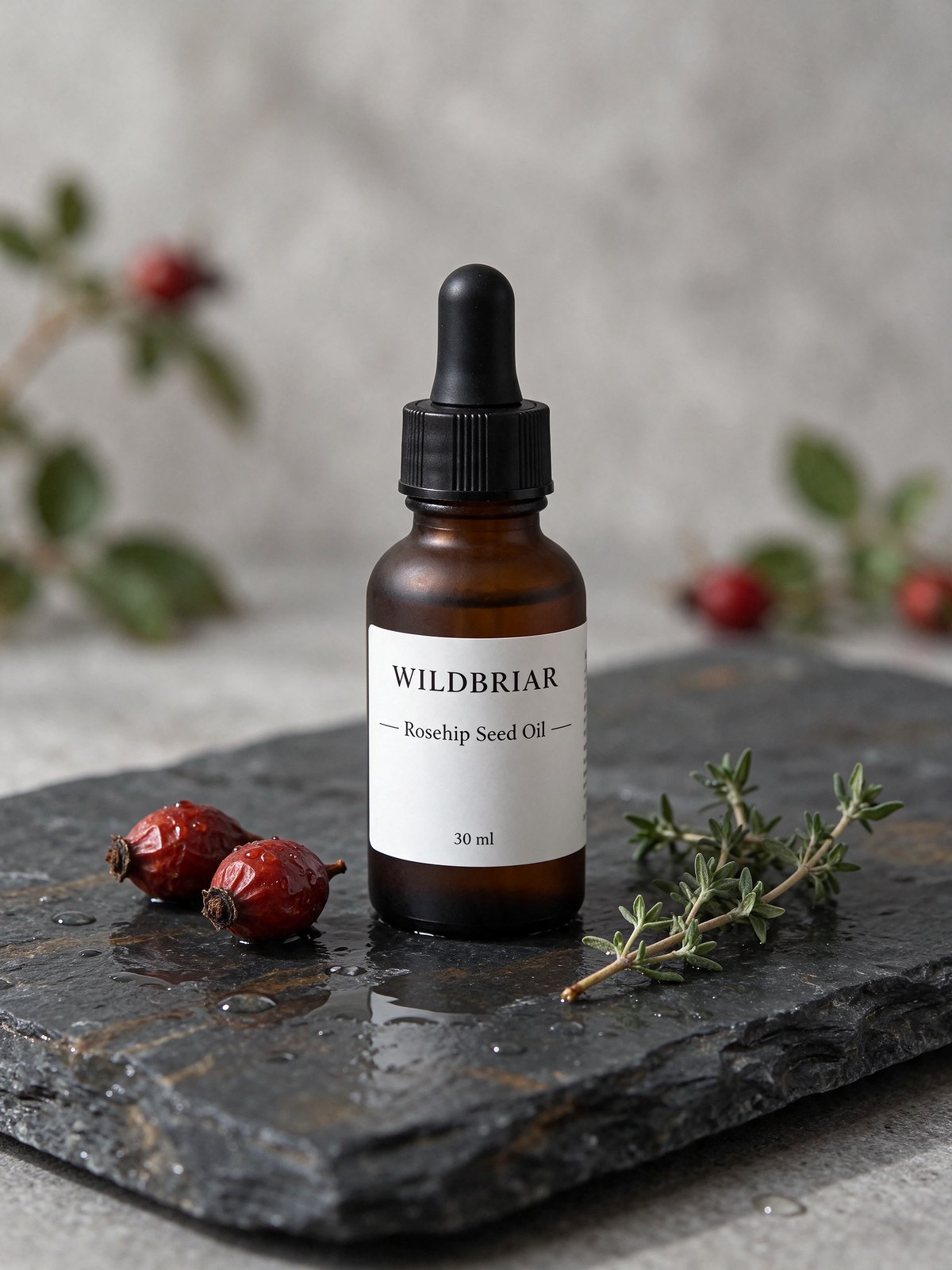
Both labels are letter perfect. Only 5.0 Pro made the glass matte.
Both rendered WILDBRIAR, Rosehip Seed Oil and 30 ml exactly, with nothing invented. 5.5 added two small decorative rules either side of the middle line, which is a design flourish rather than text. The difference is the bottle: I asked for matte amber glass. 5.0 Pro gave me a frosted matte bottle with the type printed directly on the glass. 5.5 gave me a glossy bottle with a paper label and added a rosehip bush in the background. Win: 5.0 Pro.
3. Flat vector infographic
Parameters size: 2K | aspect_ratio: 16:9 | output_format: png
Seedream 5.5
Seedream 5.0 Pro
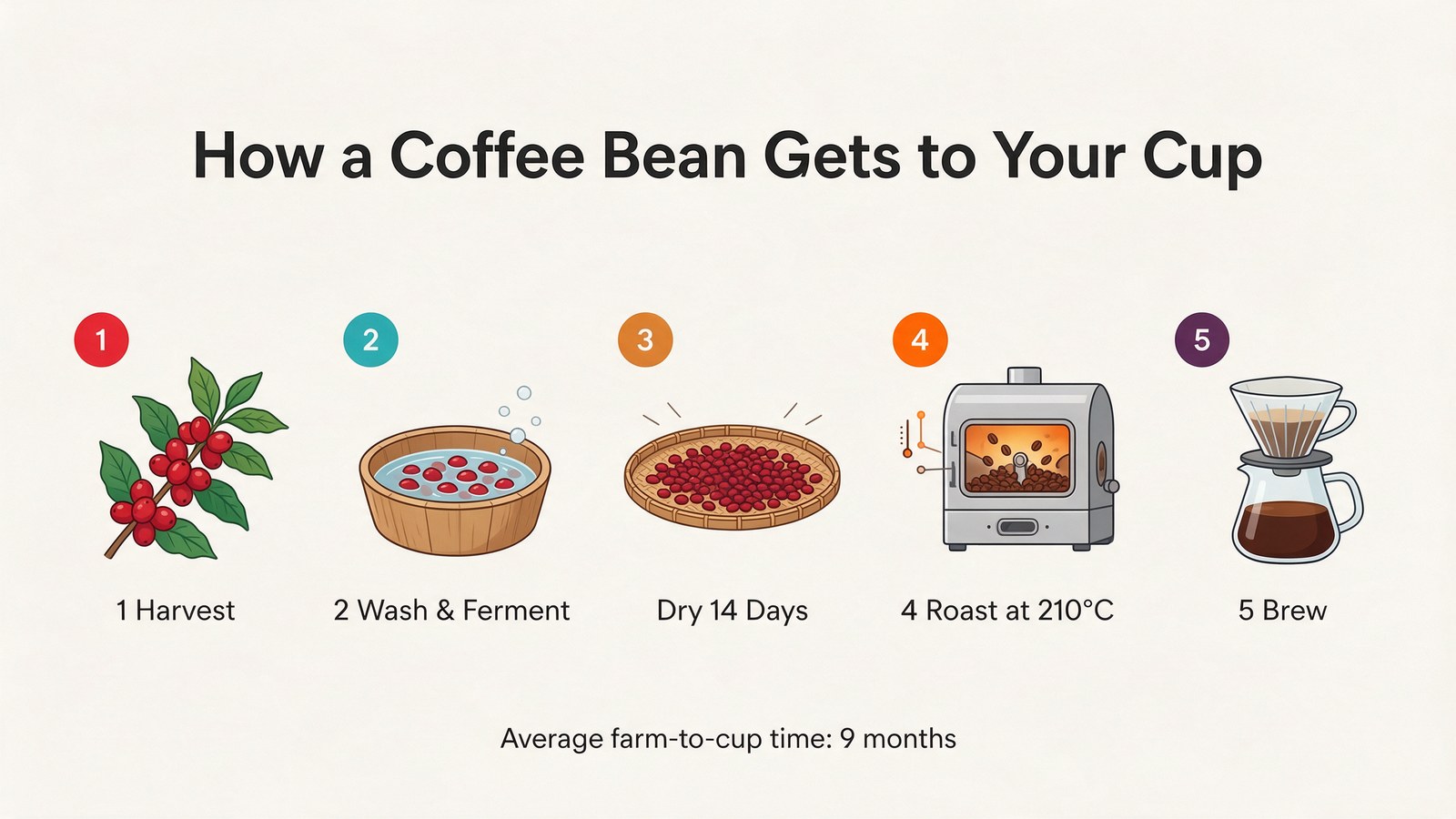
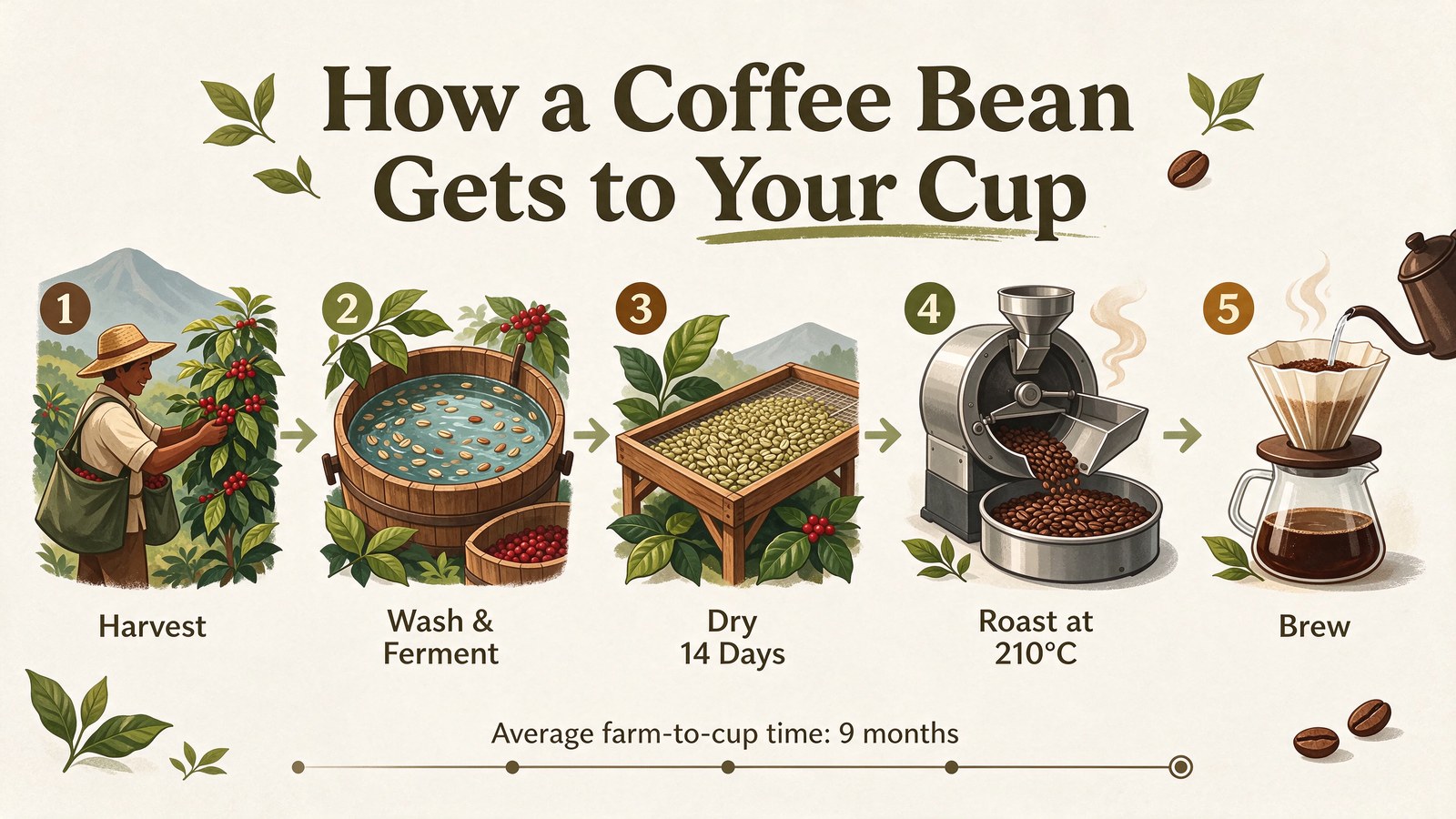
Every string correct on both, including the degree sign and the ampersand.
Text was perfect on both. The difference is style. 5.0 Pro gave me what I asked for: a flat vector layout with simple icons and the labels written as "1 Harvest", "2 Wash & Ferment". It dropped the 3 from "Dry 14 Days" in the label but kept it on the badge. 5.5 drew a richer, more attractive illustrated infographic with a farmer, a wooden fermentation tub and a roaster, but that is not flat vector, and it moved every number into a badge. If you need a house style, 5.0 Pro followed it. Win: 5.0 Pro.
4. Three scripts on three signs
Parameters size: 2K | aspect_ratio: 16:9 | output_format: png
Seedream 5.5
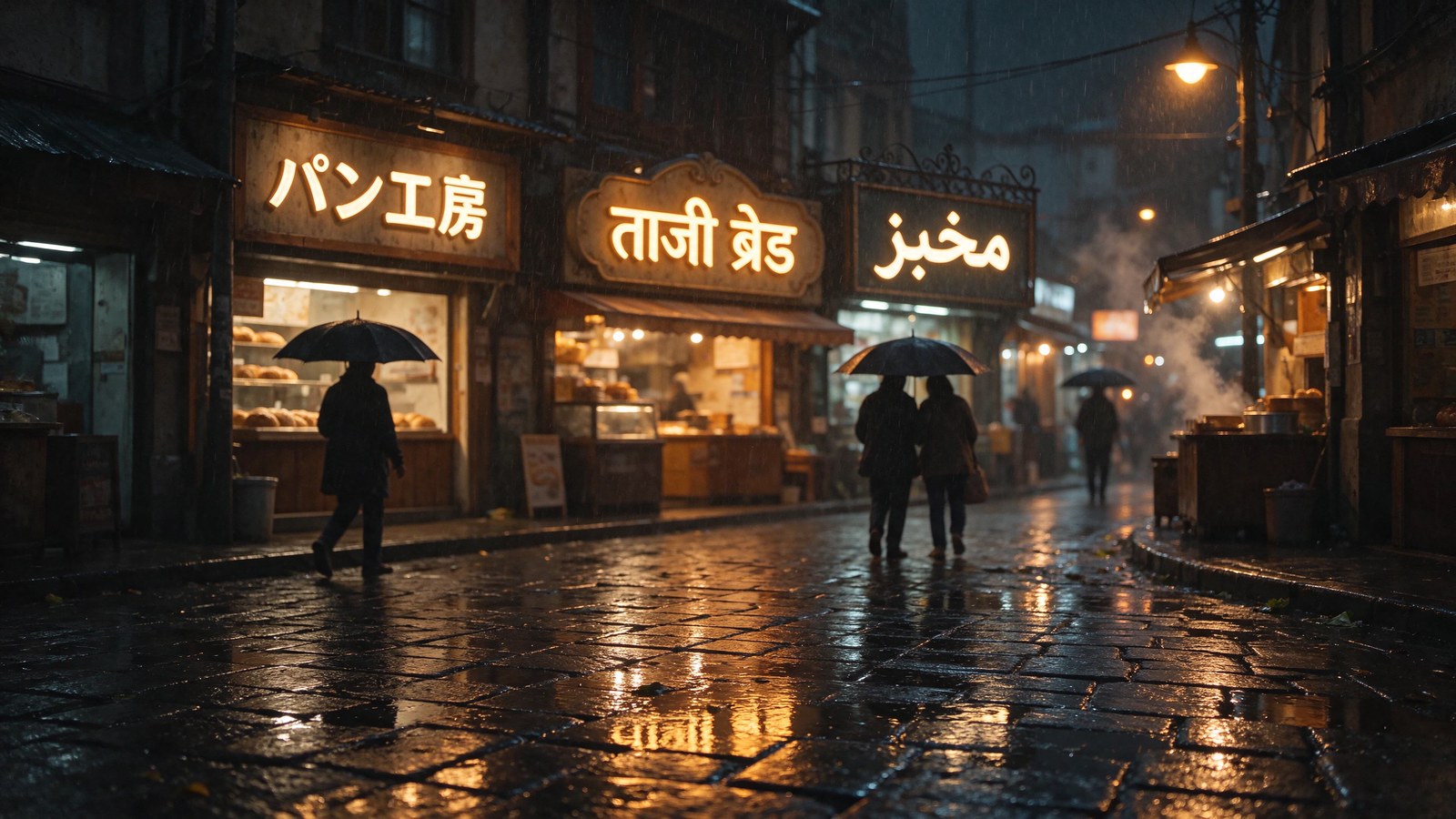
Seedream 5.0 Pro
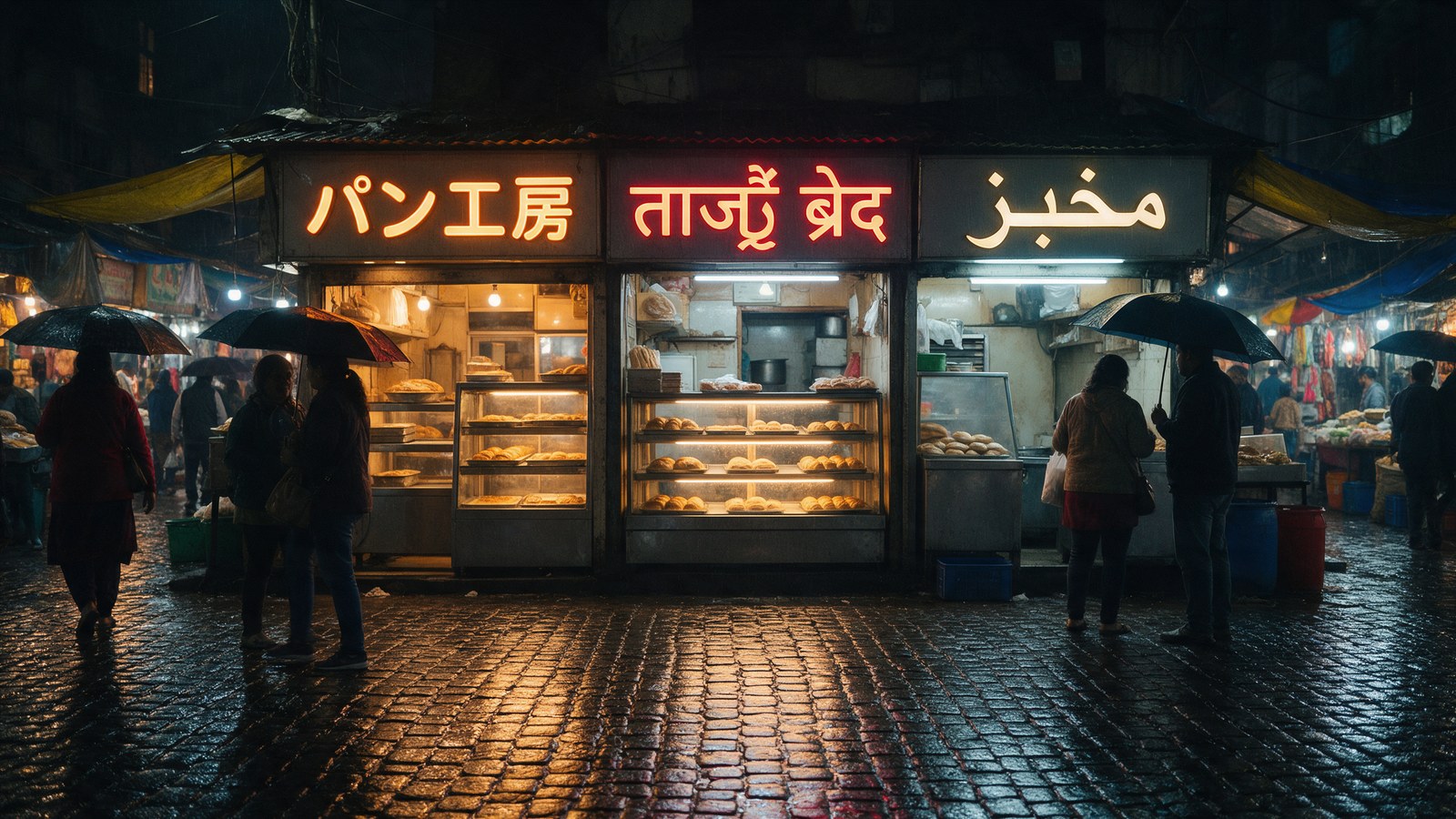
Japanese and Arabic are correct on both. Look closely at the middle sign.
Seedream 5.5, full-size crop

Seedream 5.0 Pro, full-size crop
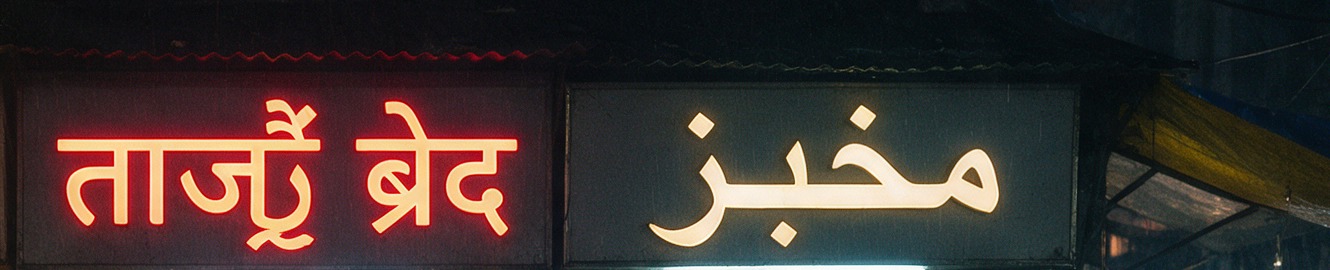
5.5 wrote a readable ताजी ब्रेड, missing only the dot under ज. 5.0 Pro invented a conjunct in the first word and turned ड into द.
パン工房 and مخبز came out correct on both. The Hindi is where they split. Seedream 5.5 wrote ताजी ब्रेड: it dropped the nukta under ज, which is how many Hindi signs are actually spelled, so any reader will read it as fresh bread. Seedream 5.0 Pro wrote something that is not a word, stacking an invented conjunct onto the first word and ending the second with द instead of ड. If you localise into Indic scripts, this one test is reason enough to switch. Win: 5.5.
5. Dashboard UI with small type
Parameters size: 2K | aspect_ratio: 16:9 | output_format: png
Seedream 5.5
Seedream 5.0 Pro
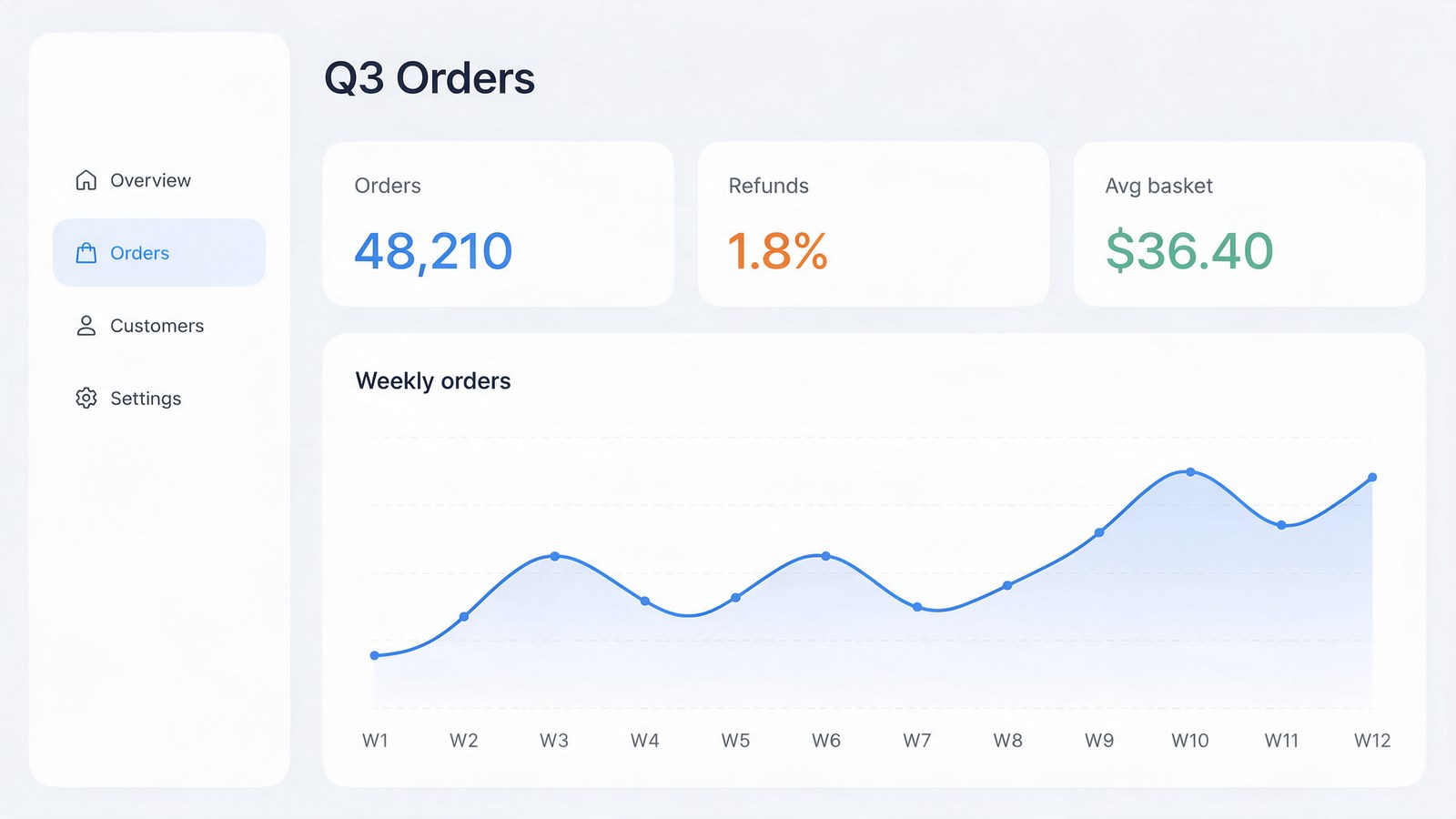
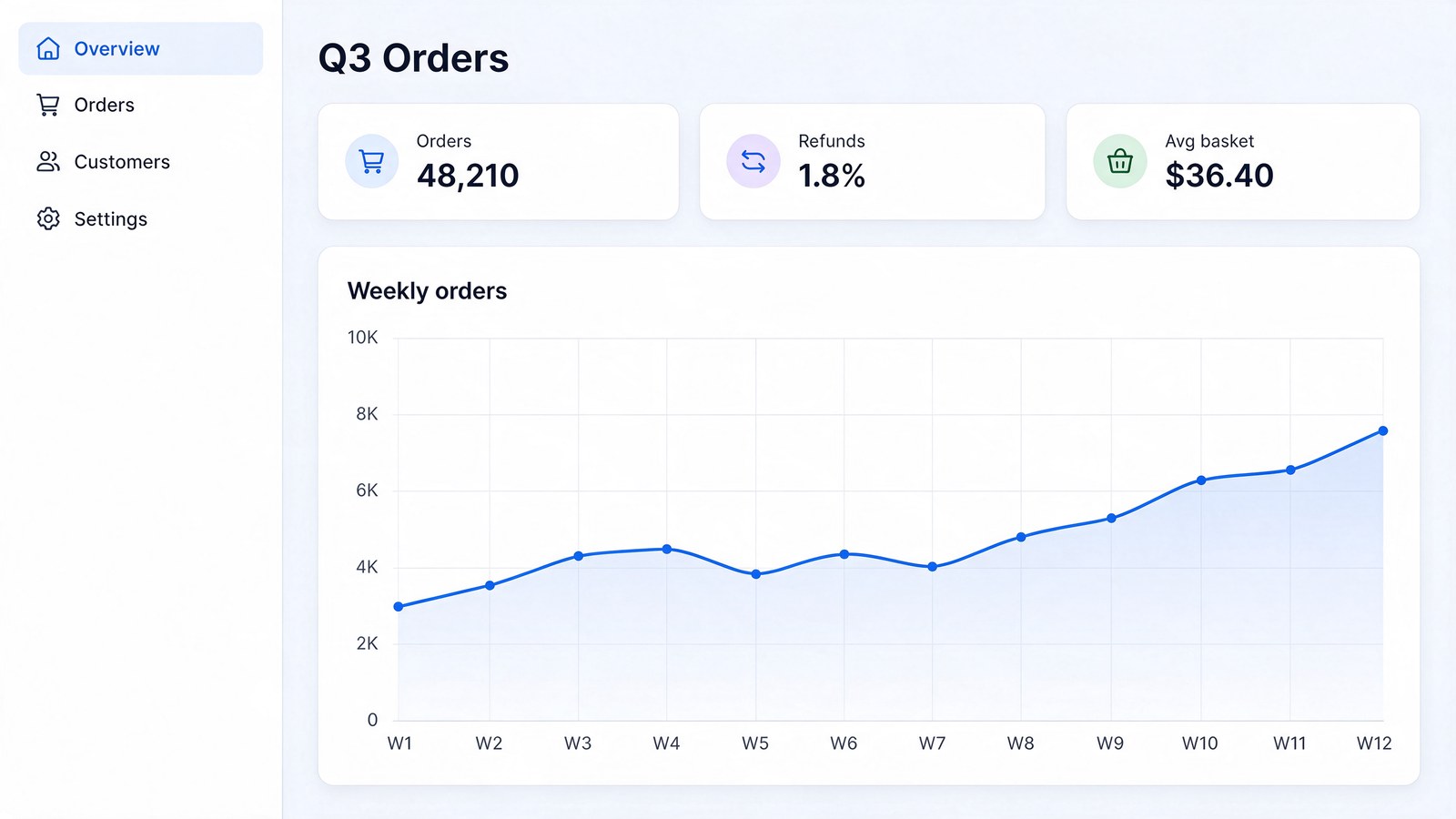
48,210, 1.8%, $36.40 and all twelve week labels are correct on both.
Both nailed every number, every sidebar item and W1 through W12. 5.5 added a y-axis running 0 to 10K, which looks natural but breaks "no other text" and invents data that a real dashboard would have to match. 5.0 Pro left the axis unlabelled. Small thing, but this is the kind of invented copy that slips through review. Win: 5.0 Pro.
6. Four people, four actions
Parameters size: 2K | aspect_ratio: 3:2 | output_format: png
Seedream 5.5, take 1
Seedream 5.0 Pro, take 1

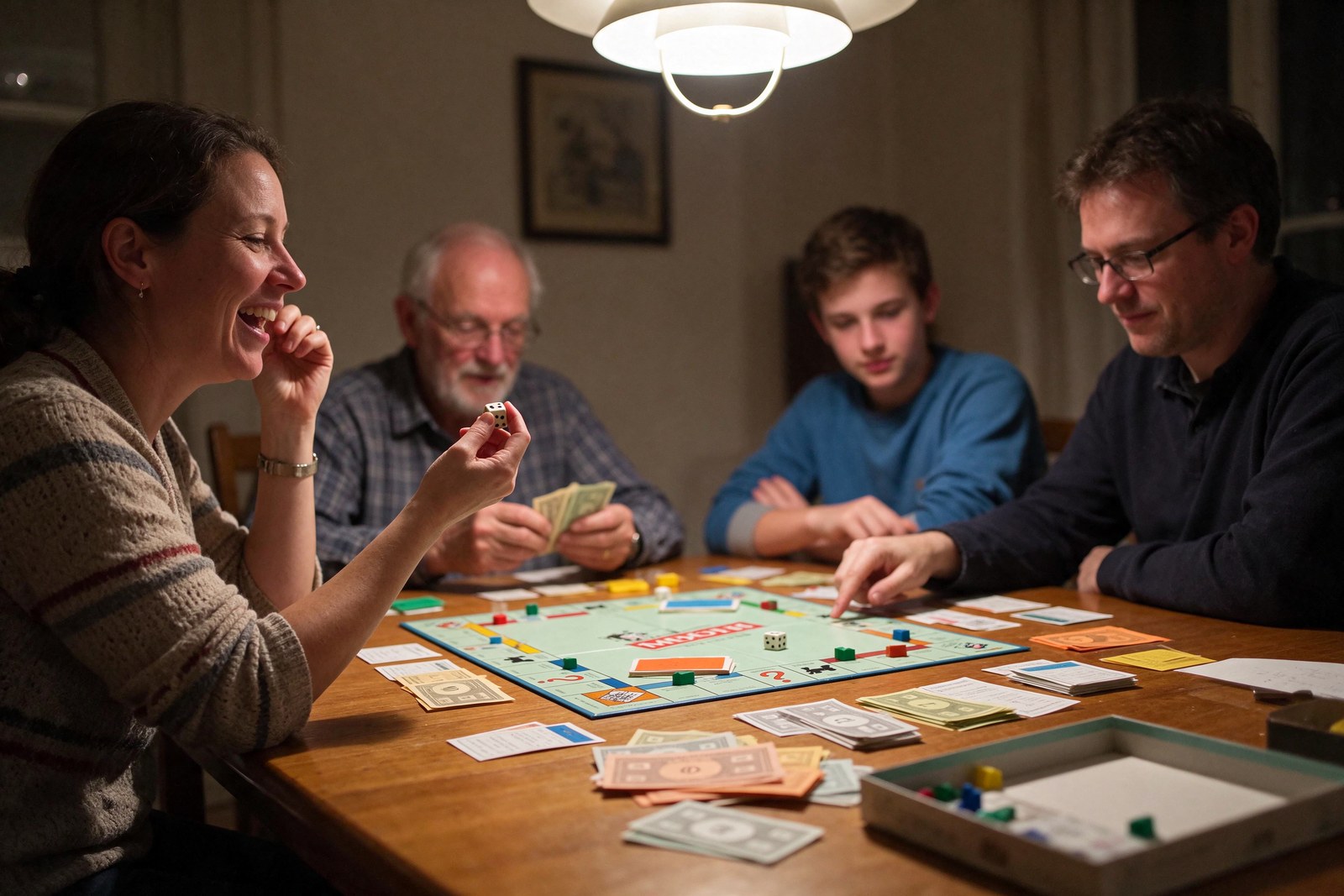
Take 1. On 5.5 the man in glasses is pointing and nobody has crossed arms.
Seedream 5.5, take 2

Seedream 5.0 Pro, take 2
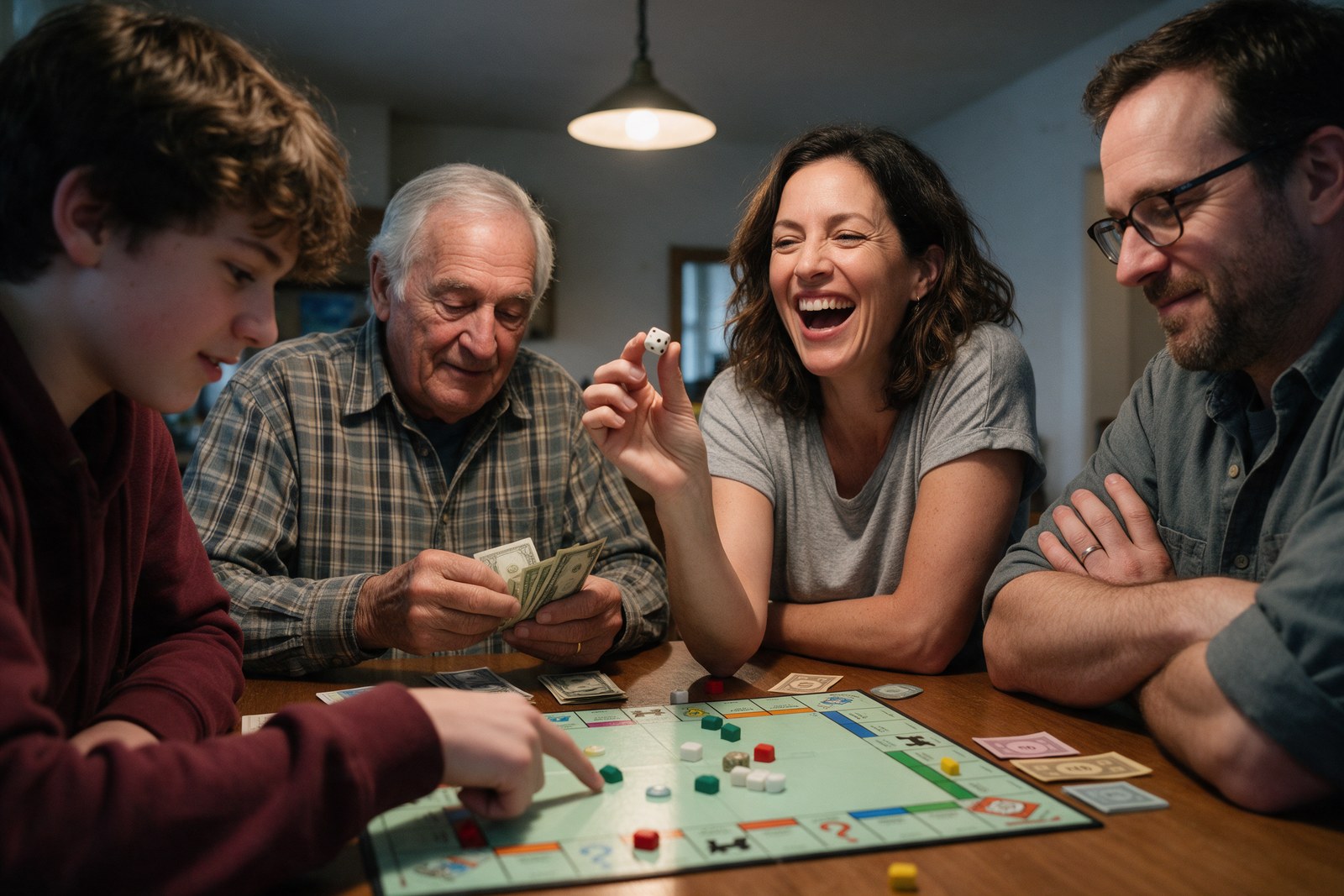
Take 2. 5.5 gets all four actions this time; 5.0 Pro gets them again.
This is a clause-counting test: die in hand, counting money, pointing, arms crossed, each on the right person. 5.0 Pro got all four on both takes. 5.5 swapped two on the first take, putting the pointing hand on the man in glasses and giving nobody crossed arms, then got all four on the second take, with the woman smiling rather than mid-laugh. Two out of two against one out of two. Win: 5.0 Pro.
7. Storybook illustration
Parameters size: 2K | aspect_ratio: 4:3 | output_format: png
Seedream 5.5

Seedream 5.0 Pro

Both are usable storybook spreads. 5.5 added a cottage; 5.0 Pro added a rope railing.
Fox, raincoat, lantern, mossy log, stream, fireflies, dusk palette: both got every element. 5.5's brushwork reads more like real gouache, and it added an unrequested cottage on the hill. 5.0 Pro's version is cleaner and added a rope handrail to the log. I would happily ship either. Tie.
8. Spanish concert poster in line art
Parameters size: 2K | aspect_ratio: 3:4 | output_format: png
Seedream 5.5, take 1

Seedream 5.0 Pro, take 1

All accents and the middle dots are correct on all four posters.
Seedream 5.5, take 2

Seedream 5.0 Pro, take 2

Take 2 repeats take 1: 5.5 renders a shaded engraving, 5.0 Pro renders line art.
Sábado, Colón, the times and the separators were right every time. The miss is the trumpet. I asked for fine gold line art. 5.0 Pro drew line art on both takes. 5.5 drew a fully shaded, engraved trumpet on both takes, and on take 2 it grew extra tubing loops no trumpet has. It also styled "DE" small and underlined on take 1. The 5.5 posters are arguably more striking, but they are not what the brief said, twice. Win: 5.0 Pro.
Transparent PNGs: only 5.5 does it
Parameters size: 1K | aspect_ratio: 1:1 | output_format: png | background: transparent (5.5 only)
Seedream 5.5 (RGBA)

Seedream 5.0 Pro (no alpha)

The checkerboard behind 5.5 shows through its alpha channel. 5.0 Pro returned the sticker on solid white.
Seedream 5.5 has a background parameter, and with it set to transparent it returned a real RGBA PNG: 53.6% of pixels fully transparent, 45.8% fully opaque and only 0.5% in between, so the cut-out edge is clean. Seedream 5.0 Pro has no such parameter. Asking for a transparent background in the prompt got me a sticker on flat white in an RGB file. You would need a separate background-removal step, and another bill. Win: 5.5.
Editing with reference images: 5 tests
9. Recolour one part, keep everything else
Reference Image 1
Source photo
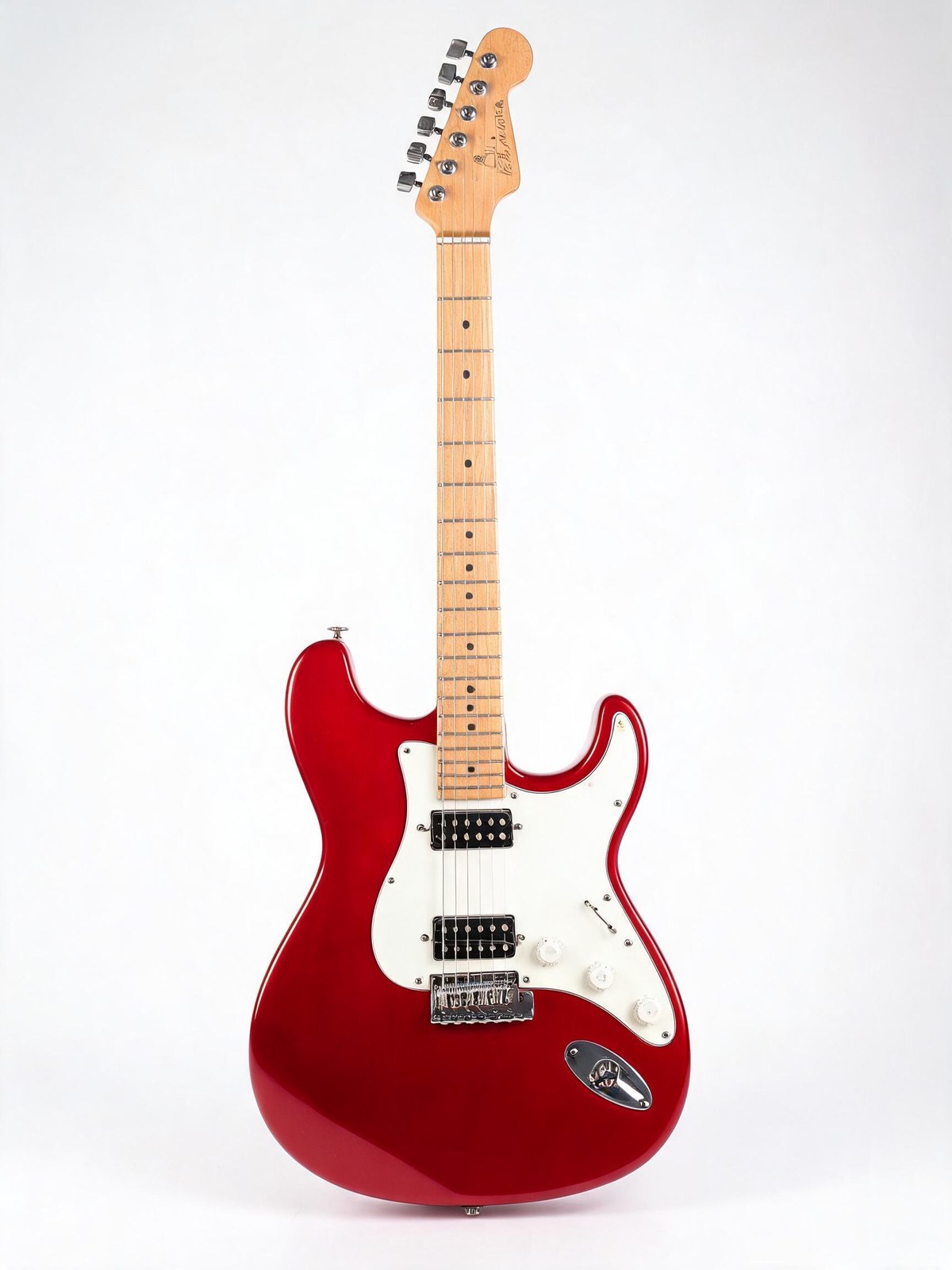
The source photo, sent as the only reference image to both models.
Parameters size: 2K | aspect_ratio: 3:4 | output_format: png | 1 reference
Seedream 5.5 ($0.0455, 18 s)
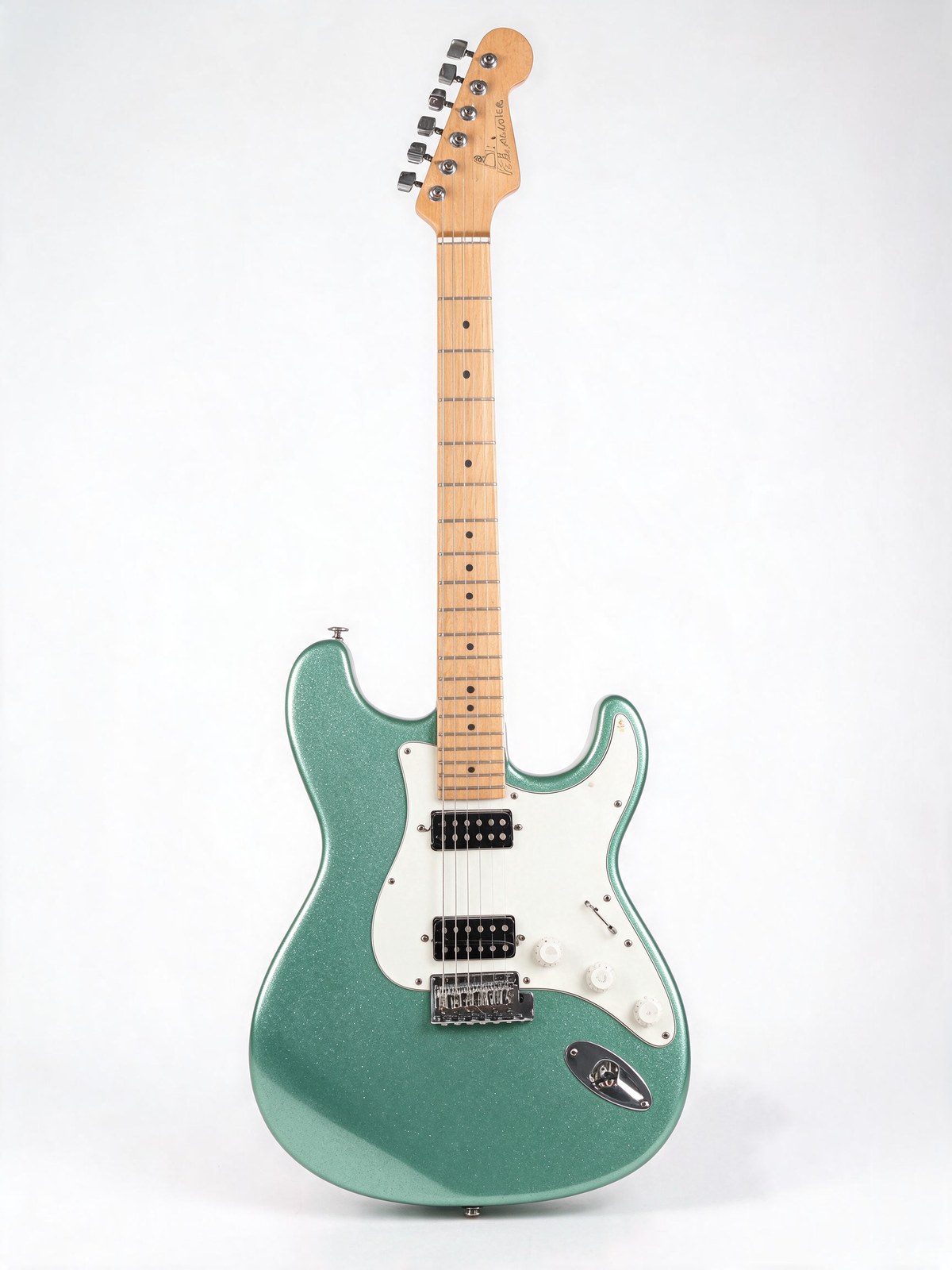
Seedream 5.0 Pro ($0.1069, 120 s)
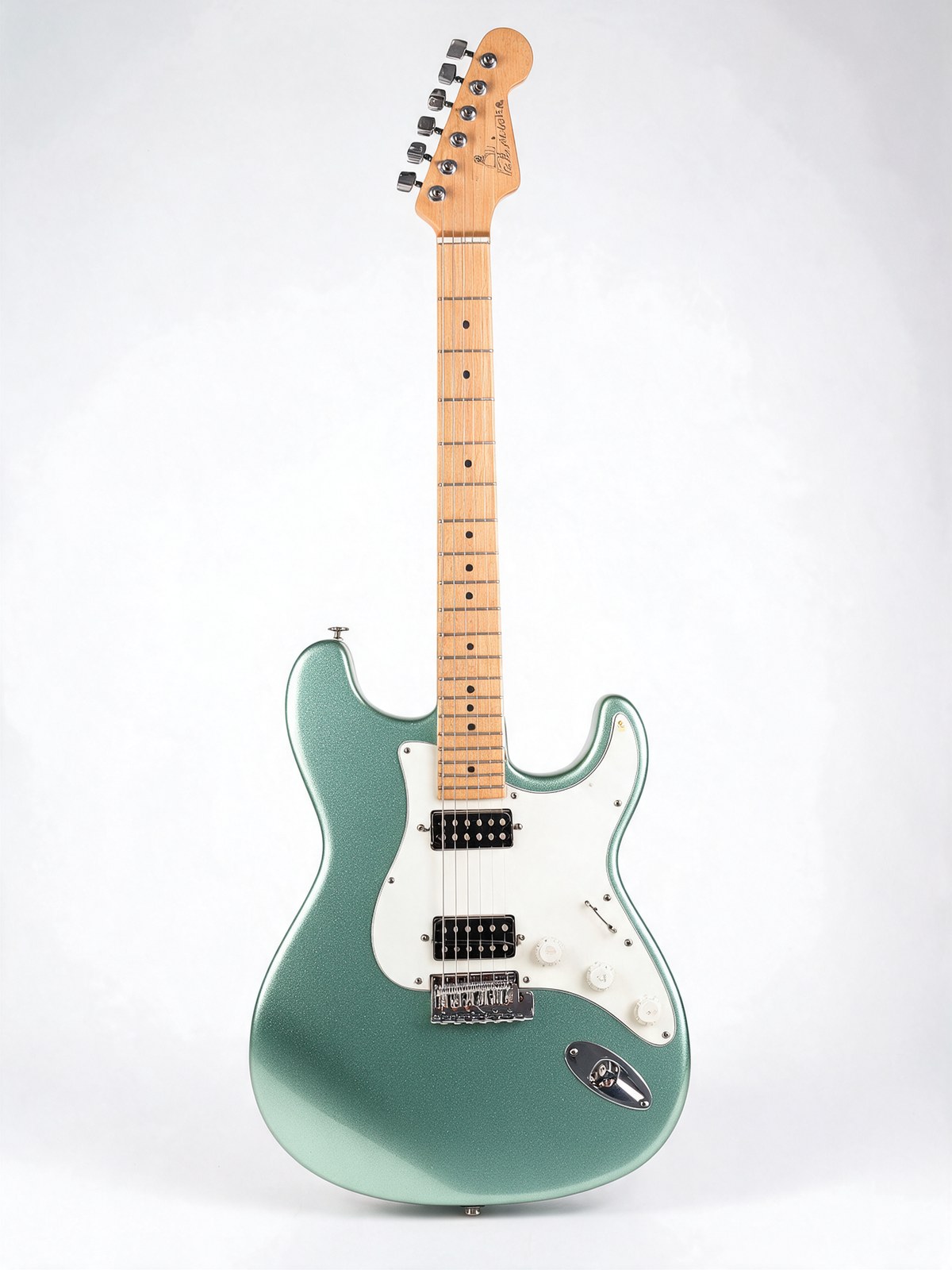
Both changed only the body. Outside the body, under half a percent of pixels moved on either.
This is the job most people buy an edit model for, and both are excellent at it. Measured against the source, outside the guitar body only 0.47% of pixels moved by more than 32 levels on 5.5 and 0.32% on 5.0 Pro. 5.5 held the overall tone closer, with an average difference outside the body of 1.3 levels against 3.7 for 5.0 Pro. That difference looks trivial in one round. The edit chain below shows why it is not. Tie.
10. Two-reference blend
Reference Image 1
Product
Reference Image 2
Scene
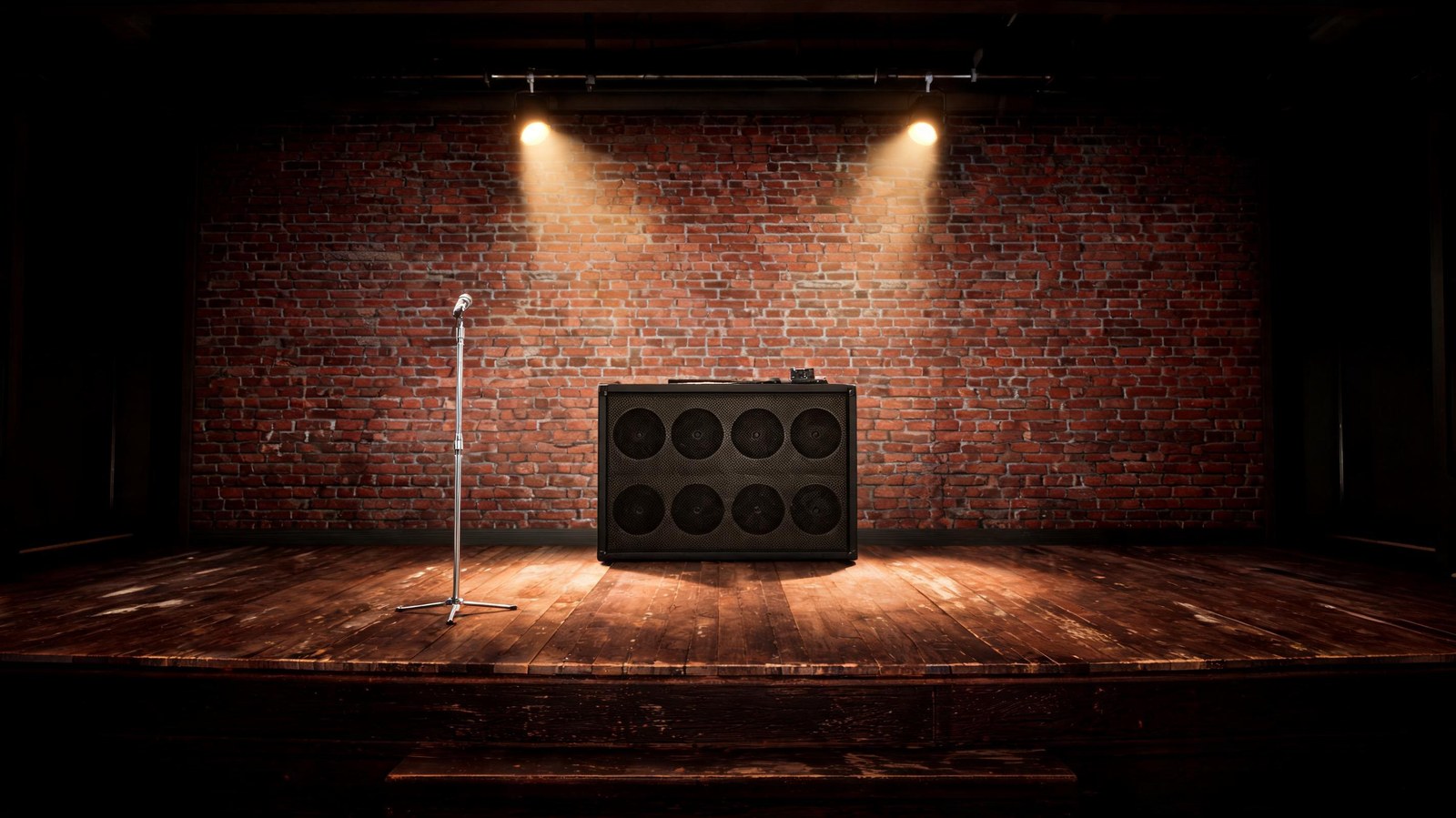
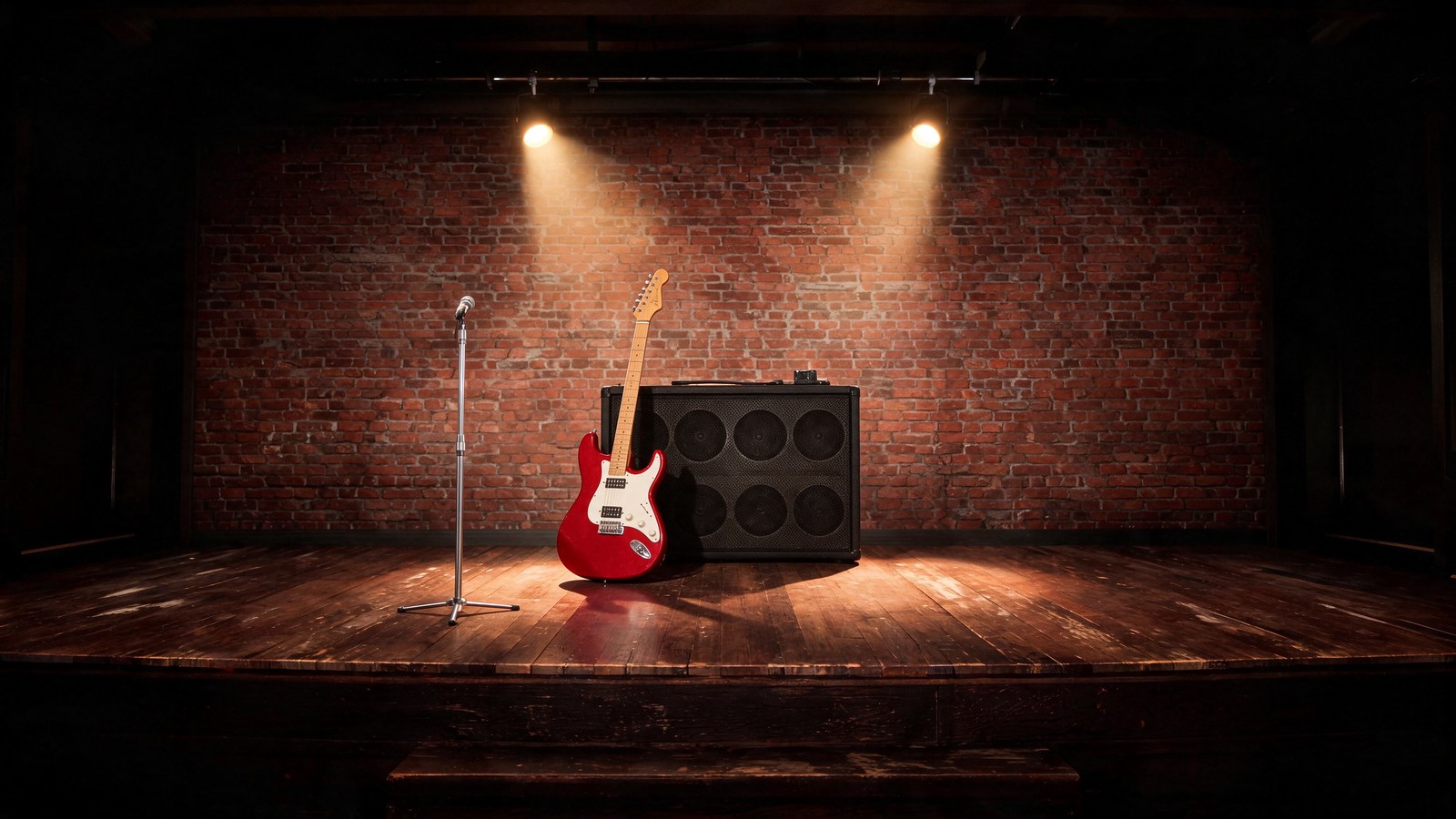
Product first, scene second, in the order the prompt names them.
Parameters size: 2K | aspect_ratio: 16:9 | output_format: png | 2 references
Seedream 5.5 ($0.0540)
Seedream 5.0 Pro ($0.1104)
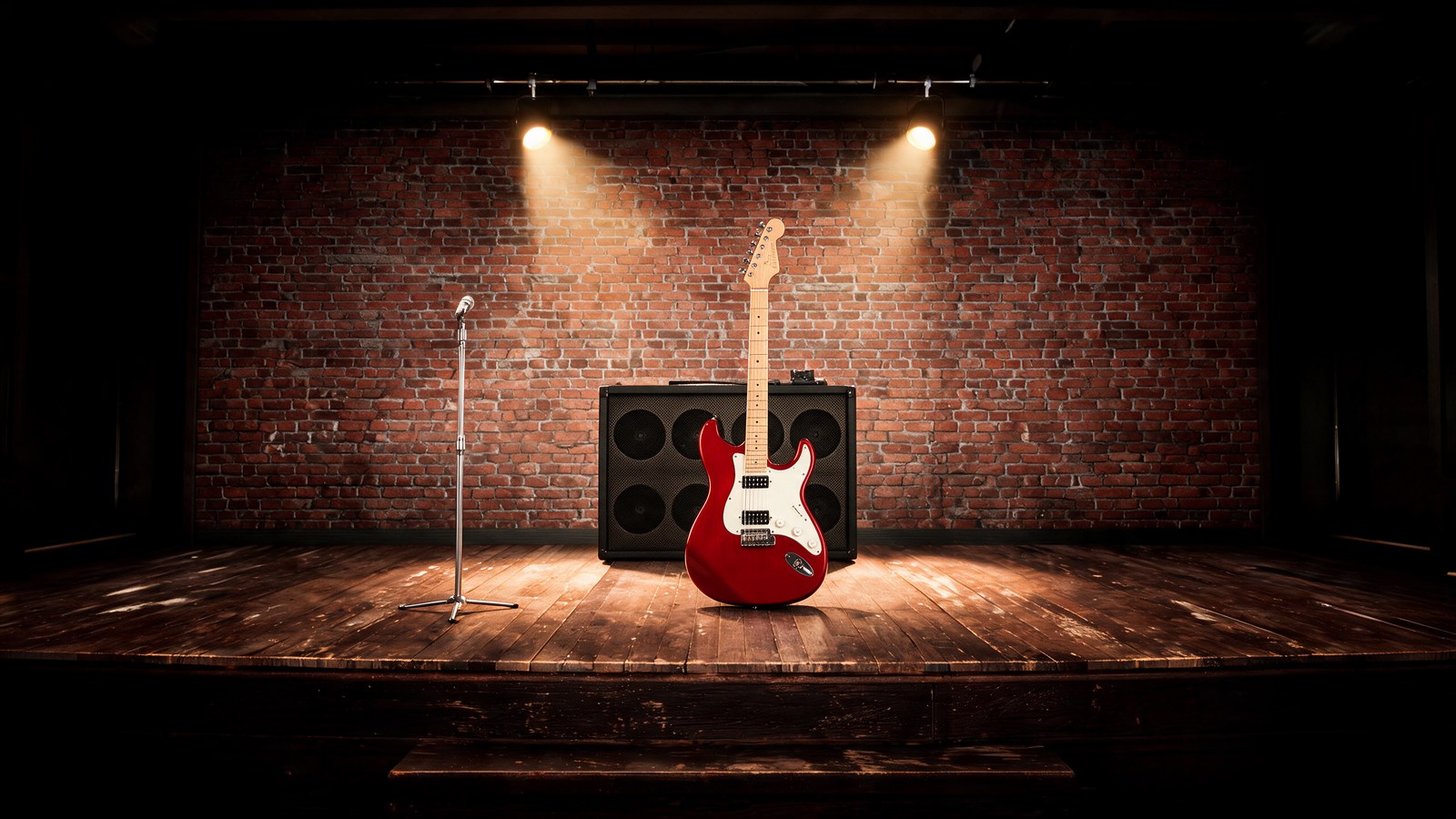
5.5 leans the guitar on the amp with a floor reflection. 5.0 Pro stands it upright in front of the amp.
Both kept the stage exactly, down to the mic stand and the two spotlights. 5.5 did what I asked: the guitar leans against the amp at believable scale, with a reflection in the boards and a shadow falling to the right. 5.0 Pro stood the guitar upright in front of the cabinet, not leaning on it, which reads as pasted in. Win: 5.5.
11. Three-reference blend
Reference Image 1
Product
Reference Image 2
Scene
Reference Image 3
Prop

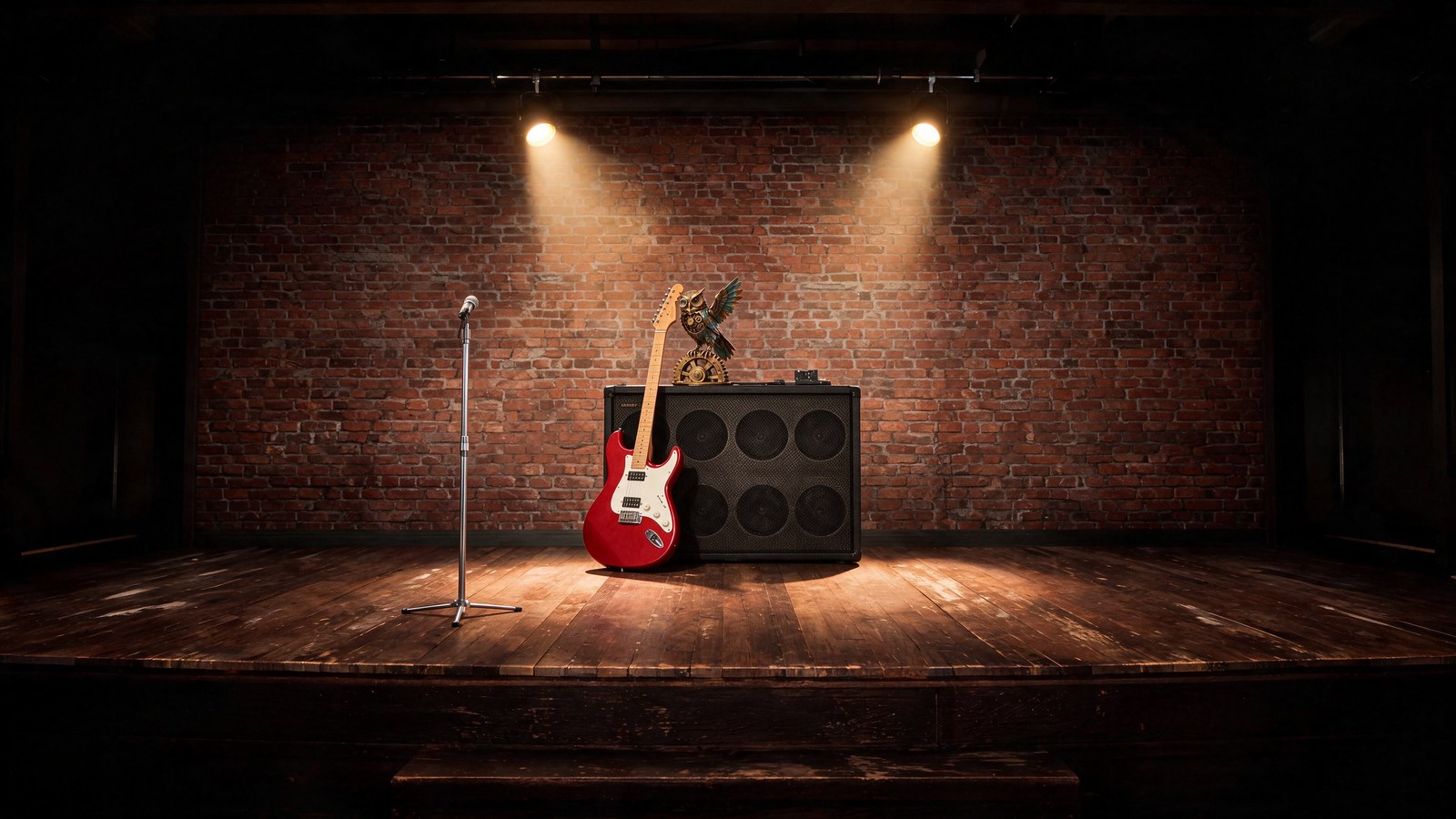
Three references: product, scene and a prop.
Parameters size: 2K | aspect_ratio: 16:9 | output_format: png | 3 references
Seedream 5.5 ($0.0624)
Seedream 5.0 Pro ($0.1140)
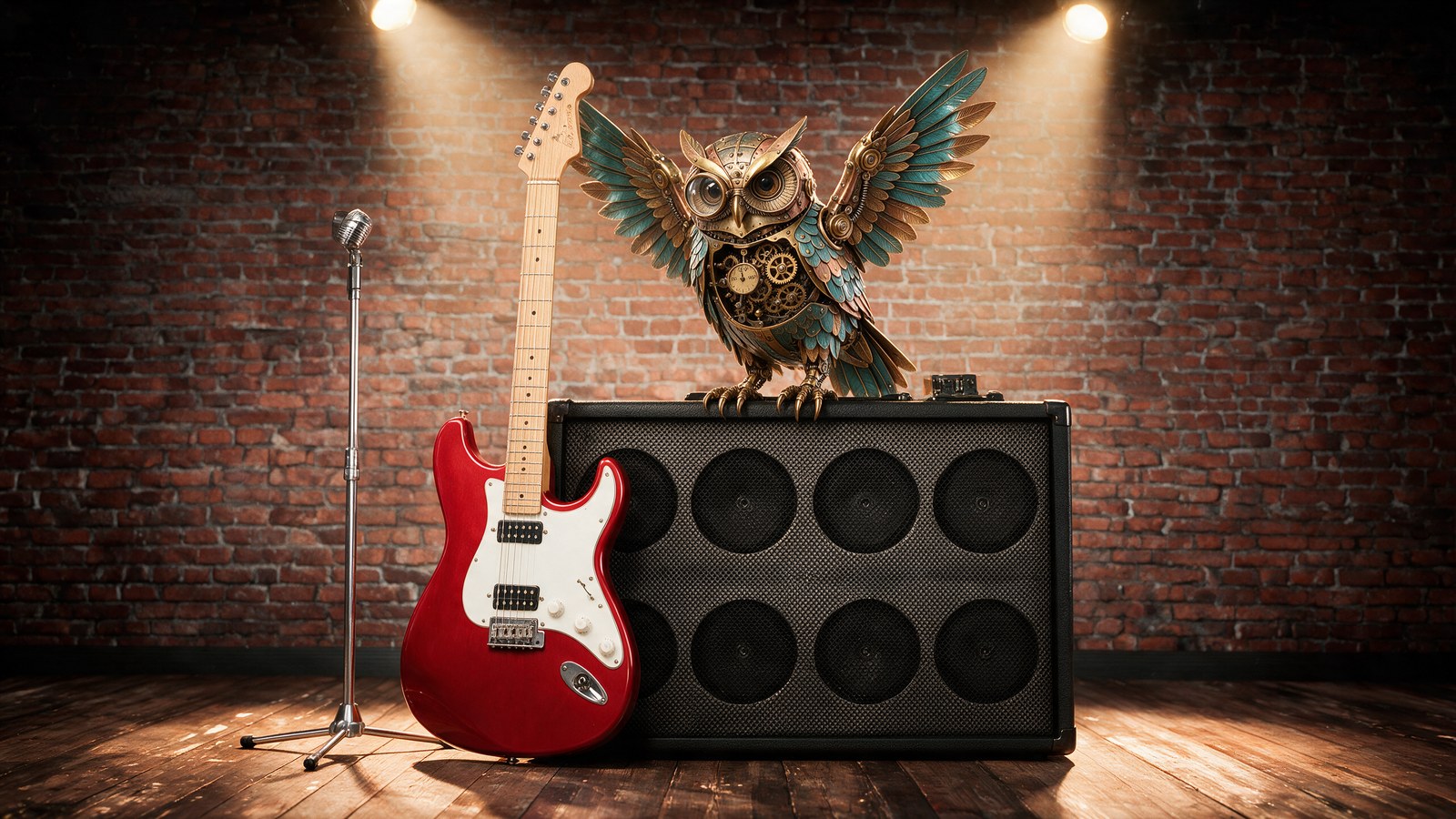
5.5 keeps the stage's framing. 5.0 Pro zooms in, rebuilds the amp and enlarges the owl.
5.5 kept the second reference as the scene: same framing, same stage, and the owl perched on the amp at a plausible size. 5.0 Pro made a more dramatic image but threw away the scene reference's framing, zoomed in, widened the amp and made the owl as big as the guitar body. If the scene reference is a real location or an existing campaign shot, 5.5's behaviour is the one you want. Win: 5.5.
12. Six references in one image
Reference Image 1
Guitar
Reference Image 2
Stage
Reference Image 3
Owl
Reference Image 4
Bottle
Reference Image 5
Illustration
Reference Image 6
Photo
Six references, the point where 5.0 Pro becomes the cheaper model at the lower tier.
Parameters aspect_ratio: 4:3 | output_format: png | 6 references | size: 1.5K on 5.5, 1K on 5.0 Pro
Seedream 5.5 1.5K ($0.0720, 29 s)
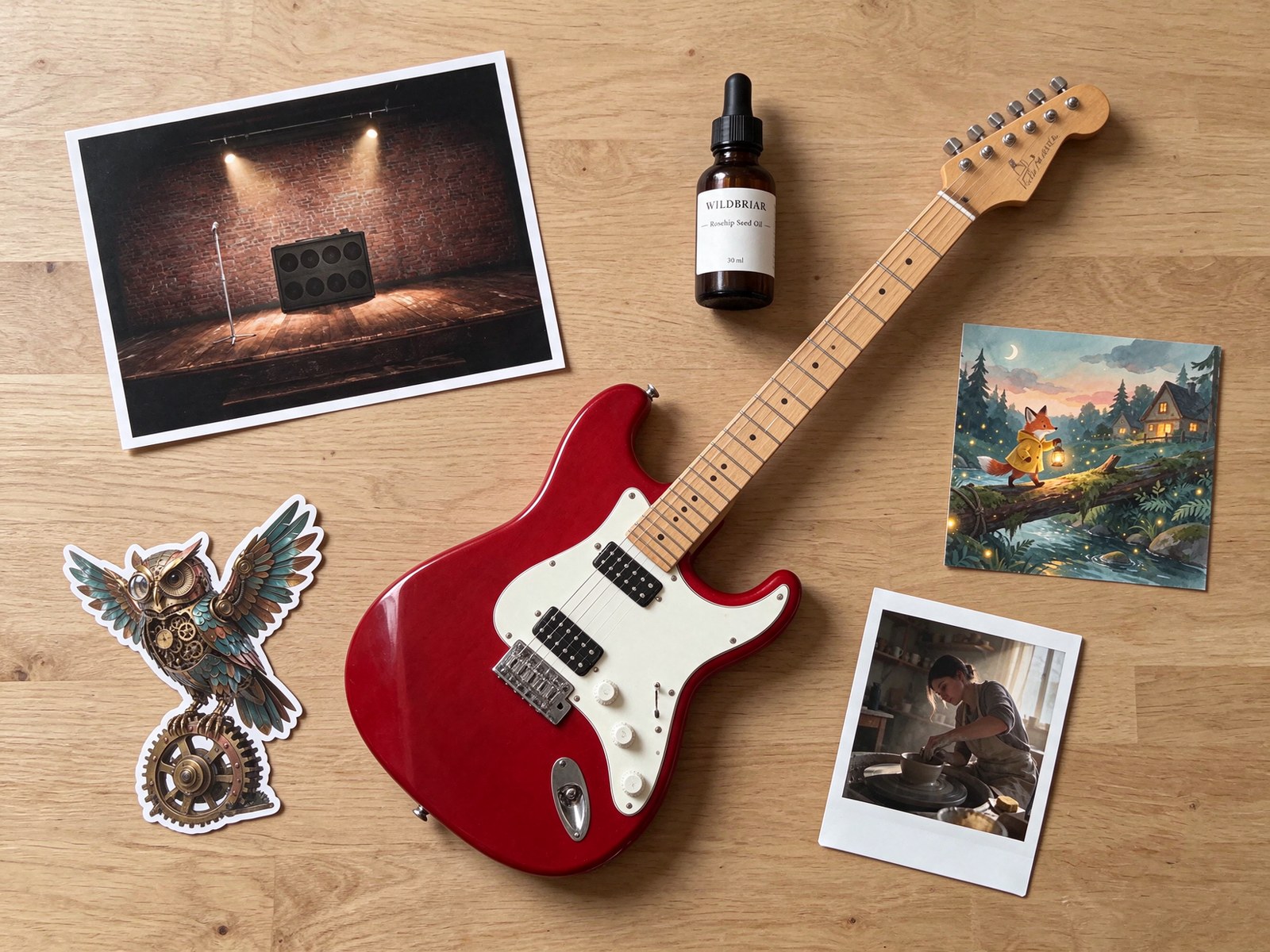
Seedream 5.0 Pro 1K ($0.0712, 126 s)
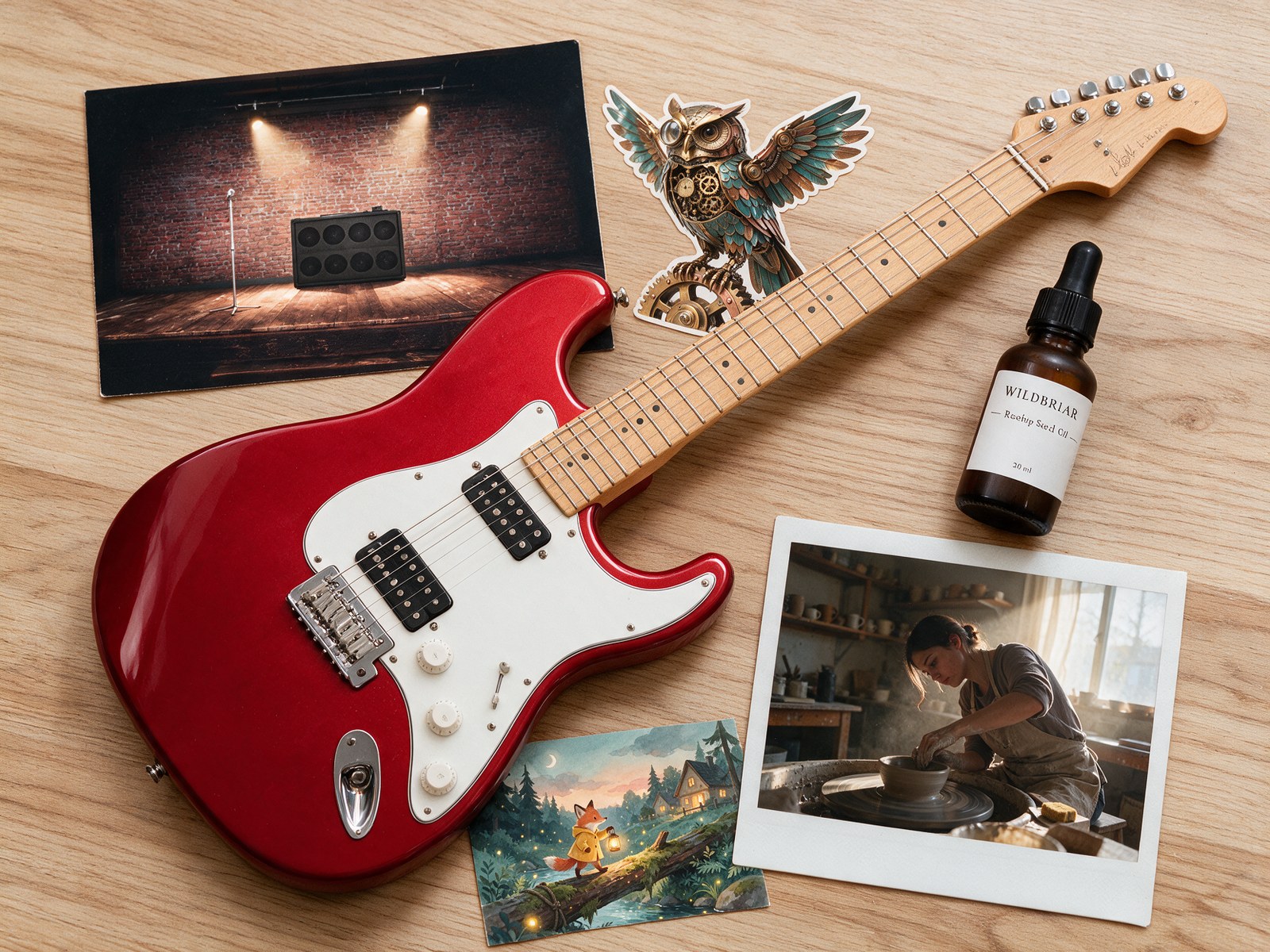
All six items made it into both. 5.5 shot it top down as asked; 5.0 Pro shot it at an angle.
This is the job that costs less on 5.0 Pro, by $0.0007. Both placed all six items and kept each recognisable, down to the fox's lantern and the pottery photo as a polaroid. Both mangled the small "Rosehip Seed Oil" line on the shrunken bottle, which is expected at this scale. 5.5 shot it as a true top-down flat lay; 5.0 Pro shot it at an angle and let the guitar dominate. It took 5.0 Pro 126 seconds against 29. Paying 1% more for 5.5 here is an easy call. Win: 5.5.
13. Three rounds of edits on one image
Real editing is iterative, so I chained it. Round 1 was the recolour above. Round 2 fed each model its own round 1 output and asked it to add a black leather strap. Round 3 fed back round 2 and asked for black control knobs. Then I measured the white backdrop, which nobody asked either model to touch, against the original photo.
Parameters size: 2K | aspect_ratio: 3:4 | output_format: png | 1 reference per round (the previous output)
5.5, round 1
5.5, round 2
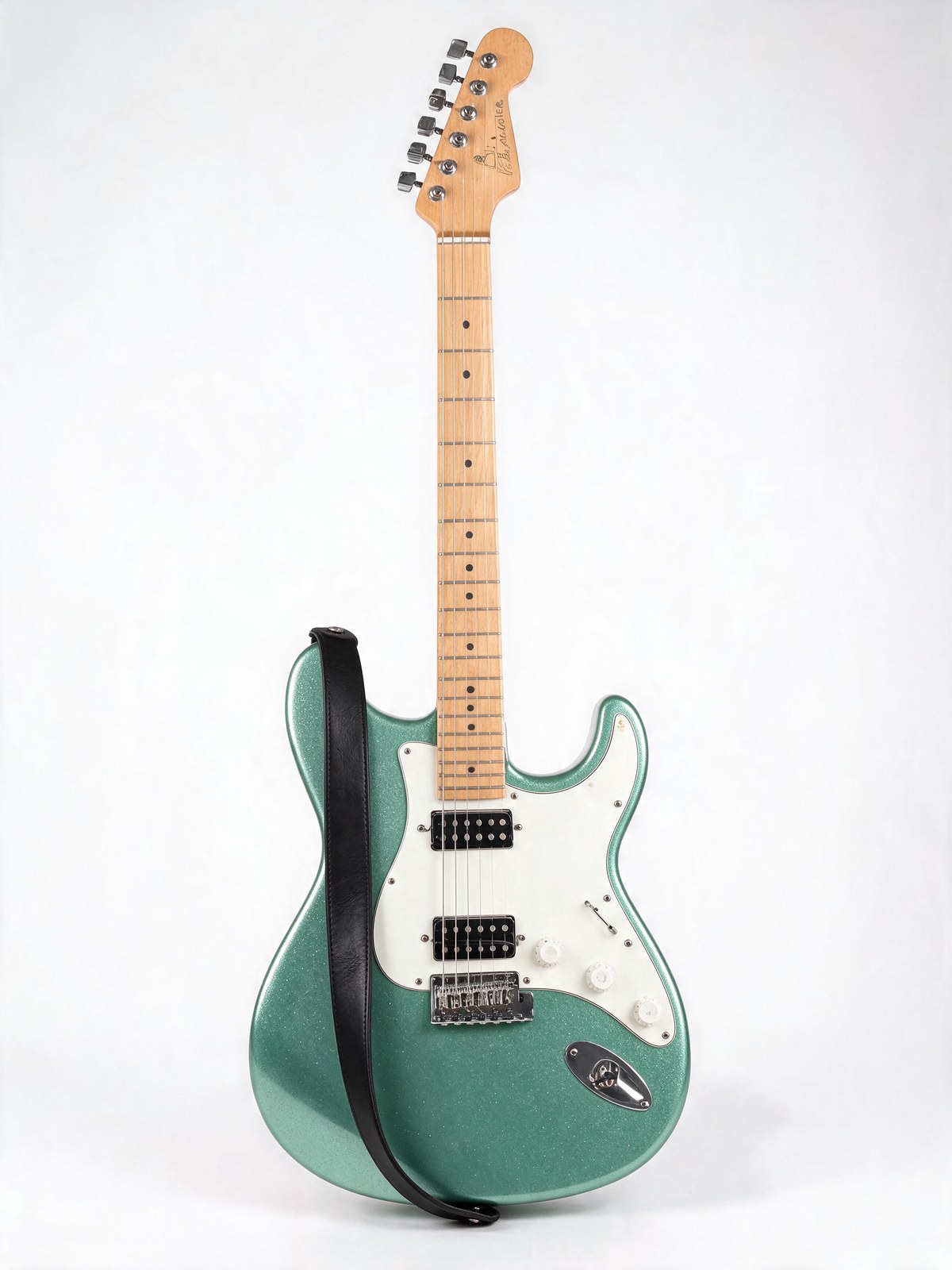
5.5, round 3
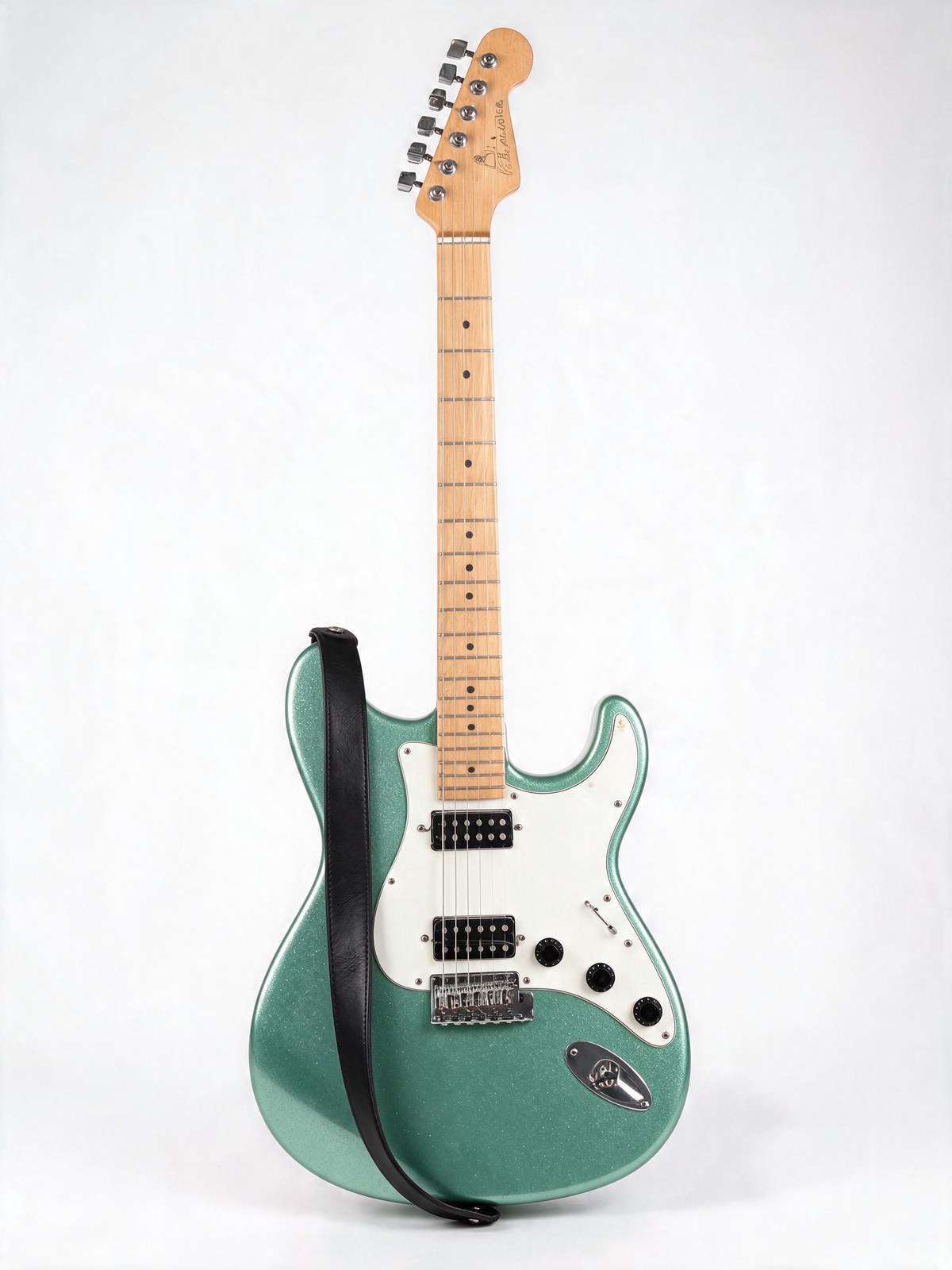
5.0 Pro, round 1
5.0 Pro, round 2
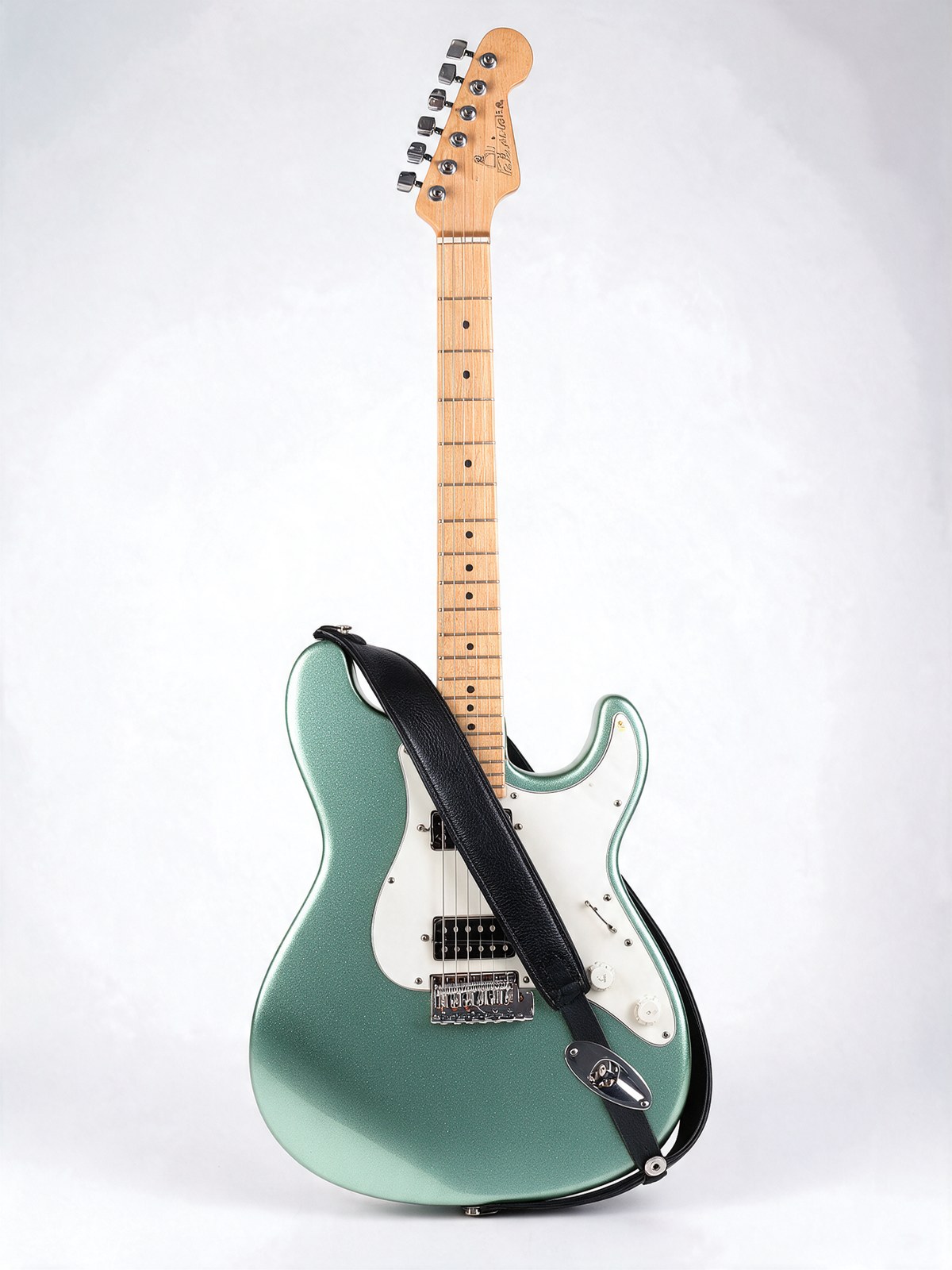
5.0 Pro, round 3
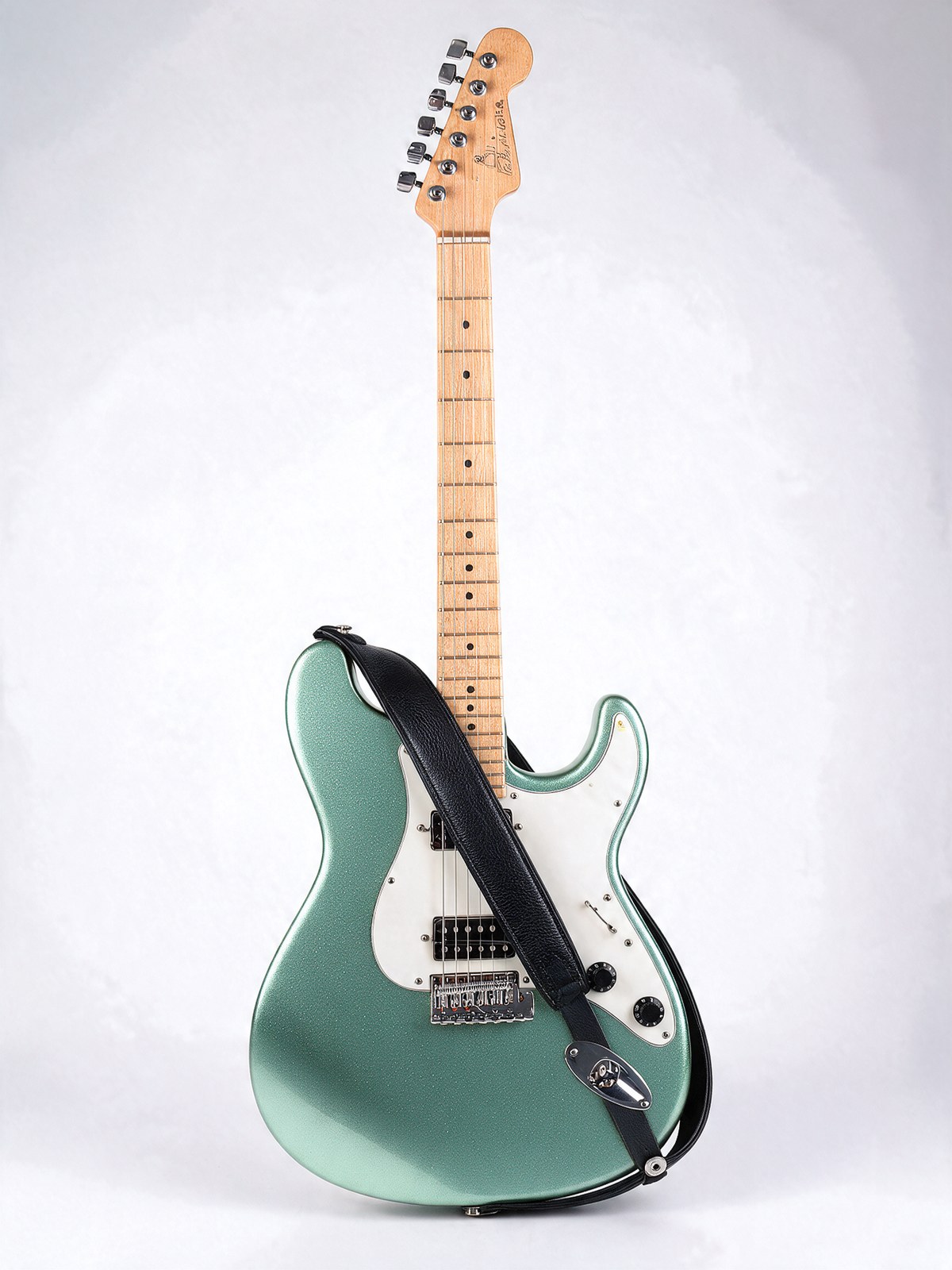
Each round feeds the previous output back in. Watch the corners of the 5.0 Pro row get darker.
| Round | 5.5: backdrop shift | 5.5: backdrop pixels moved over 16 levels | 5.0 Pro: backdrop shift | 5.0 Pro: backdrop pixels moved over 16 levels |
|---|---|---|---|---|
| 1 | -0.75 | 0.01% | -3.25 | 0.00% |
| 2 | -1.28 | 0.02% | -6.66 | 7.45% |
| 3 | -1.80 | 0.03% | -9.60 | 19.51% |
Average brightness change of the untouched white backdrop against the original photo, on a 0 to 255 scale, measured on the full 2K files.
Both models did every edit. The strap and the black knobs landed on both, though 5.0 Pro draped its strap across the pickguard where it hides two knobs. The real difference is what happened to the part nobody touched. 5.0 Pro darkened the backdrop by about 3.2 levels per round, so by round 3 a fifth of the background had shifted visibly and the corners had picked up a vignette. 5.5 drifted about 0.6 levels per round, under a fifth of the rate. Extrapolate to ten rounds of client feedback and 5.0 Pro's white sweep is light grey. Win: 5.5.
Scorecard
| Test | Winner | Why |
|---|---|---|
| 1. Photoreal scene | Tie | 5.5 better frame, 5.0 Pro right light direction |
| 2. Product label | 5.0 Pro | Matte glass as asked; both labels exact |
| 3. Flat infographic | 5.0 Pro | Flat vector as asked; 5.5 illustrated it |
| 4. Three scripts | 5.5 | Readable Hindi; 5.0 Pro garbled it |
| 5. Dashboard UI | 5.0 Pro | 5.5 invented y-axis values |
| 6. Four actions | 5.0 Pro | 2 of 2 takes vs 1 of 2 |
| 7. Storybook | Tie | Both complete and usable |
| 8. Line art poster | 5.0 Pro | 5.5 shaded it on both takes |
| 9. Transparent PNG | 5.5 | Only 5.5 returns alpha |
| 10. Recolour | Tie | Both under 0.5% drift |
| 11. Two-reference blend | 5.5 | Natural lean, grounded reflection |
| 12. Three-reference blend | 5.5 | Kept the scene's framing |
| 13. Six-reference flat lay | 5.5 | True top-down, 4x faster |
| 14. Three-round chain | 5.5 | 0.6 vs 3.2 levels of drift per round |
5.5 won 6, 5.0 Pro won 5, 3 ties. Tests 6 and 8 used two takes each.
The pattern is clear. On a fresh text-to-image prompt with several style constraints, 5.0 Pro is the more literal model. It held onto words like matte, flat vector and line art that 5.5 treated as suggestions. Everything involving an existing image went to 5.5: blends, reference framing, multi-round edits, and the alpha channel 5.0 Pro does not have at all. And 5.5 did all of it at about a third of the price and in well under half the time.
Which one should you use?
Use Seedream 5.5 when
- You generate at volume. At 2K it is $0.037 against $0.107, so 1,000 images cost $37 instead of $107.
- You edit in rounds, or let people iterate in an app. It drifts a fifth as much per round and answers in about 23 seconds instead of two minutes.
- You need cut-outs.
background: transparentsaves a separate background-removal call. - You localise into Hindi or other Indic scripts.
- You composite products into existing scenes and need the scene to stay put.
Keep Seedream 5.0 Pro when
- A brand guide dictates the style and you need flat vector, line art or a specific material rendered literally the first time.
- Your prompts pack many small constraints (who holds what, which way the light falls) and a reroll costs you a review cycle.
- You run reference-heavy jobs at the lower tier. From six references up, 5.0 Pro at 1K is slightly cheaper than 5.5 at 1.5K.
- You already depend on its region-level editing workflow and it works for you.
My own default from here is 5.5 at 1.5K for drafts and 2K for finals, with the style constraints written as their own short sentences so they are harder to drop. At these prices I can afford two takes on 5.5 for less than one take on 5.0 Pro, and on the clause tests a second take was often enough.
Switching from 5.0 Pro to 5.5 in the API
The two endpoints are close but not identical. Rename image_input to reference_images, move from 1K to 1.5K for the same pixel count, and note the new defaults: 5.5 returns PNG unless told otherwise, where 5.0 Pro defaults to JPEG, and its aspect_ratio defaults to auto, where 5.0 Pro defaults to 3:2.
curl -X POST https://api.segmind.com/v1/seedream-5.5 \
  -H "x-api-key: $SEGMIND_API_KEY" \
  -H "Content-Type: application/json" \
  -d '{
    "prompt": "Change only the guitar body colour to sea-foam green. Keep everything else exactly as in the reference.",
    "reference_images": ["https://your-cdn.com/guitar.jpg"],
    "size": "2K",
    "aspect_ratio": "3:4",
    "background": "opaque",
    "output_format": "png"
  }' --output edited.png
The /v1 endpoint returns the image itself. For chained edits, the /v2 async endpoint returns a hosted URL you can pass straight back into reference_images for the next round. Try both models side by side on the Seedream 5.5 page and the Seedream 5.0 Pro page.
FAQ
Is Seedream 5.5 better than Seedream 5.0 Pro?
In my 14 tests, 5.5 won 6, 5.0 Pro won 5 and 3 were ties. 5.5 was better at reference blends, multi-round edits, Hindi text and transparent output. 5.0 Pro followed detailed text-to-image style instructions more literally. Given the price gap, 5.5 is the better default for most teams.
How much cheaper is Seedream 5.5 vs 5.0 Pro?
At 2K, $0.037 against $0.107 per image, about 35% of the price. At the lower tier, 5.5's 1.5K costs $0.021 against $0.053 for 5.0 Pro's 1K at a similar pixel count, about 40%.
Why is Seedream 5.5 1K smaller than Seedream 5.0 Pro 1K?
The two models size their tiers differently. At 3:2, 5.5's 1K returned 1248x832 while 5.0 Pro's 1K returned 1776x1184. Use 5.5's 1.5K tier (1824x1216), which costs the same as its 1K.
Do reference images cost extra on Seedream 5.5 vs 5.0 Pro?
Yes on both, but differently. 5.5 bills $0.0085 for every reference. 5.0 Pro bills $0.0036 per reference after the first, which is free. That makes 5.0 Pro cheaper at the lower tier from six references up. At 2K, 5.5 stays cheaper even at ten.
Can Seedream 5.0 Pro make transparent PNGs?
No. It has no background parameter, and asking for transparency in the prompt returned a white background with no alpha channel. Seedream 5.5 returns a true RGBA PNG with background set to transparent.
Which is faster, Seedream 5.5 or 5.0 Pro?
Seedream 5.5, by a wide margin. In my run it averaged 27.5 seconds for text-to-image against 63.2 seconds, and 22.6 seconds for reference edits against 130.5 seconds.
The verdict
Seedream 5.5 is not better than 5.0 Pro at everything. It is looser with style instructions on a blank canvas, and it occasionally invents a line of text nobody asked for. But it is about a third of the price, more than twice as fast, steadier across edits, better with Hindi and the only one of the two with transparency. For most production work, that trade is not close.
Keep 5.0 Pro for the literal, brand-locked brief. Move everything else to 5.5, set it to 1.5K, and spend the savings on a second take.