
Rebuild Your Best Ad With a New Product: Segmind Antiquark
How to swap a product in a video ad without a reshoot: Segmind Antiquark rebuilt a four-shot coat campaign around an ivory coat in one 1080p run.


Every brand I talk to has one ad that just works. The cut lands, the music sits right, the product looks expensive, and the numbers prove it. Then a new piece drops, a new colourway, a new market, and that ad is suddenly about last season's product. The usual answer is a reshoot: crew, location, model, grade, edit, weeks of calendar for something you already got right once.
Segmind Antiquark is our answer to that. You give it the edit that already works and one photo of the new product, and it gives you the same edit back with your product in it: the same shots, the same cuts, the same camera moves, the same music. If you want to swap a product in a video ad without a new shoot, this is the tool built for it.
This is the launch post, so I am walking through the demo on the page: a four-shot luxury coat campaign, rebuilt around an ivory coat in one run at 1080p. I pulled both files down and measured them frame by frame, so you get what I saw, including the parts that are not perfect. Then I ran it myself on real footage: a three-shot headphone ad, rebuilt in two colourways.
TL;DR
- Antiquark takes a reference edit (up to 30 seconds), one product photo and a plain-English line saying what to replace, and returns the edit with your product in every shot.
- In the coat demo, the cut points landed within one frame of the original, and the music came back as the original track, at 0.99999 correlation with zero offset.
- Details the new coat lacks are removed: the original's belt, flap pockets and double-breasted buttons are gone from every shot.
- On my own real-footage test, a three-shot headphone ad, two colourways came back at $3.47 each in about 5 to 6 minutes, with all 240 frames and the original music.
- You choose 480p, 720p or 1080p, and deliver in H.264, HEVC 10-bit or ProRes 422 HQ.
- The page lists an average of about $3.14 and 7 minutes 39 seconds per run. It runs from the playground or from your own code through an async API.
What is Segmind Antiquark?
Antiquark is a Segmind PixelFlow: a packaged workflow with a playground, an API and a fixed set of inputs. It does one job. It puts your product into an edit that already works.
That framing matters. Most video models start from a prompt and hope you like what comes back. Antiquark starts from a finished piece of work you have already approved: the shot list, the pacing, the camera moves, the soundtrack. Everything a creative director signed off on stays put, and only the product changes. You are not generating an ad. You are re-casting the product in one.
There are three steps, and the page lists them plainly:
- Upload the edit. An ad, a fashion film or a product reel of up to 30 seconds that you own or have licensed.
- Add one product photo. Sharp and clear. Its details become close-ups, so buttons, clasps and labels need to hold up.
- Name the item and run. Say what to replace, such as "the woman's black coat", then pick a resolution and a delivery format.
One product per run. If your ad has a coat and a bag and you want to change both, that is two runs.
The demo: a four-shot coat campaign, rebuilt in ivory
Here is the published example. The film and the model in it are generated, so nobody's real campaign was touched. Inputs first, as always.
Input 1, the reference edit: a 10-second, four-shot coat film, 1920x1080 at 24 fps. Segmind's published example. Re-encoded to H.264 for browser playback; the source file is HEVC 10-bit.
Input 2, the product photo
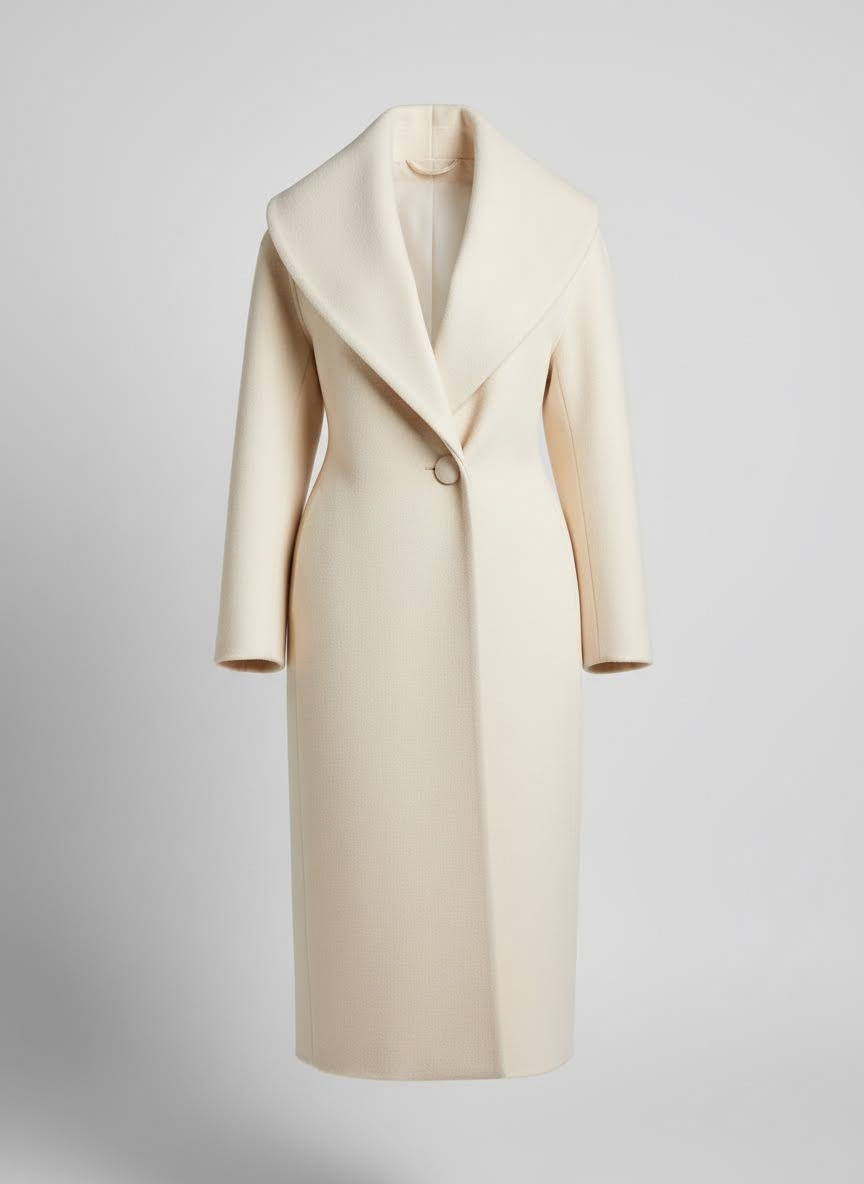
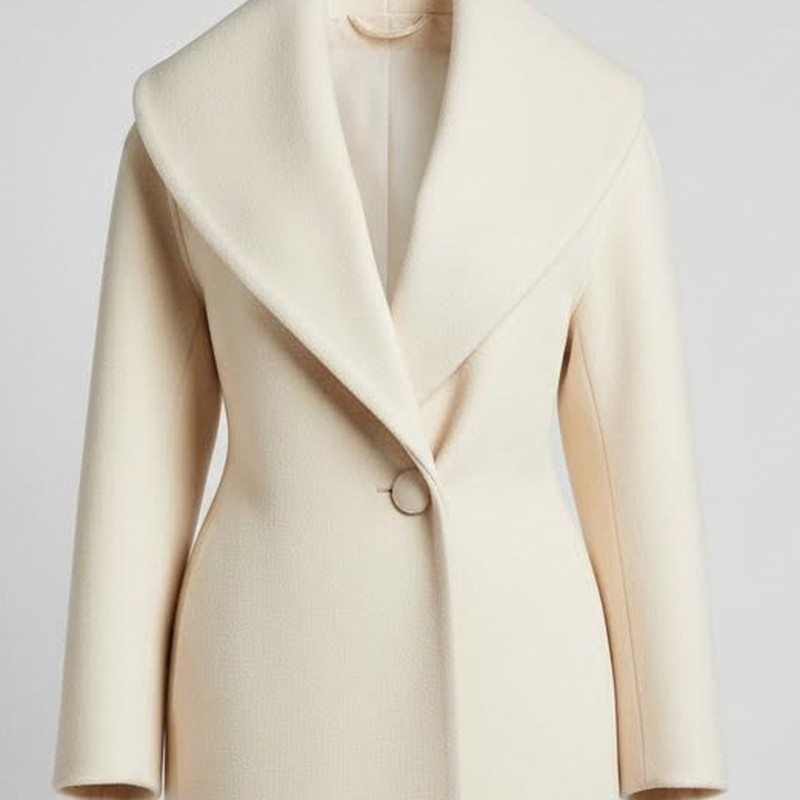
One flat product shot of an ivory wool coat with a shawl collar and a single button. 864x1184.
Parametersresolution: 1080p | delivery: H.264 mp4 (plays everywhere) | smooth_retime_and_grain_match: true
The Antiquark output: the same four shots and the same music, with the ivory coat in every frame. One run at 1080p, H.264.
And the two together, synced, so you can watch the cuts land at the same moments. This one carries the original edit's audio.
Left, the original edit. Right, the Antiquark output. Same timeline, frame for frame.
The first thing I noticed is what did not change. The corridor of light shafts, the walk, the slow close-up at the waist, the look over the shoulder, the figure at the top of the stairs with the lens flare: it is the same film. If you had approved the original, you would recognise this as your edit on the first viewing.
Shot by shot
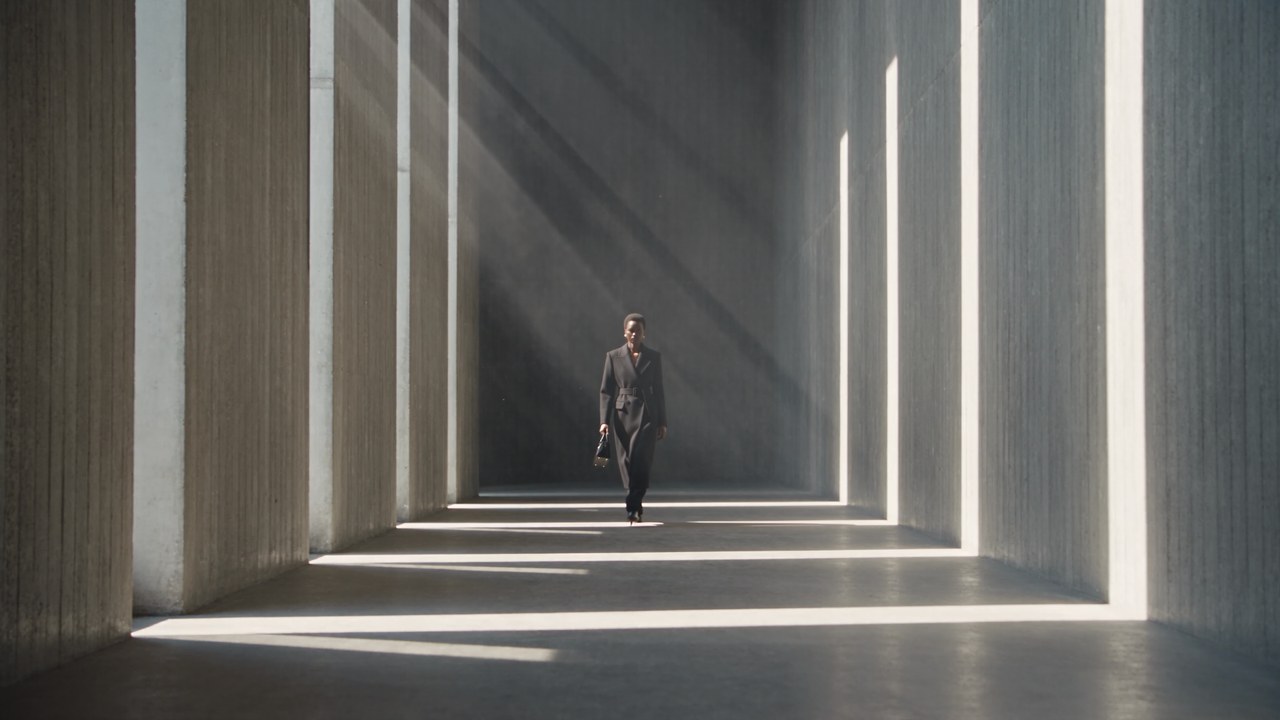
Shot 1: the corridor walk
Original edit
Antiquark output
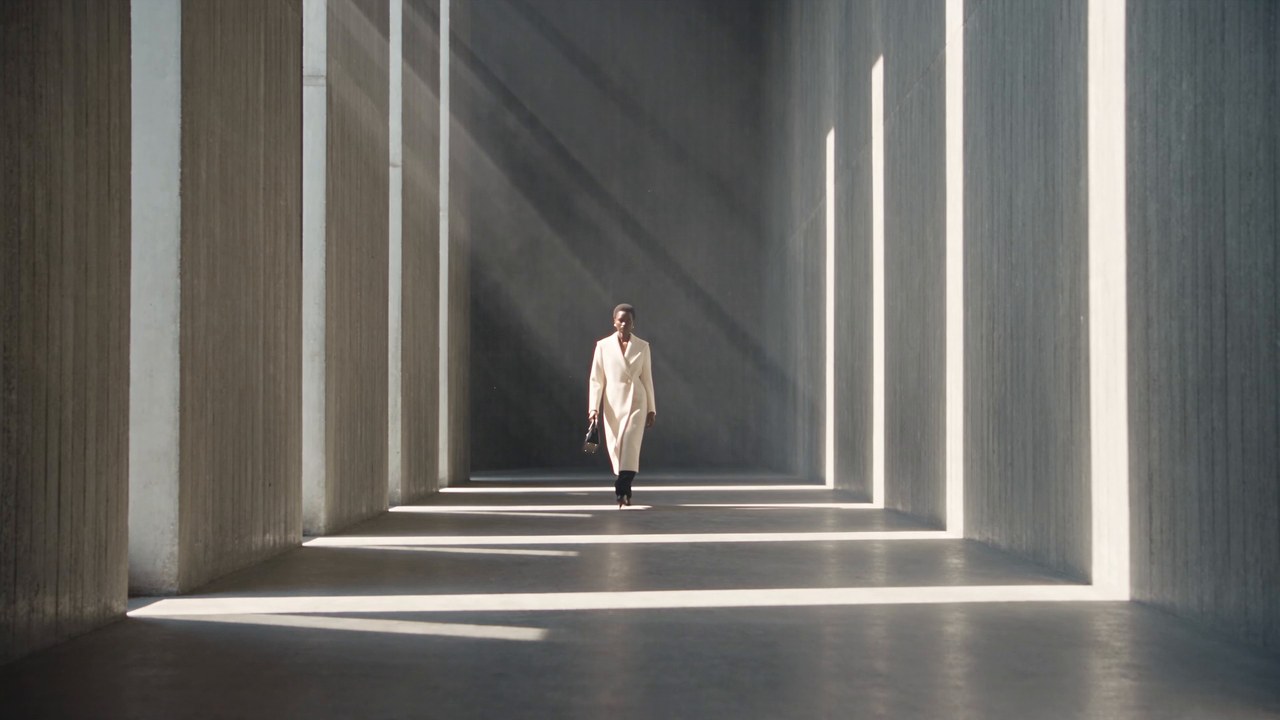
Frame 30 of 241. The handbag is still in her left hand, the light shafts fall in the same places, and the coat reads as the long ivory piece from the photo.
The wide shot is the hardest place to judge a product, because the coat is a small part of the frame. What I look for here is whether everything around it survived. It did: same pose, same stride, same bag, same pattern of light on the floor. The ivory coat ends at mid-calf with dark trousers below, which matches the length of the coat in the photo rather than the original black one.
Shot 2: the close-up at the waist
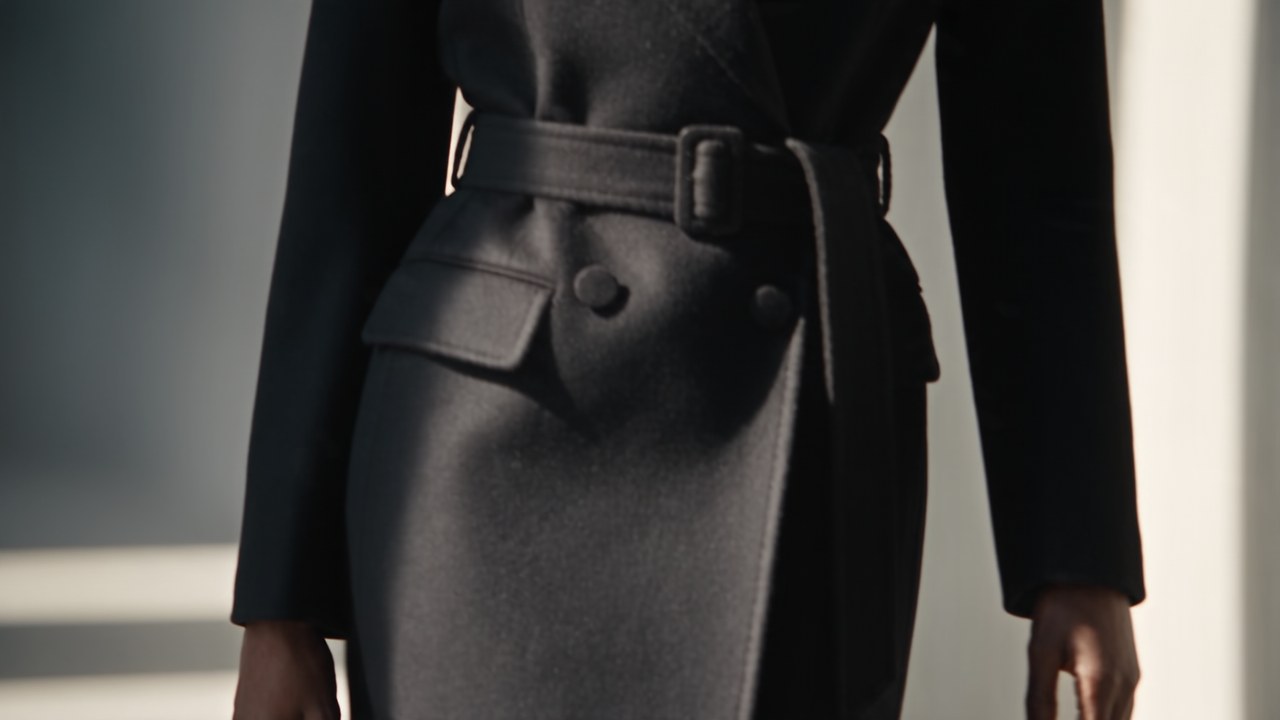
Original edit
Antiquark output
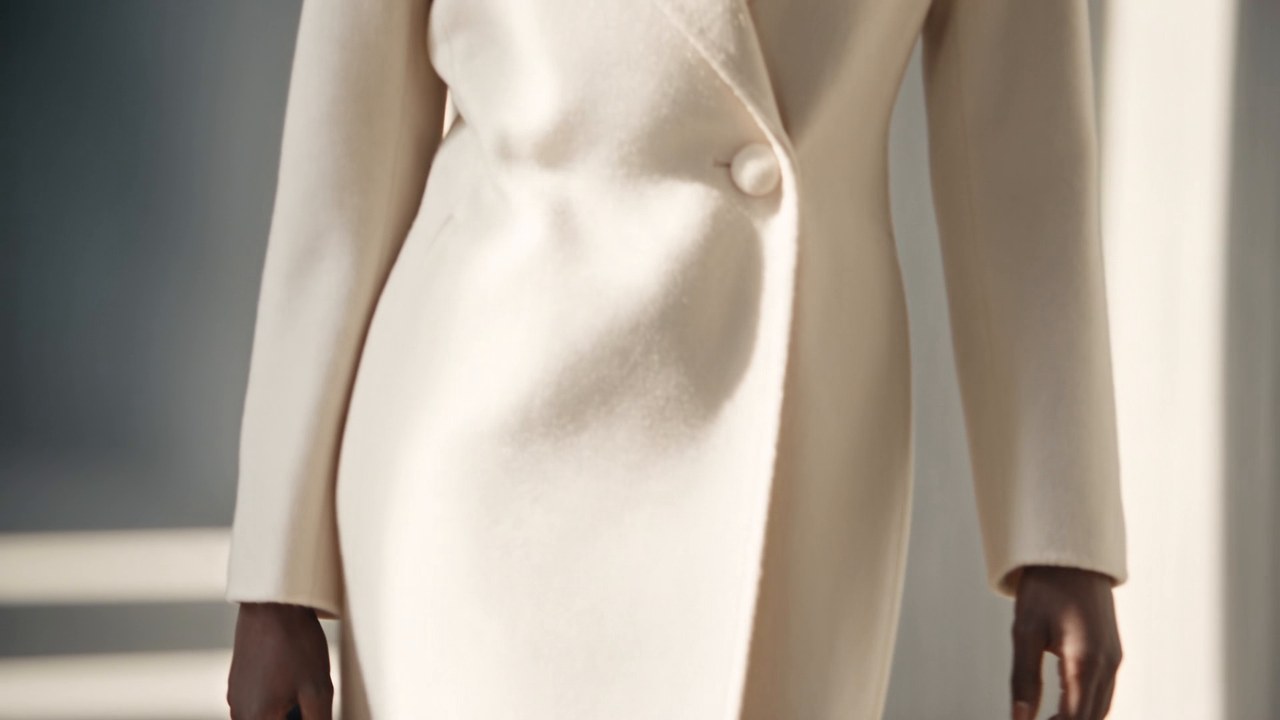
Frame 90. The original coat has a belt, flap pockets and two buttons. The ivory coat has none of them, because the product photo has none of them.
This is the shot that sold me. The original coat is belted, with flap pockets and a double-breasted button stance. The ivory coat in the photo has none of that: it is a clean front with one button. A lazy recolour would have given you an ivory coat with a black-coat silhouette, belt and all. Antiquark took the belt out, took the pockets out, and put a single button where the photo has it, in a shot that only exists as a close-up.
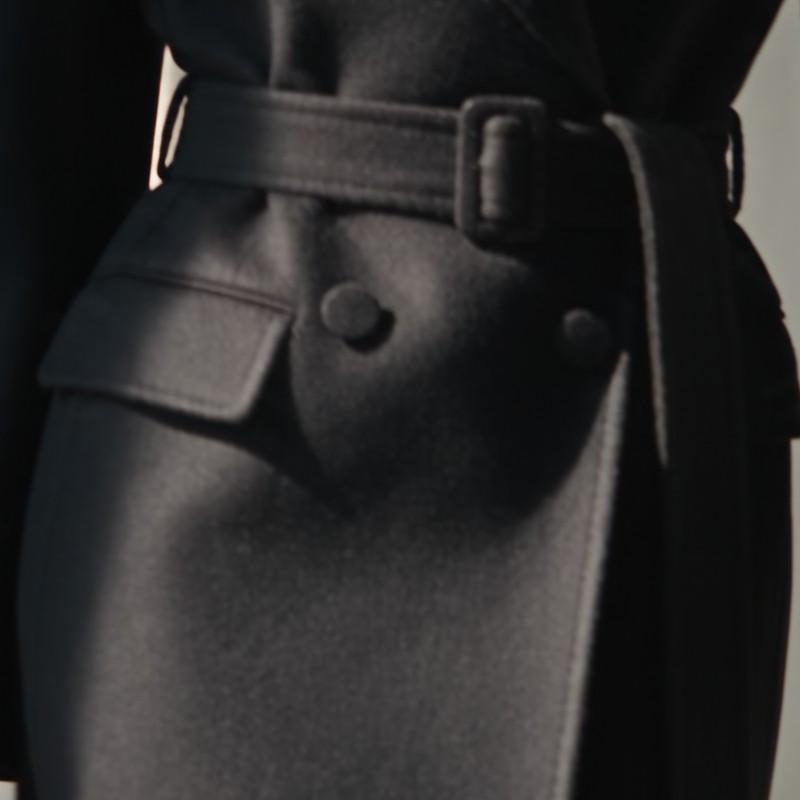
The page calls this "nothing left over": a belt or pocket your product lacks is taken out of every shot. Here is that claim, zoomed in.
Original coat
Product photo
Antiquark output
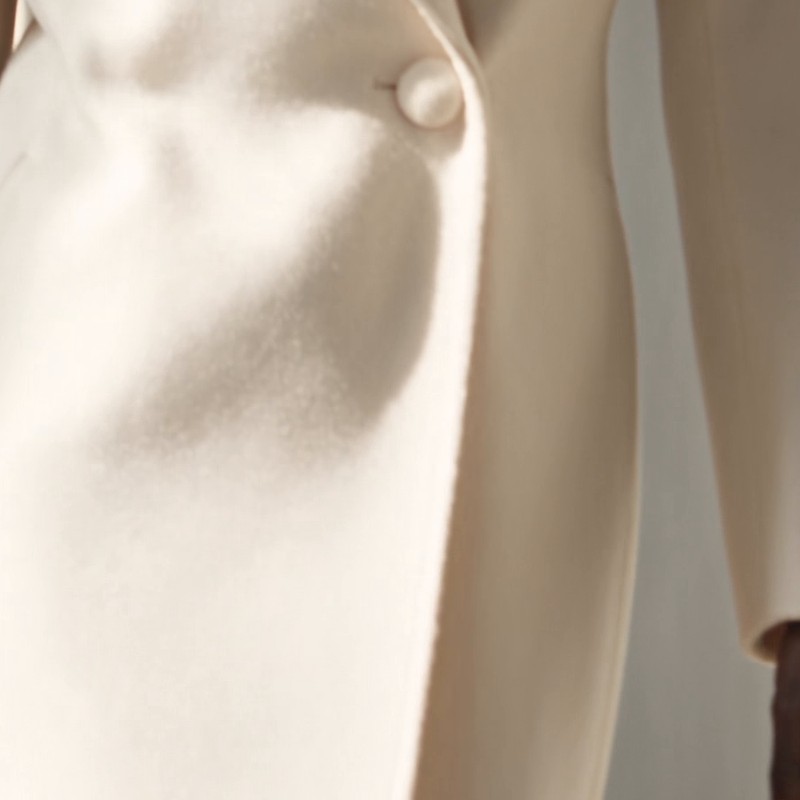
Crops from frame 90 and the product photo. Belt, buckle, flap pocket and the second button are gone; one button sits at the waist overlap.
One honest note on that button. In the photo it reads as a slightly warmer, glossier disc against the wool. In the output it is matte and close to the colour of the cloth. Shape and placement are right; the finish is softer. On a hero product where the hardware is the selling point, I would run this at 1080p, as the demo did, and check the close-ups before anything else.
Shot 3: the look over the shoulder
Original edit
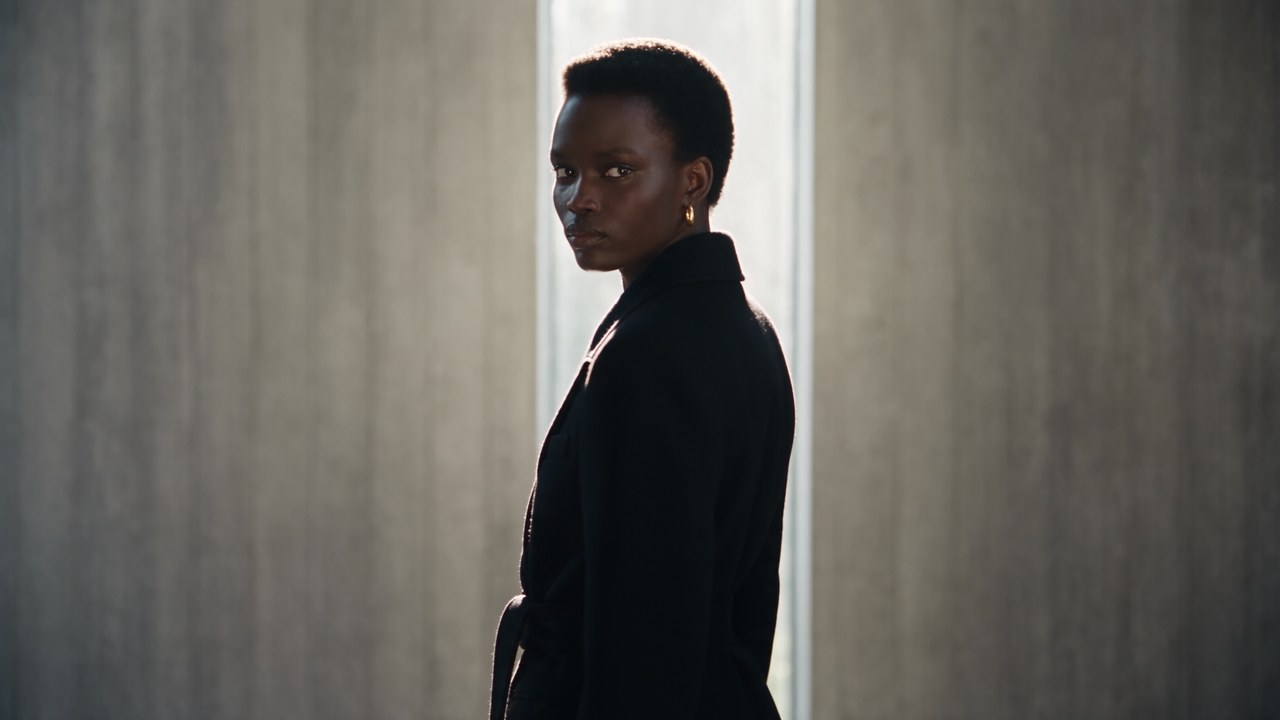
Antiquark output
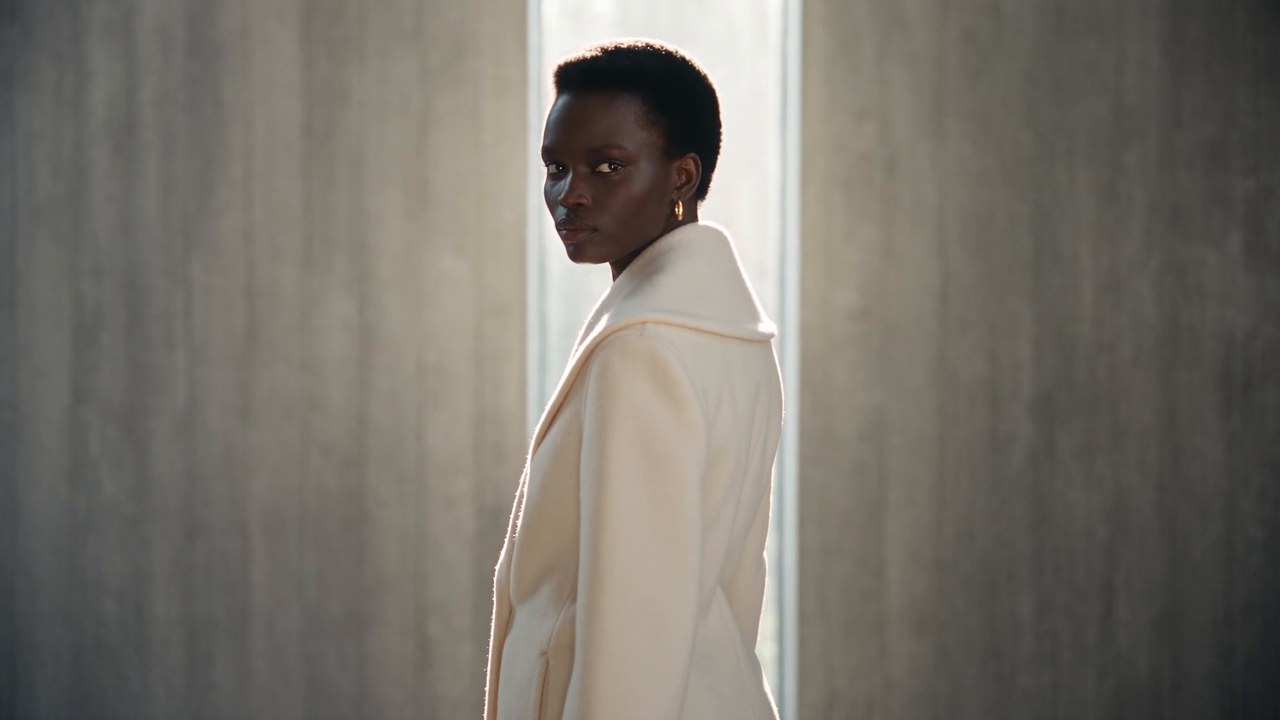
Frame 150. The shawl collar from the photo rolls up around her neck; the face, earring and window light carry over.
The shawl collar is the signature of this coat, and it is right here: the deep rolled collar standing up at the back of the neck, the way the photo shows it. Her face, the gold earring, the backlight from the window and the grey plaster wall all carry over. This is the frame Segmind uses as the page thumbnail, and it is the one I would put in front of a client first.
Shot 4: the stairs
Original edit
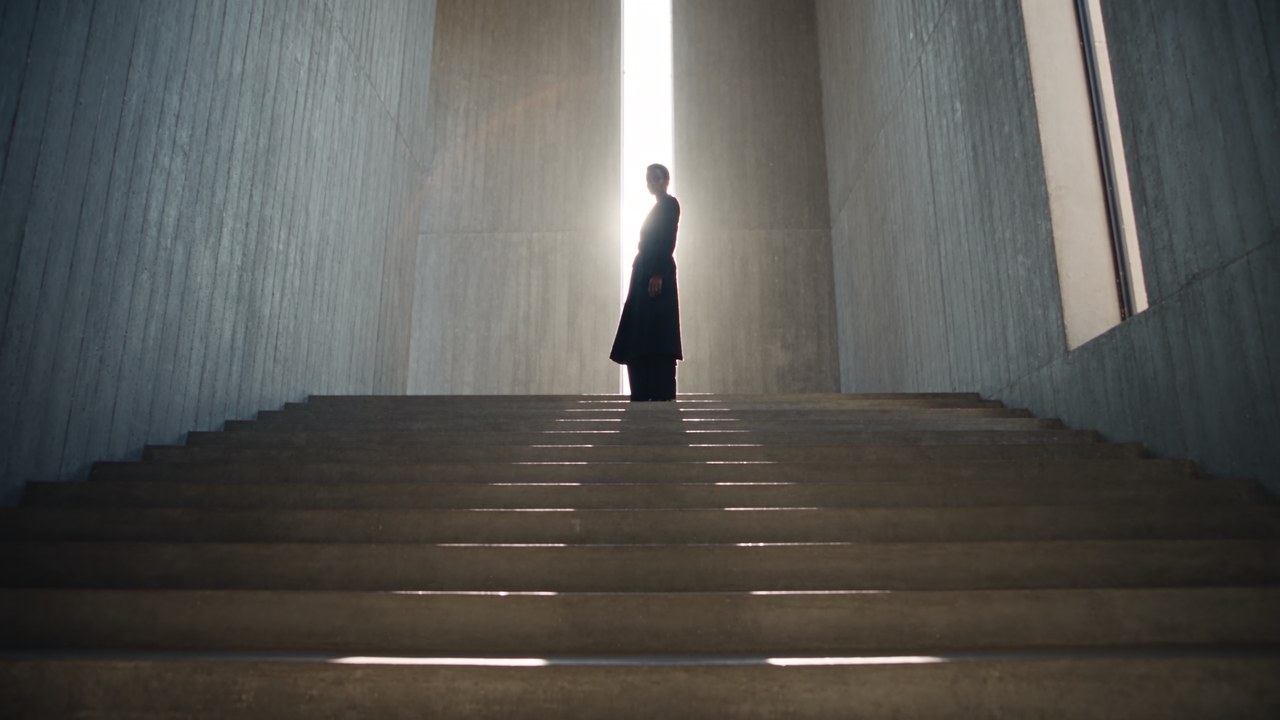
Antiquark output
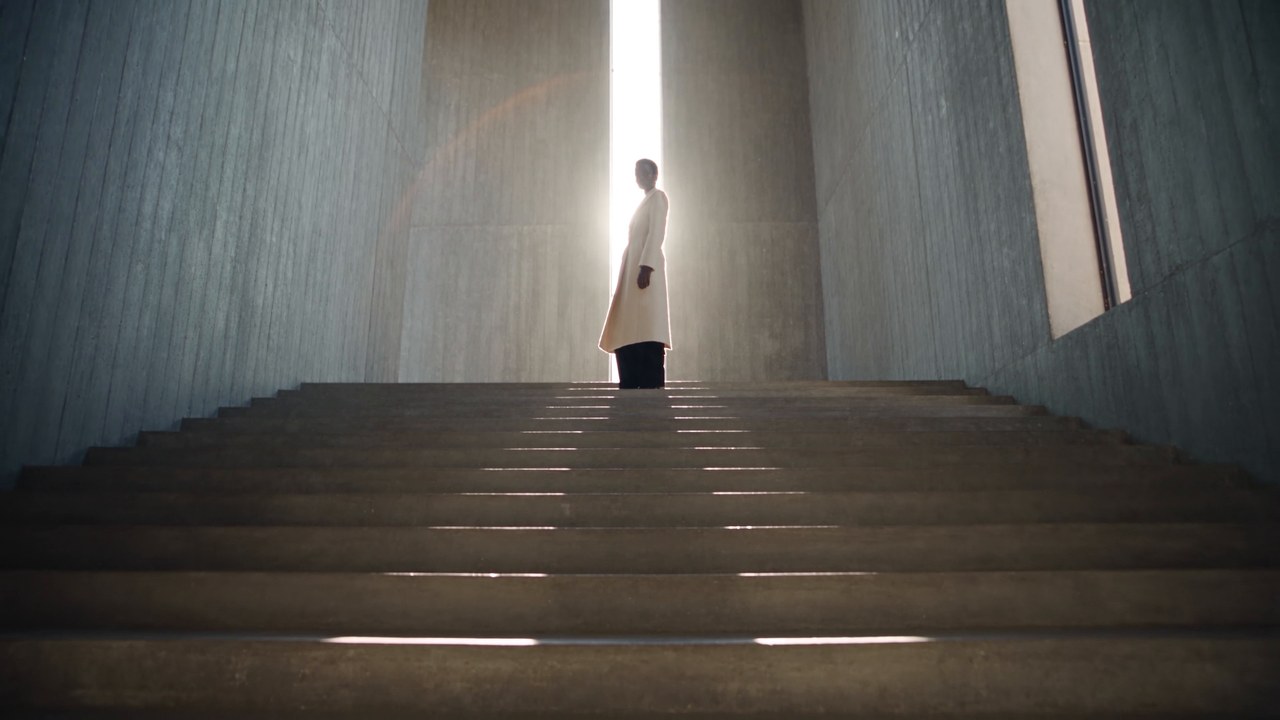
Frame 210. The silhouette at the top of the stairs is now ivory, and the flare and window light are the same.
The last shot is a silhouette against a blown-out window, which is a tough place for a white coat because it competes with the brightest part of the frame. It holds up. If you flip between the two frames you will see the framing sits a touch higher in the output, a few pixels on a 1080p frame. In motion I could not see it.
What I measured
A side-by-side can flatter. So I pulled both files and checked the things an editor cares about, with ffmpeg and a few lines of Python.
| Check | Original edit | Antiquark output |
|---|---|---|
| Resolution and frame rate | 1920x1080, 24 fps | 1920x1080, 24 fps |
| Length | 241 frames, 10.04 s | 242 frames, 10.08 s |
| Cut points (frame) | 60, 120, 181 | 60, 120, 180 |
| Video codec | HEVC Main 10, 10-bit | H.264 High, 8-bit (the delivery picked) |
| Audio | AAC, 32 kHz stereo, -23.0 LUFS | AAC, 32 kHz stereo, -23.0 LUFS |
| Audio match | 0.99999 correlation at zero offset |
Three things stand out.
The cuts land where they were. Two of the three cuts are on the exact same frame, and the third is one frame earlier. The output is one frame longer, 42 milliseconds on a 10-second edit. The page promises exact length and frame rate; on this demo it is within a frame, which no viewer will notice and an editor conforming to picture lock should still check.
The music is the original track. Same loudness, same peak, and a waveform correlation of 0.99999 with zero offset. That is not a model guessing at a soundtrack. It is your audio, put back where it was. If your ad is built on a licensed track and a hit point, that hit point stays.
The frame is re-rendered, not patched. I ran a structural similarity check between matching frames. It scores 0.57 on the waist close-up, where the coat fills the frame, and 0.72 to 0.85 on the other shots. In other words, Antiquark is not pasting a coat over untouched footage: it rebuilds each shot and then matches the grain, light and composition of the original. You get a coherent picture where the new coat actually sits in the light, at the cost of the frame not being a pixel-for-pixel copy of the original around it.
Second example: a real headphone ad, in two colourways
The coat film is generated, and a generated film is the friendliest possible input. So I built a real one and ran Antiquark on it myself.
The footage is three clips of the same man from one Mixkit shoot, used under the Mixkit Stock Video Free License. I cut them into a 10-second, three-shot edit: he picks a pair of black over-ear headphones up off a café table and puts them on, a close-up as they settle over his ear, and a wide shot of him working with them on. It is 1080p at 23.976 fps, the frame rate most real cameras shoot, not the clean 24 of the demo. Under it sits a music bed, "Sleepy Cat" by Alejandro Magaña, under the Mixkit Stock Music Free License.
For the product I generated two photos of one unbranded headphone design for this post: cream with tan leather and gold metal, and the same pair in sage with charcoal leather and silver metal. Two runs, identical except for the photo. That is the agency workflow in miniature: one approved edit, one run per colourway.
Input, the reference edit: three shots of real footage, 10.01 s, 1920x1080 at 23.976 fps, with a music bed. Footage and music from Mixkit, free licence.
Run 1 product photo
cream, tan leather, gold metal
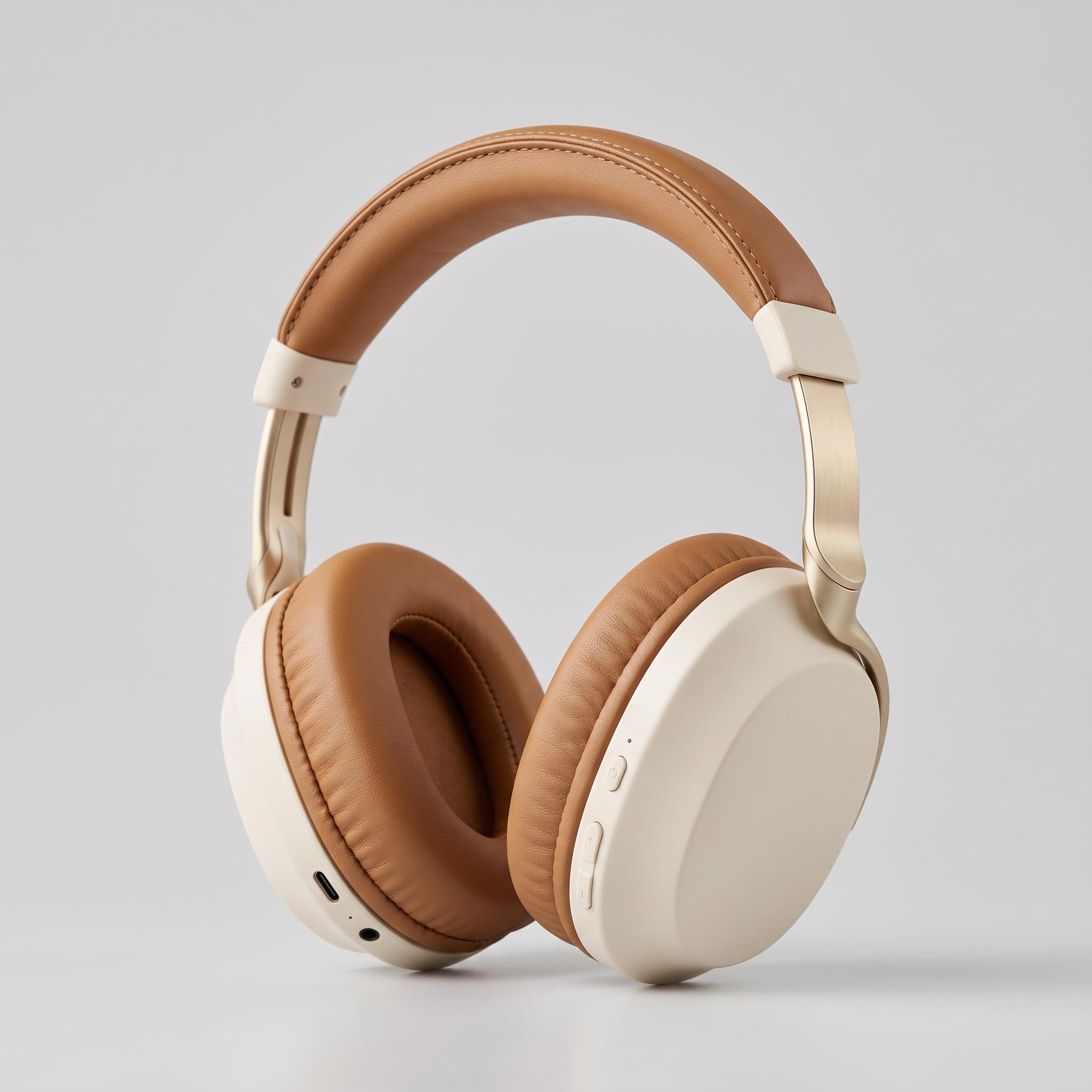
Run 2 product photo
sage, charcoal leather, silver metal
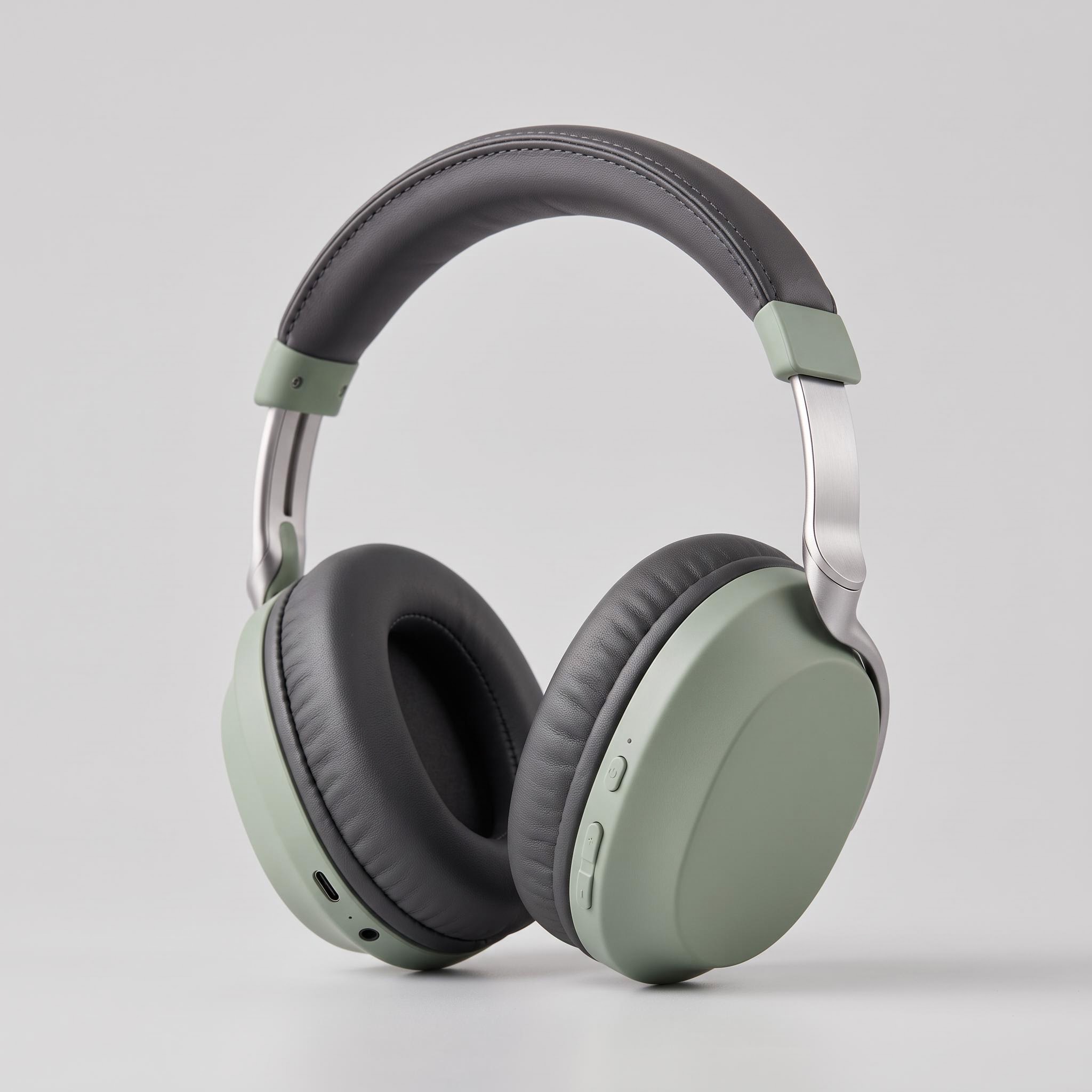
Both photos are of the same unbranded design, generated for this post. The only thing that changes between the two runs is this photo.
Parametersresolution: 720p | delivery: H.264 mp4 (plays everywhere) | smooth_retime_and_grain_match: true
Left, the original edit. Middle, the cream run. Right, the sage run. All three synced on one timeline, with the original music.
Here are matching frames from each shot.

Shot 1, frame 40: he turns the headphones in his hands. The new pair follows his fingers, and the mug, notebook, laptop and sign stay where they were.

Shot 2, frame 110: the close-up. The oval cup shape comes from the photo, and so does the metal: gold on the cream pair, silver on the sage.

Shot 3, frame 200: the wide shot, where the product is a few dozen pixels across. Still unmistakably cream, and unmistakably sage.
The hardest moment in this edit is the first shot, where he picks the headphones up, turns them over and lifts them onto his head. Hands on a product are where swaps usually fall apart. In the frames I stepped through, the new pair stays one solid object through the whole handling, his ring stays on his finger, and the headband sits where his hands say it should.
I ran the same checks as on the coat demo.
| Check | Source edit | Cream run | Sage run |
|---|---|---|---|
| Resolution | 1920x1080 | 1280x720 | 1280x720 |
| Frames and frame rate | 240 at 23.976 fps | 240 at 23.976 fps | 240 at 23.976 fps |
| Cut points (frame) | 72, 156 | 72, 156 | 71, 157 |
| Music vs source | 0.99993 correlation, zero offset | 0.99993 correlation, zero offset | |
| Loudness | -11.9 LUFS, 48 kHz | -11.9 LUFS, 48 kHz | -11.9 LUFS, 48 kHz |
| Similarity to source, per shot | 0.97 / 0.94 / 0.97 | 0.92 / 0.95 / 0.94 | |
| Billed | $3.47 | $3.47 | |
| Time | about 6 min | about 5.5 min |
Every frame is accounted for, even at 23.976 fps. 240 frames in, 240 frames out, on both runs, at the source's odd frame rate. That is the smooth retime doing its job.
Cut accuracy varies from run to run. The cream run put both cuts on exactly the right frame. The sage run, same edit and same settings, started the close-up one frame early and ended it one frame late. Nobody watching will see two frames. An editor dropping the file onto a locked timeline will, so check the cut points first.
The music is untouched again. Same loudness, same 48 kHz sample rate as the source (the demo came back at its source's 32 kHz), and a 0.99993 correlation with no offset. On both edits, the output kept the source's own sample rate.
The rest of the frame barely moves. Per-shot similarity to the source is 0.92 to 0.97, far higher than the 0.57 to 0.85 on the coat demo. The difference is how much of the frame the product fills. A coat in close-up is most of the picture. Headphones are a small part of it, and everything else stays very close to what you shot.
Each colourway costs the same. Both 10-second 720p runs billed $3.47 and took about 5 to 6 minutes. Five colourways of this edit would be about $17 and could run while you write the brief for the next one.
The settings you pick
| Input | What it takes | My advice |
|---|---|---|
reference_edit | Video URL. An ad, fashion film or product reel up to 30 s that you own or have licensed. | Cut the edit you would actually ship, music included. |
product_photo | Image URL. One product. | Sharp, high resolution, the whole product in frame. Its details become the close-ups. |
what_to_replace | Plain text, such as "the woman's black coat". | Name the item as it appears in the edit, with who is wearing or holding it. |
resolution | 480p, 720p (default) or 1080p. | 480p to check the idea, 1080p for anything with close-ups. |
delivery | "H.264 mp4 (plays everywhere)", "HEVC 10-bit mp4" or "ProRes 422 HQ master". | H.264 for social and review links, ProRes if it goes back into an edit or a grade. |
smooth_retime_and_grain_match | true (default) or false. | Leave it on. It fills in-between frames so the length and frame rate match, and matches the grain. |
The pairing advice on the page is short and right: the same kind of item, a coat for a coat; a sharp, high-resolution photo; 1080p for close-ups. Swapping a coat for a coat lets Antiquark reuse every movement the original garment already makes. Swapping a coat for a handbag asks it to invent a different object's physics, and that is not the job it was built for.
Where Antiquark fits
Fashion and luxury brands
The demo is this use case. You have a campaign film for one piece, and the next drop is a different coat, dress or jacket. Instead of booking the location again, you rebuild the film shot for shot around the new piece, with the same model, set and music. The campaign stays visually consistent across the season because it literally is the same campaign.
D2C brands and sellers
Most D2C teams have one format that sells: a UGC-style unboxing, a three-cut product reel, a before-and-after. When you launch a new product, the safest bet is that format again. Antiquark puts the new product into the ad that already converts, so you are testing the product, not a new edit and a new product at the same time.
Agencies
This is where the arithmetic gets interesting. One approved edit becomes a version for every product, colourway or market. Five colourways is five runs, which is exactly the headphone test above, each with its own product photo and the same what_to_replace line. The client approves one film and gets a matched set, and the edit, sound and pacing never drift between versions, because they never change.
Run it from your own code
Antiquark runs through the same async API as the playground, with the same inputs. You submit, get a poll_url back, and poll until the status is COMPLETED. The API docs suggest polling every 7 seconds. This is the documented pattern with the demo's inputs; swap in your own URLs.
import json, time, requests

API_KEY = "YOUR_API_KEY"
URL = "https://api.segmind.com/workflows/v2/6ae62f1b98a6abfbcf9507d4-v1"

payload = {
    "reference_edit": "https://images.segmind.com/public/5efe2dabe878f485fd22d191d4b53dfc.mp4",
    "product_photo": "https://images.segmind.com/public/af50bdbfbf73c0c66cfe36a181f300e6.jpeg",
    "what_to_replace": "the woman's black coat",
    "resolution": "1080p",
    "delivery": "H.264 mp4 (plays everywhere)",
    "smooth_retime_and_grain_match": True,
}

r = requests.post(URL, json=payload, headers={"x-api-key": API_KEY})
r.raise_for_status()
poll_url = r.json()["poll_url"]

while True:
    status = requests.get(poll_url, headers={"x-api-key": API_KEY}).json()
    if status["status"] == "COMPLETED":
        print(json.loads(status["output"]))  # the output arrives as a JSON string
        break
    if status["status"] == "FAILED":
        raise RuntimeError(status.get("error", "Antiquark run failed"))
    time.sleep(7)
Two practical notes. Runs take minutes, not seconds, so build this as a background job rather than something a user waits on in a browser tab. And keep your inputs on stable URLs: the edit and the photo are fetched by the workflow, not uploaded in the request body.
What it costs and how long it takes
The Antiquark page lists an average of about $3.14 per run and an average run time of about 7 minutes 39 seconds. Those are averages across runs, not a quote for a specific resolution or length, and the page does not break the price out by resolution. My working assumption is that a short 480p test lands under the average and a 30-second 1080p master lands over it, so test cheap, then render the keeper.
For a real number: my two headphone runs, 10 seconds each at 720p, billed $3.47 apiece and took about 5 to 6 minutes.
Put that next to the alternative. A reshoot of a four-shot fashion film is a location, a crew, a model, a day of shooting and an edit. Even at many times the average, Antiquark is a rounding error against that, and you get the version back the same day.
Honest assessment
What it does well. It respects the edit. Cuts, camera moves and the soundtrack come back where they were, and the product details that matter in a close-up, the collar and the button stance, follow the photo. It also removes what should not be there, which is the part most product-swap tools get wrong.
Where to be careful.
- I have run it on the page's generated demo and on one real three-shot edit with gentle motion. Fast action, heavy occlusion, or a product that changes shape on screen (folding, pouring, opening) are harder tests, and I would run a 480p pass on your own edit before promising a client anything.
- Small hardware can soften. The button in the demo has the right shape and placement but a matte finish where the photo's is glossier. If the clasp is the product, check the close-ups.
- Cut accuracy varies by run. The cream headphone run was frame-exact, the sage run moved both cuts by one frame, and the coat demo was off by one. Check the cuts before you drop the output onto a locked timeline.
- One product per run, up to 30 seconds per edit.
- Rights are on you. Use edits you made, own or have licensed, and photos of products you have the right to show. A trending video you found online usually contains someone else's work and music.
FAQ
Can I swap a product in a video ad without reshooting it?
Yes, that is what Segmind Antiquark does. Upload the ad, one product photo and a line naming the item to replace. It returns the same edit, with the same shots, cuts, camera moves and music, and your product in every shot.
Will the product look like my photo?
It follows the photo closely. In the coat demo, the shawl collar and single button came from the photo, and the original's belt and pockets were removed. Use a sharp, high-resolution photo of the same kind of item, and 1080p if the edit has close-ups.
Does Antiquark keep the music and the cuts?
Yes. In the demo the soundtrack came back as the original track, at 0.99999 correlation with zero offset, and the cuts landed within one frame of the original. On my real headphone edit, both runs returned all 240 frames with the music at 0.99993 correlation; one run was frame-exact on the cuts, the other one frame off.
How much does Segmind Antiquark cost?
The Antiquark page lists an average of about $3.14 per run and about 7 minutes 39 seconds per run. My own 10-second runs at 720p billed $3.47 each. The page does not publish a price per resolution, so test at 480p before rendering at 1080p.
Which video formats can I deliver in?
H.264 mp4 for anywhere it needs to play, HEVC 10-bit mp4 for smaller high-quality files, or a ProRes 422 HQ master for editing and grading. Resolution is 480p, 720p or 1080p.
Can I change two products in one ad?
Not in one run. Antiquark replaces one product per run, so changing a coat and a bag in the same ad means two runs.
Try it on the ad you already trust
The best creative you own is the edit that already proved itself. Antiquark lets you keep it and change the one thing that went out of date: the product. Open Segmind Antiquark, start with your best-performing edit and one clean product photo at 480p, and once the swap looks right, render the 1080p master. If you are rolling this across a catalogue, the API runs the same inputs from your own code.