
Pruna P Video 2 Pro Guide: Features, Examples & What Developers Should Know
Pruna P Video 2 Pro tested: 11 clips, exact per-second costs, speed vs cost vs quality on one seed, and the billing and seed traps developers should know.

Pruna calls P Video 2 Pro the final release in its P-Video family, and it is the one I would point most developers at first. It takes a text prompt, a first-frame image, or a first-and-last-frame pair, and returns a 5 to 15 second clip at 480p or 768p with audio generated in the same pass. Under the hood it is MiniMax H3 (Hailuo 3.0), tuned by Pruna for a much faster generation pass. That is not my guess: the model page on Segmind says so outright.
The model has grown since launch. There are now three generation recipes, speed, quality and a new cost mode, each with its own per-second rate at each resolution. That is six price points behind one endpoint, and the docs make some claims about how they relate that I wanted to check rather than repeat.
So on October 15, 2026 I ran 11 video fires and 2 helper stills through p-video-2-pro, checked every clip with ffmpeg, transcribed the audio, and matched every bill against the x-cost response header. Total spend: $1.98. This guide covers the features, the examples with their exact prompts, and the handful of behaviours that will save you money or a debugging session.
What Pruna P Video 2 Pro is
One synchronous endpoint, binary MP4 in the response body, no polling. Three ways in: text-to-video, first-frame image-to-video, and a first-and-last-frame lock. Every clip carries native audio, so you write the dialogue, ambience and sound effects straight into the prompt.
| Property | P Video 2 Pro |
|---|---|
| Slug | p-video-2-pro |
| Endpoint | https://api.segmind.com/v1/p-video-2-pro |
| Base model | MiniMax H3 (Hailuo 3.0), tuned by Pruna |
| Inputs | Text, first-frame image, optional last_frame_image |
| Resolutions | 480p, 768p (default 768p) |
| Duration | 5 to 15 seconds, default 5 |
| Aspect ratios | 16:9, 9:16, 4:3, 3:4, 3:2, 2:3, 1:1 |
Recipes (mode) | speed (default), quality, cost |
| Prompt upsampler | off, turbo (default), max |
| Audio | Always on, AAC 32 kHz stereo |
| Output | H.264, 24 fps |
It does not take an audio track as input, it does not edit existing footage, and there is no 1080p. If you need any of those, Pruna has sibling models for them, which I cover near the end.
Pricing: six rates behind one endpoint
P Video 2 Pro bills per second of video, keyed on resolution and recipe. These are the published rates, and every fire I ran billed exactly against them:
| Resolution | cost | speed (default) | quality | 5s clip (cost / speed / quality) |
|---|---|---|---|---|
| 480p | $0.01/s | $0.02/s | $0.04/s | $0.05 / $0.10 / $0.20 |
| 768p | $0.025/s | $0.035/s | $0.075/s | $0.125 / $0.175 / $0.375 |
The x-cost header on my 768p five-second fires read 0.125, 0.175 and 0.375 for cost, speed and quality. An 8 second 768p speed clip billed $0.28 and a 10 second 480p cost clip billed $0.10. No per-call fee, no surprises in the rate itself.
The surprise is in the seconds. The docs say the model "treats this as a target and may return a slightly shorter or longer clip; billing follows the video you receive." That is accurate, and it matters, because the clip lengths come in fixed steps and the bill rounds up:
| duration requested | Clip returned | Seconds billed |
|---|---|---|
| 5 | 5.17s | 5 |
| 6 | 6.58s | 7 |
| 8 | 8.00s | 8 |
| 10 | 10.13s | 10 |
Ask for 6 seconds and you pay for 7. I mapped the full range on this model when it launched and found the same pattern on 7, 9, 11, 13 and 14 seconds, while 5, 8, 10 and 12 bill exactly what you ask for. The 6 second result above reproduced that today. So if you are budgeting a high-volume pipeline, stick to those four lengths. Note that Segmind's own recommended text-to-video setting in the docs is duration: 6, which is the first length that overbills.
The three recipes, tested on one seed
This is the part of the spec I most wanted to verify. The description of mode says quality "spends more compute on the same prompt", and that cost "matches speed's output at the lowest per-second rate". If cost really gave you speed's output at 71% of the price, nobody should ever use speed.
So I fired one prompt three times at 768p with the same seed, changing only mode. I also set prompt_upsampler to off, for a reason I explain in the developer section: with the upsampler on, the seed does nothing and no comparison is meaningful.
Parameters resolution: 768p | duration: 5 | aspect_ratio: 16:9 | prompt_upsampler: off | seed: 777 | mode: speed / cost / quality
mode: speed · $0.175
mode: cost · $0.125
mode: quality · $0.375
Same prompt, same seed, same resolution. Only the recipe changes.
What came back:
- cost and speed are the same shot, not the same file. Same framing, same window, same pour, same push-in. But the pixels differ: frame-by-frame SSIM between the two was 0.62, and the details drift. The speed clip gave the glass two handles; the cost clip gave it one. "Matches speed's output" is true of the composition, not of the render.
- quality is a different take entirely. SSIM against speed was 0.47, which is what two unrelated clips score. It reframed the shot wider, added a second cup and a street view. It also got the core action wrong: the espresso stream falls from the group head into the drip tray behind the cup, and the cup never fills. One clip is not a verdict on the recipe, but it is a useful reminder that paying 3x the cost-mode rate buys a different render, not a guaranteed better one.
- cost is fully reproducible. I fired the cost clip twice. Both came back byte-identical, same MD5, at $0.125 each.
Speed was also the fastest: 20.2 seconds wall clock, against 26.6 and 28.8 seconds for the two cost runs and 38.4 seconds for quality. So the practical reading is simple. Iterate on cost, because the shot you approve is the shot you can reproduce at the lowest rate. Pay for speed only when the extra few seconds of latency matter. Treat quality as a separate roll of the dice and judge it on your own prompts.
Example generations
Below are the use-case clips, each with the exact prompt and parameters. All were fired once, so what you see is a first take, not a pick of several.
A dialogue scene for film and previs
Native audio is the reason to pick this model over a silent one, and spoken lines are the hardest test of it. I wrote one line of dialogue in quotes and left the default turbo upsampler on, as most people will.
Parameters resolution: 768p | mode: speed | duration: 8 | aspect_ratio: 16:9 | seed: 2026
768p speed, 8 seconds, billed $0.28. The spoken line came back word for word.
I ran the audio through Whisper and it transcribed "Everything you need is in there. Don't open it here." exactly, with good confidence, starting 0.64 seconds in. Rain, the clatter and the neon hum are all present underneath. The staging held: same booth, same lighting, same two people for the full 8 seconds, with the folded paper visible on the table. The one miss is the blocking: he never pockets the note, and the clip ends with his hand resting on it. For previs and storyboard animatics, that level of adherence is plenty.
A vertical social clip on the cheapest tier
For a channel or MCN producing short-form at volume, the interesting number is the floor. This is the cheapest configuration on the model: 480p, cost recipe, 9:16, and 10 seconds because that length bills honestly.
Parameters resolution: 480p | mode: cost | duration: 10 | aspect_ratio: 9:16 | seed: 31
480p cost, 10 seconds, billed $0.10. 480x832, correctly oriented.
Ten seconds of usable vertical footage for ten cents. The cook flips the skewers, smoke rises through the string lights, and at the end he hands a skewer across to a reaching hand, which is the beat I asked for. The output is a true 480x832 portrait file, not a rotated landscape. One thing to watch for: the cook's apron picked up a small invented logo. If brand-safety matters, say "plain unbranded clothing" in the prompt.
A product reveal with a first-and-last-frame lock
For e-commerce and product marketing, the hard requirement is that the shot ends on the product, exactly as shot. That is what last_frame_image is for. I made two stills of the same scene (box closed, box open with a mug inside) and passed them as the first and last frames.
image · first frame
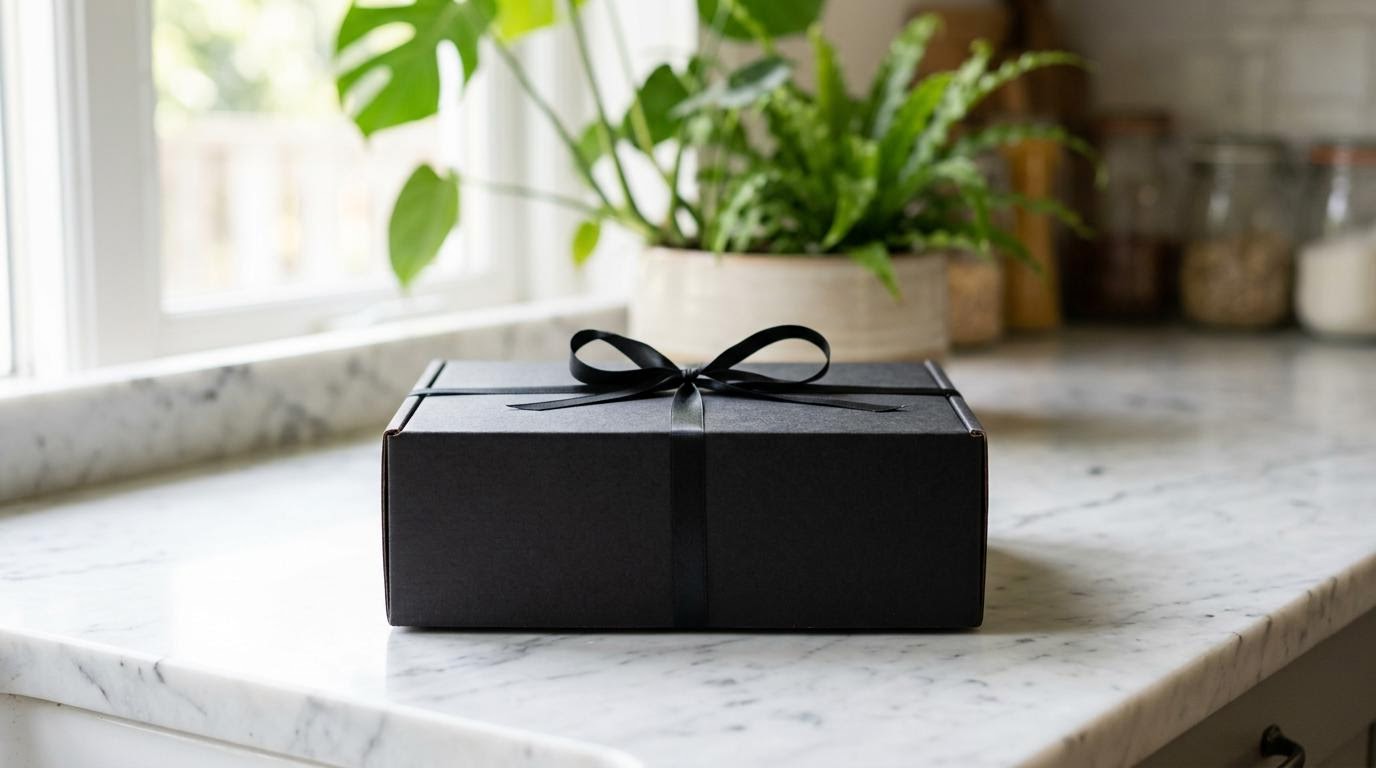
last_frame_image · final frame
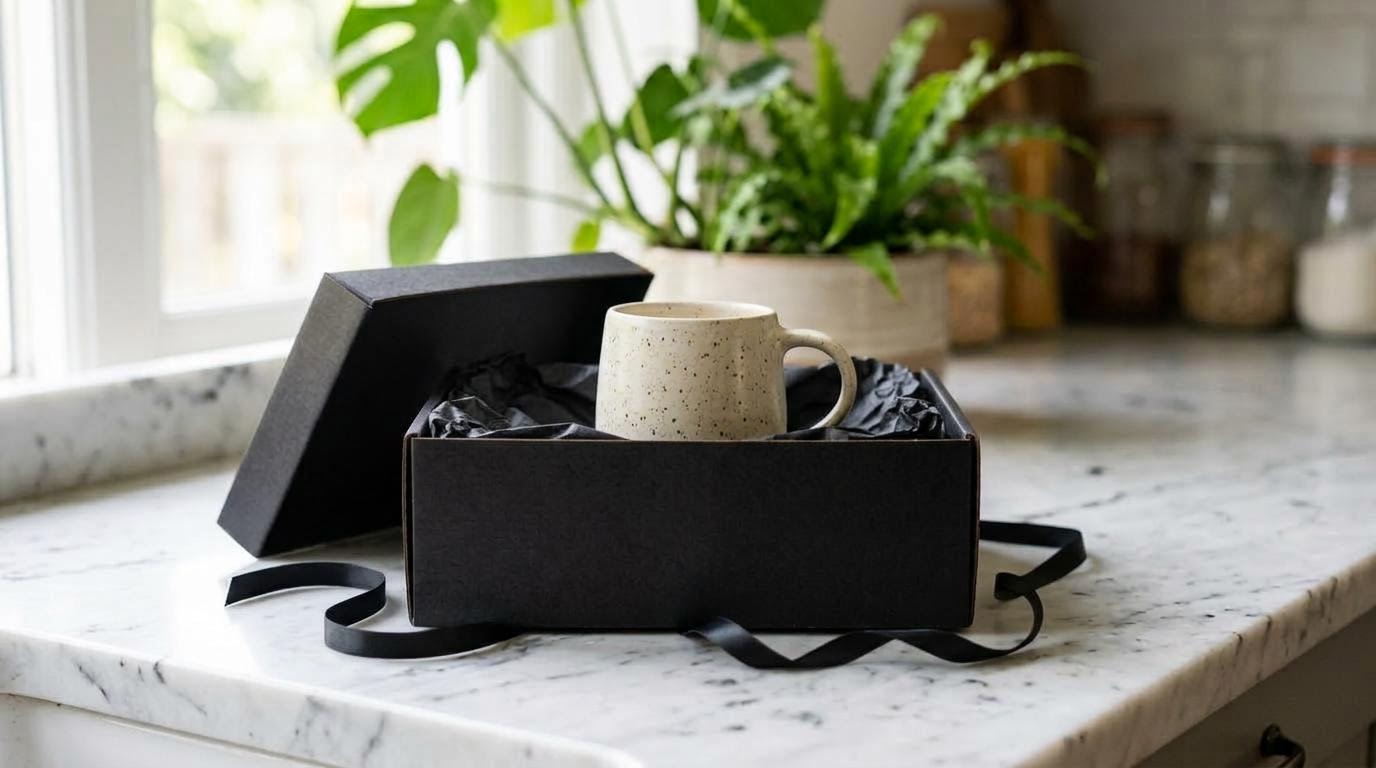
The two stills I supplied. The model has to fill in everything between them.
Parameters image: first frame | last_frame_image: final frame (left clip only) | resolution: 768p | mode: speed | duration: 8 | seed: 404
with last_frame_image
first frame only
Same prompt and seed. Left: locked to the final still. Right: free to end wherever it likes.
To put a number on it, I compared each clip's final frame with the still I supplied, as a mean pixel difference on a 0 to 255 scale. The two stills themselves are 54.0 apart. With the lock, the final frame landed 20.1 from the target. Without it, 76.8. The opening frames matched the first still at 4.5 in both cases. The locked clip also resolves well: the hands lift the mug into place and withdraw, and the shot settles onto the still with no visible jump in the last second. The unlocked version is a perfectly good unboxing, but the lid has vanished, the tissue is crumpled differently and the mug ends in a hand. For a product page, only the locked version is shippable.
Two things to know. You pay nothing extra for the images: both clips billed $0.28. And aspect_ratio is ignored when you send an image. I sent 9:16 with the locked clip, and it came back 1344x768 to match the 16:9 stills, exactly as documented.
The six-second clip
Parameters resolution: 480p | mode: cost | duration: 6 | aspect_ratio: 16:9 | prompt_upsampler: off | seed: 5
Asked for 6 seconds, received 6.58, billed 7 at $0.01/s.
A nice slow tracking shot, and the clearest illustration of the billing step: one extra second on a $0.06 job is noise, but at 10,000 clips a month it is a 17% overspend on that length.
What developers should know
1. The seed only works with the upsampler off
The docs say the model is "reproducible with an explicit seed". It is, but only if you set prompt_upsampler to off. The default, turbo, rewrites your prompt before generation, and that rewrite is not seeded, so the model receives a different prompt on every call. When I tested this on launch, two runs at the same seed under turbo were no more alike than two runs at different seeds. With off, they are byte-identical, and today's repeated cost-mode fire confirmed it again. Turning it off costs nothing and tends to be faster.
2. A seed does not carry across recipes or resolutions
The model page suggests drafting at 480p and delivering at 768p, and using speed for drafts and quality for finals. Be careful what you expect from that. The quality clip above, at the same seed as its speed sibling, is a different shot. A cheap draft validates your wording, not your composition. If you need the approved draft and the delivered final to match, keep the recipe and resolution fixed and change nothing but the prompt.
3. Request 5, 8, 10 or 12 seconds
Covered above. Other lengths return a little more video and bill the next whole second. A tiny saving per clip, a real one at scale.
4. Validate your payloads yourself
Bad values for known parameters fail fast and free: sending mode: "bogus" returned an HTTP 400 in under a second listing the valid options. But when I tested this at launch, a parameter the model does not have at all was silently accepted and billed, so a typo in a key name will run a full generation with the default instead. Keep your payload keys in a typed config.
5. Retry 502s
One of my 11 video fires failed after 35 seconds with an HTTP 502 saying the provider's prediction "succeeded without a delivery URL". My request history shows it billed $0.00, and an identical retry worked first time. A single retry on 502 is the right policy.
6. Normalise audio before you cut clips together
Audio comes back as AAC at 32 kHz stereo, at very different levels. Average loudness across my clips ranged from -32.3 dB on the paper boat to -19.8 dB on the street stall. Run a loudness normalisation pass before you sequence clips, or the cuts will jump.
7. The output plays everywhere
Every clip came back as H.264 at 24 fps: 1344x768 at 768p 16:9, 832x480 at 480p 16:9, 480x832 at 480p 9:16. No HEVC, so the files drop straight into a <video> tag. Latency on my successful video fires ranged from 20.2 to 38.4 seconds, well under the 30-day average of 56.7 seconds that the spec quotes. Set a client timeout of a few minutes anyway.
Calling it from Python
import requests

API_KEY = "YOUR_SEGMIND_API_KEY"
URL = "https://api.segmind.com/v1/p-video-2-pro"

payload = {
    "prompt": (
        "Close-up of a barista pulling an espresso shot into a clear glass cup, "
        "warm morning light. Slow push-in. Sound: the hum of the espresso machine, "
        "the drip of coffee, quiet cafe chatter."
    ),
    "resolution": "768p",       # or "480p"
    "mode": "cost",             # "speed" (default), "quality" or "cost"
    "duration": 8,              # 5, 8, 10 and 12 bill exactly what you ask for
    "aspect_ratio": "16:9",     # ignored when you send an image
    "prompt_upsampler": "off",  # required if you want the seed to reproduce
    "seed": 777,
}

resp = requests.post(URL, headers={"x-api-key": API_KEY}, json=payload, timeout=600)
resp.raise_for_status()

with open("clip.mp4", "wb") as f:
    f.write(resp.content)

# What you were actually charged, in USD
print("billed:", resp.headers.get("x-cost"))
For the first-and-last-frame lock, add two URLs and drop the aspect ratio:
payload = {
    "prompt": "Two hands lift the lid off the gift box to reveal a ceramic mug. "
              "Static camera. Sound: ribbon sliding, tissue paper crinkling. No music.",
    "image": "https://your-cdn.com/box-closed.jpg",           # first frame
    "last_frame_image": "https://your-cdn.com/box-open.jpg",  # where the shot must land
    "resolution": "768p",
    "mode": "speed",
    "duration": 8,
}
The full parameter reference and a playground are on the P Video 2 Pro model page.
Where it sits in the Pruna family
Pruna ships several P-Video models on Segmind, and picking the right one is mostly about inputs:
| Model | Best for | Resolution | Lowest published rate |
|---|---|---|---|
| P Video 2 Pro | Text, first frame or first-and-last-frame to video, generated audio | 480p, 768p | $0.01/s (480p cost) |
| P Video 2 | Driving a clip from your own audio track, 1080p, 48 fps | 720p, 1080p | $0.015/s (720p draft) |
| P Video Edit | Editing existing footage | Follows the source clip | $0.025/s (draft) |
| P Video Avatar | Talking-head avatars | 720p, 1080p | $0.03125/s (720p) |
If you need 1080p or want to supply your own soundtrack, P Video 2 is the better fit. If you want the base model with 2K output, MiniMax H3 is on Segmind too (I wrote up its prompt and parameter behaviour here), but its published 768P rate is $0.10/s, four times P Video 2 Pro's 768p cost recipe at $0.025/s.
Honest assessment
What it does well. Spoken dialogue lands verbatim with ambience underneath, in a single call. The last-frame lock is precise enough for product work. And the cost recipe at 480p puts a 10 second clip with generated sound at ten cents.
Where it falls short. 768p is the ceiling, so it is not a hero-shot model for large screens. The rounding on in-between durations is a quiet tax. And the recipe names promise more than they deliver: cost is the same shot as speed rather than the same output, and quality gave me a different and, on this prompt, less accurate take.
Best fit: social and short-form at volume, product reveals that must end on a fixed frame, previs and dialogue tests. Not a fit: 1080p or 4K delivery, or workflows that start from an existing audio track.
FAQ
What is Pruna P Video 2 Pro?
Pruna P Video 2 Pro is a text-to-video and image-to-video model built on MiniMax H3 and tuned by Pruna for speed. It returns 5 to 15 second clips at 480p or 768p with native audio.
How much does Pruna P Video 2 Pro cost?
From $0.01 per second (480p, cost mode) to $0.075 per second (768p, quality mode). A 5 second 768p clip costs $0.125, $0.175 or $0.375 depending on the recipe.
What is the difference between speed, cost and quality mode?
In my test, cost and speed produced the same shot with small detail differences, and cost was 29% cheaper. Quality produced a different take at roughly 2x the speed price.
Is the seed reproducible?
Only with prompt_upsampler set to off. Then the same payload returns a byte-identical file. With the default turbo upsampler, the seed has no visible effect.
Does P Video 2 Pro generate audio and dialogue?
Yes. Every clip has stereo audio generated in the same pass. A quoted line of dialogue in my test was transcribed back word for word.
Can I control the last frame of the video?
Yes. Pass a last_frame_image along with a first-frame image. In my test the final frame landed close to the supplied still; without it, the shot ended somewhere else.
Wrapping up
Pruna P Video 2 Pro gets you a clip with generated sound from a cent a second, and the first-and-last-frame lock makes it genuinely useful for product work. Turn the upsampler off when you need repeatability, request 5, 8, 10 or 12 seconds, and start on the cost recipe before you pay for anything else. You can try P Video 2 Pro on Segmind in the playground or call it from the API with no setup.