
Kling 4.0 API on Segmind: Text, Image, Reference and Edit, With Real Costs
Kling 4.0 API on Segmind, tested: 9 clips across text, image, reference and edit endpoints, with exact per-second rates, real bills and gotchas.

I spent $22.05 on the Kling 4.0 API this week so you can budget yours before you write a line of code. That bought nine clips across all four Kling 4.0 endpoints on Segmind: text to video, image to video, reference to video and video edit. Every clip below shows its exact prompt, its parameters and the dollar figure Segmind billed for it, read straight from the API response.
Kling 4.0 is Kuaishou's newest video model, and it is cheap for what it does: 1080p costs $0.2487 per second of output, with native stereo audio included and clips up to 30 seconds in a single pass. The headline rate is simple, but one of my nine bills missed it by 12%, and one parameter quietly changes what an edit does to your footage. Those are the things I wish someone had told me first, so they are in here too.
This post covers the four slugs and what each one is for, the price table against my real bills, the async API pattern I used for every fire, and the gotchas I hit along the way.
The four Kling 4.0 API endpoints on Segmind
Kling 4.0 is split into four task endpoints. Each one has its own parameter set, so pick the slug by what you are feeding in:
- kling-4-text-to-video: prompt only. 3 to 30 seconds, 720p or 1080p, aspect ratio 16:9, 9:16, 1:1 or 21:9.
- kling-4-image-to-video: a required
first_frame_imageand an optionallast_frame_image. There is noaspect_ratiofield: the output takes the shape of your keyframe. - kling-4-reference-to-video: up to 10
reference_imagesand up to 5reference_videos, which you name in the prompt as @Image1, @Video1 and so on. - kling-4-video-edit: a source
video(3 to 30 seconds, 700 to 4553 px per side) plus a prompt describing the change, with optional reference images.
There is also a unified kling-4 slug with its own model page. When I tested it on October 31 it returned 404 {"error": "Mappings not found"} for a valid request, the same as when I first tried it three days earlier. A 404 bills nothing, so it costs you only a minute, but build against the four task slugs above.
Every endpoint returns stereo AAC audio at 24 fps with no toggle to switch it off. The model writes dialogue, ambience and effects from what your prompt describes.
Kling 4.0 API pricing: the table and my real bills
All four endpoints bill per second of output video. Here are the published rates from the model pages:
| Endpoint | 720p per second | 1080p per second | On top of that |
|---|---|---|---|
| kling-4-text-to-video | $0.1661 | $0.2487 | nothing |
| kling-4-image-to-video | $0.1661 | $0.2487 | nothing |
| kling-4-reference-to-video | $0.1661 | $0.2487 | listed at $0.2656 / $0.3979 per second when reference videos are attached |
| kling-4-video-edit | $0.1989 | $0.2984 | $0.0995 / $0.1492 per source second beyond the output duration |
1080p is exactly 1.5x the 720p rate on every endpoint. Video edit costs 20% more per second than generation.
And here is what each of my nine fires was billed, read from the cost field in the API's own status response and cross-checked against my account's request history:
| Clip | Endpoint | Settings | Table price | Billed | Difference |
|---|---|---|---|---|---|
| Headphone ad | text-to-video | 10s, 1080p, 16:9 | $2.4868 | $2.4868 | exact |
| Selfie UGC | text-to-video | 8s, 720p, 9:16 | $1.3291 | $1.3333 | +0.3% |
| Harbour long take | text-to-video | 30s, 1080p, 21:9 | $7.4603 | $7.4603 | exact |
| Kettle pour | image-to-video | 5s, 1080p, first frame | $1.2434 | $1.2487 | +0.4% |
| Train platform | image-to-video | 10s, 720p, first + last frame | $1.6614 | $1.6614 | exact |
| Cyclist ad | reference-to-video | 10s, 1080p, 2 images | $2.4868 | $2.4868 | exact |
| Bottle, copied camera move | reference-to-video | 5s, 720p, 1 image + 1 video | $1.3280 | $1.4921 | +12.4% |
| Snow restyle | video-edit | 5s, 720p, from a 10s source | $1.4921 | $1.4921 | exact |
| Iced coffee swap | video-edit | 8s, 1080p, from an 8s source | $2.3873 | $2.3915 | +0.2% |
| Total | $22.05 |
Five of nine landed exactly on the table and three more came in less than half a percent above it. The exception is the reference-to-video call with a reference video attached: it billed $0.2984 per second, which is the video-edit rate plus the input-video rate, not the $0.2656 the pricing table lists. If you plan to run reference videos at volume, budget 12% over the published number until that changes.
For context, Seedance 2.5's published text-to-video rate on Segmind is $0.2389 per second at 720p and $0.5876 at 1080p (16:9). A 10-second 1080p clip is $2.49 on Kling 4.0 against $5.88 on Seedance 2.5, so Kling costs 58% less at 1080p.
Calling the Kling 4.0 API: use the async v2 pattern
Every endpoint works synchronously at https://api.segmind.com/v1/{slug}: you POST, hold the connection open and get the MP4 bytes back. That is fine for a quick test, but my renders took between 119 and 622 seconds of inference, and a 10-minute HTTP connection is fragile. I ran all nine fires through the async v2 API instead:
import time, requests

KEY = "YOUR_API_KEY"
H = {"x-api-key": KEY}

job = requests.post(
    "https://api.segmind.com/v2/kling-4-text-to-video",
    headers=H,
    json={
        "prompt": "A barista pours latte art, the camera slowly pushes in, espresso machine hiss.",
        "duration": 5,
        "resolution": "720p",
        "aspect_ratio": "16:9",
    },
).json()
rid = job["request_id"]          # returned immediately, status "QUEUED"

while True:
    st = requests.get(f"https://api.segmind.com/v2/requests/{rid}/status", headers=H).json()
    if st["status"] in ("COMPLETED", "FAILED"):
        break
    time.sleep(10)

print(st["status"], st.get("metrics", {}).get("cost"))   # the billed dollar amount
result = requests.get(f"https://api.segmind.com/v2/requests/{rid}", headers=H).json()
video_url = result["output"]     # a hosted MP4 URL
Two details that matter in production. First, the completed status carries metrics.cost and metrics.remaining_credits, so you can log the real spend per job without a separate billing call. Second, v2 does not validate your payload at submit time. I posted a request with no prompt at all and got a 200 with a request_id; the error ("'prompt' is required") only appeared when I polled, as an HTTP 422 with status FAILED. The same body on v1 fails instantly with a 400. Failed requests billed $0.00 either way, but your error handling has to live in the poll loop, not around the POST.
Text to video: three jobs, three price points
The text endpoint is where most people will start. I gave it three different jobs: a polished product ad, a vertical UGC clip with dialogue and a 30-second long take at the maximum settings.
A 1080p product ad with a voiceover
Parameters duration: 10 | resolution: 1080p | aspect_ratio: 16:9 | billed: $2.4868 | render: 285s
Kling 4.0 text to video: 10 seconds at 1080p, 16:9, billed $2.4868. The voiceover line came back word for word.
The camera work is the strong part: a macro glide along the ear cup, a pull back, an orbit to the woman, all in one continuous move with no cut. The audio follows the brief closely too. The traffic noise drops away as the headphones go on, and a transcription of the soundtrack returned the voiceover exactly as written: "Ten hours of quiet. Wherever you go." For an agency producing ad variants, that is a finished rough cut for $2.49.
The weakness is the product. While the headphones sit on the slate they look right, but once she picks them up the band and one ear cup merge into something closer to a single ring. For a real product launch, use the image-to-video or reference endpoints and feed it your actual packshot.
A vertical UGC clip with dialogue
Parameters duration: 8 | resolution: 720p | aspect_ratio: 9:16 | billed: $1.3333 | render: 145s
Kling 4.0 text to video: 8 seconds at 720p, 9:16, billed $1.3333.
This is the clip I would show anyone asking whether AI UGC is usable yet. The handheld shake reads as a real phone, the laugh lands on the beat after the line, and the dialogue came back verbatim. At 720p it cost $1.33, and 720p is the right call for vertical social: the 720x1280 output is what the feed plays anyway, at two thirds of the 1080p price.
A 30-second long take at maximum settings
Parameters duration: 30 | resolution: 1080p | aspect_ratio: 21:9 | billed: $7.4603 | render: 622s
Kling 4.0 text to video: 30 seconds at 1080p, 21:9 (2200x940), billed $7.4603, the most expensive single call in this post.
Thirty seconds is the ceiling, and Kling held one unbroken take for the whole length: walk the pier, untie the boat, step in, row out, then the camera rises to reveal the fjord and the mountains as the light warms. A scene-change detector found no cuts anywhere in the clip. For a film studio doing previs or a production house that needs establishing shots, $7.46 for 30 seconds of 21:9 footage is the number to plan around. It was also the slowest render at 622 seconds, so this one belongs in a background queue.
Note the shape: 21:9 at "1080p" came back as 2200x940, not 2520x1080. The resolution name sets the pixel budget, not the short edge.
Image to video: start from your own frame
The image endpoint is how you keep a real product or a designed shot intact. It takes a first frame and, optionally, a last frame. The output follows the keyframe's shape: my 2752x1536 stills came back as 1924x1076 at 1080p and 1280x716 at 720p.
One frame: a product pour
First frame
first_frame_image
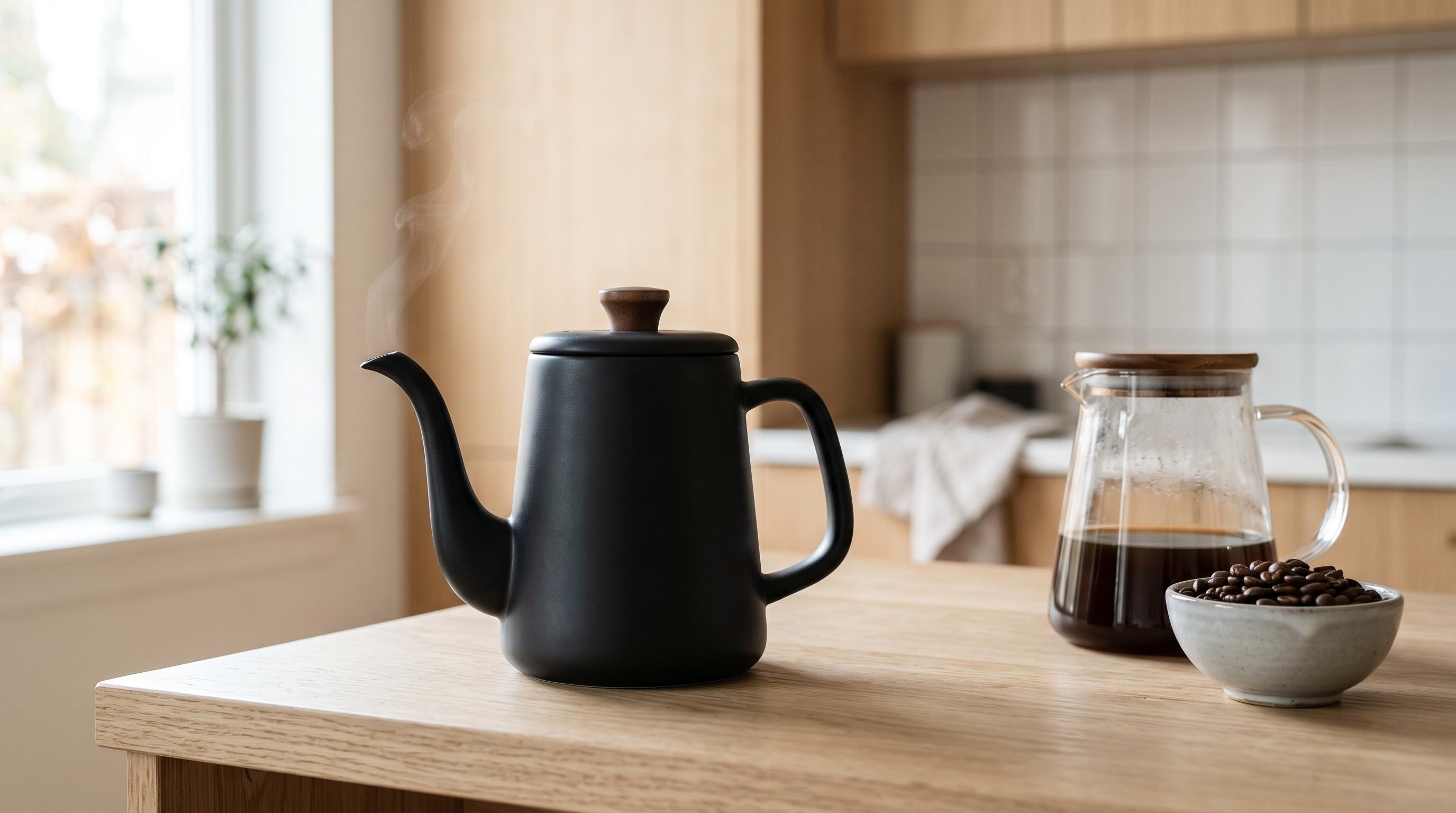
The starting still, generated with Nano Banana 2 for $0.126.
Parameters first_frame_image: URL | duration: 5 | resolution: 1080p | billed: $1.2487 | render: 468s
Kling 4.0 image to video: 5 seconds at 1080p from one frame, billed $1.2487.
The kettle keeps its exact shape, finish and walnut knob through the lift, the pour and the set-down, which is precisely what the text-only ad could not do with the headphones. The steam, the light and the background stay where the still put them. The odd part is the very end, where a second hand drifts into frame after the kettle is back on the counter. For e-commerce teams, that is the trade: perfect product fidelity, but you still review every take.
First and last frame: a planned shot
First frame
first_frame_image
Last frame
last_frame_image
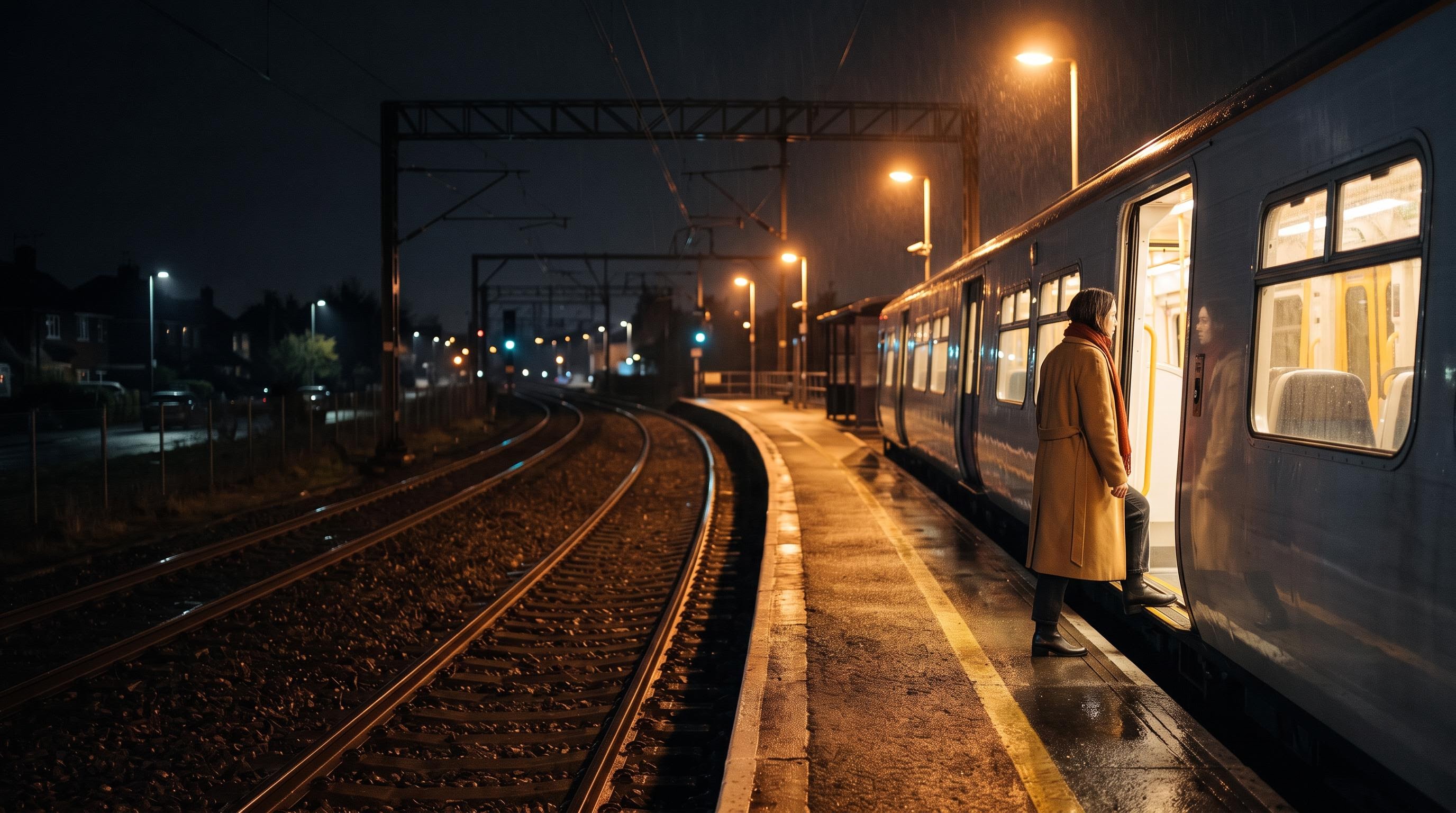
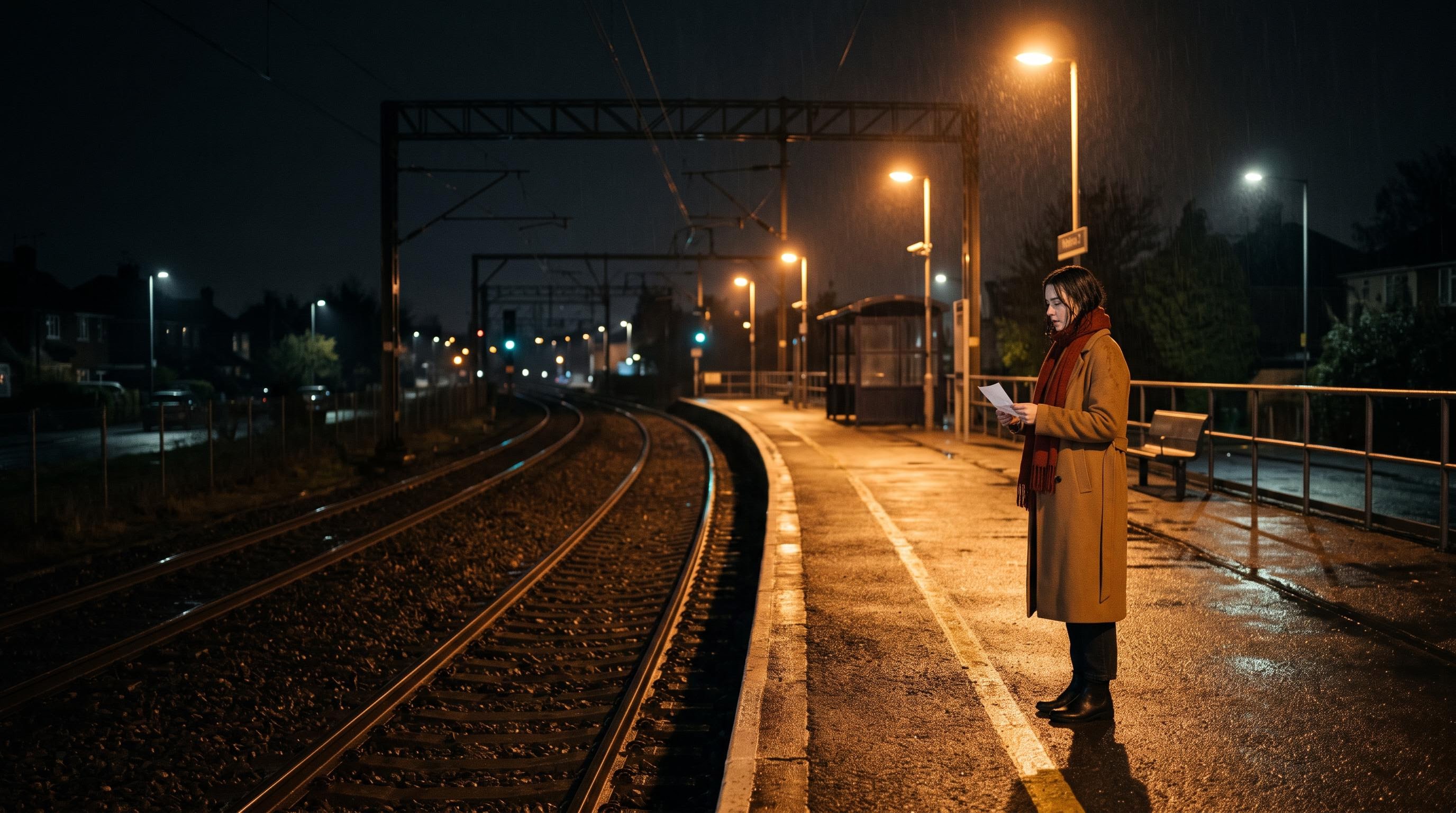
Two keyframes. The second was made by passing the first to Nano Banana 2 as a reference, so the camera position matches.
Parameters first_frame_image: URL | last_frame_image: URL | duration: 10 | resolution: 720p | billed: $1.6614 | render: 240s
Kling 4.0 image to video with first and last frame: 10 seconds at 720p, billed $1.6614.
Kling joined the two frames without a cut and ended on a match for the target frame. But look at the timing: the train is in the station by about 1.5 seconds, and the rest of the clip is her moving around near the doors before she boards. Ten seconds was more than the action needed. In an earlier test with too little time it did the opposite and jumped the subject toward the end frame. Size duration to the action: around 5 to 6 seconds would have fit this shot better and cost $0.83 less.
Reference to video: keep a person and a product consistent
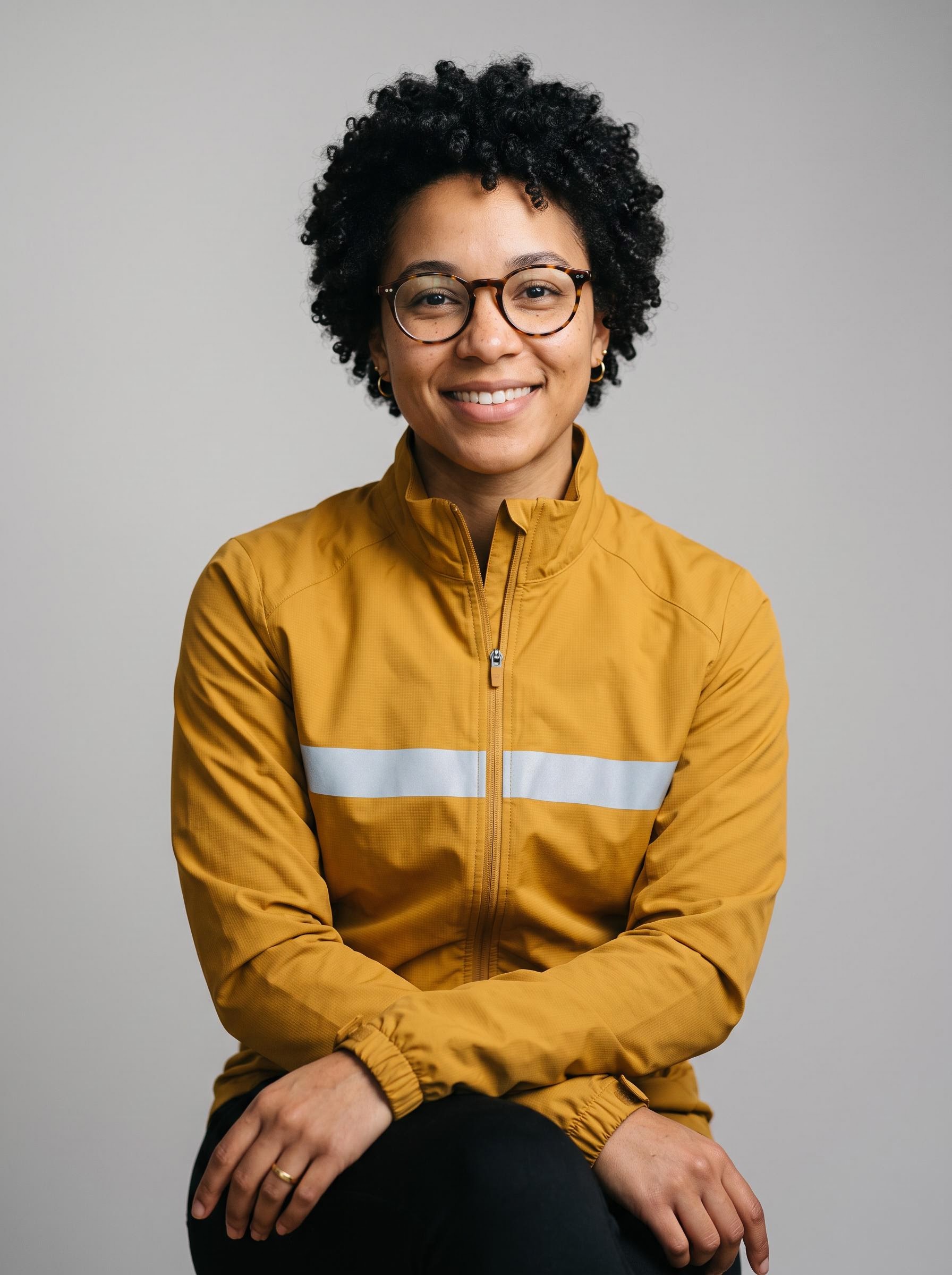
The reference endpoint is the one for brand work. You hand it up to 10 images (characters, products, places) and refer to them by tag in the prompt.
Two images: a cyclist and a bottle
Reference image 1
@Image1: the cyclist
Reference image 2
@Image2: the product
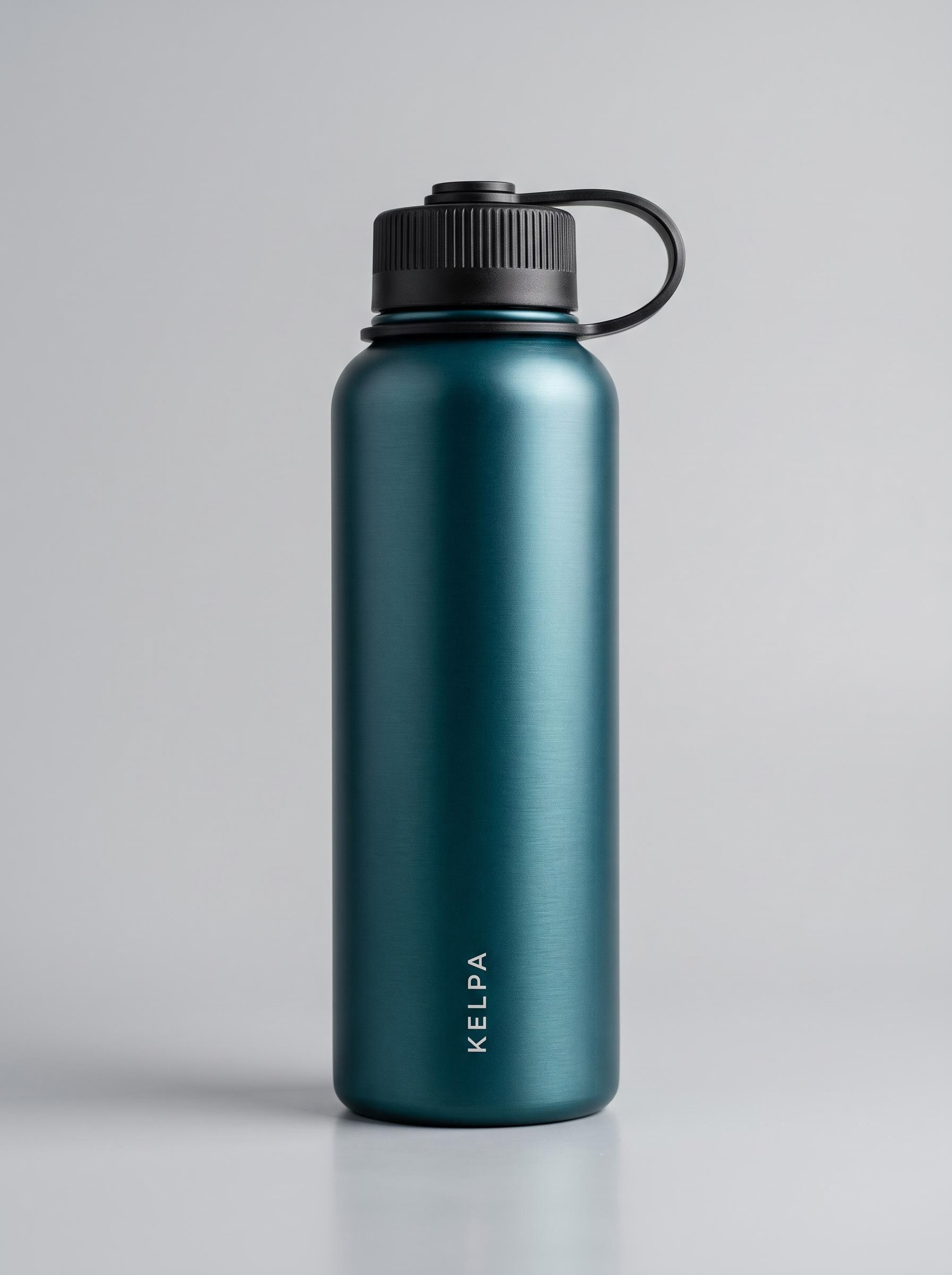
Both references generated with Nano Banana 2. KELPA is an invented brand.
Parameters reference_images: 2 URLs | duration: 10 | resolution: 1080p | aspect_ratio: 16:9 | billed: $2.4868 | render: 231s
Kling 4.0 reference to video: 10 seconds at 1080p from two images, billed $2.4868.
Identity holds well. Her face, curly hair, tortoiseshell glasses and the single silver stripe on the mustard jacket all carry through, and the bottle stays deep teal with a black cap. Two things did not follow the brief. I asked for the camera to track alongside her and then settle into a close-up; Kling cut hard at 4.0 seconds instead, the only cut in all nine clips. And the KELPA wordmark is clean while the bottle stands upright, but once she tilts it to drink, the letters smear into mirrored nonsense. If the label is the point of the shot, keep the product upright and facing the camera.
A reference video: copying a camera move
Reference image 1
@Image1: the product
@Video1 was the headphone ad above (10 seconds, 1080p), passed as reference_videos.
Parameters reference_images: 1 URL | reference_videos: 1 URL | duration: 5 | resolution: 720p | aspect_ratio: 16:9 | billed: $1.4921 | render: 119s
Kling 4.0 reference to video with a reference video: 5 seconds at 720p, billed $1.4921.
The move transferred: a slow, low glide that eases back and orbits the product, very close to the opening of the headphone ad, applied to a completely different scene. The wordmark stayed readable the whole way because the bottle never tilts. This is a useful pattern for a production house that wants one signature camera move across a whole campaign.
This is also the clip that billed 12.4% over the table. Five seconds at 720p should be $1.3280 at the listed $0.2656 per second; it billed $1.4921, which is $0.2984 per second.
Video edit: restyle footage you already have
The edit endpoint takes a clip and a prompt describing the change. It is billed at a higher rate than generation, plus a charge for any source seconds beyond your output duration. I tested it twice, and the two results taught me the most important rule for this endpoint.
Same duration: swap one object
Parameters video: URL | duration: 8 | resolution: 1080p | aspect_ratio: adaptive | billed: $2.3915 | render: 221s
Source (720p)
Edited (1080p)
Kling 4.0 video edit: the 8-second selfie clip with the mug swapped for iced coffee, output at 1080p, billed $2.3915.
This is a clean edit. The mug became a glass of iced coffee with a straw, and everything else stayed put: his face, the hoodie, the kitchen, the handheld wobble, and his line, which transcribed word for word from the edited file just as it did from the source. It also upscaled a 720p source to 1080x1920 without being asked. For an MCN reworking one hero clip into sponsor variants, this is the most valuable endpoint in the family.
Shorter duration: the 2x trap
Parameters video: URL | duration: 5 | resolution: 720p | aspect_ratio: adaptive | billed: $1.4921 | render: 125s | source: the 10s headphone ad
Kling 4.0 video edit: a 10-second source edited to a 5-second output at 720p, billed $1.4921.
I set duration to 5 expecting the first five seconds of the 10-second ad, restyled. Instead, Kling compressed the whole 10-second performance into 5 seconds. I compared frames: the edit at second 1 matches the source at second 2, and at 4 it matches the source at 8. So the motion plays at double speed. The voiceover did not survive either: the edited track is ambience only, about 15 dB quieter than the source. You still pay for the five source seconds beyond the output ($0.4974 here). The restyle itself is lovely (snow, blue dusk, a lamp, the green sweater), and it also swapped the city skyline for a snowy forest that I never asked for.
The rule: if you want part of a clip, trim the source before you upload it, and set duration to match. That is cheaper, and it keeps the timing and the audio.
How I would budget Kling 4.0 API usage
- Draft at 720p. It is a third cheaper and renders faster. Move to 1080p for the take you will actually ship.
- Size duration to the action. Five seconds per beat is plenty. My keyframe clip had the train in by 1.5 seconds and padded the rest.
- Use the cost field. v2's
metrics.costgives you the real bill per job. Log it, because four of my nine bills were not exactly duration times rate. - Trim edit sources first. Source seconds beyond the output both bill and speed up your footage.
- Add 12% to reference-video jobs until the billed rate matches the published one.
As a worked example: a social team making 20 vertical 8-second UGC variants a week at 720p spends about $26.67 a week on generation. Rendering the four best at 1080p as edits of those drafts adds about $9.57.
Honest assessment
What Kling 4.0 does very well: camera moves and continuity. One 30-second take with no cut, a three-part move in the headphone ad, a camera move copied from one clip into another. Dialogue is the other standout: three spoken lines across three clips, all transcribed back word for word, including after an edit.
Where it falls short: product geometry and text in motion. Invented products warp when handled, and a wordmark melts once the object rotates. It also takes liberties with timing: a hard cut where I asked for a continuous move, idle seconds in a keyframe clip, and an edit that changed playback speed instead of trimming. And the published price for reference videos does not match what it bills today.
Best fit: UGC and dialogue clips, previs and establishing shots, and restyling existing footage at matched length. Not a fit, on its own: any shot where a real product's label must stay legible while it moves. Use a first frame of the real packshot for those.
FAQ
How much does the Kling 4.0 API cost?
On Segmind, text, image and reference generation cost $0.1661 per second at 720p and $0.2487 at 1080p. Video edit is $0.1989 and $0.2984. A 10-second 1080p clip billed me $2.49.
Which Kling 4.0 API slug should I use?
Use the task slugs: kling-4-text-to-video, kling-4-image-to-video, kling-4-reference-to-video or kling-4-video-edit. The unified kling-4 slug returned "Mappings not found" in my tests.
Does the Kling 4.0 API generate audio?
Yes. Every clip comes with stereo AAC audio, with no option to turn it off. Quoted dialogue in the prompt came back word for word in all three of my dialogue tests.
How long does a Kling 4.0 generation take?
My nine renders took 119 to 622 seconds of inference. The 30-second 1080p clip was the slowest. Use the async v2 API and poll the status endpoint rather than holding a request open.
Can the Kling 4.0 API keep a character or product consistent?
Yes, with reference-to-video. Pass up to 10 images and tag them @Image1, @Image2 in the prompt. Faces and clothing held well; small printed text held only while the product stayed upright.
What happens if a video edit is shorter than the source?
Kling compresses the whole source into the output length, so motion speeds up, and in my test the voiceover was dropped. Extra source seconds still bill. Trim the source first.
Wrapping up
Kling 4.0 gives you four clean endpoints for four jobs: text for fast ideas and UGC, image for exact products and planned shots, reference for consistent characters and camera moves, and edit for reworking footage you already own. At $0.2487 per second for 1080p with audio, it is one of the cheapest ways to get 30-second single-take video through an API, as long as you size durations to the action and trim edit sources first.
Try it on Segmind: Kling 4.0 Text to Video, Image to Video, Reference to Video and Video Edit. Available via API with no setup required.