
How to Write AI Image Generation Prompts: 4 Levers Tested on GPT Image, Nano Banana and Seedream
How to write AI image generation prompts, tested one clause at a time on GPT Image 2, Nano Banana 2 and Seedream 5.0 Pro. 13 real generations.

Every prompt guide I have read opens with a 200-word "perfect prompt" and never shows you what happens if you delete half of it. That is the part I actually care about. Which words did the work? Which ones were decoration?
So I ran the experiment. I started with the worst possible prompt, "a coffee shop", and added exactly one idea at a time, holding the seed fixed so the only thing changing was my wording. Then I took the finished prompt and fired it at three different models to see how much of my careful phrasing survived the trip.
What follows is four levers that measurably changed the image, one section each, with the actual generations inline. Every image on this page came out of the Segmind API this morning. Nothing is cherry-picked from a batch: each prompt was fired once, and the first result is what you see.
The method: change one thing, hold the seed
If you change your prompt and the image changes, you have learned nothing. Diffusion models are stochastic, so two identical prompts give you two different pictures. The only way to attribute a change to your words is to pin the random seed and vary one clause.
That turns out to be harder than it sounds, because a seed is not a given. Of the three models here, only one exposes it:
| Model | Seed parameter | What that means for testing |
|---|---|---|
| Nano Banana 2 | Yes, seed, 0 to 999999999999999 | You can A/B a single clause |
| GPT Image 2 | None | Every run is a fresh sample |
| Seedream 5.0 Pro | None | Every run is a fresh sample |
So the ladder below runs on Nano Banana 2 at seed 42, and the cross-model comparison later is explicitly a comparison of one sample each, not a controlled test. I will flag which is which as I go.
One thing to get out of the way early: pinning the seed does not pin the picture. Seed 42 with "a coffee shop" and seed 42 with a three-sentence description are not variations on a theme, they are unrelated images. The seed only fixes the noise you start from. The prompt decides almost everything else. Between rung two and rung four of my ladder the barista changed from a bearded man to a woman, on the same seed, because I never specified a person and the model was free to re-cast the role every time. If a detail matters, the seed will not protect it. Write it down.
Lever 1: name the subject, not the place
Here is rung zero. The entire prompt is a coffee shop.
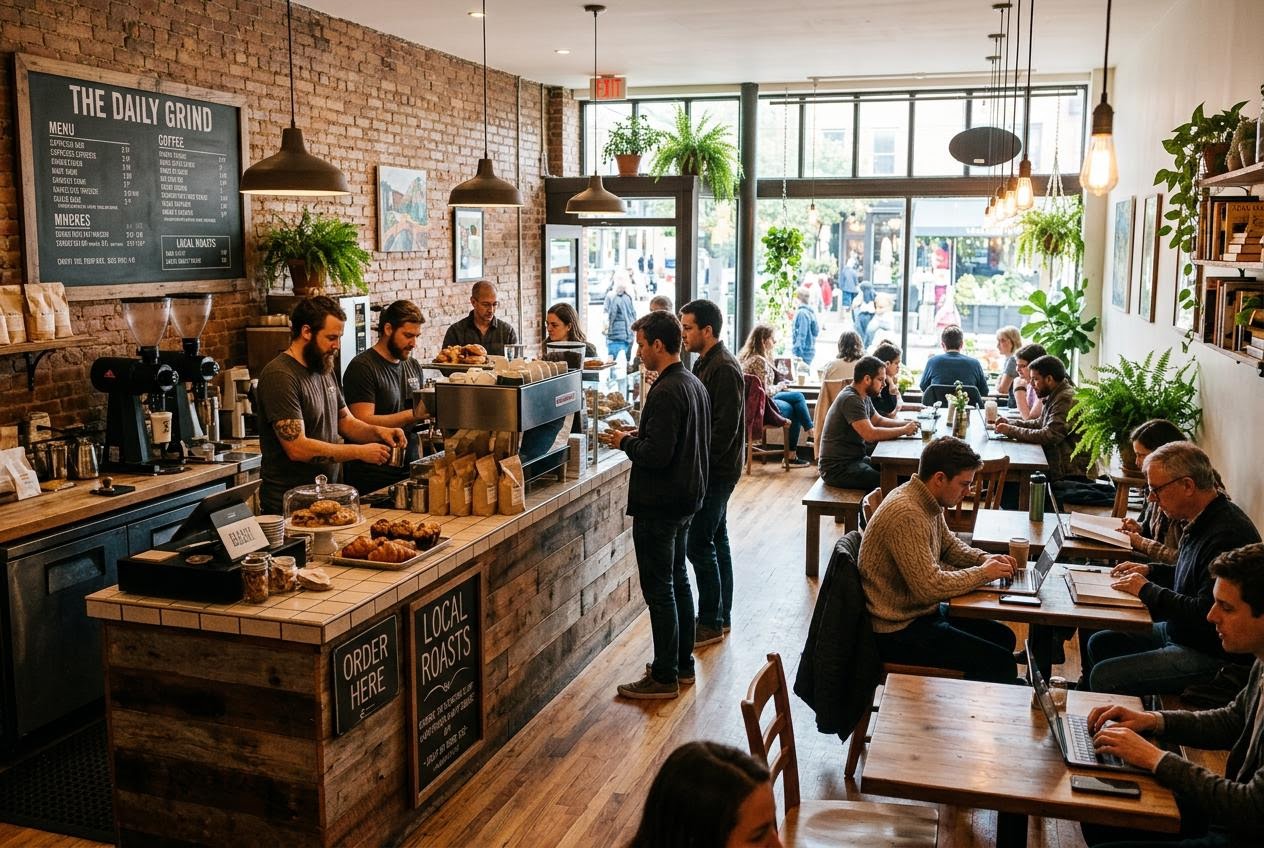
It is a competent image and a useless one. The model had no subject, so it defaulted to the statistical centre of every coffee shop photo ever scraped: a wide establishing shot, exposed brick, hanging pendants, pot plants, fourteen people, four laptops. Nobody is the subject because everybody is. Note also the chalkboard reading "THE DAILY GRIND", a brand I did not ask for. Hold that thought, it comes back in lever four.
Now I name a subject and the things around it. Same seed, same model:
A specialty coffee roastery at opening time, seen from the customer side of the counter. A barista in a charcoal apron tamps a portafilter into a chrome espresso machine. Behind the counter, a wall of kraft-paper bean bags on raw pine shelves and a slate menu board.
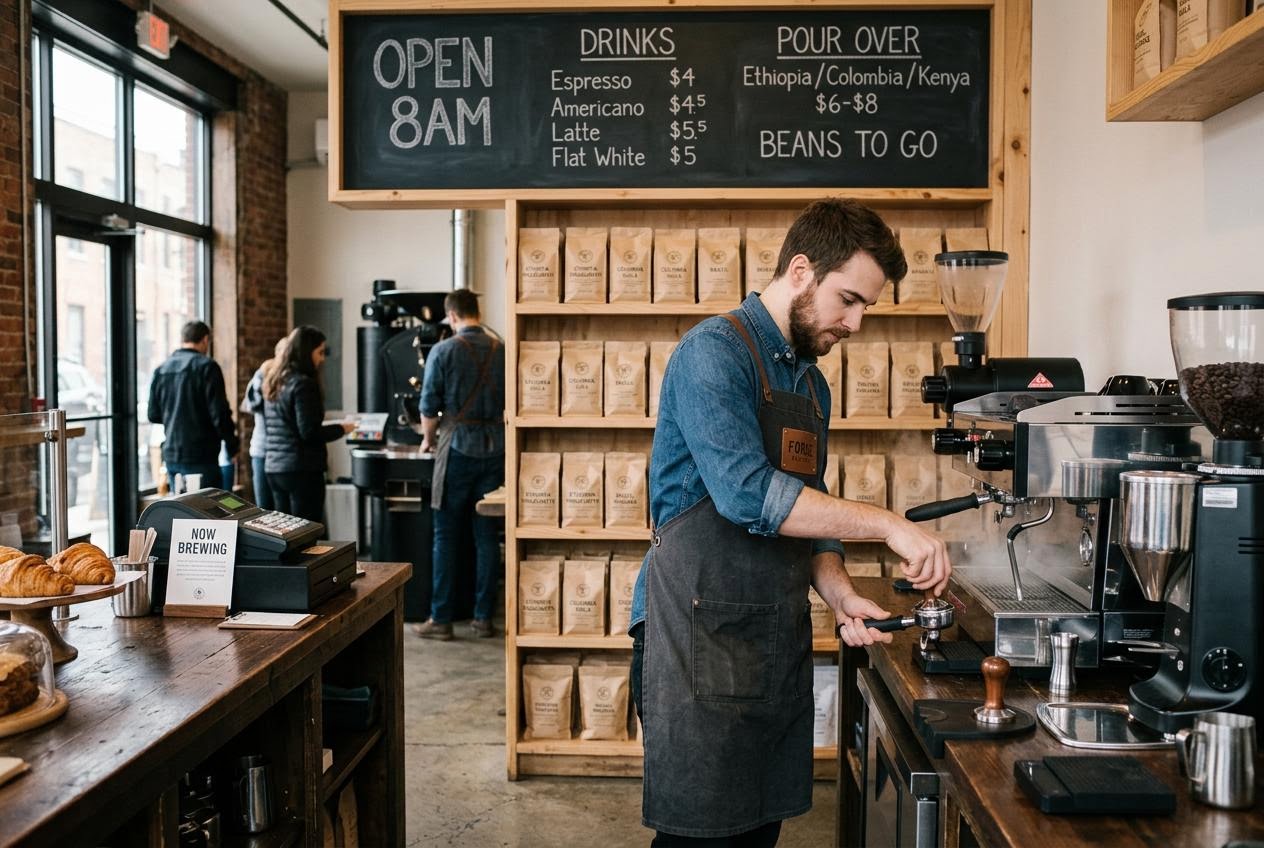
The crowd is gone, the camera has walked twenty feet forward, and there is now a person doing a specific thing with their hands. Every noun I supplied is present and correct: the kraft-paper bags, the pine shelving, the slate board, the chrome group head. The ones I did not supply got invented, which is the deal you are always making.
The useful rule here is that "a coffee shop" is a category and categories average out. "A barista tamping a portafilter" is an event, and events have a camera position implied by them. Naming the action is what moved the lens.
Lever 2: direct the light
Rung two adds nothing to the scene. It only says where the light comes from and what the grade should do:
Low morning sun rakes in from a tall east-facing window on the left, throwing long shadows across the counter and catching the steam off the group head. Warm neutral grade, deep unlifted shadows, no overhead fluorescent light.
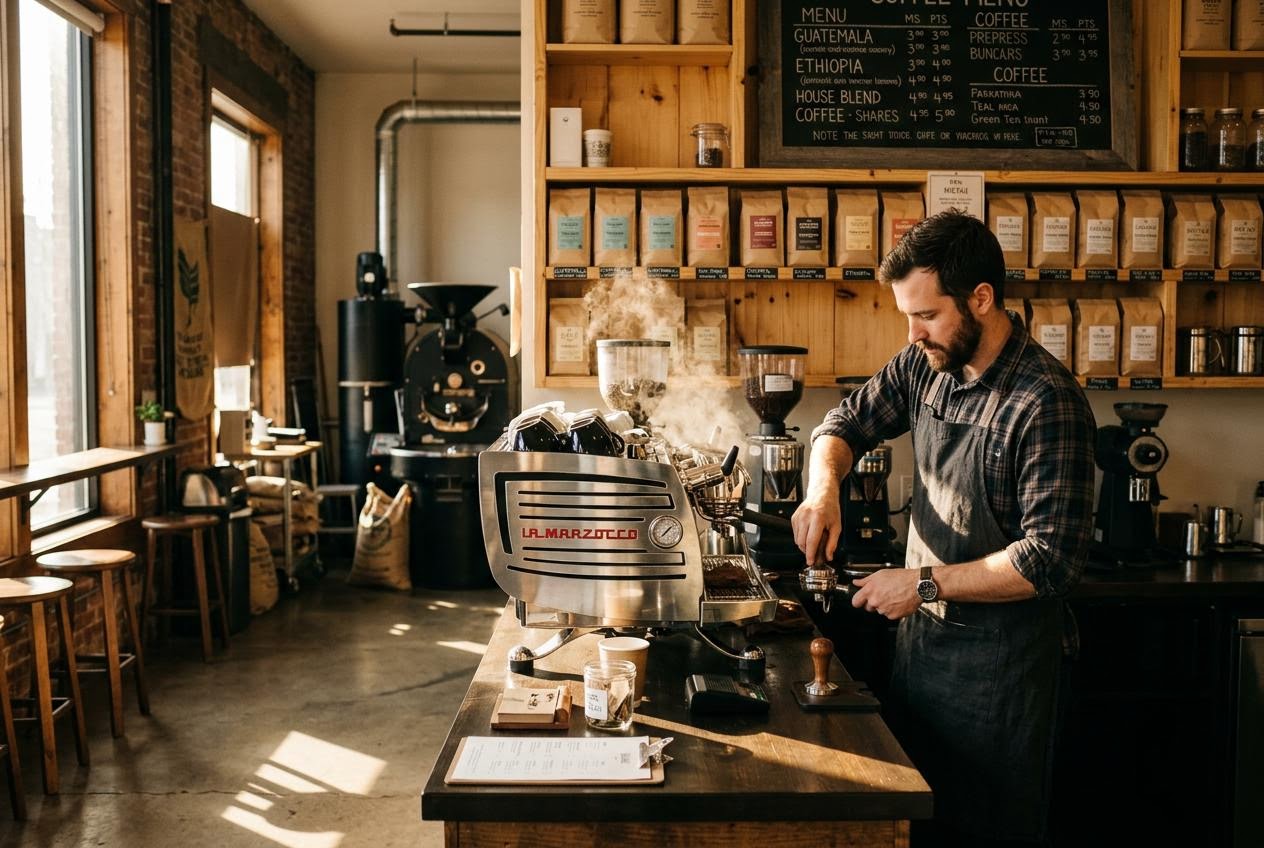
This is the single biggest jump in the whole ladder, and it cost me one sentence. The flat, evenly-lit room from rung one is now a real interior with a light source in it: hard shafts across the floor, the espresso machine catching a highlight, the steam visible because it has something to be backlit by. The grade went warm and the shadows stayed closed instead of being lifted into grey.
Three phrasings did the work, and they are worth stealing verbatim. Naming the direction and height ("low, from a tall window on the left") gives the renderer a vector. Naming the consequence ("throwing long shadows across the counter") is a check on that vector, because a model that gets the direction wrong usually gets the shadows wrong in a visible way. Naming what you do not want ("no overhead fluorescent light") kills the default, which for interiors is nearly always a flat, sourceless ambient fill.
One thing did get worse. In rung one the slate menu board was legible and sensibly priced. Here it degraded into "PREPRESS", "BUNCARS" and "Teal aca". Adding atmosphere pushed the model's budget away from small background type. That tradeoff shows up again below.
Lever 3: specify the camera
Rung three adds a lens, a height and a focus intention:
Shot on a 35mm lens at f/2.0 from standing eye height, the barista's hands sharp and the back shelves falling into soft bokeh, fine 35mm film grain.
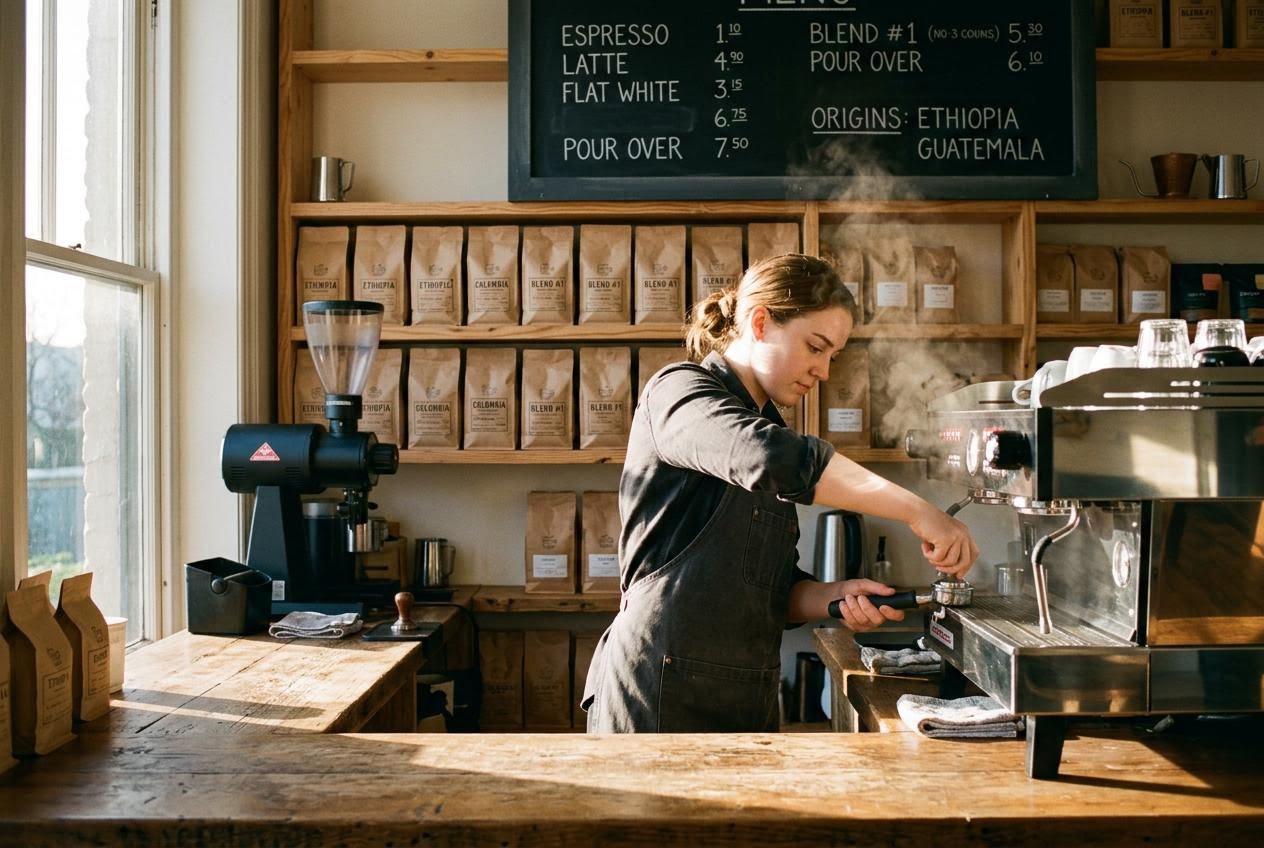
This is the smallest of the four jumps, and it is worth being honest about why. "f/2.0" is not being simulated. What the model does with a camera clause is match the look of photographs whose captions contained those words, which mostly means framing and depth, not optics. The real changes are that the camera moved closer and settled to eye height, the background shelves lost definition, and there is visible grain.
Also: the barista is now a woman. She was a bearded man in rungs one and two, at the identical seed. I never specified a person, so the model recast the role when I changed the framing. This is the clearest evidence in the whole run that a seed buys you far less stability than people assume, and that anything you care about has to be in the words.
Lever 4: close the set
This is the lever nobody teaches and the one that will actually get you in trouble. Ask for a product shot without saying what is written on the product:
A skincare serum bottle standing on a pale marble slab, soft studio lighting, minimal beauty product photography, shallow depth of field.
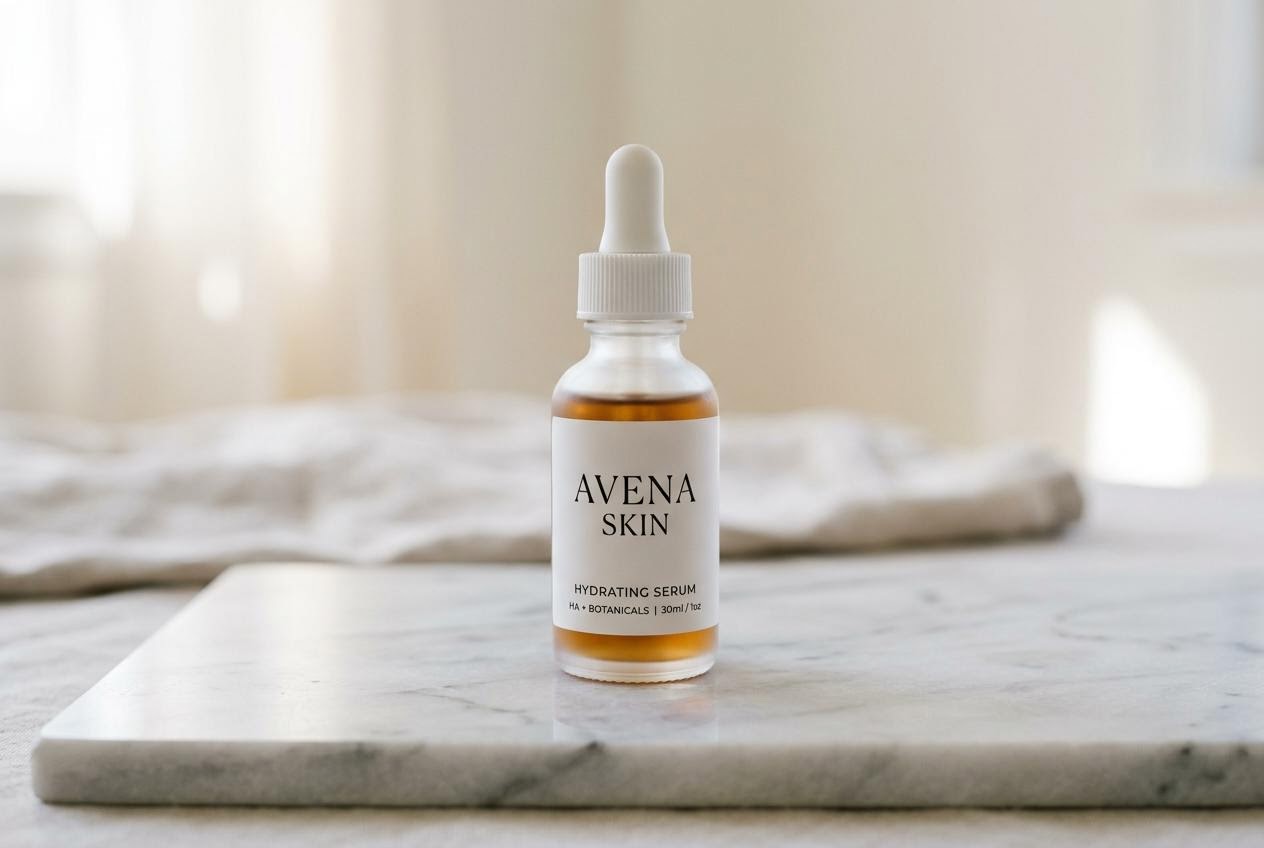
I asked for a bottle. I got a brand. The label reads "AVENA SKIN", then "HYDRATING SERUM", then "HA + BOTANICALS | 30ml / 1oz". That is a company name, a product line, an ingredient claim and a fill volume, none of which I requested and none of which I can stand behind. If you are generating product photography for a real client, this is the failure mode that matters: the model does not leave surfaces blank, it fills them, and what it fills them with is a plausible average of real brands.
The fix is to close the set. State exactly what text exists, then explicitly forbid the rest:
The bottle's label carries exactly two lines of text: the first line reads "FIELD NOTES" and the second line reads "Niacinamide 10%", set in a thin uppercase sans-serif. No other text, no logos, no brand marks and no printed claims anywhere in the frame, including on the slab and in the background.
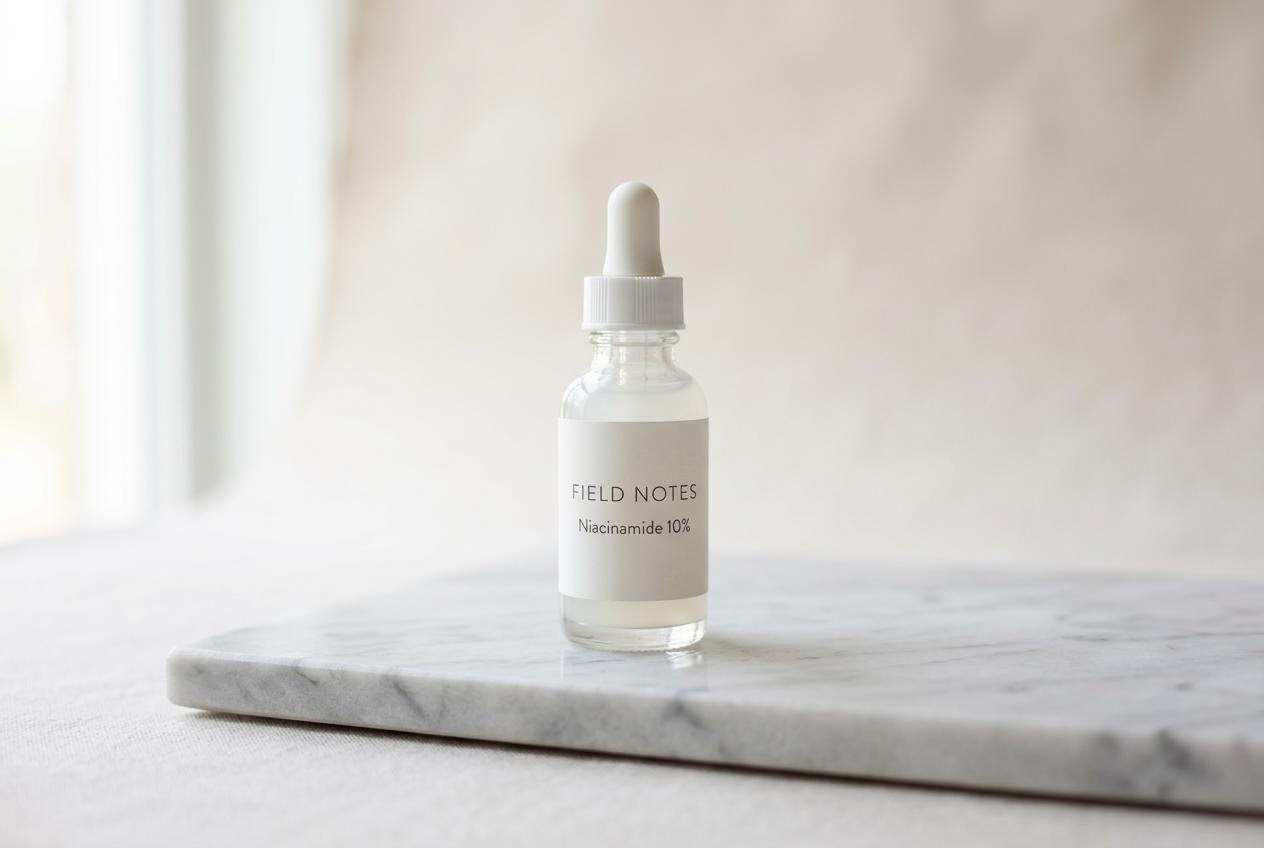
Two lines, both mine, nothing else in the frame. The pattern that works is a positive enumeration ("exactly two lines... the first reads... the second reads") followed by a negative sweep that names the surfaces you are worried about. "No other text" alone is weaker than "no other text anywhere in the frame, including on the slab and in the background", because the model needs the specific places listed.
One small tell in that result: I asked for both lines in uppercase, and got "Niacinamide 10%" in mixed case, exactly as I typed it inside the quotes. When a quoted string and a style adjective disagree, the quoted string wins. Type the text the way you want it set.
The same prompt is not portable
Here is where the ladder stops being tidy. I took the finished rung-three prompt, unchanged, and sent it to GPT Image 2 and Seedream 5.0 Pro. Neither exposes a seed, so this is one sample each and not a controlled test. It is still the most useful comparison in this post, because the three results are not variations. They are different readings.
Nano Banana 2
Eye-level medium shot, the barista's face visible and in frame, the whole back wall packed with type: menu board, bean bag labels, price list. It followed my light direction closely.
GPT Image 2
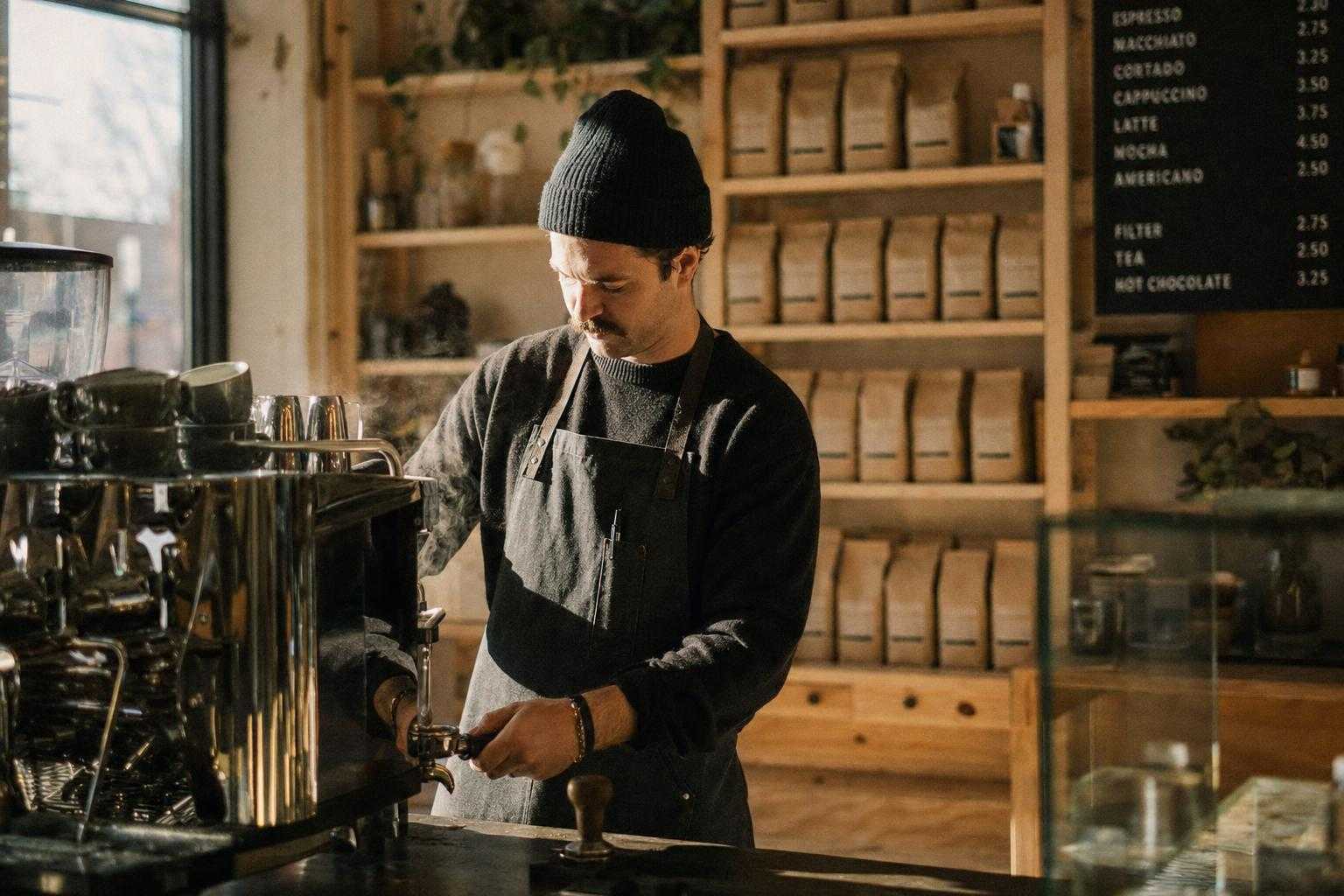
Much darker and more restrained, closer to a real editorial photograph. The menu board is the interesting part: it is perfectly legible, correctly kerned and priced like an actual café, with espresso at 2.50 and a hot chocolate at 3.25. The bean bags, which I never said anything about, were left blank. What it did not do is my lighting. I asked for low sun raking in from the left and got soft, dim, sourceless light instead.
Seedream 5.0 Pro
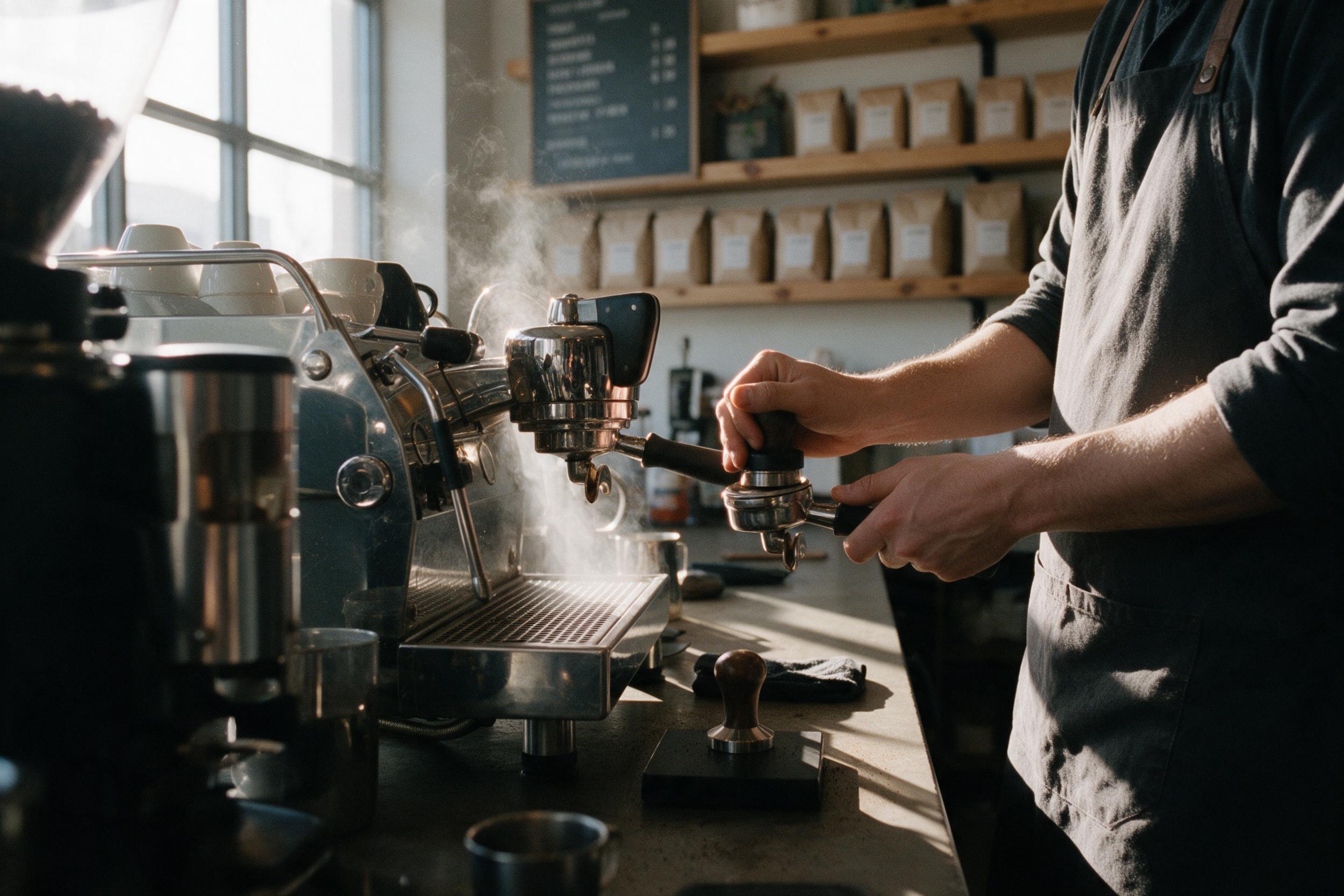
The most literal reading of the three, and the most surprising. I wrote "the barista's hands sharp", and Seedream made the hands the subject by cropping her head out of frame entirely. It also gave me the strongest version of the window light I asked for. Background text is present but tiny and illegible.
Three sensible interpretations of one paragraph. If you have been treating prompts as portable assets, that is the thing to internalise: the words that were load-bearing on one model were decoration on another. GPT Image 2 quietly dropped my light direction. Seedream promoted a subordinate clause about focus into the entire composition. Nano Banana 2 was the most literal about lighting and the loosest about text.
Text in images: quote it and they will set it
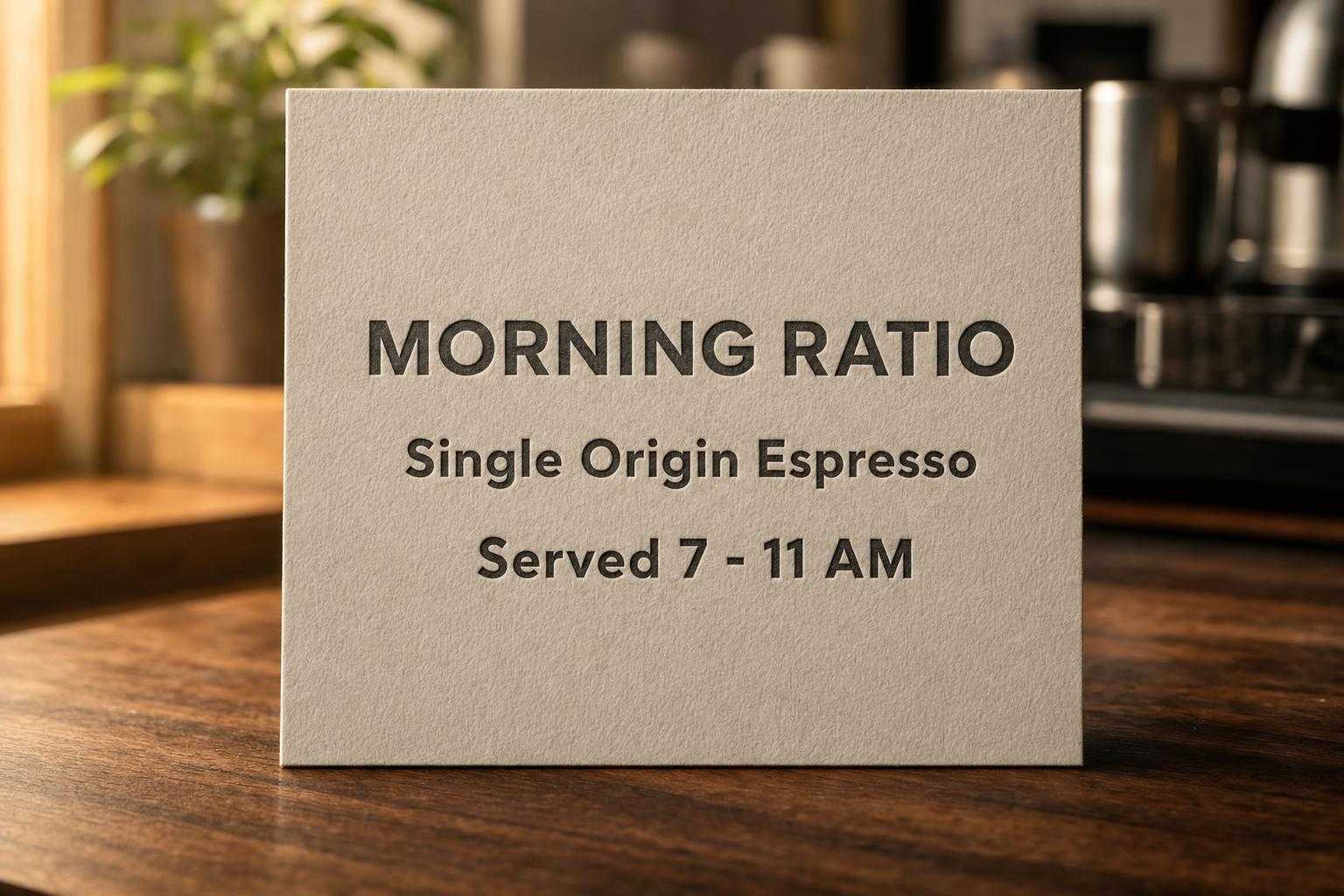
"AI can't do text" is out of date, and this test is why. I gave all three an identical prompt naming three exact lines, and explicitly forbidding anything else in frame.
The card carries exactly three lines of text in a clean bold sans-serif: the first line reads "MORNING RATIO", the second line reads "Single Origin Espresso", the third line reads "Served 7 - 11 AM". [...] No other text, numbers, logos or brand marks anywhere in the frame.
Nano Banana 2
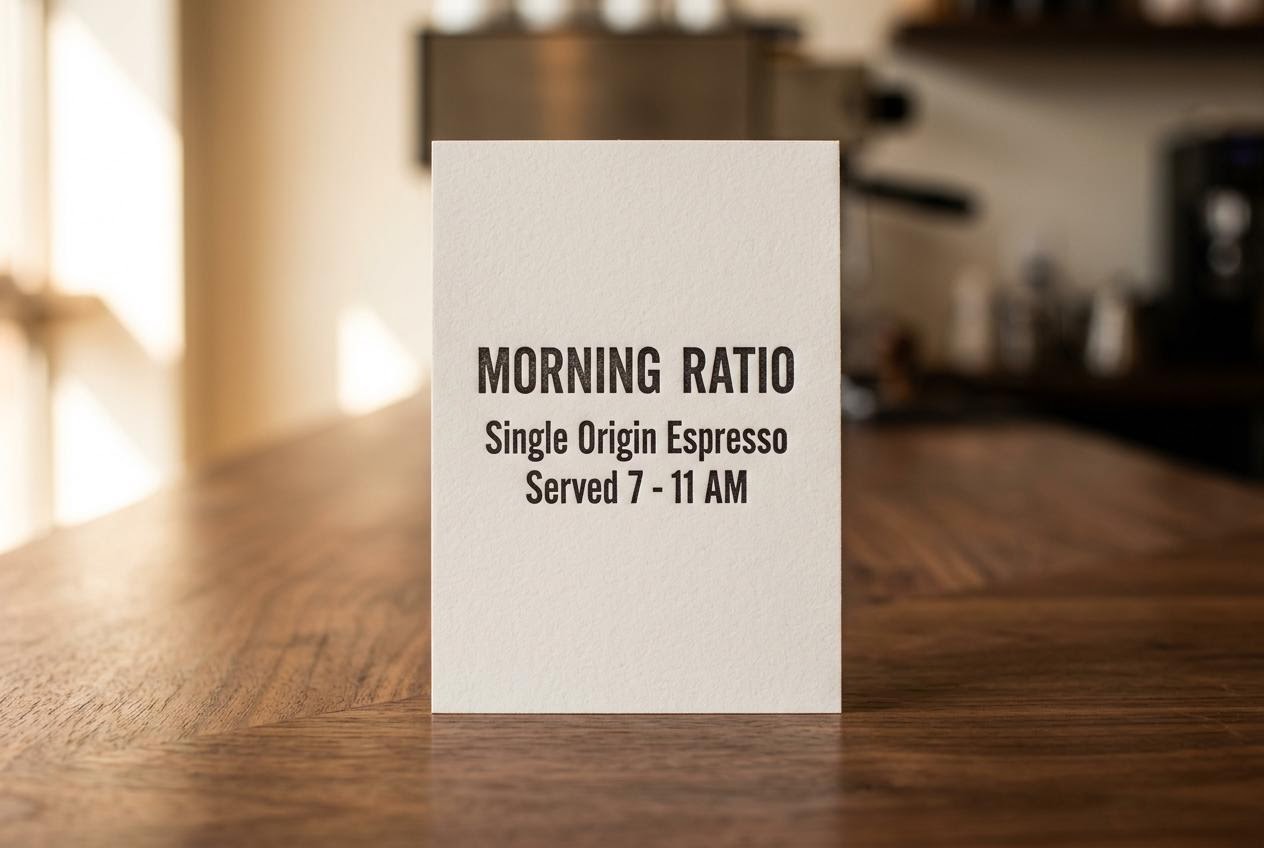
GPT Image 2
Seedream 5.0 Pro
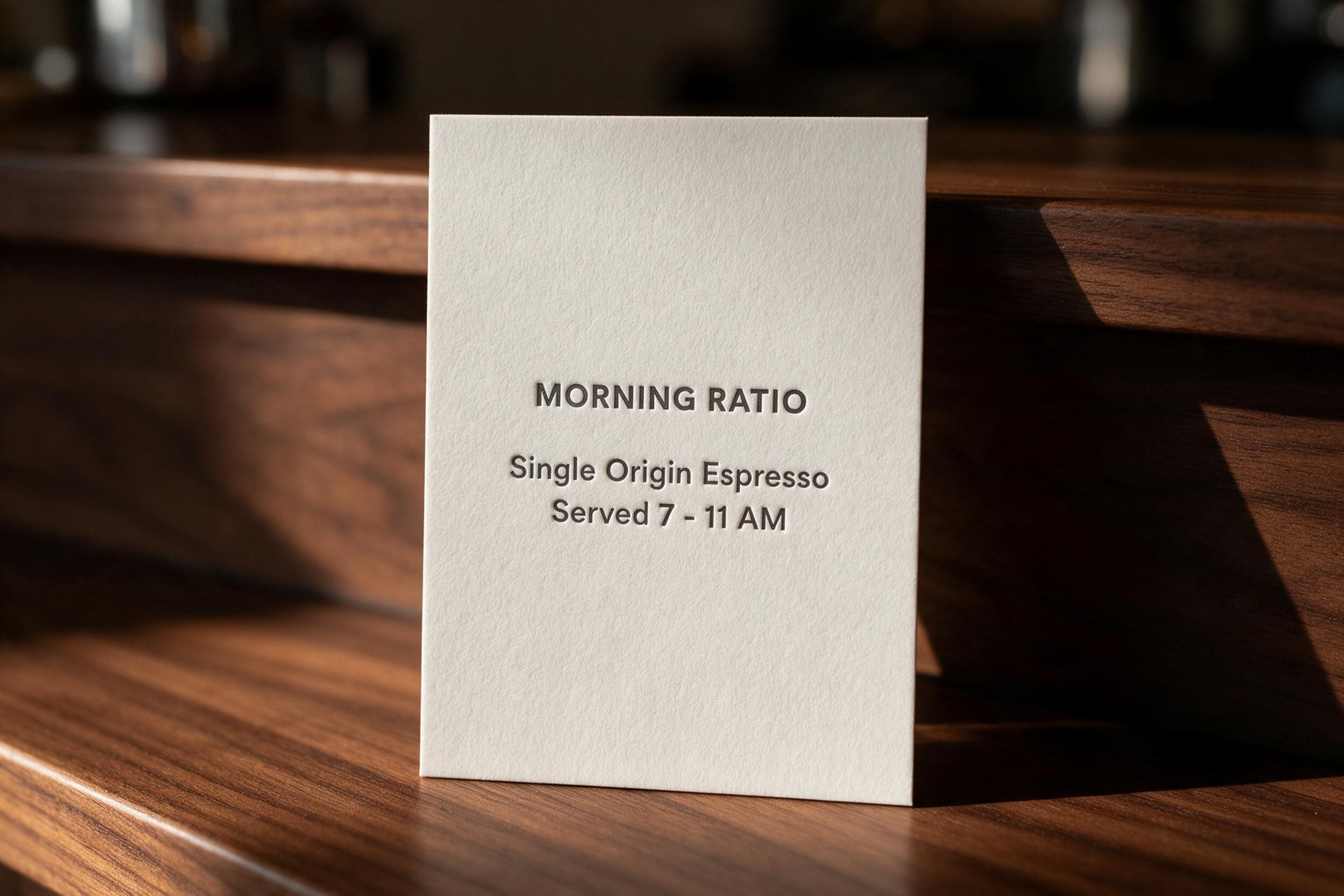
All three got all three lines exactly right, including the spaced en-dash-style hyphen in "7 - 11 AM". No misspellings, no doubled letters, no invented fourth line. They differ on craft rather than accuracy: Nano Banana 2 gave a flat inked letterpress look, Seedream a genuine deboss with the paper catching hard window light, GPT Image 2 the heaviest type and the deepest impression.
Put that next to the rung-two result, where the same model garbled a background menu board into "PREPRESS" and "BUNCARS", and the real rule falls out. These models are reliable on text you specify and unreliable on text you leave to them. The garbling everyone complains about is almost always in the second category. So if a surface in your frame will have writing on it, either dictate that writing or forbid it, but do not leave it unmentioned and hope.
The one caveat is that this held at three short lines. I would not extrapolate it to a dense paragraph, a spec sheet or a menu with twenty items, and I did not test those here.
The knobs that are not prompts
Two of the levers above are words. Some of the most useful controls are parameters, and they are free.
Nano Banana 2 has a thinking_level flag, minimal or high. The pricing table for the model is a function of output_resolution and web_search only, so reasoning depth costs nothing. I gave both levels an identical, deliberately fussy prompt with countable constraints: exactly three mugs in a row, left matte black and empty, centre glossy white and half full, right terracotta and full to the brim, plus a brass spoon at a stated angle.
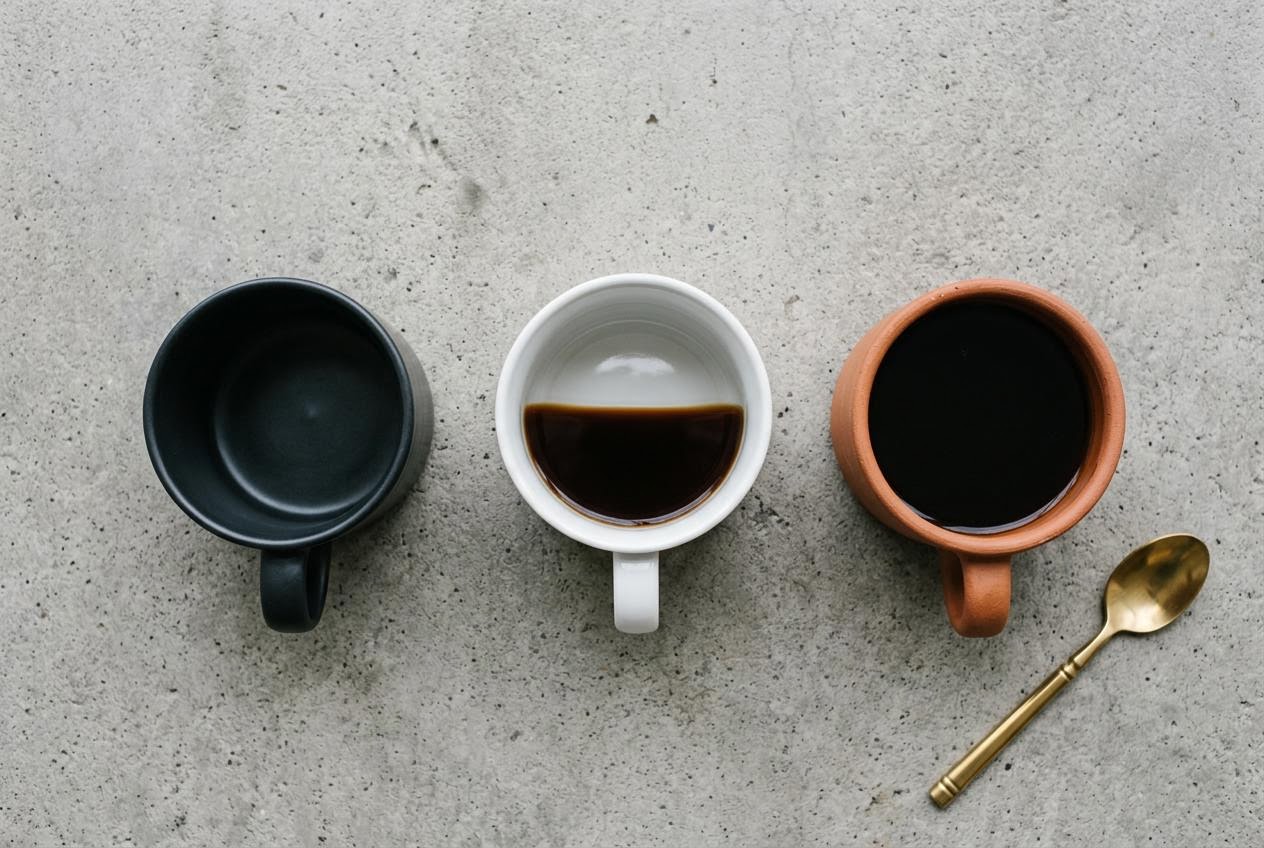
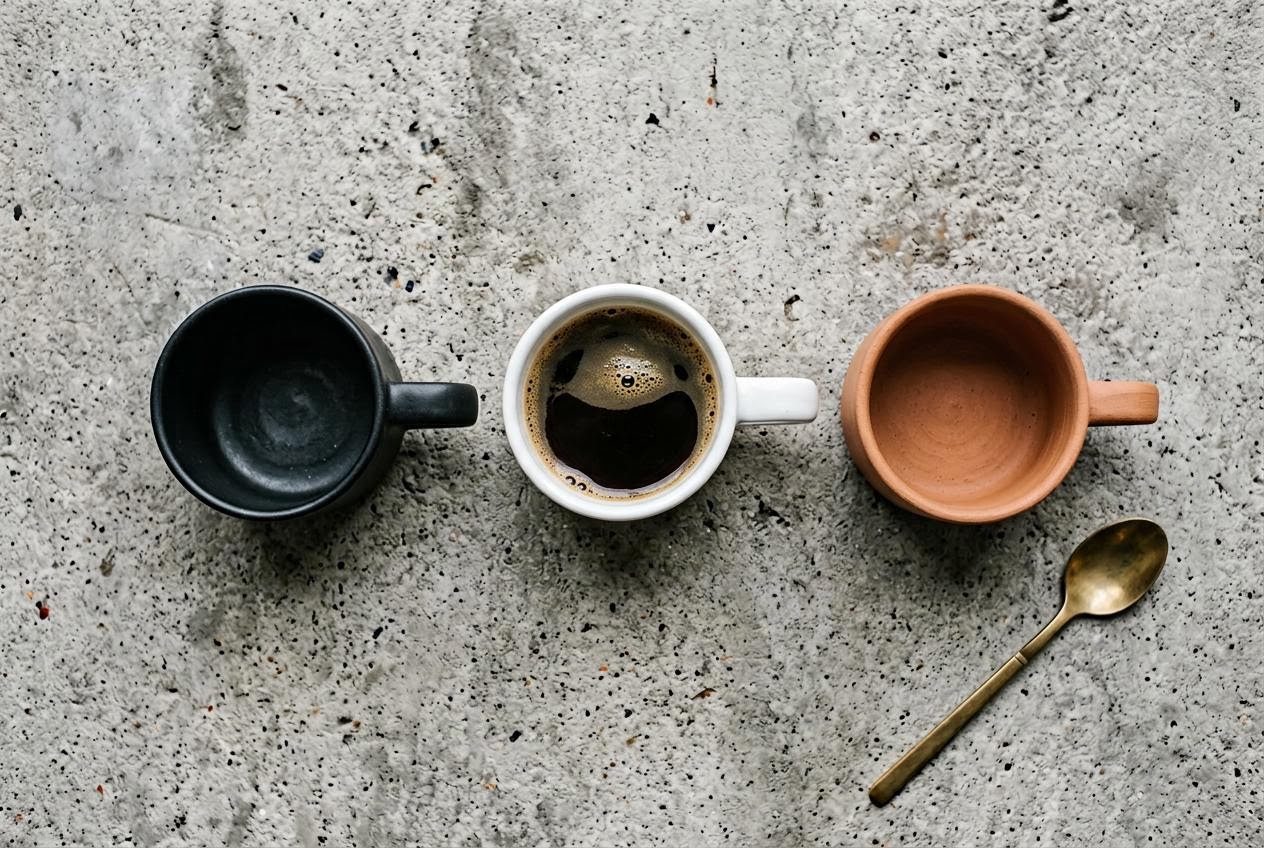
The result is not the one I expected. At minimal all three fill states came back correct, but the coffee in the centre mug is drawn as a tilted plane that makes no sense from directly overhead. At high the geometry is properly top-down, handles flat in plane, liquid surfaces believable, and the fill states are wrong: the centre mug is brimming with crema and the terracotta mug that I asked to be full is empty. Both got the spoon's handle pointing the wrong way.
That is one sample per level, so treat it as a caution rather than a benchmark: high is not a strictly better setting you can leave on. It bought physical coherence and spent it on instruction-following. It also took 30.0s against 21.7s. If your prompt's hard requirements are countable states, check them rather than assuming the deeper setting handled it.
The other free knob is resolution, and it is worth knowing what it does to your bill rather than your image. On Nano Banana 2 the same prompt costs $0.06 at 512px, $0.08 at 1K, $0.12 at 2K and $0.16 at 4K. On Seedream 5.0 Pro there are only two tiers, $0.0534375 up to 2.36 MP and $0.106875 above it. Draft at the bottom tier, render the keeper at the top. With no seed on Seedream or GPT Image, though, a cheap draft only validates your wording, not your composition: the expensive re-render will be a different picture.
What the whole experiment cost
Thirteen images, every one of them fired once, billed from the x-cost response header rather than estimated:
| Model | Config | Images | Per image | Latency |
|---|---|---|---|---|
| Nano Banana 2 | 1K, 3:2 | 9 | $0.08 | 10.1s to 30.0s |
| Seedream 5.0 Pro | 2K, 3:2 | 2 | $0.106875 | 54.2s and 62.8s |
| GPT Image 2 | 1536x1024, quality high | 2 | $0.2067 | 82.7s and 101.3s |
Call it $1.35 for the set. The thing I would flag for anyone budgeting a real shoot is the spread: GPT Image 2 at high costs 2.6x a Nano Banana 2 1K image and takes roughly nine times as long. That is a fine trade when you need the typography it produces and a bad one when you are iterating on composition. Iterate cheap, finish expensive.
A prompt template you can actually reuse
Putting the four levers in order, this is the skeleton I now start from. Fill each slot or knowingly leave it to the model:
[SUBJECT doing a specific ACTION], [in a named SETTING with 2-3 concrete props].
[LIGHT: direction + height + quality], [its visible CONSEQUENCE], [what light to avoid].
[CAMERA: lens + height + what is sharp and what falls off], [grain or none].
[TEXT: exactly N lines, each quoted verbatim], [no other text, logos or marks anywhere,
including SURFACE_A and SURFACE_B].
And the API call that goes with it, using the cheapest tier to iterate:
import requests

r = requests.post(
    "https://api.segmind.com/v1/nano-banana-2",
    headers={"x-api-key": YOUR_API_KEY},
    json={
        "prompt": prompt,
        "aspect_ratio": "3:2",
        "output_resolution": "1K",
        "output_format": "jpg",
        "response_modalities": "IMAGE",
        "seed": 42,
        "thinking_level": "minimal",
    },
    timeout=120,
)
open("out.jpg", "wb").write(r.content)
print(r.headers["x-cost"])
Two practical notes on that call. Setting response_modalities to IMAGE returns raw bytes you can write straight to disk, instead of a JSON envelope you have to unwrap. And x-cost on the response is the real billed amount for that call, which is the only honest way to track what an iteration loop is costing you.
Honest assessment
The levers work, but they are not equal. Light direction gave me the biggest visible return for the fewest words, and I would put it first in any prompt after the subject. Closing the text set is the one with actual downside risk attached, and it is the one most guides skip entirely. The camera clause is real but oversold across the internet: you are steering framing and depth-of-field cues, not simulating a lens, and adding "f/1.2, 85mm, shot on Portra" to a prompt that has no subject will not save it.
What I could not test here is consistency across a batch. Every image on this page is a single fire, and with only one of the three models exposing a seed I cannot tell you how stable any of these results are over ten runs. If you are shipping a campaign rather than a blog post, budget for that test yourself before you trust a phrasing.
FAQ
What makes a good AI image generation prompt?
A named subject doing a specific action, a setting with two or three concrete props, an explicit light direction and its visible consequence, and any on-image text quoted verbatim with everything else forbidden. In this test, light direction produced the largest single improvement per word.
Do negative prompts work in AI image generation prompts?
These three models have no separate negative prompt field, but negation inside the prompt does work. "No overhead fluorescent light" visibly killed the flat ambient default, and an explicit "no other text, no logos" stopped the model inventing a brand. Name the surfaces you are worried about rather than negating in general.
Why does AI keep putting made-up brand names in my images?
Because it does not leave surfaces blank. An open product prompt here returned a bottle labelled "AVENA SKIN, HYDRATING SERUM, HA + BOTANICALS, 30ml / 1oz", none of it requested. Enumerate the exact text you want, then forbid the rest, and check the output before it reaches a client.
Does specifying a camera and lens actually change the image?
Yes, but less than you would hope. Adding "35mm at f/2.0 from standing eye height" moved the camera closer, settled it to eye level and softened the background. It is matching the look of similarly captioned photographs, not modelling optics, so treat it as framing and depth guidance.
Which model handles text in images best?
All three set the three requested lines correctly when asked explicitly. The difference is what they do with text you did not ask for: GPT Image 2 left unrequested labels blank and produced a coherent, correctly priced menu board, while Nano Banana 2 filled background surfaces with garbled type and invented a real espresso-machine trademark.
Can I reuse the same prompt across different image models?
Not without checking. One identical prompt produced three genuinely different images here: one eye-level with the barista's face visible, one darker and more restrained, and one that cropped the face out of frame entirely to make the hands the subject. Re-tune per model rather than porting a prompt and assuming.
Wrapping up
Four levers, thirteen images, about $1.35. The part that changed how I write prompts was not any single phrasing, it was the discipline of pinning a seed and moving one clause at a time, because most of what I believed about prompt writing turned out to be untested. Half of it held up. The camera clause did less than I expected and the light clause did far more.
All three models are on Segmind behind one API and one key: Nano Banana 2, GPT Image 2 and Seedream 5.0 Pro. Run the ladder yourself on whatever subject you actually shoot. It costs about a dollar to find out which of your habits are real.