
Gemini Omni Flash Video Generation Guide: Features, Examples & How It Compares
Gemini Omni Flash makes 720p video with native audio at $0.102/sec. I tested every parameter: real costs, speed, and how it compares to Veo 3.1.

Google shipped Gemini Omni Flash as a video model that does something most of its rivals still split into two jobs: it writes the picture and the soundtrack in the same pass. No separate audio model, no sync step, no foley pass. One POST, one MP4, dialogue and ambience already sitting in the file.
It landed on Segmind on 30 June 2026. Since then I have watched it become the fastest video model we host, and also one of the most opinionated about what it will agree to make. I ran a fresh test matrix through it for this post: six clips, every parameter in the schema, $3.37 of credits, and a walk through our production logs to see how it behaves when it is not me driving.
Here is what it actually does, what it costs, where it beats Veo 3.1 and Kling 3.0, and the two gotchas I would want to know before wiring it into anything.
What Gemini Omni Flash actually is
Gemini Omni Flash is a text-to-video model with native synchronized audio. You hand it a prompt, optionally a reference image or clip, and it returns a 720p H.264 file with an AAC stereo track already mixed in. Google's framing is that it is a "world model" rather than a clip generator: it is reasoning about how a scene would sound as it works out how the scene looks, which is why the audio lands in sync instead of being bolted on afterwards.
The practical version of that claim is simpler. When I asked for a matchstick striking, I got the crack of ignition on the right frame. When I asked for two people talking in a car, I got two voices and rain on a roof. That is the whole pitch.
On Segmind it sits at https://api.segmind.com/v1/gemini-omni-flash as a synchronous endpoint. You POST, you wait, you get binary MP4 back in the response body. There is no polling, no job ID, no webhook. For a video model that is unusual, and it only works because the thing is genuinely fast.
The parameter surface
The whole schema is six fields, which tells you something about the design philosophy:
| Parameter | Type | Values | Notes |
|---|---|---|---|
prompt | string | required | Scene, camera, dialogue and audio all in one block of prose |
duration | integer | 3, 5 or 10 | Default 5. These three values only, nothing in between |
aspect_ratio | string | 16:9 or 9:16 | Default 16:9. No 1:1, no 4:3, no 21:9 |
seed | integer | -1 to 999999999 | -1 for random |
image_urls | array | image URLs | Reference images. Read the caveat below before trusting this |
video | file URL | beta | Reference video |
Two things are missing that you might expect. There is no resolution parameter, because 720p is the only output: 1280x720 landscape, 720x1280 vertical, 24fps, every time. And there is no generate_audio toggle, because audio is not optional. Every clip comes back with a stereo 48kHz AAC track whether you asked for one or not.
The duration enum is worth burning into your memory: 3, 5 and 10 seconds. Not 4, not 6, not 8. If your storyboard is cut to 6-second beats, this model cannot serve it and you will get an error rather than a rounded-down clip.
Example 1: a product spot for a marketing team
First test, the bread-and-butter case. A 5-second beverage insert of the kind an agency turns around a dozen of before lunch.
Parameters duration: 5 | aspect_ratio: 16:9 | seed: 42 | cost: $0.5102 | latency: 37.7s
Gemini Omni Flash output. 5s, 16:9, $0.5102. The glass, condensation and hand motion hold up. The label does not.
The physics are the good news. Condensation beads and slides, the highlight tracks correctly along the bottle as the dolly moves, the hand enters and grips without the finger-melting you used to get. The fizz and cafe tone are both there in the mix.
The bad news is the label. I never specified a brand, so the model invented one, and what it invented reads "Delorte" with a line of complete gibberish above it. This is the single clearest limit I hit all day: Gemini Omni Flash cannot render text on a surface inside a video. If your product has a logo, a wordmark, or legible packaging copy, plan to composite it in afterwards or use a reference image and accept that the model will still drift. For anything where the pack shot has to be legally accurate, this model is not the last step in your pipeline.
Example 2: a 10-second dialogue beat
The 10-second ceiling is the most interesting thing in the schema, because it is where native audio stops being a novelty and starts being useful. Two lines of dialogue need room to breathe. Here is a noir beat written as a single scene with the lines inline.
Parameters duration: 10 | aspect_ratio: 16:9 | seed: 42 | cost: $1.0168 | latency: 27.3s
10 seconds, two speakers, rain bed and traffic hum. $1.0168 and it came back in 27.3 seconds.
Note the latency: the 10-second clip came back in 27.3 seconds, faster than the 5-second product shot did at 37.7. Duration and generation time are close to uncoupled here, which is not true of most video models. If you are choosing between 5s and 10s, choose on story, not on speed. You are paying double either way but you are not waiting double.
Writing dialogue as inline quoted speech inside one continuous scene description is the pattern that works. I would resist the temptation to structure a 10-second prompt as "Shot 1 / Shot 2 / Shot 3", which is a habit that tends to break single-pass video models.
Example 3: vertical, for social
Same model, aspect_ratio: "9:16", and you get a native 720x1280 file rather than a cropped landscape one.
Parameters duration: 5 | aspect_ratio: 9:16 | seed: 42 | cost: $0.5112 | latency: 24.6s
Native 720x1280. The latte art pour is the part I did not expect to hold together.
The pour is the impressive bit. Fluid simulation with a rosetta forming correctly under a moving pitcher is a hard ask, and it holds. For a production house or an MCN pushing volume to Reels and Shorts, a 5-second vertical at $0.51 with usable sound already attached is a real unit economic, not a demo.
Example 4: what image_urls actually does
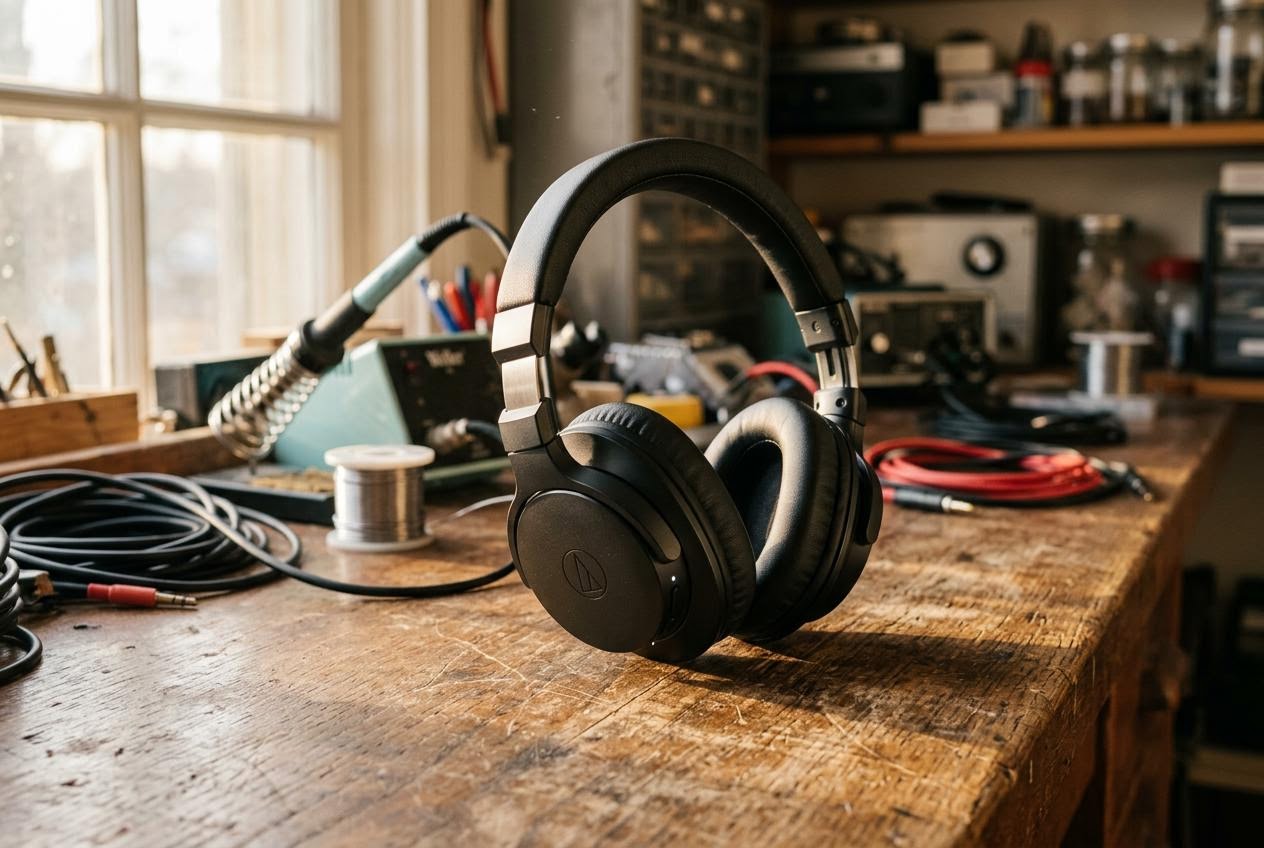
This one matters and it is not documented in a way that makes it obvious. I generated a reference still with Nano Banana 2, passed it in via image_urls, and asked for a slow orbit around the subject.
Input via image_urls
First frame of output
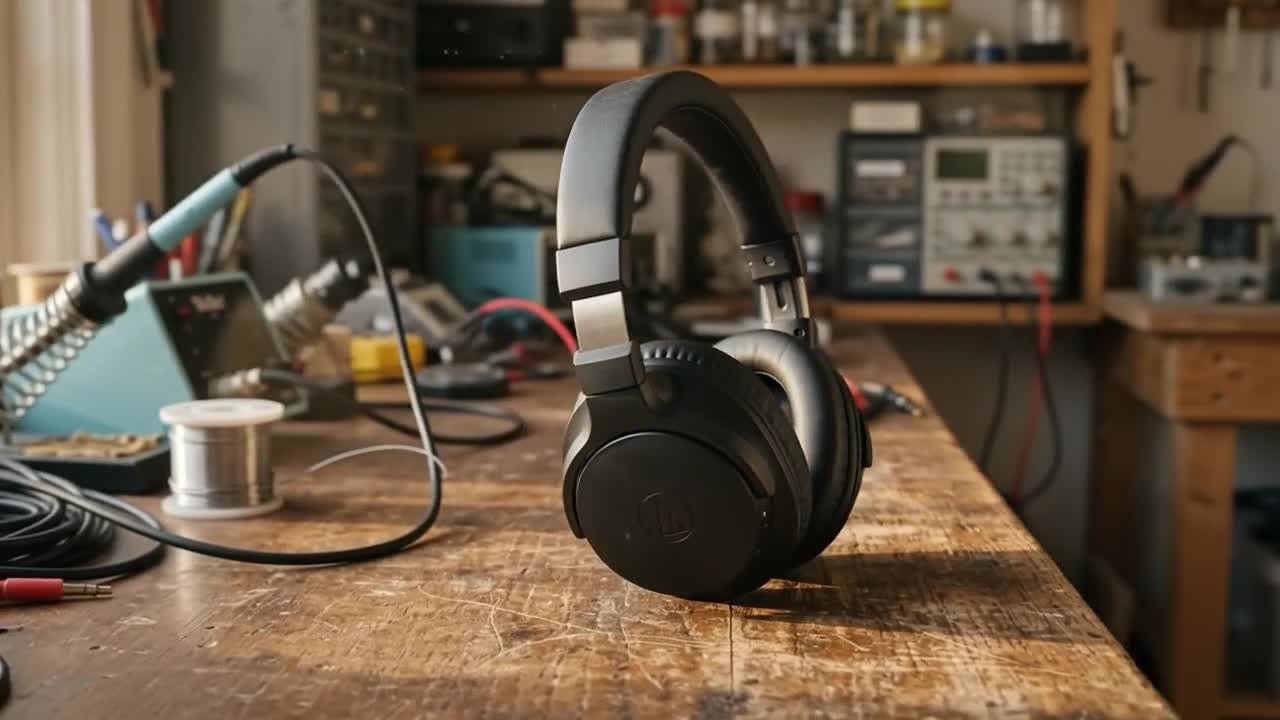
Same subject, same workshop, different photograph. image_urls is a reference, not a first frame.
5s, 16:9, $0.5112. The subject survives. The exact composition does not.
Look at the two frames side by side. The headphones are the same headphones, the workbench is the same workbench, the soldering iron and the solder spool and the coiled cables all made the trip. But the camera has moved, the window on the left is gone, and the headphones have been re-staged. The model rebuilt the scene from an understanding of it rather than animating the pixels I gave it.
So: image_urls conditions subject and style, it does not lock the first frame. If you need the output to start on an exact plate, for a continuity shot or a brand asset that has to match, this is the wrong tool and you want a model with true first-frame conditioning. If you want "more of this thing, in motion", it works well.
Cost and speed, measured
Pricing is token-based on paper: $1.50 per million input tokens, $9 per million text output tokens, $17.50 per million video output tokens. Nobody thinks in video tokens, so here is what actually got deducted on my six runs, straight from the request log.
| Duration | Aspect | Actual cost | Per second | My latency |
|---|---|---|---|---|
| 3s | 16:9 | $0.3073 | $0.102 | 23.4s |
| 5s | 16:9 | $0.5102 | $0.102 | 37.7s |
| 5s | 9:16 | $0.5112 | $0.102 | 24.6s |
| 5s | 16:9 (defaults) | $0.5093 | $0.102 | 23.6s |
| 5s | 16:9 + image_urls | $0.5112 | $0.102 | ~25s |
| 10s | 16:9 | $1.0168 | $0.102 | 27.3s |
The $0.10 per second figure is real and it is flat. Aspect ratio does not change it, reference images do not change it, and the per-second rate does not improve with length. A 10-second clip costs exactly twice a 5-second clip. There is no bulk discount for going long, which is a refreshingly honest pricing curve.
My own latencies ran 23 to 38 seconds. Across all 477 completed generations in our production logs the median is 41.6 seconds, with a p90 of 70.9 seconds and a mean of 48.9. Call it 40 seconds for planning purposes, and know that the tail is not brutal.
How Gemini Omni Flash compares
Every price below is the published Segmind rate for the shortest clip that model will make with audio on. Every latency is the median of real production traffic on Segmind over the last 120 days, not a vendor benchmark.
| Model | Max resolution | Durations | Native audio | Cost with audio | Per second | Median latency |
|---|---|---|---|---|---|---|
| Gemini Omni Flash | 720p | 3, 5, 10s | Always on | $0.51 (5s) | $0.102 | 41.6s |
| Veo 3.1 | 1080p | 4, 6, 8s | Optional, on by default | $1.60 (4s) | $0.400 | 122.3s |
| Kling 3.0 Standard | 1080p | 3 to 15s | Optional, on by default | $1.26 (5s) | $0.252 | 59.7s |
| Kling 3.0 Pro | 1080p | 3 to 15s | Optional, on by default | $1.68 (5s) | $0.336 | 134.2s |
| Seedance 2.0 | 4K | 4 to 15s | Optional, off by default | Token-based, $1.21 avg | Varies | 223.5s |
| HappyHorse 1.1 | 1080p | 5s | Yes | $0.70 (720p) | $0.140 | 155.1s |
Read that table and the positioning writes itself. Gemini Omni Flash is the cheapest and the fastest video model with sound we host. It is 2.5x cheaper per second than Kling 3.0 Standard, 3.9x cheaper than Veo 3.1, and its median generation is 30% quicker than Kling 3.0 Standard's, a third of Veo 3.1's, and roughly a fifth of Seedance 2.0's.
It pays for that in three currencies. Resolution: 720p is the floor everyone else clears, and it is the only model here that cannot give you 1080p. Length: 10 seconds is the ceiling, where Kling and Seedance go to 15. Aspect: two options, where Seedance offers seven. And you cannot turn the audio off, which sounds like a feature until you want a clean plate.
The way I would put it: Veo 3.1 and Kling 3.0 Pro are for the hero shot. Seedance 2.0 is for when you need 4K or a 15-second multi-shot. Gemini Omni Flash is for the other ninety percent of the timeline, and for iterating fast enough that you actually explore the idea before you commit to the expensive render.
About that "conversational editing"
Google's launch material makes a lot of the model's multi-turn editing: keep a session open, say "make it rain", then "now make it night", and watch the clip evolve while holding context. It is the most interesting thing about the model and I need to be straight with you about it.
That loop is not what this endpoint exposes. https://api.segmind.com/v1/gemini-omni-flash is a single-shot synchronous call. There is no session ID, no conversation handle, no turn parameter in the schema. Google runs the multi-turn behaviour through a different API surface, and our logs confirm it directly: among the failed requests sits an upstream error reading "gemini-omni-flash-preview is only supported in the Interactions API and cannot be called directly via generateContent". Two different doors into the same model.
What you can do today is chain manually: generate, keep the seed, re-prompt with the change described, and accept that you are getting a fresh interpretation rather than a true edit of the previous frame. Given that the image_urls path also reinterprets rather than locks, manage your expectations about consistency across a chain.
The honest assessment
Three things you should know before this goes anywhere near a production pipeline.
1. It refuses a lot. This is the big one. Across 687 requests in our logs, 477 completed and 192 came back HTTP 400. That is a 27.9% rejection rate, and roughly two thirds of those 400s are content-safety blocks. The breakdown is the interesting part: 93 were the generated result being blocked after the fact, versus 28 where the prompt or input media was blocked up front. Another 56 returned "No video generated" with no useful reason attached. So the model will frequently do the work, look at what it made, and then decline to hand it over. My six-for-six run today was, on those numbers, a good day. The one mercy is that failures are free: across all 192 rejections, total credits deducted was $0.00.
2. Audio levels are all over the place. Every clip has a real audio track, but the loudness spread across my six is 26 dB. The matchstick came in at -18.2 dB mean, the barista at -26.5, and the ambient workshop room tone at -44.3 dB mean with a -34.3 peak, which is close to inaudible on a phone speaker. Sharp transients and dialogue land hot, ambient beds land whisper-quiet. Budget for a loudness normalization pass if you are cutting these together, because the model is not delivering a consistent mix.
3. It cannot write. Text on any surface inside the frame comes out as convincing-looking gibberish, as the "Delorte" bottle demonstrates. Signage, packaging, screens, labels: composite them in post.
What it does well is everything else. Physics, fluids, hands, faces, camera moves and dialogue timing were all better than I expected at this price, and the speed changes how you work. At 40 seconds a shot you iterate on prompts conversationally. At Seedance 2.0's 223-second median you go make coffee.
Running it on Segmind
Synchronous endpoint, binary response. The only thing that will catch you out is the timeout: the default in most HTTP clients is shorter than this model's p90, so set it explicitly.
import requests

API_KEY = "YOUR_SEGMIND_API_KEY"

response = requests.post(
    "https://api.segmind.com/v1/gemini-omni-flash",
    headers={"x-api-key": API_KEY},
    json={
        "prompt": (
            "Close-up commercial shot of a chilled glass bottle of sparkling "
            "citrus soda on a wet slate counter, condensation beading and sliding "
            "down the glass. Warm morning light rakes through a window. Camera "
            "pushes in slowly on a smooth dolly. Crisp fizzing sound and gentle "
            "ambient cafe tone. Photorealistic, shallow depth of field."
        ),
        "duration": 5,          # 3, 5 or 10 only
        "aspect_ratio": "16:9", # 16:9 or 9:16 only
        "seed": 42,
    },
    timeout=120,  # median 41.6s, p90 70.9s. Do not use the default.
)

if response.status_code == 200:
    with open("output.mp4", "wb") as f:
        f.write(response.content)   # MP4 with audio already muxed in
    print("done")
else:
    print(response.status_code, response.text)
Four notes from having just done this:
- The response body is the video. Not JSON, not a URL. Write
response.contentstraight to a file. - Handle 400 as a normal outcome, not an exception. At a 27.9% rejection rate you need a retry-with-rewrite path, not a stack trace. Nothing is charged when it fails.
- Fire requests sequentially if you are generating a batch. I fired five at three-second intervals and all five landed; hammering the endpoint in parallel from one process is a good way to have some quietly drop.
- Add a reference image by passing
"image_urls": ["https://..."]. Remember it steers, it does not lock.
You can try it in the browser first on the Gemini Omni Flash model page, and the full parameter reference lives at the API docs. If you want to chain it after a still image generator, Nano Banana 2 is what I used to make the reference plate in Example 4.
FAQ
What is Gemini Omni Flash?
Gemini Omni Flash is Google's text-to-video model that generates 720p clips with synchronized native audio in a single pass. It takes a text prompt plus optional reference images or video, and returns an MP4 with dialogue, effects and ambience already mixed in.
How much does Gemini Omni Flash cost?
It works out to a flat $0.102 per second of 720p video. A 3-second clip costs $0.31, a 5-second clip $0.51, and a 10-second clip $1.02. The rate does not change with aspect ratio or reference images, and failed generations are not charged.
How long can Gemini Omni Flash videos be?
Three lengths only: 3, 5 or 10 seconds. The duration parameter is an enum, so 4, 6, 7 and 8 second requests will error rather than round to the nearest allowed value.
Does Gemini Omni Flash generate audio?
Yes, and you cannot switch it off. Every clip returns with a 48kHz stereo AAC track containing dialogue, effects and ambience. Levels are inconsistent between clips, so normalize loudness before cutting several together.
Why does Gemini Omni Flash keep rejecting my prompts?
Content-safety filters account for about two thirds of the 27.9% of requests that return HTTP 400 in our logs. Most blocks happen after generation rather than at the prompt, which is why the error feels arbitrary. Real people, named public figures and anything violent or brand-adjacent are the usual triggers. Rewrite descriptively rather than by name and retry, since failures cost nothing.
Is Gemini Omni Flash better than Veo 3.1?
Different jobs. Veo 3.1 gives you 1080p and Gemini Omni Flash tops out at 720p, so Veo wins on the hero shot. Gemini Omni Flash is 3.9x cheaper per second and roughly three times faster in production, so it wins on volume and iteration.
Can Gemini Omni Flash do image-to-video?
Partly. The image_urls parameter conditions the output on a reference image, but it treats it as a subject and style reference rather than locking it as the first frame. Expect the model to re-stage the scene. If you need an exact starting plate, use a model with true first-frame conditioning.
Where this lands
Gemini Omni Flash is not the best video model on Segmind and it is not trying to be. It is the one that made me stop batching my prompts and start iterating on them, because forty seconds and fifty cents is cheap enough to be wrong a few times. It gives you sound for free, in sync, at a price where you can afford to generate ten options and keep one.
Cap your expectations at 720p, keep text out of frame, write a retry path for the refusals, and normalize your audio. Inside those lines it is the best cost-per-iteration in the category right now.
Try Gemini Omni Flash on Segmind, or browse the rest of the model catalog to chain it into something bigger.