
Gemini Omni 1.1 Flash: Features, Examples and 1.0 Compared
Gemini Omni 1.1 Flash adds 4K, frame control and free-form durations. I tested every tier against 1.0 and measured what each clip really costs.

Google shipped Gemini Omni 1.1 Flash on Segmind on 28 August 2026, two months after the original Gemini Omni Flash. The version number suggests a point release. The parameter list says otherwise: 1.1 adds a resolution selector, first and last frame control, and free-form durations, and it quietly drops the reference video input that 1.0 had.
I ran both models on the same prompt with the same seed, walked the new resolution ladder from 360p to 4K, and read the billed cost off the response header of every call. Ten clips, $7.30 spent. This guide covers what is new in Gemini Omni 1.1 Flash, what each feature actually produced, exactly what it costs, and the one measurement that changed how I would use the resolution parameter.
What Gemini Omni 1.1 Flash is
Gemini Omni 1.1 Flash is Google's text-to-video model with synchronized native audio, served on Segmind at gemini-omni-1.1. You send a prompt, you get back an MP4 with a real AAC audio track already in it. There is no separate sound pass and no polling loop: the endpoint is synchronous, so the HTTP response body is the video file.
Three things define it. It generates 3 to 10 seconds per call. It writes its own audio from cues in your prompt, which is why the prompts in this post all end with a short sound description. And it now offers four output resolutions instead of one.
The model page lists it as Gemini Omni 1.1. The 1.0 model, still live, is gemini-omni-flash. Both are worth keeping in your account, and by the end of this post you will see why.
What changed from 1.0
Here is the full parameter diff, pulled from both models' specs rather than from a changelog.
| Parameter | Gemini Omni Flash (1.0) | Gemini Omni 1.1 Flash |
|---|---|---|
resolution | not exposed, 720p only | 360p, 720p, 1080p, 4k |
duration | 3, 5 or 10 only | any integer, 3 to 10 |
first_frame | not available | exact opening frame |
last_frame | not available | closing frame, needs first_frame |
| reference images | image_urls, up to 14 | reference_images, 1 to 10, bound in-prompt with <IMAGE_REF_0> |
| reference video | video (beta) | removed |
seed | up to 999,999,999 | up to 999,999,999,999,999 |
prompt | plain description | supports [0-3s] timecodes and image ref tags |
aspect_ratio | 16:9, 9:16 | 16:9, 9:16 (unchanged) |
Parameter diff between the two live Segmind endpoints, taken on 31 August 2026.
Note the last row of substance. If you built anything on 1.0's video parameter to restyle an existing clip, 1.1 has no equivalent. That path only exists on the older endpoint, and the older endpoint is still the only place to get it.
The resolution ladder, and what it actually buys you
This is the headline feature, so I tested it properly. Same prompt, same seed, same duration, same aspect ratio, four calls, one per resolution tier.
Parameters duration: 5 | aspect_ratio: 16:9 | seed: 42 | resolution: 360p / 720p / 1080p / 4k
Gemini Omni 1.1 Flash output, 4K, 5 seconds, native audio. Billed $1.905536, returned in 275.9 seconds.
Cropped to the same region of the frame and blown up to the same size, the four tiers separate exactly where you would expect them to, until they stop separating.
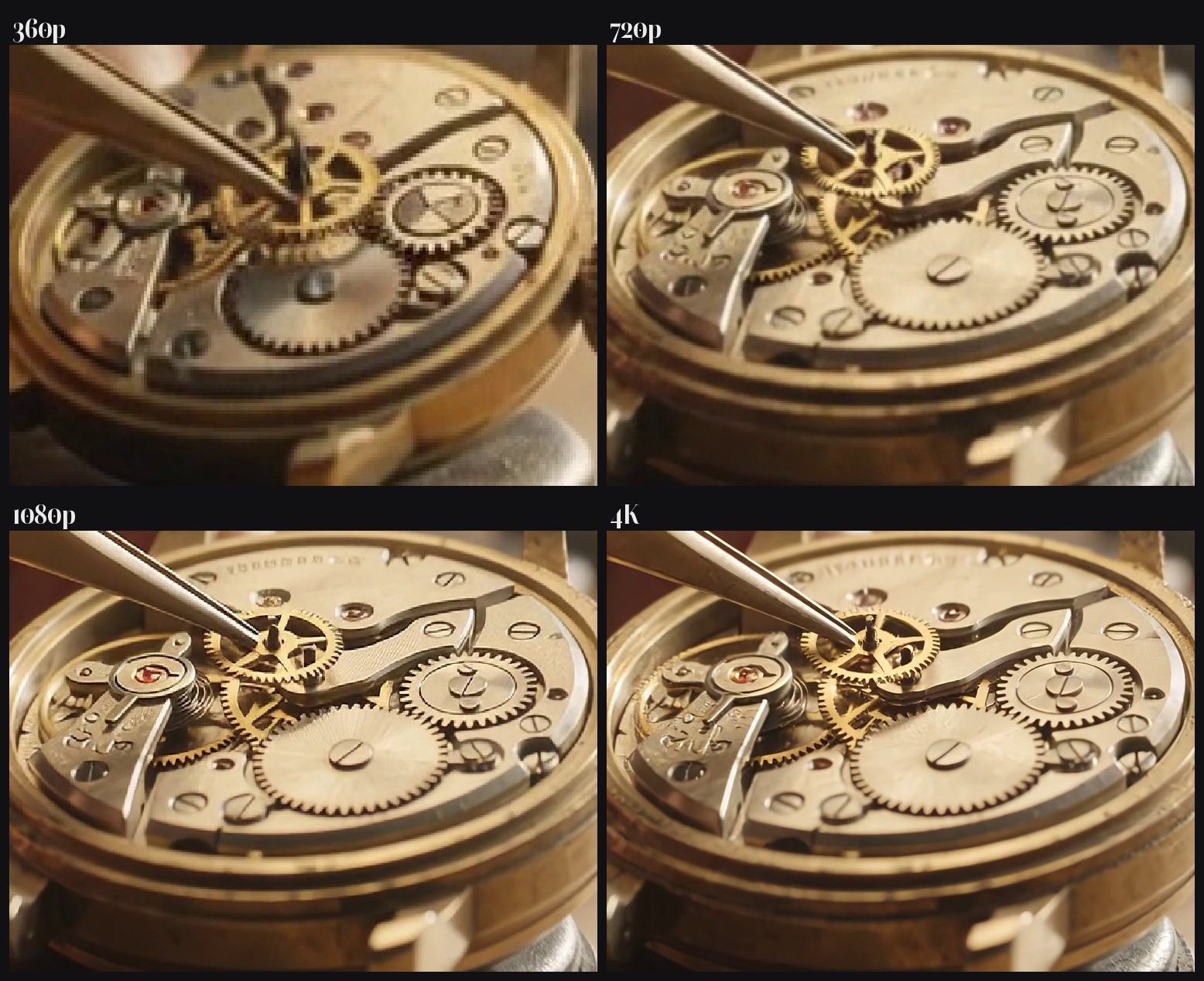
The same crop from each resolution tier, scaled to a common size. 360p to 720p is a real jump. 1080p to 4K is not.
Segmind's own parameter help is upfront that "1080p and 4k are upscaled", so I wanted to know what that meant in practice. I pulled frames from all four clips at four timestamps and correlated them against each other.
| Frame at | 360p vs 720p | 720p vs 1080p | 720p vs 4K |
|---|---|---|---|
| 0.5s | 0.721 | 0.999 | 0.999 |
| 1.5s | 0.725 | 0.999 | 0.999 |
| 3.5s | 0.475 | 0.999 | 0.998 |
| 4.5s | 0.441 | 0.999 | 0.999 |
Pixel correlation between resolution tiers, same prompt and seed 42.
720p, 1080p and 4K correlate at 0.998 and above at every timestamp. They are not four renders. They are one render delivered at three sizes. Downscale the 4K frame back to 1280x720 and it differs from the native 720p frame by 4.58 grey levels out of 255, which is compression noise.
360p is the odd one out, at 0.44 to 0.73. That is a genuinely different take, and it drifts further from the others as the clip runs.
The practical consequence is the opposite of the advice on the parameter page, which suggests drafting in 360p and finishing in 4K. A 360p draft does not show you the shot you will get at 720p, so it is only useful for judging whether a prompt reads at all. Draft at 720p instead. A 720p render tells you exactly what the 1080p and 4K deliveries will contain, for a fifth of the 4K price and a twelfth of the wait.
What it costs, measured
Every generation returns an x-cost header with the exact dollar amount billed. These are those numbers, not a rate card.
| Resolution | Duration | Billed | Per second | Returned in |
|---|---|---|---|---|
| 360p | 3s | $0.135347 | $0.0451 | 26.5s |
| 360p | 5s | $0.216239 | $0.0432 | 24.0s |
| 720p | 5s | $0.638536 | $0.1277 | 34.4s |
| 720p | 7s | $0.890395 | $0.1272 | 36.0s |
| 1080p | 5s | $0.955286 | $0.1911 | 51.0s |
| 4K | 5s | $1.905536 | $0.3811 | 275.9s |
| 720p on 1.0 | 5s | $0.512089 | $0.1024 | 27.7s |
Billed amounts read from the x-cost response header, 31 August 2026.
Four things fall out of that table.
1.1 costs 24.7% more than 1.0 at the same 720p, 5-second output. $0.1277 per second against $0.1024. If you are running 1.0 in production purely for 720p clips and you do not need frame control, the upgrade is a price rise.
4K is the worst-value rung. It doubles the 1080p price for an upscale of a render you can already buy at 720p, and it took 275.9 seconds against 51.0 for 1080p. That is 5.4 times the wall clock for 2 times the money. Render at 720p and upscale locally unless the single-call convenience is worth $1.27 to you.
Duration is almost exactly linear. The 5-second and 7-second 720p clips imply a marginal rate of $0.1259 per second, so longer clips are very slightly cheaper per second, not meaningfully so.
Aspect ratio is free and reference images are nearly free. The 9:16 clip billed $0.638369 against $0.638536 for 16:9, a difference that comes from prompt length. Attaching two reference images added $0.002.
First and last frame control
This is the feature I would upgrade for. 1.0 could take reference images, but it could not pin the exact opening frame, and it had no concept of an ending. 1.1 takes both and interpolates between them.
I gave it a product shot lit flat and grey, and the same shot regraded with a golden rim light and low haze, then asked for one continuous take between the two.
Input
first_frame

Input
last_frame

Both stills made on Nano Banana 2 Lite, the second as an edit of the first so the geometry matches.
Parameters first_frame + last_frame | duration: 5 | resolution: 720p | aspect_ratio: 16:9 | seed: 42
A lighting transition built from two stills. Billed $0.640537, returned in 35.2 seconds.
It landed. The opening frame matches the input, the haze rolls in, the amber warms, and the closing frame arrives where it was told to arrive, in one take with no cut. For an agency shooting product beauty passes this changes the workflow: you art-direct two stills in an image model, where iteration costs four cents, and you only pay for video once the endpoints are approved.
One caveat visible in the clip. The large "AURÉLIA" wordmark survives, but the fine print under it degrades into gibberish as soon as the lighting moves. In-frame text was a weakness in 1.0 and it still is. Keep small type out of the frame and composite it afterwards.
Reference images and the IMAGE_REF tags
1.0 accepted a bare list of reference images. 1.1 lets you name them inside the prompt with <IMAGE_REF_0> tags, so with several references the model knows which one you mean. Note that reference images and first or last frame cannot be combined in one call.

The single reference passed to reference_images and tagged as <IMAGE_REF_0> in the prompt.
Parameters reference_images: 1 | duration: 5 | resolution: 720p | aspect_ratio: 16:9 | seed: 42
Character identity carried from a studio still into a new scene. Billed $0.641602, returned in 42.0 seconds.
Identity transfer is strong. The undercut, the crescent scar, the jacket colour and the grey piping all survive the move from a grey studio backdrop to a neon alley. Two references in one call added only $0.002 to the bill, so this is cheap to use.
Action fidelity is weaker, and this is the honest limitation of the model. I asked for her to walk with her hands in her pockets while a handheld camera tracked beside her. She stands. The same pattern showed up in my vertical test below, where I asked for a vendor tossing noodles and got a beautiful wok with no vendor in it. 1.1 is excellent at rendering a described subject and only moderate at performing a described action. Write prompts that lean on atmosphere and let the motion be simple.
Vertical output for short-form
Aspect ratio is unchanged from 1.0 and costs nothing extra, which makes 9:16 the cheapest way to feed a short-form pipeline. A production house cutting Reels and Shorts can run the whole thing at 720p vertical for about 13 cents a second.
Parameters duration: 5 | resolution: 720p | aspect_ratio: 9:16 | seed: 42
720x1280 output. Billed $0.638369, returned in 37.3 seconds. Texture and flame are excellent, the vendor never appears.
One thing to build into your pipeline: audio levels are not consistent between calls. Across my eight clips the mean level ranged from -56.5 dB on the quiet studio scene to -29.0 dB on this market scene, a 27.5 dB spread, and this clip peaks at -0.2 dB while the studio one peaks at -42.9 dB. Run every output through a loudness normalisation pass before you cut clips together or your edit will jump.
Calling it from Python
The endpoint is synchronous and returns the MP4 as the response body, so there is no job ID and no polling.
import requests

resp = requests.post(
    "https://api.segmind.com/v1/gemini-omni-1.1",
    headers={"x-api-key": "YOUR_API_KEY"},
    json={
        "prompt": (
            "Slow dolly-in on a watchmaker's hands at a lit workbench, brass "
            "tweezers lowering a tiny gear into an open watch movement, dust "
            "motes in a shaft of window light, shallow depth of field, "
            "photorealistic. Audio: the faint tick of the escapement, a small "
            "click of metal on metal, quiet room tone. No music."
        ),
        "duration": 5,
        "resolution": "720p",
        "aspect_ratio": "16:9",
        "seed": 42,
    },
    timeout=600,
)

if resp.status_code == 200:
    open("out.mp4", "wb").write(resp.content)
    print("billed $", resp.headers["x-cost"])
else:
    print(resp.status_code, resp.text)
Three notes from running this ten times. Set a generous timeout: 4K took 275.9 seconds, which is well past most default client timeouts. Read x-cost on every response, because it is the only place the exact billed amount appears. And fire sequentially rather than in parallel from a single process, which has been the more reliable pattern for video endpoints on this gateway.
Two more parameters are worth knowing. duration now accepts any integer from 3 to 10, so a 7-second clip is a single call on 1.1 where 1.0 would have forced you to 10 seconds and charged you for the extra 3. My 7-second request returned 7.02 seconds of video and billed $0.890395. And the prompt field accepts bracketed timecodes such as [0-3s] and [3-6s] to stage action across the clip.
Honest assessment
What Gemini Omni 1.1 Flash does well: first and last frame interpolation is clean and it moves storyboard control out of the expensive video step into the cheap image step. Subject identity from a reference image holds up across a full scene change. Native audio arrives in the file with no second pass. And the free-form duration removes real waste from any pipeline that needs 4, 6, 7, 8 or 9 second clips.
Where it falls short: 4K and 1080p are upscales of the 720p render, so the top two rungs of the price ladder sell you resolution rather than detail. Described actions are followed loosely. And it is 24.7% more expensive per second than 1.0 at the resolution most people will actually ship.
Best fit: product and beauty shots with controlled endpoints, character-consistent short-form, and anything where you want sound without a separate audio model.
FAQ
What is Gemini Omni 1.1 Flash?
It is Google's text-to-video model with synchronized native audio, available on Segmind as gemini-omni-1.1. It generates 3 to 10 second clips at up to 4K in 16:9 or 9:16, and returns the MP4 directly from a synchronous API call.
How much does Gemini Omni 1.1 Flash cost?
Measured from billing headers: $0.0432 per second at 360p, $0.1277 at 720p, $0.1911 at 1080p and $0.3811 at 4K. A standard 5-second 720p clip costs $0.638536.
How is Gemini Omni 1.1 Flash different from 1.0?
1.1 adds a resolution selector, first and last frame control, free-form durations from 3 to 10 seconds, and in-prompt image reference tags. It removes the reference video input that 1.0 had, and it costs about 25% more per second at 720p.
Is the 4K output real 4K?
It is a 3840x2160 file, but it is an upscale. Frames from the 720p, 1080p and 4K renders of the same prompt correlate above 0.998, so all three deliver the same underlying render at different sizes.
Can Gemini Omni 1.1 Flash keep a character consistent across clips?
Yes. Pass a reference image and tag it in the prompt as <IMAGE_REF_0>. In my test the hairstyle, a facial scar and jacket detailing all carried from a studio still into a completely different scene.
How long does a generation take?
In my ten calls: about 24 seconds at 360p, 34 at 720p, 51 at 1080p and 276 at 4K for 5 second clips. Set your client timeout well above 300 seconds if you use 4K.
Where I would leave it
Gemini Omni 1.1 Flash is a real upgrade in control and a modest downgrade in value. The frame interpolation and the free-form durations are worth having, and identity transfer from a reference image is genuinely good. The resolution ladder is the part to read carefully: 720p is where the model actually renders.
My recommendation is to draft and approve at 720p, use first and last frame control to move iteration into an image model, and upscale when you need delivery at 4K. If you were happy on 1.0 and you do not need frame control, staying put saves you a quarter of your video spend.
Both models are live: Gemini Omni 1.1 and Gemini Omni Flash. The stills in this post were made with Nano Banana 2 Lite at four cents each.