
32 Qwen Models on Segmind: The Full Model Family Overview
The full Qwen model family on Segmind: 32 endpoints across LLMs, VLMs, text-to-image, and 15+ image edit variants. Pricing, latency, and use cases.

When someone on our team says “Qwen” at this point, they almost always mean a specific model. Sometimes it’s a chat model for a research agent. More often, it’s one of the image editors that has quietly become a workhorse for creative teams on Segmind. What started as a text LLM family from Alibaba has expanded into one of the broadest open model families available via API, covering text, vision, image generation, image editing, and code.
This post is the overview I wish had existed when I was trying to decide which Qwen model to choose. I’ll walk you through the full Qwen model family as we host it on Segmind, what each layer is good at, how the pricing spreads out, and where marketing agencies, film studios, and production houses are actually putting these models to work.
TL;DR
- Segmind hosts 32 Qwen models across text LLMs, vision-language models, text-to-image, and image editing endpoints.
- Qwen Image 2512 is the best starting point for most text-to-image workflows, especially when prompts involve on-canvas text, product labels, or ad copy.
- The image editing side is the real workhorse, with task-specific variants for product photography, relighting, object removal, scene continuation, texture work, group photos, and multiple angles.
- For agent pipelines, Qwen Flash works well for lightweight classification and summarisation, while Qwen 3 VL Flash is useful for OCR, screenshots, image understanding, and document extraction.
- Pricing and latency vary by model, so teams should check each model page before moving a Qwen workflow into production.
What Sits Under the Qwen Model Family on Segmind
The Qwen family on Segmind covers 32 models at the time of writing, spread across four capability layers:
- Text generation LLMs: Qwen Flash, Qwen Plus, Qwen 3 Max, Qwen 3 Coder Flash, Qwen 3 Coder Plus, Qwen 3.5 Flash, Qwen 3.5 Plus.
- Vision-language models (VLMs): Qwen 3 VL Flash, Qwen 3 VL Plus, Qwen2-VL-7B-Instruct, Qwen2.5-VL 32B Instruct, Qwen2-VL-72B-Instruct.
- Text-to-image: Qwen Image, Qwen Image 2512, Qwen Image Fast.
- Image editing: Qwen Image Edit, Qwen Image Edit Fast, Qwen Image Edit Plus, Qwen Image Edit Plus Blend It, Qwen Image Edit Plus Eigen Banana, Qwen Image Edit Plus Eraser, Qwen Image Edit Plus Face To Portrait, Qwen Image Edit Plus Group Photo, Qwen Image Edit Plus Multiple Angles, Qwen Image Edit Plus Next Scene, Qwen Image Edit Plus Product Photography, Qwen Image Edit Plus Relight, Qwen Image Edit Plus Remove Lighting, Qwen Image Edit Plus Texture Apply, Qwen Image Edit Plus Texture Extract, Qwen Image Edit Plus Add People Lora, and Qwen Image Edit Plus Multi Lora.
The pricing spread for the family is wide. The cheapest Qwen model on Segmind shows $0.01 average pricing (qwen-flash, a lightweight LLM); the most compute-heavy is qwen-image-edit at about $0.199 per run
The median cost across the visible Qwen catalog is around $0.074, and most image-editing variants fall between $0.07 and $0.11. That pricing profile is a big part of why teams reach for Qwen: you can run hundreds of edits a day at a cost structure that does not blow up a unit-economics spreadsheet.
Text-to-Image: Qwen Image, Qwen Image 2512, Qwen Image Fast
The three text-to-image endpoints sit along a classic quality, speed, and cost curve. Qwen Image is the full-quality model, averaging about 28 seconds per generation on Segmind. Qwen Image 2512 is the newer revision at roughly 18 seconds, with stronger text rendering and more precise prompt following.
Qwen Image Fast is the speed-biased variant, at around 5 to 6 seconds per call, which makes it useful when you need to iterate on prompts before committing compute to a finished render.
If you are building anything that touches on-canvas typography, such as ad variants with CTA text, product labels, or UI mockups, Qwen Image 2512 is the one I reach for first.
It holds small text better than most open models in its class. Below is a sample I generated for this post using Qwen Image 2512.
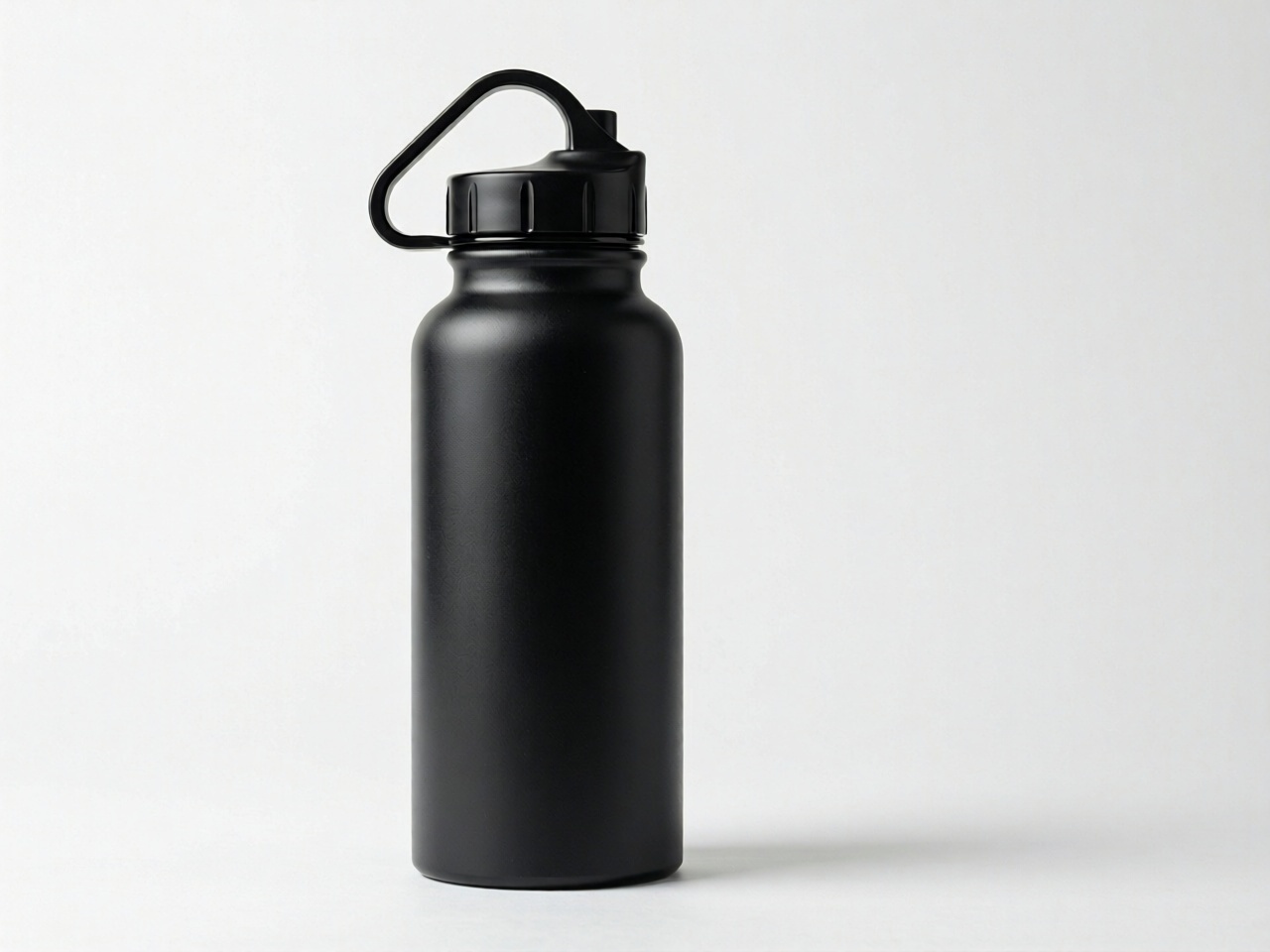
A minimal API call against Qwen Image 2512 looks like this:
import requests

response = requests.post(
 "https://api.segmind.com/v1/qwen-image-2512",
 headers={"x-api-key": "YOUR_API_KEY"},
 json={
 "prompt": "A matte black water bottle on a pastel gradient, studio lighting, centered, headline text 'Hydrate Daily'",
 "aspect_ratio": "1:1",
 "output_format": "jpg",
 },
)
Full parameter list, enums, and pricing are on the model page at Qwen Image 2512.
Edit Product Shots, Scenes, Lighting, and Textures With Qwen Image Models
The image editing side of Qwen is where the 15-plus specialized variants live. They all share the same core model underneath; the difference is the task prior baked into the endpoint. Instead of writing a long natural-language prompt to force a general image edit model to do one specific thing well, you pick the variant that already expects your use case.
A quick tour of the ones I use most:
- Qwen Image Edit Plus Product Photography (~$0.089, ~20.20s): transforms white-background products into immersive lifestyle scenes.
- Qwen Image Edit Plus Next Scene (~$0.095, ~21.93s): takes a source frame and generates a plausible next scene in the same setting. Good for storyboards and continuity exploration. Its model page describes it as creating cinematic sequences with smooth visual continuity.
- Qwen Image Edit Plus Eraser (~$0.078, ~19.83s): removes objects or people from a scene while preserving realistic backgrounds and scene integrity. Good for clean backgrounds and fixing distractions.
- Qwen Image Edit Plus Relight (~$0.103, ~20.73s): relights an existing image with a new lighting setup. Turn daylight into golden hour, or a flat office shot into a more controlled studio look.
- Qwen Image Edit Plus Multiple Angles (~$0.096, ~22.23s): takes a source and generates the same subject from a different camera angle. Useful for e-commercefor hero, three-quarter, and side shots from one input.
- Qwen Image Edit Plus Texture Apply (~$0.1, ~23.41s) and Qwen Image Edit Plus Texture Extract (~$0.102, ~23.38s): apply precise textures to images, or extract smoothly, tileable textures from photographs.
- Qwen Image Edit Plus Group Photo (~$0.105, ~23.73s): merges individual portraits into realistic group photos.
Here is an example of Qwen Image Edit Plus Product Photography in action: same source product shot, upgraded to a studio composition in one call.

And here is Qwen Image Edit Plus Next Scene, starting from the same source image and generating what the next scene in a sequence could look like.

The interface is consistent across variants. Most edit endpoints take an image URL plus a short prompt that describes the intent, and return a new image. A minimal call:
import requests

response = requests.post(
 "https://api.segmind.com/v1/qwen-image-edit-plus-product-photography",
 headers={"x-api-key": "YOUR_API_KEY"},
 json={
 "prompt": "Studio product photography, soft shadow, pure white backdrop, centered composition",
 "image_1": "https://your-cdn.example.com/source-product.jpg",
 },
)
Looking for the perfect Qwen model for your workflow? Explore Segmind's full Qwen model catalog to find the right fit.
Text and Vision-Language: The Reasoning Side of the Qwen Family
The non-image Qwen endpoints on Segmind split into text LLMs and vision-language models (VLMs). Usage patterns I see are fairly bifurcated:
- Qwen Flash and Qwen Plus at $0.0001 per call are the price leaders. Average latencies we see are around 4 to 5 seconds. Good for classification, light summarization, and short reasoning steps inside agent pipelines.
- Qwen 3 Max, Qwen 3.5 Plus, and Qwen 3 Coder Plus are the heavier text models. Qwen 3 Coder Plus, in particular, is built for code-centric workloads, including repository-scale code generation, debugging, refactoring, and agentic development.
- Qwen 3 VL Flash and Qwen 3 VL Plus are the VLMs in the current generation ($0.0001 per call). Good for image-captioning steps inside workflows, grounding agent actions on a screenshot, or pulling text and structure out of document images.
- Qwen2.5-VL 32B Instruct and Qwen2 VL 72B Instruct, are the larger open-weights VLMs we host, for teams that want a heavier model for multi-turn vision reasoning.
I will say the honest thing here: for most creative workflow use cases, the image and edit models are what matter. The LLMs in the family are useful inside agent pipelines, but are not usually what brings a team to Qwen in the first place.
Use Case 1: Marketing Agencies Running Ad Variant Volume
The most common agency pattern is ad variant generation. A creative team needs forty or fifty variants of a campaign per week, across aspect ratios and copy.
With Qwen, a practical pipeline looks like this: a base render with Qwen Image 2512, then Qwen Image Edit Plus Product Photography to swap backgrounds into campaign-specific scenes, Qwen Image Edit Plus Texture Apply to carry textures or material cues across variants, and Qwen Image Edit Plus Multiple Angles when the team wants alternate product perspectives.
At roughly $0.09 per edit call, fifty edit calls per week still land the weekly Qwen spend under $25, although a full multi-step workflow would cost more depending on how many calls each variant requires.
Use Case 2: Film Studios and VFX Previsualization
VFX Studios can reach out to the edit family for previs and continuity. Qwen Image Edit Plus Next Scene is a natural fit in this context: the previs team generates a candidate frame, then fans out three to five next-scene candidates to explore blocking and camera choices.
Qwen Image Edit Plus Relight is another useful tool here, because the director can iterate on lighting intent before anyone touches real production. Both of these are better framed as tools for faster pre-production exploration, rather than for shipping final assets.
Use Case 3: Production Houses and MCNs
For content houses pushing volume, one practical pattern is thumbnail and hero-frame generation. Qwen Image 2512 can handle the base thumbnail render, while Qwen Image Edit Plus Add People Lora or Qwen Image Edit Plus Group Photo can help when the thumbnail needs to feature the creator or additional people.
Qwen Image Edit Plus Eraser is useful for cleaning up distracting elements. In practice, that makes Qwen useful for teams that want to generate multiple thumbnail directions quickly, shortlist the strongest options, and then test performance through their usual review or publishing workflow.
How to Decide Which Qwen Model to Use
If you want a quick shortcut, this is the decision tree I use for choosing the right Qwen model on Segmind.
- Starting from a prompt alone? Text-to-image. Default to Qwen Image 2512 unless you need production-grade quality; for Qwen Image, use Qwen Image; for rapid iteration, use Qwen Image Fast.
- Editing an existing image? Pick the task-specific variant that matches your intent. Don’t reach for Qwen Image Edit Plus, the generic one, unless none of the specialized variants fit.
- Need a VLM step in a workflow? Qwen 3 VL Flash is almost always the right starting point ~$0 and goes up to ~$0.001, with latencies ranging from 2 to 20 secondsto.
- Need a text LLM inside a pipeline? Qwen Flash for classification, Qwen 3 Max image-editing, or Qwen 3 Coder Plus for heavier reasoning.
Compare Qwen Model Pricing and Latency Before Production
A compact view of the Qwen family pricing and latency on Segmind:
- LLMs: visible pricing starts at ~$0 and goes up to ~$0.001, with latencies ranging from 2 to 20 seconds, and ranges from ~$0 to ~$0.001, with a typical 4 to 8 seconds depending on the model.
- VLMs: visible pricing ranges from ~$0 to ~$0.001, with a typical 4 to 8 alternatives.
- Text-to-image: ~$0.014 to ~$0.12 per generation, 5 to 28 seconds.
- Image edit: $0.01 to ~$0.199 per generation, 13 to 49 seconds
Latency numbers are rolling averages from our platform and move with load. Pricing is published on each model page. Always confirm on the model page before committing a workflow to production.
Common Mistakes Before Using Qwen in Production
A few practical notes. First, the specialized edit variants are good specifically because they have task priors baked in; that also means they are not good at tasks outside their name. Pick the variant that matches. Second, if your edit workflow uses image URLs, make sure they are publicly fetchable; if your asset flow goes through a CDN with short-lived signed URLs, make sure the signed lifetime is long enough for the call.
Third, on latency: the heavier edit variants run in the 20 to 25 second range. That is fine for async workflows, less fine for interactive UX. If you need the lowest-latency option, stay in the fast family and confirm the model page before committing the workflow.
FAQs
How many Qwen models are on Segmind?
Thirty-two at present, covering text LLMs, vision-language models, text-to-image, and about fifteen specialized image-editing variants.
Which Qwen model should I use for image generation?
Default to Qwen Image 2512 for most cases. It balances quality, on-canvas text rendering, and latency better than the family's alternatives.
What is the cheapest Qwen model on Segmind?
Qwen Flash at $0.0001 per call. It is a lightweight text LLM, good for classification and short reasoning inside agent workflows.
Which Qwen model is best for editing an existing image?
Pick the task-specific variant that matches the job. Use Qwen Image Edit Plus Product Photography for product-shot upgrades, Qwen Image Edit Plus Next Scene for storyboarding, and Qwen Image Edit Plus Eraser for object removal. Avoid the generic Qwen Image Edit Plus unless no specialized variant fits.
Can I run Qwen models on a dedicated endpoint?
Yes. Segmind supports dedicated endpoints for Qwen models for teams running sustained volume. Pricing is per-GPU-hour rather than per-call. Reach out via the dashboard if you want to size a dedicated endpoint.
Conclusion
Qwen is not a single model. It is a family with 32 endpoints on Segmind, and the right way to use it is to treat those endpoints as a toolkit. For most creative workflow teams, a focused setup with Qwen Image 2512 and a few task-specific edit variants can cover the core work: base renders, product scenes, relighting, object removal, scene continuity, and visual variations.
The rest of the family is still worth knowing, especially Qwen Flash and Qwen 3 VL Flash for agent pipelines where lightweight reasoning, classification, OCR, or image understanding sit behind the creative workflow.
Explore the full Qwen model catalog on Segmind to compare live pricing, latency, and endpoint options before choosing the model stack for your next workflow.