
Segmind MCP Tutorial: The Most Powerful Gen AI Media MCP in Claude
Segmind MCP tutorial: connect 547 image, video and audio models to Claude and Claude Code with one URL and a sign-in. Setup, 14 tools, 5 workflows.

I spend most of my day inside Claude. Writing specs, reviewing code, drafting launch copy. The one thing that always broke the flow was media: the moment I needed a product shot, a storyboard or a 5-second clip, I left the chat, opened a playground, copied a prompt across, downloaded a file and dragged it back. The Segmind MCP server removes that whole loop. You paste one URL into Claude, sign in once, and Claude can browse, price and run any of the 547 image, video, audio, text and 3D models on Segmind from the conversation you are already in.
This is the setup guide I wish I had: how to connect the Segmind MCP to Claude on the web, the desktop app and Claude Code, what each of its 14 tools actually does, five workflows you can copy today, and the honest gotchas I hit along the way.
What is the Segmind MCP server?
The Model Context Protocol (MCP) is the open standard Claude uses to talk to external tools. An MCP server publishes a set of tools; Claude reads their descriptions and decides when to call them. The Segmind MCP server is a hosted, remote MCP server at https://mcp.segmind.com/mcp that publishes Segmind's entire media catalog as a small set of verbs: find a model, price it, run it, collect the output.
The details that matter, all from Segmind's MCP page and checked against the server itself:
- Transport: remote MCP over Streamable HTTP. There is no stdio mode and nothing to install. No Node, no Python, no Docker.
- Sign-in: OAuth 2.0 with your Segmind account. There is no API key to paste, store or rotate.
- Catalog: 547 models as of 13 October 2026, read live. A model is callable through the connector the day it ships on Segmind.
- Price: free to connect. Each generation bills your Segmind credits at exactly the model's API price, with no connector fee.
- Clients: Claude (web and desktop), Claude Code, ChatGPT, Grok Build with the Segmind plugin, and other remote MCP clients that support the same sign-in method.
When I hit the endpoint without a token, it answered with a standard 401 and pointed at its OAuth metadata, which lists four scopes: models:read, models:invoke, workflows:read and workflows:write. The authorization server is cloud.segmind.com, it uses PKCE with S256, and it advertises Client ID Metadata Document support. That last point is the reason Claude connects with one click and some older MCP clients do not; more on that in the gotchas.
Why it is the most powerful media MCP you can give Claude
The obvious way to build a media MCP server is one tool per model. That design goes stale the week a new model drops, and it fills Claude's context with dozens of near-identical tool definitions. Segmind went the other way:
- One catalog, discovered at runtime. Claude calls
list_modelsandget_model_specinstead of carrying a tool per model, so Seedance 2.5, Nano Banana Pro, GPT Image 2, ElevenLabs TTS and the other 540-odd models all sit behind the same 14 tools. - Price awareness before the spend.
compare_modelsputs a shortlist side by side with real price tables, andget_accounttells Claude your balance and whether your personal account or a team is paying. Claude can check before it fires an expensive video job. - Async jobs for slow models. Video does not block the chat. Claude submits the job, gets a request id and collects the output when it is ready, so a two-minute render never times out a tool call.
- Whole pipelines, not just single models. It can run published Pixelflows, Segmind's saved multi-model workflows, end to end.
- Your files as inputs. A chat attachment or a local file becomes a URL a model can read.
Breadth, cost visibility, async handling and pipelines in one connector is what I mean by powerful. It turns Claude from a model that describes images into one that produces them.
How to add the Segmind MCP to Claude (web and desktop)
Custom connectors work on every Claude plan, including Free. Free accounts can add one custom connector; Pro and Max can add more.
- Add a custom connector. In Claude, open Customize, then Connectors. Select + Add, then Add custom connector.
- Paste the URL. Name it
Segmind, pastehttps://mcp.segmind.com/mcpand select Continue. Leave the advanced OAuth Client ID and Secret fields empty. - Sign in. Keep the option to use Claude's published identity as the OAuth client, choose Sign in now, select Add and log in with your Segmind account.
- Turn it on in a chat. In any conversation, select the + button, then Connectors, and toggle Segmind on.
On Team and Enterprise plans an Owner adds the connector once under Organization settings, then Connectors, and each member selects Connect to sign in with their own Segmind account.
How to add the Segmind MCP to Claude Code
This is the path I use most, because Claude Code can read files on disk and hand them to a model directly. One command:
claude mcp add --scope user --transport http segmind https://mcp.segmind.com/mcp--scope user makes the server available in every project rather than only the current folder. Here is the real output from my terminal, followed by the status check before signing in:
Added HTTP MCP server segmind with URL: https://mcp.segmind.com/mcp to user config

$ claude mcp get segmind
segmind:
  Scope: User config (available in all your projects)
  Status: ! Needs authentication
  Type: http
  URL: https://mcp.segmind.com/mcp
Needs authentication is expected. Start Claude Code, run /mcp, select segmind and choose Authenticate. Your browser opens the Segmind sign-in page, you approve the scopes, and the status flips to connected. If you prefer to commit the server to a repo so your team picks it up automatically, use --scope project instead; it writes a .mcp.json at the project root, and each teammate still signs in with their own account.
The 14 Segmind MCP tools, explained
You never call these by hand. Claude picks them. Knowing what exists, though, makes you much better at asking for things.
| Group | Tool | What it does |
|---|---|---|
| Find | list_models | Browse and rank the catalog by cost, latency or popularity |
| Find | compare_models | Put a shortlist side by side with real price tables |
| Find | get_model_spec | Full spec for one model: parameters, pricing, examples |
| Generate | run_inference | Run a model and wait for it; the fast path for images |
| Generate | submit_inference | Start a slow job (video, long audio) and return its id at once |
| Generate | check_inference | Collect the output once the job finishes |
| Pixelflow | list_pixelflows | Browse published workflows and the models they chain |
| Pixelflow | get_pixelflow_spec | The inputs a flow takes and the models it runs |
| Pixelflow | submit_pixelflow | Start a flow run |
| Pixelflow | check_pixelflow | Collect the flow's outputs |
| Inputs | upload_media | Turn a chat attachment into a URL a model can read |
| Inputs | create_upload_ticket | Get a signed URL to upload a local file |
| Account | get_account | Credit balance and which account (personal or team) is billed |
| Account | ping | Health check and server version |
A typical image request runs three calls. Ask for "a hero image for our coffee brand, ceramic cup on a sunlit wooden table, steam rising" and Claude does roughly this:
list_models({ search: "text to image" })
compare_models({ slugs: ["nano-banana-pro", "gpt-image-2"] })
run_inference({ slug: "nano-banana-pro",
                params: { prompt: "...", aspect_ratio: "16:9" } })
Segmind's own walkthrough of that exact request came back from Nano Banana Pro at 16:9 and 2K in 28 seconds for $0.15. For video the middle step becomes submit_inference, and Claude polls check_inference until the clip lands.
Five Segmind MCP workflows to try first
The examples below are Segmind's published runs from the MCP page, each made through the connector from the prompt shown beside it, with the cost Segmind lists for the run. Write prompts the way you would brief a designer. Claude picks the model and fills in the parameters.
Workflow 1: E-commerce product shots from one photo
This is the one that sells agencies on it. Attach a single packshot and ask for a set.
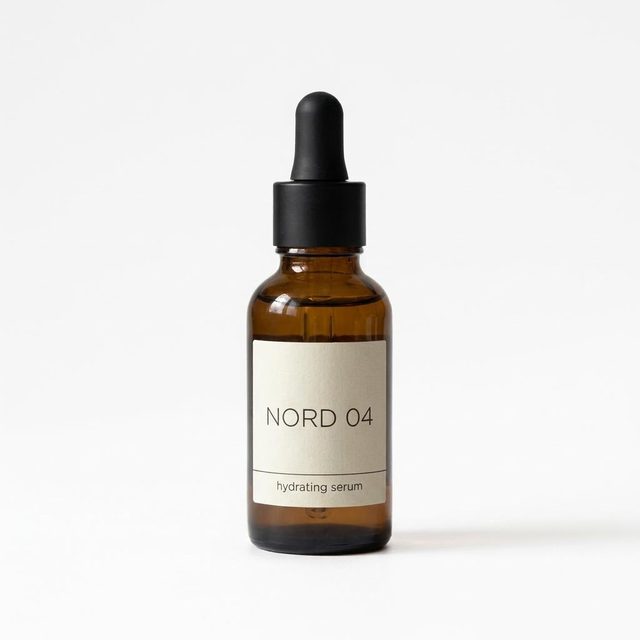
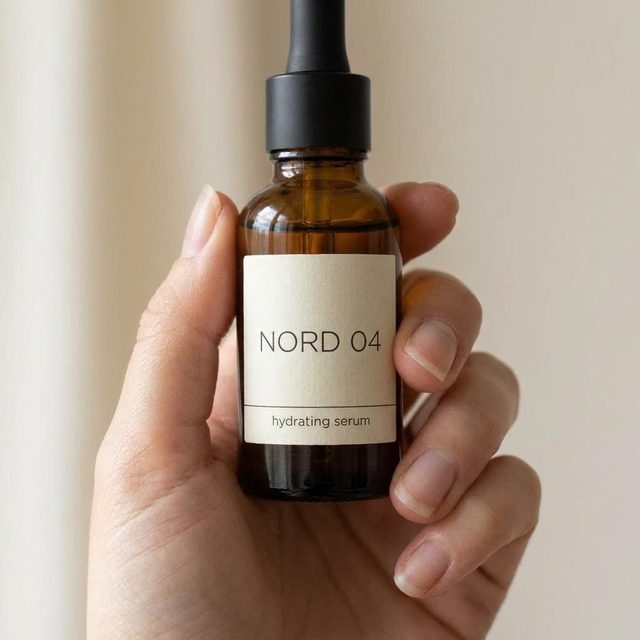
What the agent pickedModel: Nano Banana Pro | Input: 1 attached photo | Listed cost: $0.60 for the set
Input
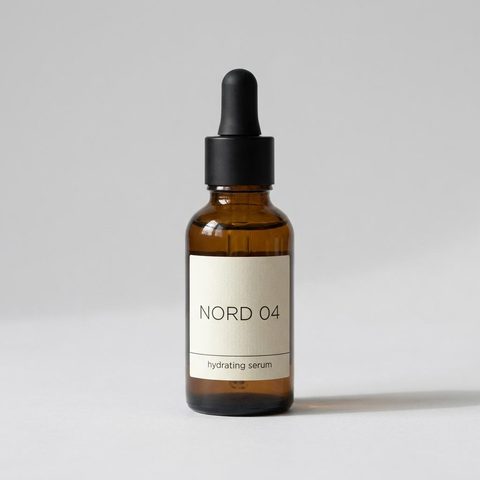
The single source photo attached to the chat.
On white
Marble

In hand
Kitchen

Four outputs from one prompt. Segmind's published example; the NORD 04 label survives every scene.
What to notice: the label text stays legible and identical across all four, which is the part that usually fails. The ask "keep the label and colors exactly as in the original" is doing real work, so keep it in your prompt.
Workflow 2: Seasonal campaign variations
What the agent pickedModel: Seedream 5.0 Pro | Input: 1 ad still | Listed cost: $0.16
Input

Spring

Summer

Holiday

Segmind's published example. Product position and the Stay cold tagline hold across all three seasons.
For a marketing team this replaces a reshoot. The constraint list ("keep the product, framing and the tagline placement") matters more than the creative direction; Claude passes it through, and Seedream respects it.
Workflow 3: Animate a still into a vertical clip
What the agent pickedModel: Seedance 2.0 | Async: submit_inference then check_inference | Listed cost: $0.76
Input

Output
Segmind's published example: one still in, a 5-second 9:16 product clip out.
This is where the async tools earn their place. Claude tells you the job is running, carries on with whatever else you asked, and drops the clip into the chat when check_inference reports it done. Videos take one to several minutes.
Workflow 4: Edit an image with plain instructions
What the agent pickedModel: Nano Banana 2 | Input: 1 headshot | Listed cost: $0.12
Before
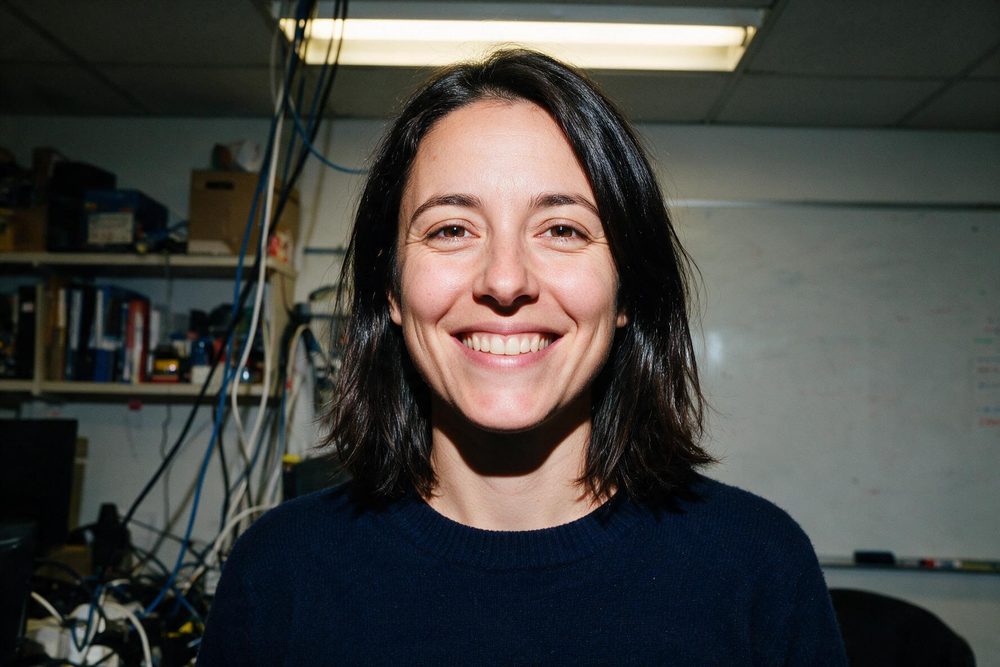
After

Segmind's published example. Three edits in one sentence, one call.
Workflow 5: Storyboard a scene for a film team
What the agent pickedModel: GPT Image 2 | Listed cost: $0.21
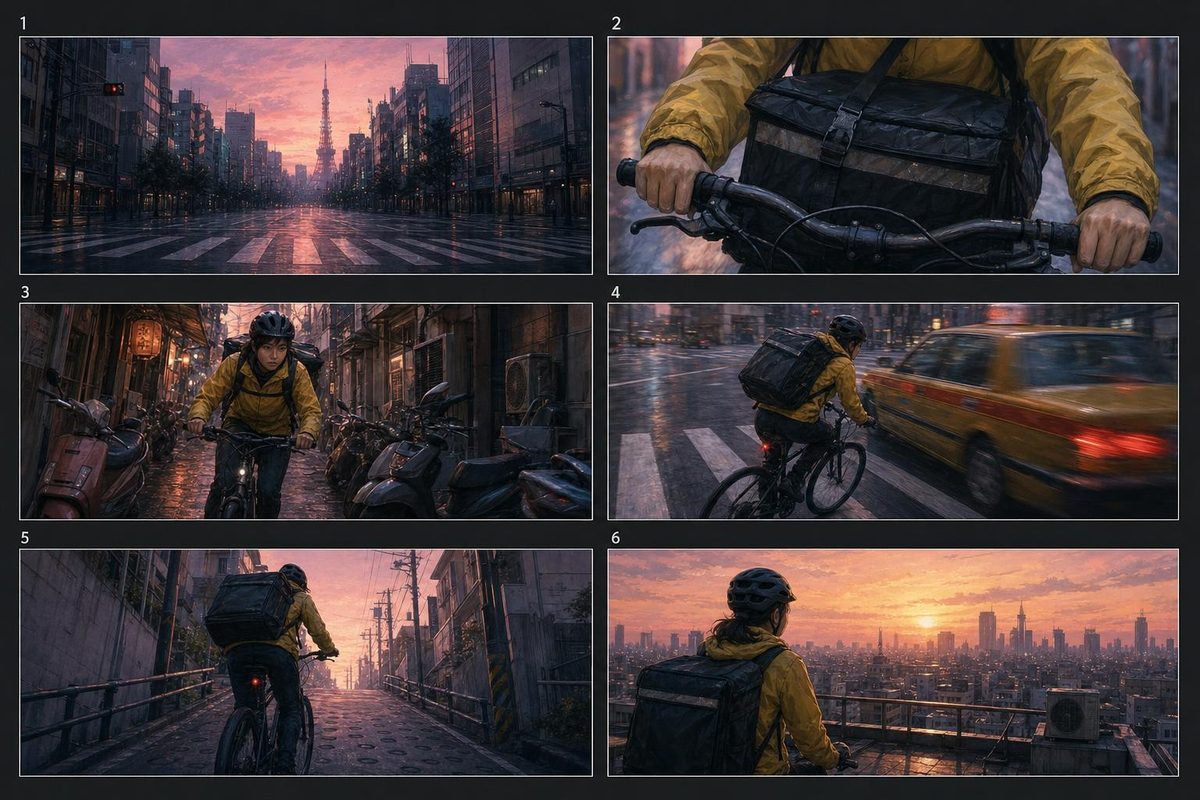
Segmind's published example: six panels, one consistent courier, from a single prompt.
Production houses can take this straight into a pitch deck, then ask Claude to animate panel one with a video model in the same conversation. That chaining, image to video to voiceover, is the real advantage of having everything behind one connector. Segmind's page also shows a 25-second ElevenLabs voiceover of a product explainer for $0.06, so a full rough cut never leaves the chat.
How I prompt Claude to get better results from Segmind MCP
- Ask for the price first on anything expensive. "Compare the three cheapest text-to-video models that do 9:16 and tell me the cost of a 5-second clip before running anything." Claude uses
compare_modelsand waits for your go-ahead. - Set a budget in words. "Stay under $2 for this whole task" works because Claude can see prices and your balance through
get_account. - Name the model when you care. If you already know you want Seedance 2.5, say so. Otherwise let Claude choose and ask it why it picked that one.
- List what must not change. Labels, logos, framing, a character's face. Edits fail on what you forgot to protect, not on what you asked to change.
- Check for a Pixelflow before chaining by hand. "Is there a Pixelflow for virtual try-on?" can replace five manual steps with one
submit_pixelflowcall.
FAQ
What is the Segmind MCP server?
The Segmind MCP server is a hosted Model Context Protocol server at https://mcp.segmind.com/mcp that lets Claude and other AI agents browse, price and run Segmind's 500+ image, video and audio models from a chat.
Is the Segmind MCP free?
Connecting is free. Each generation bills your Segmind credits at the same price as calling that model's API directly, with no connector fee. Claude can compare prices and check your balance before it runs anything.
Do I need an API key to use Segmind MCP in Claude?
No. You sign in with your Segmind account over OAuth when Claude asks. There is no key to copy or rotate, and you can revoke access from Connected Apps in the Segmind console.
How do I add Segmind MCP to Claude Code?
Run claude mcp add --scope user --transport http segmind https://mcp.segmind.com/mcp, start Claude Code, run /mcp, select segmind and choose Authenticate to sign in through your browser.
Can Segmind MCP generate video in Claude?
Yes. Video models run as async jobs: Claude submits the job, gets a request id, and collects the clip when it is ready, usually within one to several minutes, so the chat never times out.
Which models can I use through Segmind MCP?
Every model in the Segmind catalog, 547 as of 13 October 2026, including Seedance 2.5, Nano Banana Pro, GPT Image 2, Seedream 5.0 Pro and ElevenLabs TTS. New models appear automatically.
Conclusion
The Segmind MCP server is the shortest path I know from "I need a visual" to having one, without leaving Claude. One URL, one sign-in, 14 tools, and the full Segmind catalog at API prices. Start with the e-commerce prompt above on a product photo you already have, then try chaining it into a video. Add the connector from segmind.com/mcp, and if you are new to Segmind, browse the model catalog to see what Claude will be able to reach.