
Nano Banana 2.1 Guide: API, Top Features and Examples
I ran 18 generations through the Nano Banana 2.1 API on Segmind: text rendering, 4K, seeds, web search and editing, with measured costs.

Google shipped Nano Banana 2.1 to general availability on 6 October 2026, and it landed on Segmind the same week. The pitch is narrow and specific: sharper renders than Nano Banana 2, up to 14 reference images, and much cleaner in-image text and infographic layout. I have been burned enough times by launch-day claims that I no longer take any of that on trust.
So I spent $1.21 running 18 generations through the Nano Banana 2.1 API on Segmind. Every fire was logged with its billed cost from the x-cost response header, every output was measured in pixels, and the comparable pairs were diffed against each other rather than eyeballed. This guide is what came back: what the parameters actually do, what each resolution tier really costs per pixel, where the published spec is wrong, and the four or five settings that are worth changing.
What Nano Banana 2.1 is
Nano Banana 2.1 is Google's image generation and conversational editing model, served on Segmind as a synchronous endpoint at https://api.segmind.com/v1/nano-banana-2.1. You POST a JSON body, you get the image back as raw binary in the response. There is no polling, no job id, no webhook. For a developer that is the single nicest thing about it: a working integration is about nine lines of Python.
It takes a text prompt, optionally up to 14 reference images, and renders at 1K, 2K or 4K across fifteen aspect ratios including 4:1 and 8:1. The levers that matter are output_resolution, thinking_level and web_search, and all three move the price. The version it replaces, Nano Banana 2, is still live, and if you have been running it the migration is a slug change.
Text rendering: the thing it is actually for
The headline claim is legible in-image text. I tested it the hard way, with a six-callout science diagram where every label is quoted in the prompt and a wrong character is instantly visible.
Parameters aspect_ratio: 4:3 | output_resolution: 2K | thinking_level: high | output_format: png | seed: 420875 | billed: $0.075
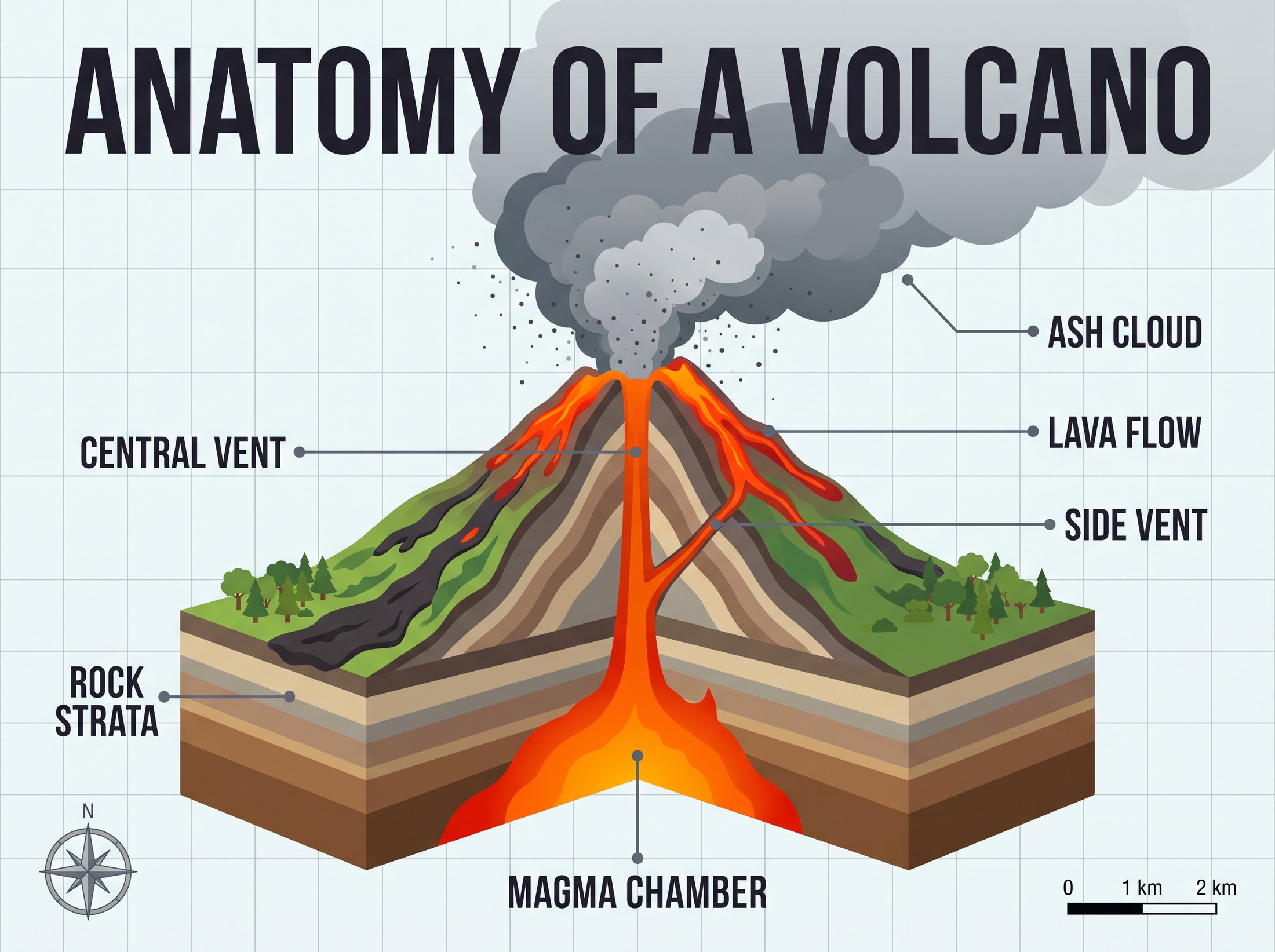
All six callouts and the title spelled correctly, with leader lines landing on the right features. 2400x1792, 28.2s, $0.075.
Six for six, title included, with the leader lines actually pointing at the right parts of the cutaway. That held at every resolution and every thinking level I tried. I got the same result on a packaging mockup where I closed the label set explicitly: four lines of copy, nothing invented, no phantom brand marks. That last part is worth saying out loud, because vague product prompts are exactly where image models like to hallucinate a rival brand and a health claim nobody asked for. Name every string you want and say "no other words anywhere in the frame".
thinking_level is a composition lever, not a quality dial
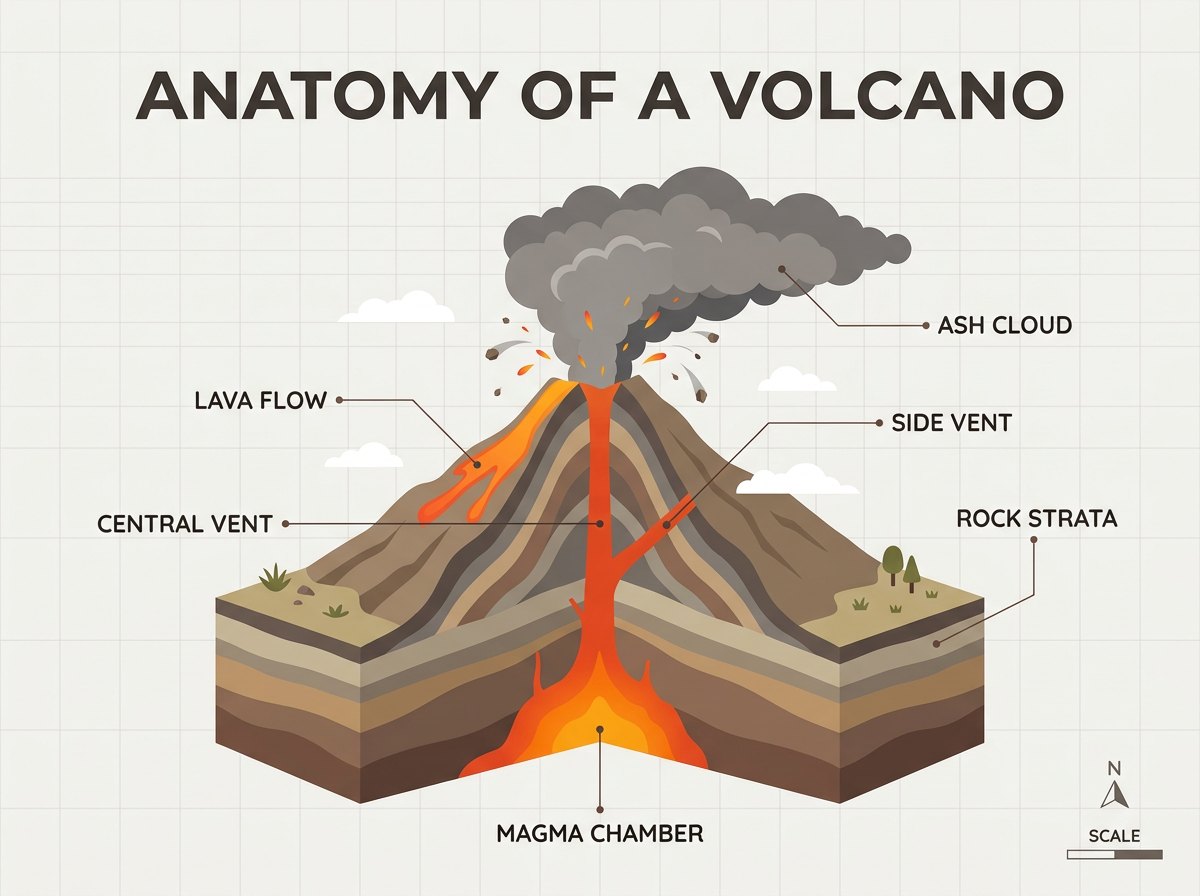
The spec describes thinking_level as reasoning depth, with minimal as fastest and cheapest. That undersells it. I ran the same infographic prompt at the same seed and the same 1K resolution, changing only this one value. The two outputs differ on 57.9% of their pixels, with a normalised cross-correlation of 0.55. These are not two renders of the same picture at different polish levels. They are two different pictures.
thinking_level: minimal ($0.045)
thinking_level: high ($0.055)
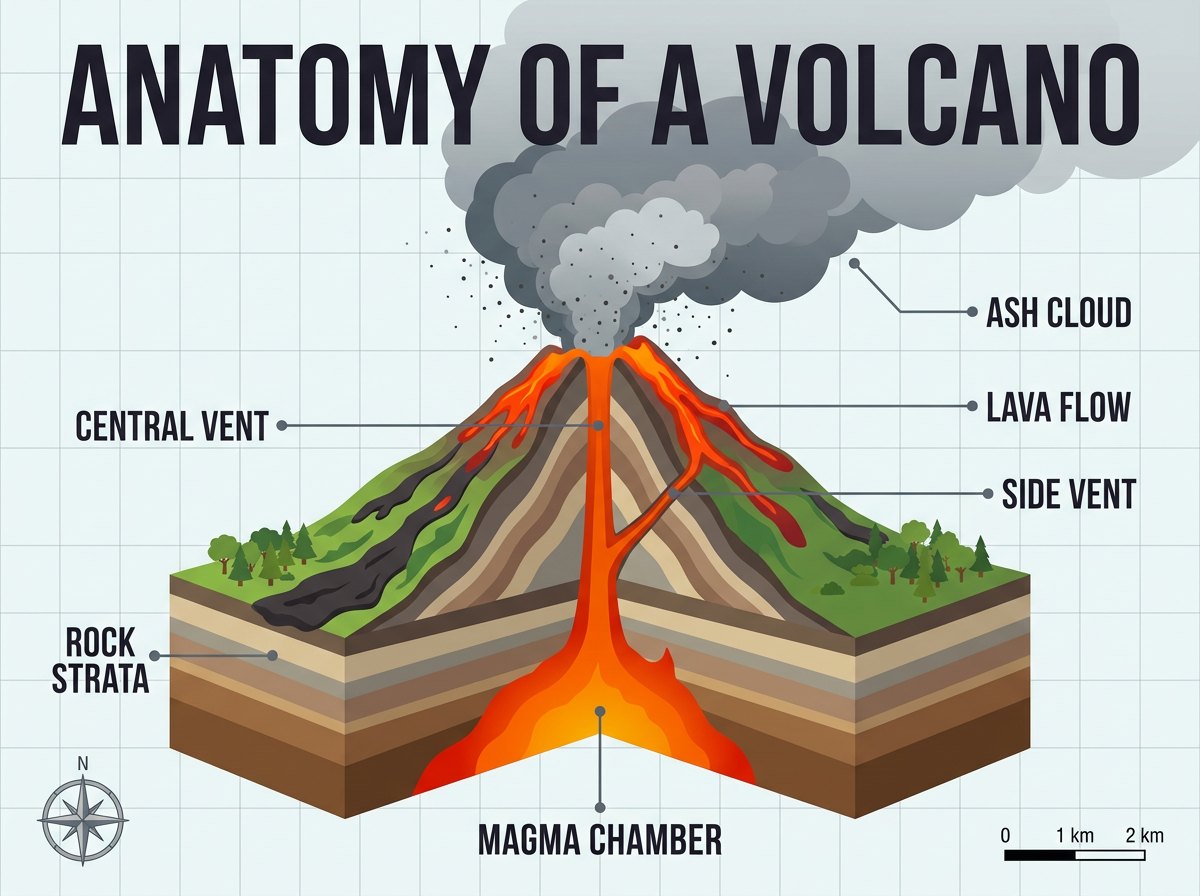
Same prompt, same seed 420875, same 1K resolution. Minimal drew the compass rose as a bare N arrow and left the scale bar unlabelled. High drew a proper compass rose and a scale bar reading 0 / 1 km / 2 km.
Look at the two corners. Minimal gave me a plain N arrow and a featureless grey block where the scale bar should be. High gave me a drawn compass rose and a scale bar with real tick labels. The small print is where the reasoning budget goes. Latency went from 11.0s to 22.0s of generation time, and the cost went up by one cent.
Here is the part worth internalising: medium and high are priced identically at every resolution tier. 1K is $0.055 either way, 2K is $0.075 either way, 4K is $0.155 either way. There is no cost reason to ever send medium. The only real decision is minimal versus high, and that one is about ten seconds of latency and one cent, not about quality tiers.
What 1K, 2K and 4K actually mean
They are pixel budgets, not long edges. Every output I measured snapped to a multiple of 16 pixels, and every tier hit the same total area regardless of aspect ratio.
| Tier | 4:3 | 4:5 | 4:1 | 8:1 | Megapixels | Cost (medium or high) |
|---|---|---|---|---|---|---|
| 1K | 1200x896 | 928x1152 | n/a | n/a | 1.05 to 1.08 | $0.055 |
| 2K | 2400x1792 | 1856x2304 | 4128x1024 | 5856x704 | 4.12 to 4.30 | $0.075 |
| 4K | n/a | 3712x4608 | n/a | n/a | 17.1 | $0.155 |
2K is four times the pixels of 1K. 4K is four times 2K and sixteen times 1K. Priced per megapixel at the same thinking level, that is $0.051 at 1K, $0.018 at 2K and $0.009 at 4K, so 4K is roughly 5.6 times cheaper per pixel than 1K.
The 16-pixel grid also explains why your aspect ratio drifts. 3:2 comes back as 1264x848, which is 1.491. 8:1 comes back as 5856x704, which is 8.318, a 4% overshoot. If you are compositing output into a fixed layout, measure what you got rather than assuming the ratio you asked for.
The tier does not change the picture
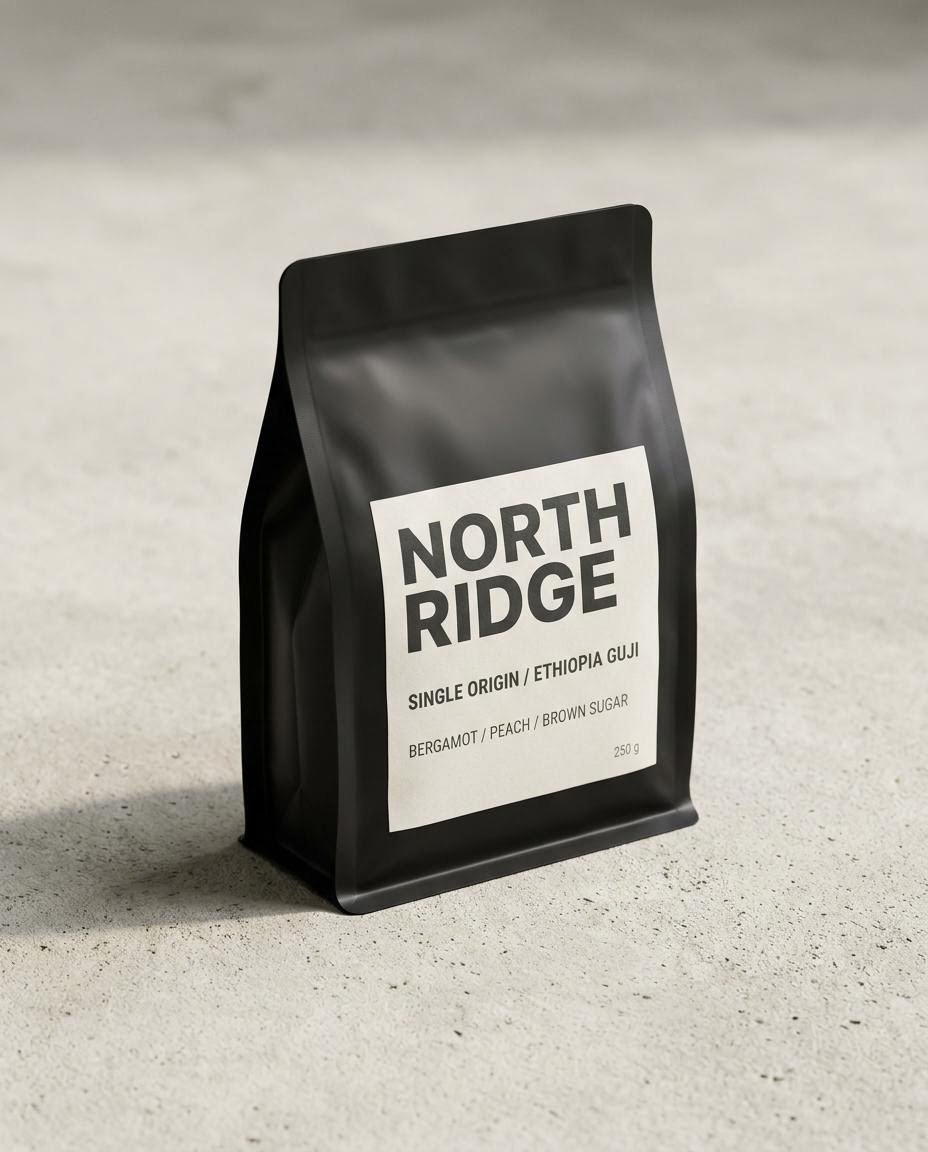
This is the finding that should change how you work. Same prompt, same seed, three resolutions, and you get the same photograph three sizes up.
1K: 928x1152, $0.055
4K: 3712x4608, $0.155
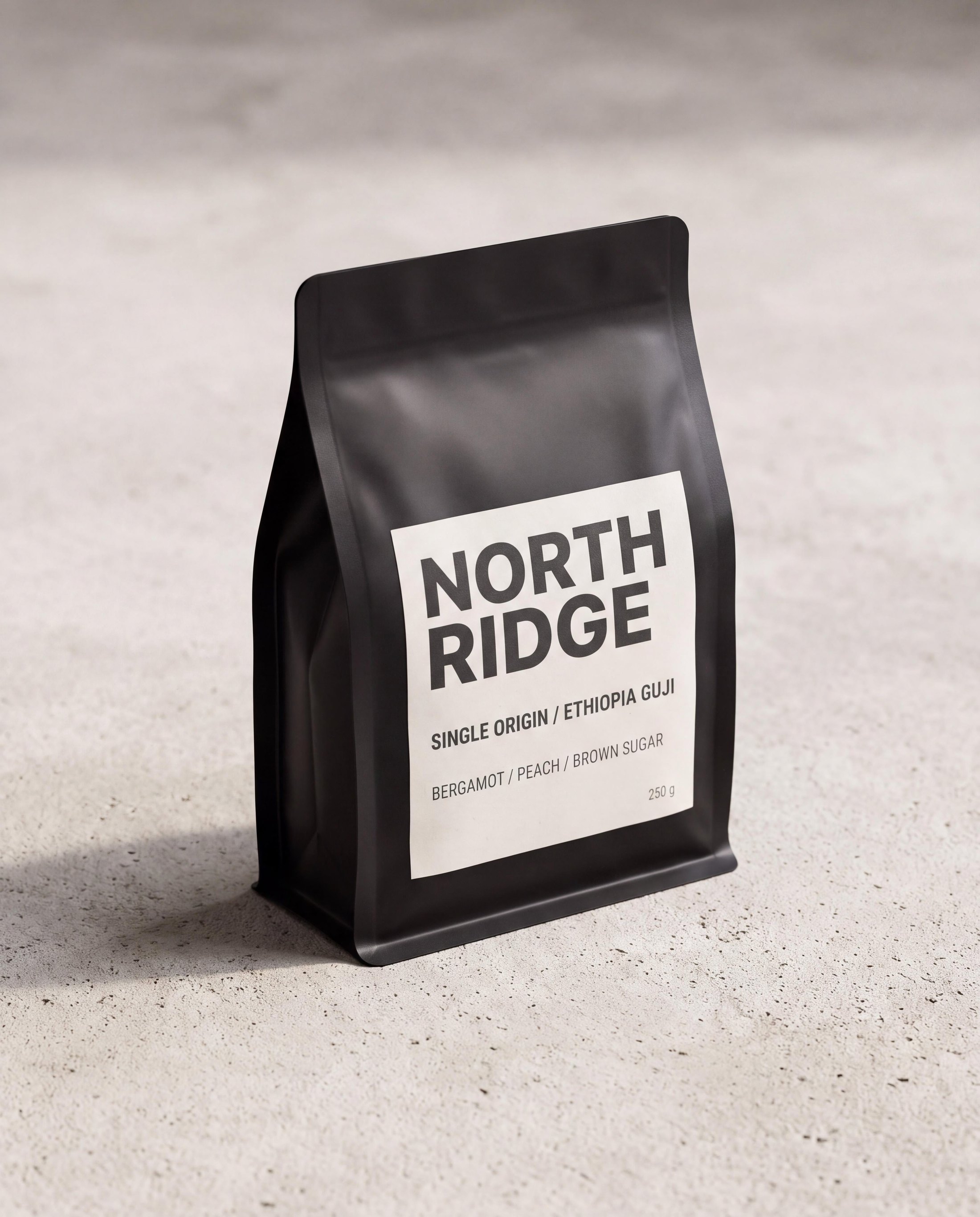
Same prompt and seed 31337. Normalised to a common size, 1K and 4K differ on 5.5% of pixels with a cross-correlation of 0.998, and the bag's centroid moves under 2px in 512. The four label lines are identical.
1K against 2K differed on 2.2% of pixels, 2K against 4K on 1.4%. The infographic behaved the same way: 1K high against 2K high differed on 1.1% of pixels with a cross-correlation of 0.9995. So the cheap workflow is real. Iterate your prompt at 1K minimal for $0.045 a go, and when the composition is right, re-fire the winner at 4K with the same seed and get that exact frame at 17 megapixels. The draft costs 29% of the final render and tells you the truth about it.
The seed is deterministic, whatever the spec says
The model page FAQ says the upstream Gemini model may ignore the seed and that exact reproducibility is not guaranteed. That is not what I measured. I fired the same request twice at seed: 777, thirteen seconds apart, and the two PNGs were pixel-identical: a SHA-256 of the decoded RGB array matched exactly. The files differed only in a 1536-byte embedded IPTC metadata block.
For comparison, most image models I have tested this year either have no seed at all or give you a seed that merely nudges the output. This one reproduces. The API also echoes the value back in an x-seed-value response header, so you can log it and replay a render months later. Treat the FAQ as conservative, but do re-check it after any model update, because determinism is a property of a deployment and not a promise.
One related note while I was there: response_modalities appears to be a no-op on this endpoint. Setting IMAGE instead of the default TEXT_AND_IMAGE returned a pixel-identical file, and both paths return raw binary rather than a JSON envelope. Do not write a JSON parsing branch for it.
web_search, measured against the real number
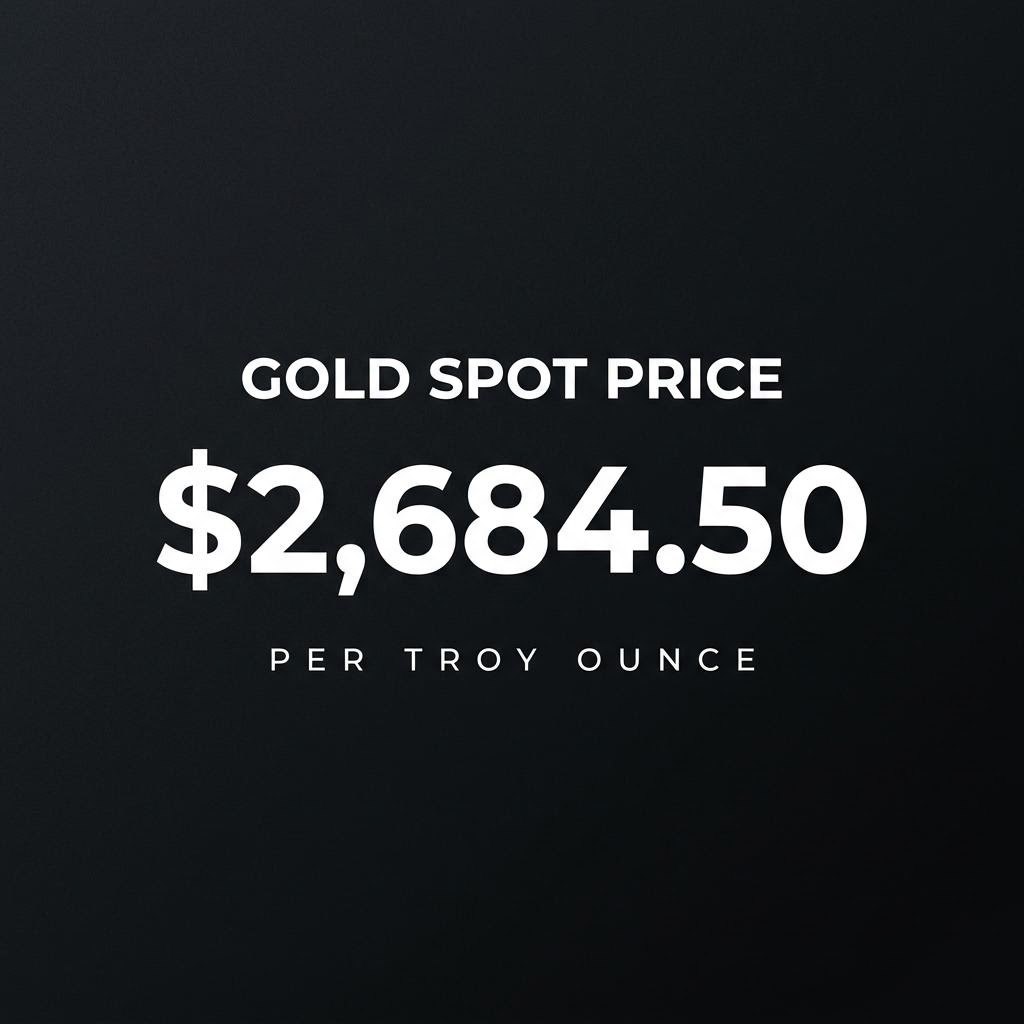
web_search grounds the generation in live data and costs $0.035 more at 1K. I wanted to know whether it does anything you can verify, so I asked for a fact card showing the current gold spot price and checked the rendered number against a live quote.
Parameters aspect_ratio: 1:1 | output_resolution: 1K | thinking_level: medium | seed: 5150 | billed: $0.055 vs $0.09
web_search: false ($0.055)
web_search: true ($0.09)
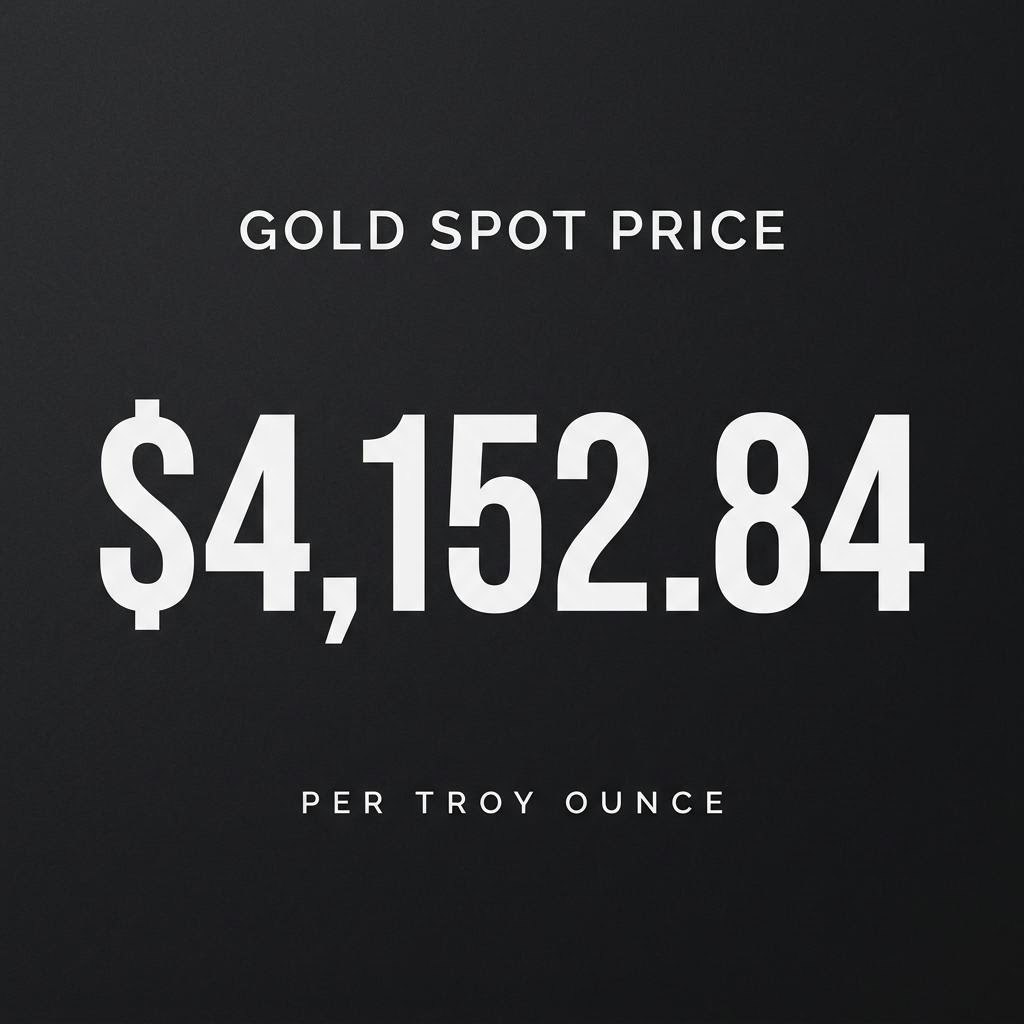
Live spot price at the time of the test was $4,146.50. Without grounding the model rendered $2,684.50, which is 35.3% low. With grounding it rendered $4,152.84, which is 0.15% high.
That is about as clean a result as this kind of test gets. Ungrounded, it reached for a number from training data that was years out of date and rendered it with total confidence. Grounded, it was within 0.15% of the live quote. Generation time went from 15.2s to 26.6s. If your card, chart or social graphic contains a number that moves, the extra three and a half cents is not optional.
Reference images: fusion and editing
Nano Banana 2.1 takes up to 14 reference images and you address them by position in the prompt. I generated two clean studio shots as separate calls, then asked for one scene containing both objects.
Reference 1
first reference image

Reference 2
second reference image
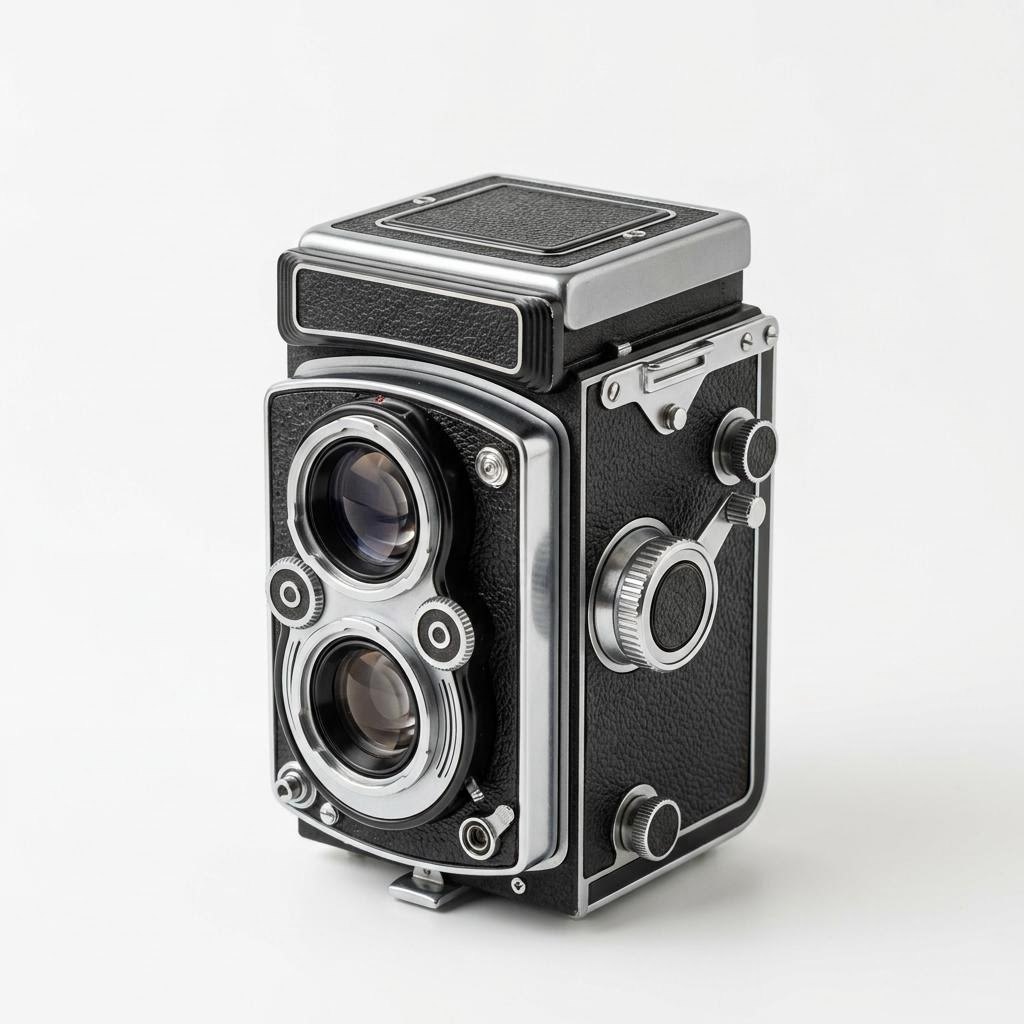
Two separate 1K generations at $0.045 each, uploaded to S3 and passed back in as image_urls.
Parameters image_urls: 2 | aspect_ratio: 3:2 | output_resolution: 2K | thinking_level: high | billed: $0.075
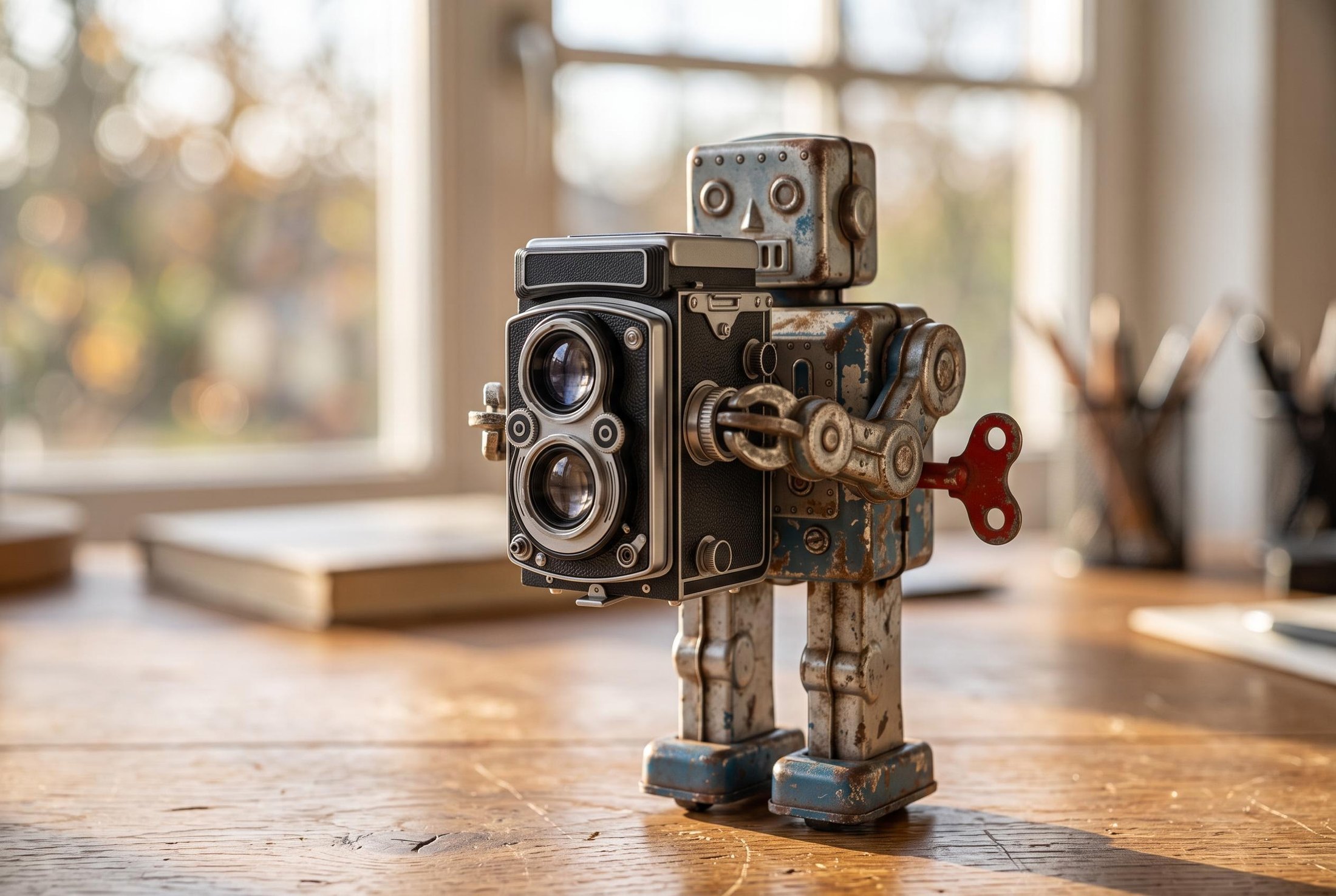
Both objects keep their identity from two separate source photographs. 2528x1696, $0.075.
The chipped blue and white paint, the red wind-up key and the camera's chrome and leather all survived the transfer. What did not survive was the staging: I asked for the camera held up to the robot's face and got it held at chest height, and the robot lost an arm in the process. Object identity is strong, physical pose instruction is weaker. Budget a couple of retries when the pose matters.
Instruction editing stays local
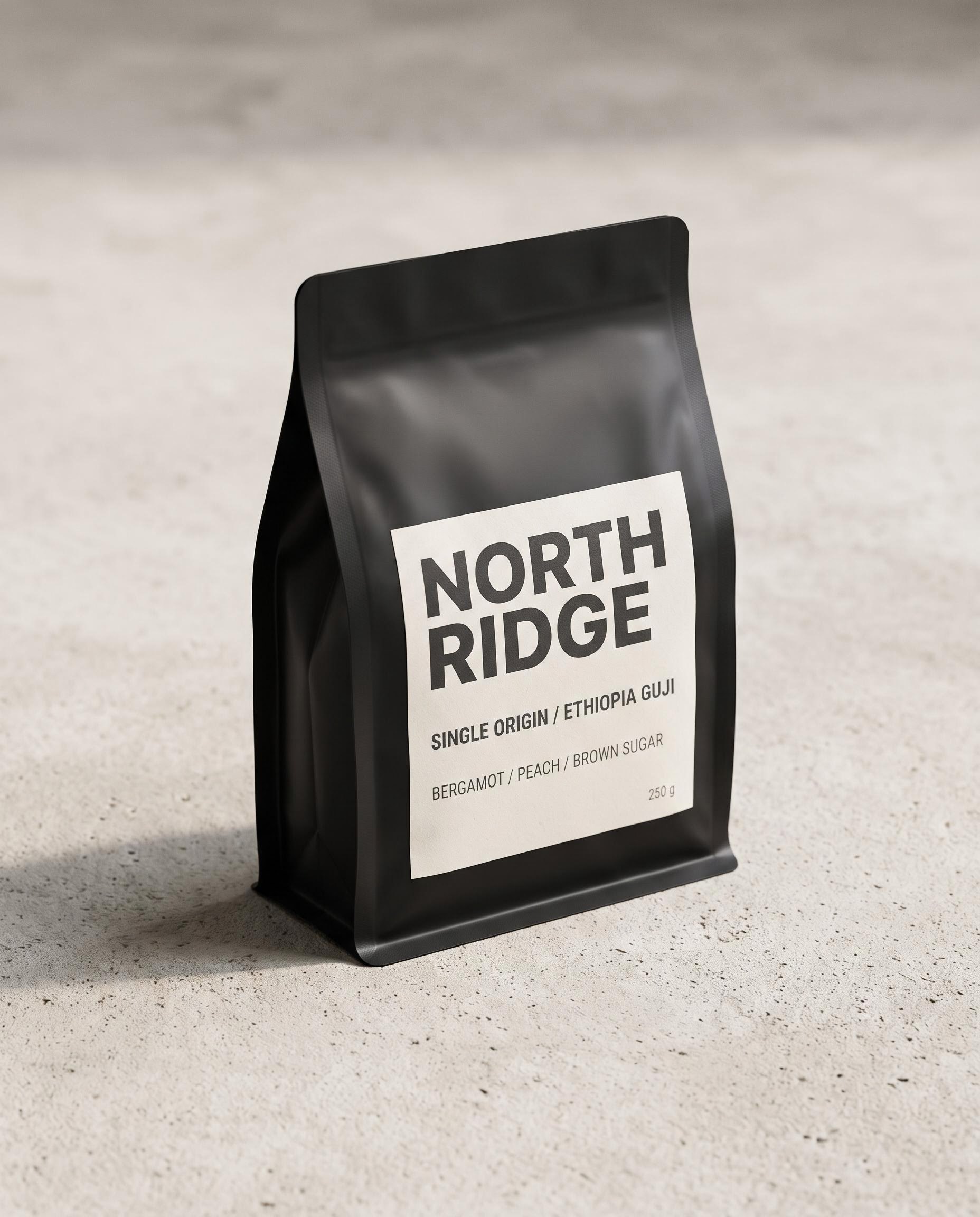
Editing is the same call with one reference and an instruction. I took the 2K packaging render and changed exactly one word.
Parameters image_urls: 1 | aspect_ratio: 4:5 | output_resolution: 2K | thinking_level: medium | billed: $0.075
Input
Output
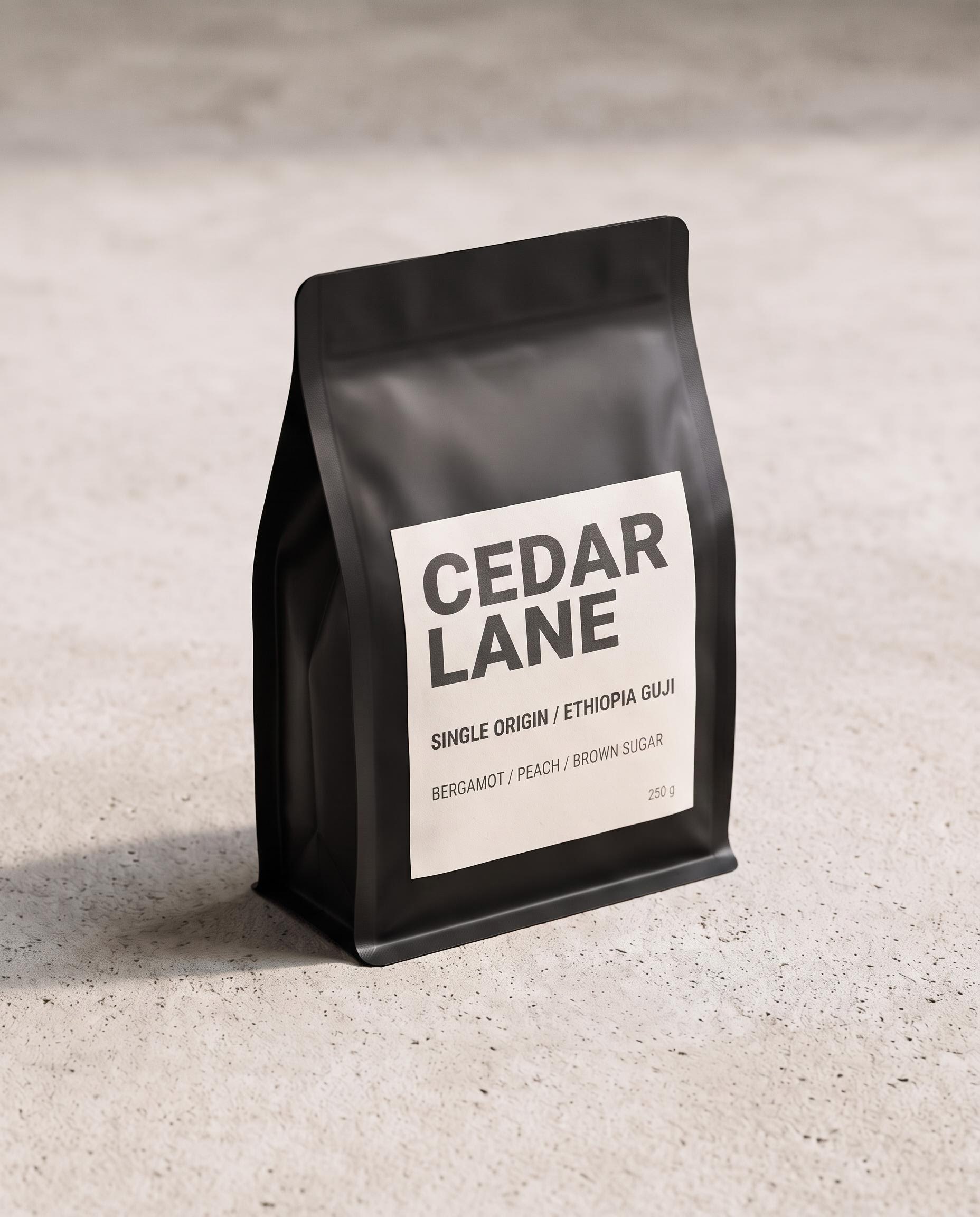
One word changed. 2.35% of the frame moved by more than 24/255 on any channel, and the output came back at exactly the source dimensions of 1856x2304.
Then I fed that output straight back in as the only reference and changed the surface underneath. Both edits held: all four label lines are still correct after two round trips, and the bag, angle and label geometry are untouched.
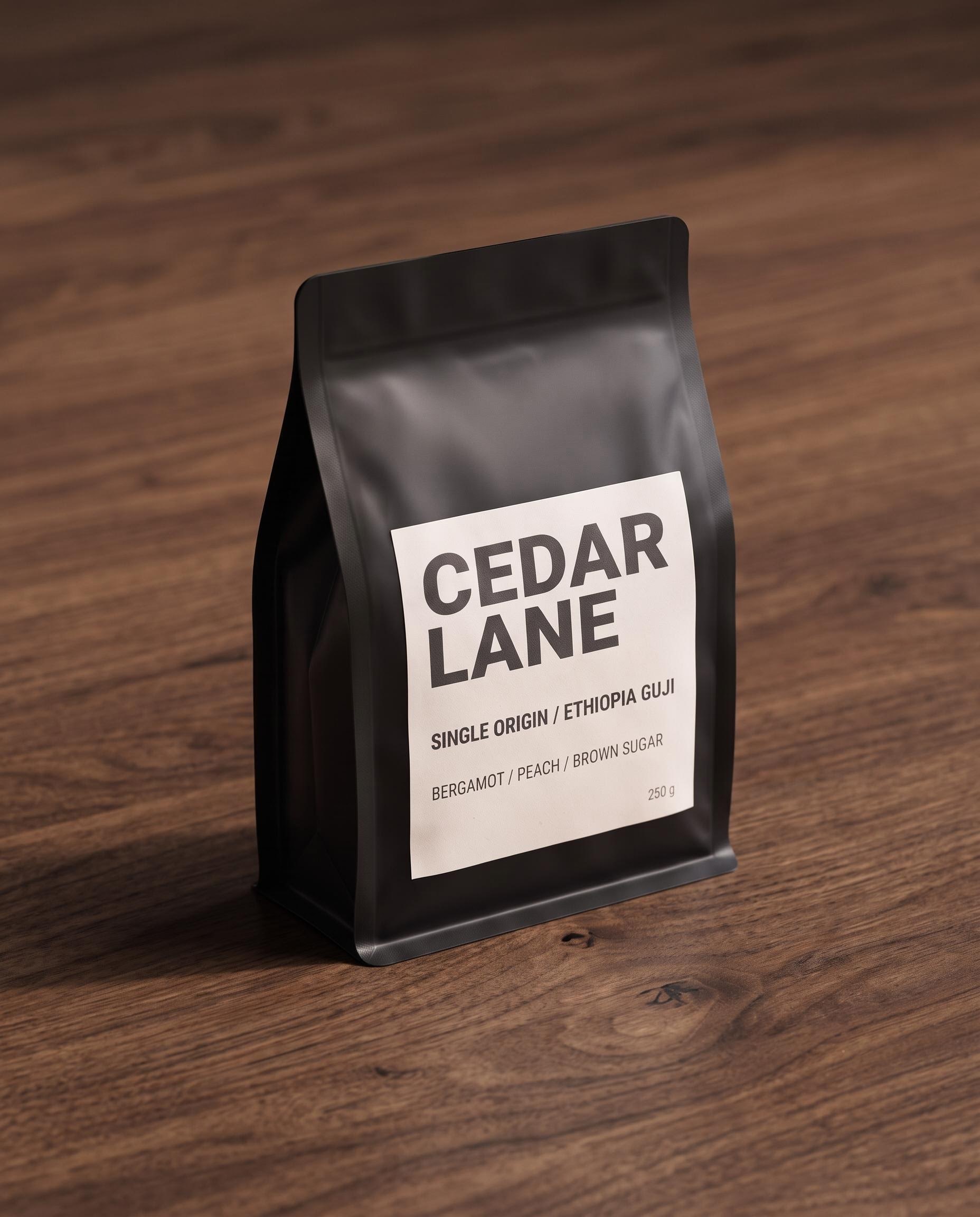
Second edit in the chain. Concrete to walnut, with the bag and every line of label copy preserved. $0.075.
For an agency running variant production this is the whole ballgame. One hero render at 4K, then a chain of $0.075 edits for every brand name, every colourway, every surface, with the text surviving each hop.
Wide and panoramic
The spec calls out 4:1 and 8:1 with the earlier tiling artifacts fixed. At 4:1 that is true and the result is genuinely seamless.
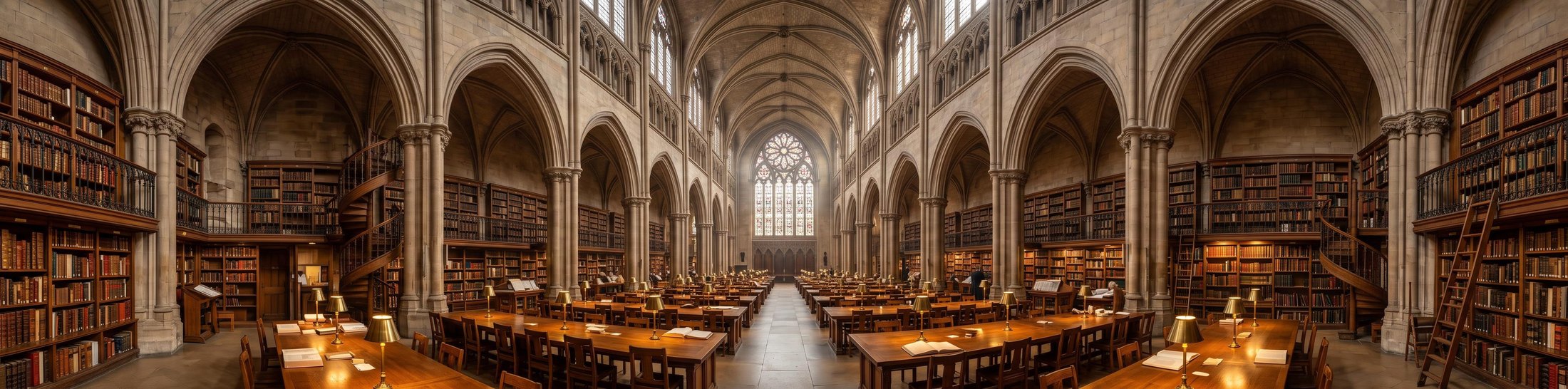
4:1 at 2K: 4128x1024, one continuous space with consistent perspective and no visible seams. $0.075.
At 8:1 it is more honest to say it holds together than that it is perfect. The scene stays one continuous room with no hard seams, but it goes mirror-symmetric around the centre and the same spiral staircase and gallery bay show up at both ends, which is exactly what the prompt told it not to do.

8:1 at 2K: 5856x704. No seams, but motifs repeat at both extremes despite the prompt asking for none.
Calling the Nano Banana 2.1 API
Synchronous and binary, so there is nothing to orchestrate. The full parameter space is on the model page:
import requests

r = requests.post(
    "https://api.segmind.com/v1/nano-banana-2.1",
    headers={"x-api-key": "YOUR_API_KEY"},
    json={
        "prompt": 'A product shot of a matte-black coffee bag. The label reads "NORTH RIDGE" '
                  'and "250 g" and nothing else.',
        "aspect_ratio": "4:5",
        "output_resolution": "2K",
        "output_format": "jpg",
        "thinking_level": "high",
        "seed": 31337,
    },
    timeout=300,
)
r.raise_for_status()
open("out.jpg", "wb").write(r.content)
print(r.headers["x-cost"], r.headers["x-seed-value"])
Three things to wire in from the start. Read x-cost on every response and log it, because it is the only honest record of what a call charged you. Log x-seed-value alongside it so you can reproduce any frame later. And set a generous timeout: I measured 10.0s to 36.3s of generation time across the 18 fires, scaling with resolution and thinking level, against a published lifetime average near 23 seconds.
One gotcha that cost me a minute of confusion. A malformed payload on this endpoint comes back as HTTP 406 with a plain validation message in the body, where most Segmind models return 400. On Segmind, 406 normally means insufficient credits. Read the response body before you go top up your balance.
Pricing
Every one of the 18 fires billed exactly the published rate, to the cent, verified against the x-cost header. No surprises, no hidden per-reference charge: the two-reference fusion billed the same $0.075 as a plain 2K text-to-image call.
| Resolution | minimal | medium or high | + web_search (minimal) | + web_search (medium or high) |
|---|---|---|---|---|
| 1K | $0.045 | $0.055 | $0.08 | $0.09 |
| 2K | $0.065 | $0.075 | $0.10 | $0.11 |
| 4K | $0.145 | $0.155 | $0.18 | $0.19 |
Three cost rules fall straight out of the measurements. Never send medium, because high is the same price. Draft at 1K minimal and promote the winner to 4K with the same seed, because the composition does not change. And only pay for web_search when the image contains a fact that moves, because it adds 64% to a 1K call.
A worked example: an agency producing 200 packaging variants a month runs 200 draft fires at 1K minimal ($9.00), promotes 40 approved concepts to 4K ($6.20), and generates 160 label edits at 2K ($12.00). That is $27.20 a month, and the text is right every time.
Honest assessment
What it does very well: in-image text, and layout for things like diagrams, labels and fact cards. Across every text test in this run, nothing was misspelled and nothing was invented when the string set was closed. The second genuine strength is edit locality. Changing one word moved 2.35% of the frame and survived being chained.
Where it falls short: physical pose instruction in multi-reference fusion is much weaker than object identity, so "holding it up to its face" became "holding it at chest height" and an arm vanished. And 8:1 is a stretch rather than a solved problem, with motifs repeating despite an explicit instruction. I would ship 4:1 to a client and treat 8:1 as a starting point.
Not a fit if you need per-region masked editing or a strict pose rig. Very much a fit if your output has words in it.
FAQ
What is the Nano Banana 2.1 API used for?
Generating and editing images from text, with up to 14 reference images. Its strongest use is anything with legible text: infographics, packaging mockups, posters, fact cards and ad creative.
How much does Nano Banana 2.1 cost?
From $0.045 per image at 1K to $0.155 at 4K, with web search adding $0.035. Every call I measured billed the published rate exactly.
Is Nano Banana 2.1 reproducible with a seed?
In my testing, yes. Two identical requests at the same seed returned pixel-identical images, although the model page FAQ warns that reproducibility is not guaranteed.
Does Nano Banana 2.1 do image editing as well as generation?
Yes. Pass one reference in image_urls and describe the change. A single-word label edit moved only 2.35% of the frame and preserved everything else.
What resolutions does Nano Banana 2.1 support?
1K, 2K and 4K, which are pixel budgets of roughly 1.05, 4.2 and 17.1 megapixels. Dimensions snap to multiples of 16, so wide ratios drift slightly.
How is Nano Banana 2.1 different from Nano Banana 2?
It is the generally available successor, released 6 October 2026, with better text rendering, stronger prompt adherence and wide aspect ratios up to 8:1. Both are live on Segmind, so switching is a slug change.
Where I landed
Eighteen fires, $1.21, zero failures, and a model that did what it said on the two things I care most about: it spells words correctly inside images, and it edits one element without disturbing the rest. The three settings worth changing are resolution, thinking level and web search, and now you know what each one buys. Skip medium entirely, draft at 1K and promote with the seed, and pay for grounding only when a number is on the canvas.
You can run every prompt in this post yourself on the Nano Banana 2.1 model page. The API is synchronous, the output is binary, and the integration is about nine lines.