AI Sale Banners for Black Friday: 20 Renders, 3 Models, $1.05
I made AI sale banners for Black Friday with Nano Banana 2.1, GPT Image 2.6 and Seedream 5.5: 20 renders, $1.05, and the prompt rule that kept text exact.

Black Friday 2026 lands on Friday 27 November, and Cyber Monday follows on the 30th. Last year Adobe Analytics put US online Black Friday spend at a record $11.8 billion in a single day. For anyone running ecommerce creative, that number has a less glamorous side: one sale means a homepage hero, an email header, a story ad, a feed post, a product deal card and a couple of translated versions, all due the same week. Then the discount changes on Wednesday night and you make them all again.
AI image models used to be useless here because sale banners are mostly text, and the text came out mangled. That is no longer the real problem. I ran 20 renders across three image models on Segmind to make a full Black Friday kit for a made-up outdoor gear store, and read every output letter by letter. The whole kit cost me $1.05. This post covers what worked, what broke, and the prompt pattern that made the difference.
What I tested
Three models, the same prompts, every output checked against the brief by hand. Prices are what Segmind billed me per image in the configuration I used, read from each response.
| Model | Config I used | Billed per image | Time per image |
|---|---|---|---|
| Nano Banana 2.1 | 2K, thinking high | $0.075 | 28 to 45s |
| GPT Image 2.6 Flare | 2048x1152, quality high | $0.046 (about $0.058 with a reference image) | 12 to 14s |
| Seedream 5.5 | 2K | $0.022 (plus $0.005 per reference image) | 21 to 37s |
One sample per model per brief, so read this as field notes from a real campaign build, not a benchmark. Only Nano Banana 2.1 takes a seed, so it is also the only one where you can get the same image back twice.
The one rule that matters: close the text set
Before the comparisons, here is the mistake I see in almost every AI banner I get sent. This is what a typical prompt produces:
Parameters model: nano-banana-2.1 | aspect_ratio: 16:9 | output_resolution: 2K | thinking_level: high | seed: 271127
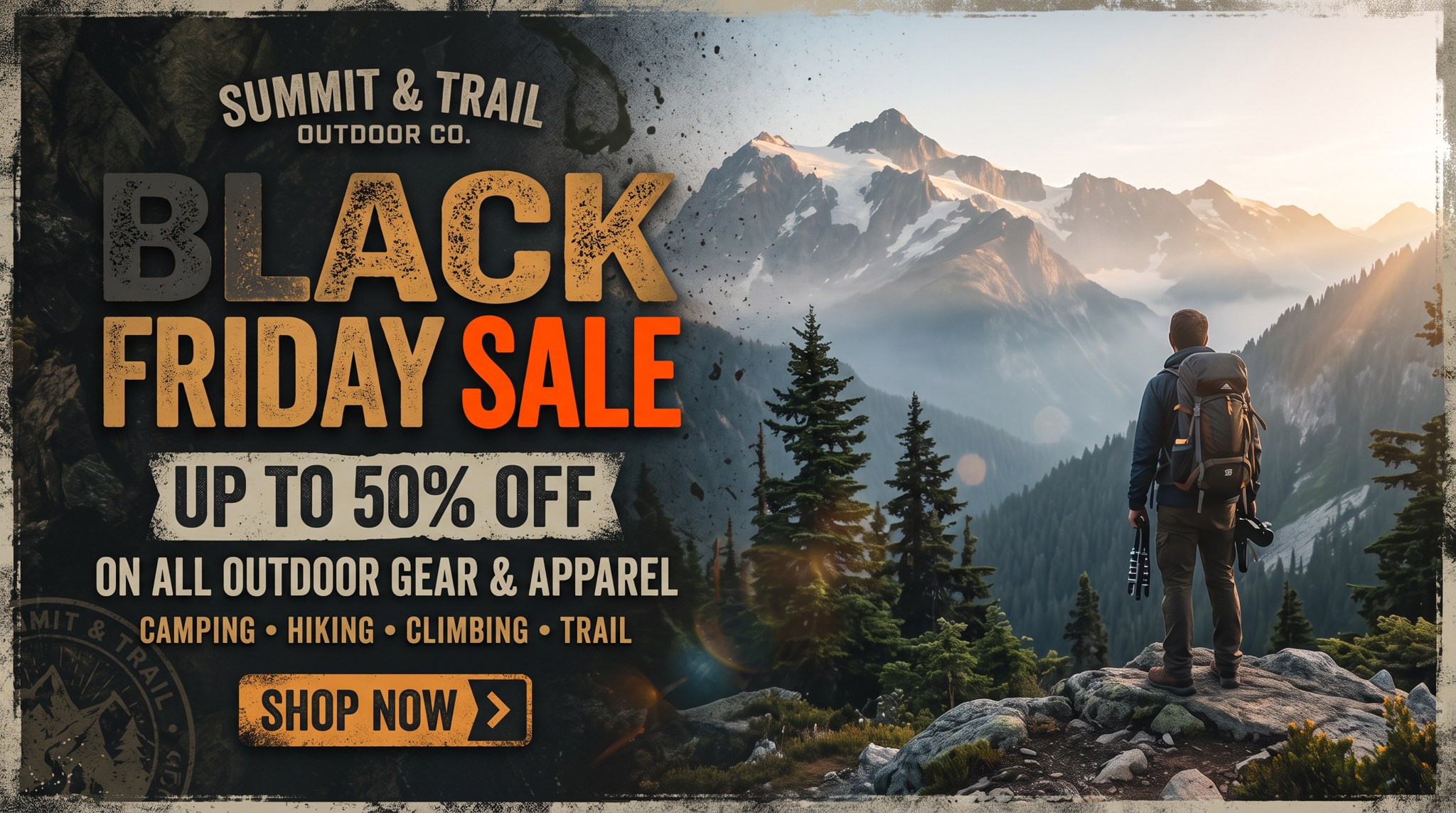
Seven words in, and the model invented a brand, a logo stamp, a product category line and its own copy.
It looks finished, and that is the danger. Nobody asked for "SUMMIT & TRAIL OUTDOOR CO.", a circular logo stamp, "ON ALL OUTDOOR GEAR & APPAREL" or the "CAMPING, HIKING, CLIMBING, TRAIL" line. A plausible invented store name is exactly the kind of name a real business already owns, and the extra lines are promises your sale may not make. Every word is spelled correctly. None of it is yours.
The fix is to treat the prompt like a spec sheet: list every text element in quotes, say where each one goes, and then say the set is closed, naming the surfaces where models like to sneak extra text in. This is the clause I used on every banner below:
The banner contains exactly these four text elements and no other text, letters, numbers, logos or symbols anywhere, including on the products and in the background.
With that clause in place, all three models rendered every quoted line correctly in every banner. Here is what that looked like across the kit.
Use case 1: the homepage hero banner
The banner most stores need first: a wide 16:9 hero with a headline, the discount, the sale dates and a button, with product on the other side.
Parameters aspect: 16:9 | nano-banana-2.1 2K seed 271127 | gpt-image-2.6-flare 2048x1152 high | seedream-5.5 2K
Nano Banana 2.1 · $0.075
GPT Image 2.6 Flare · $0.046
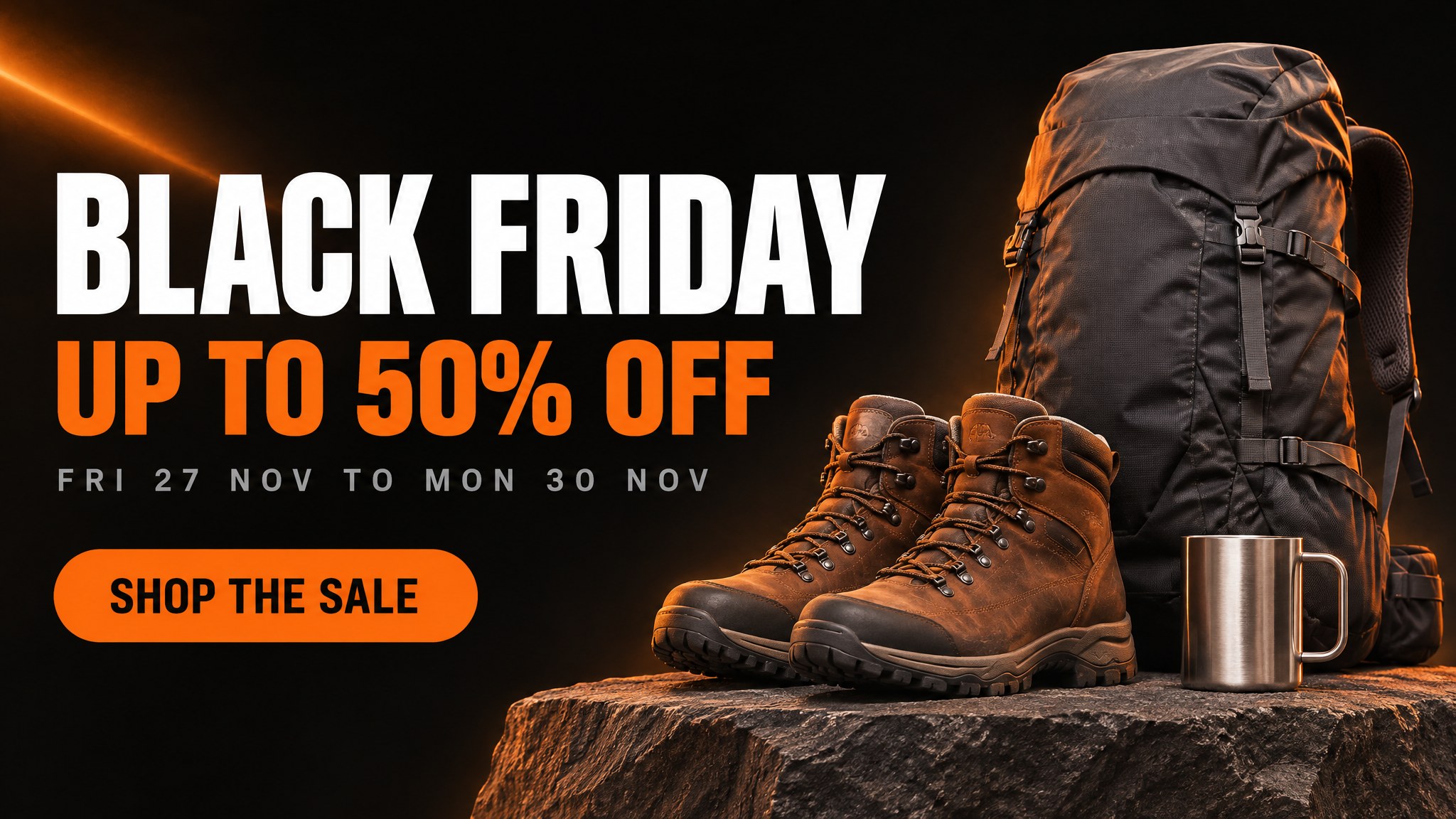
Seedream 5.5 · $0.022
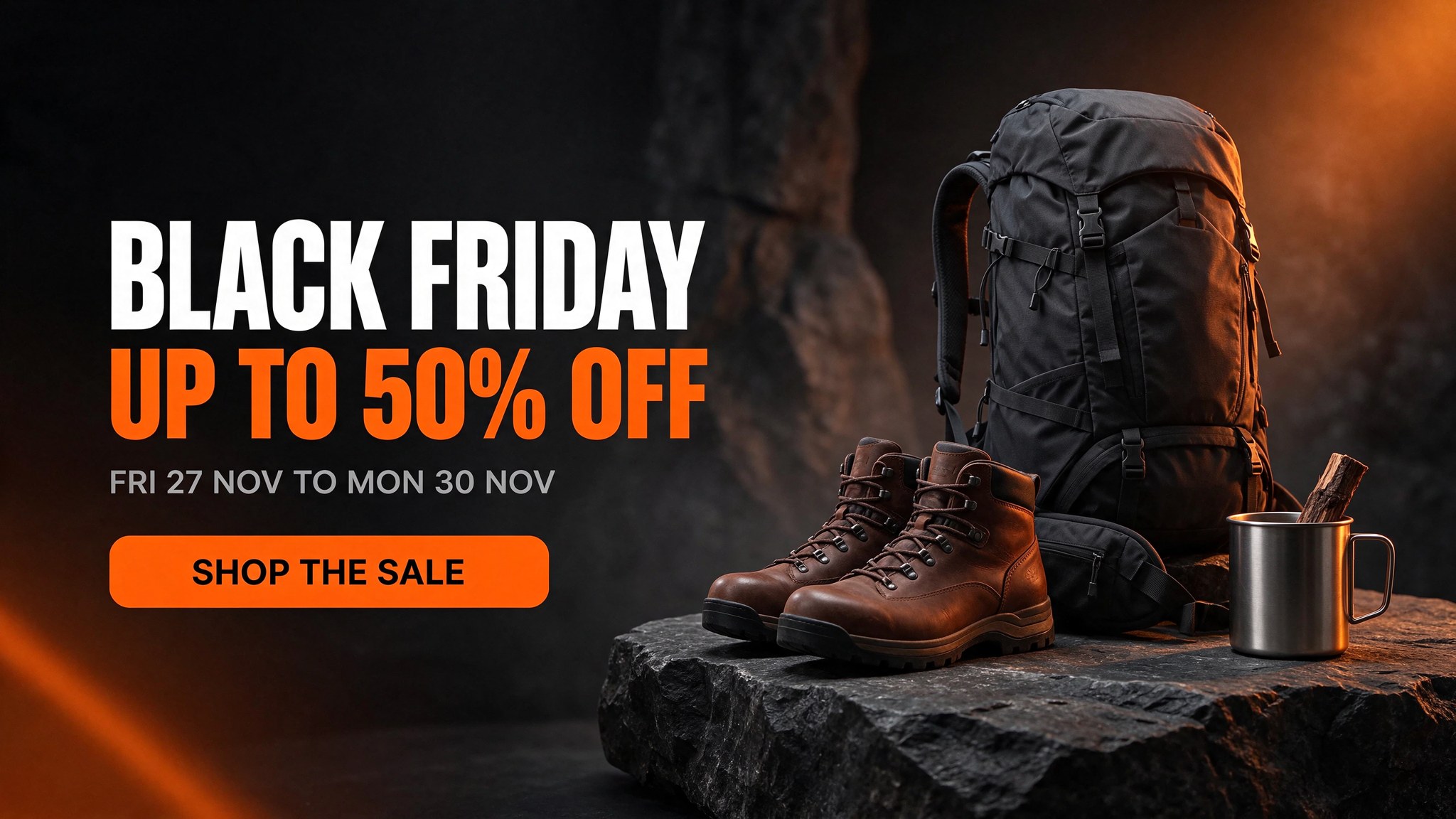
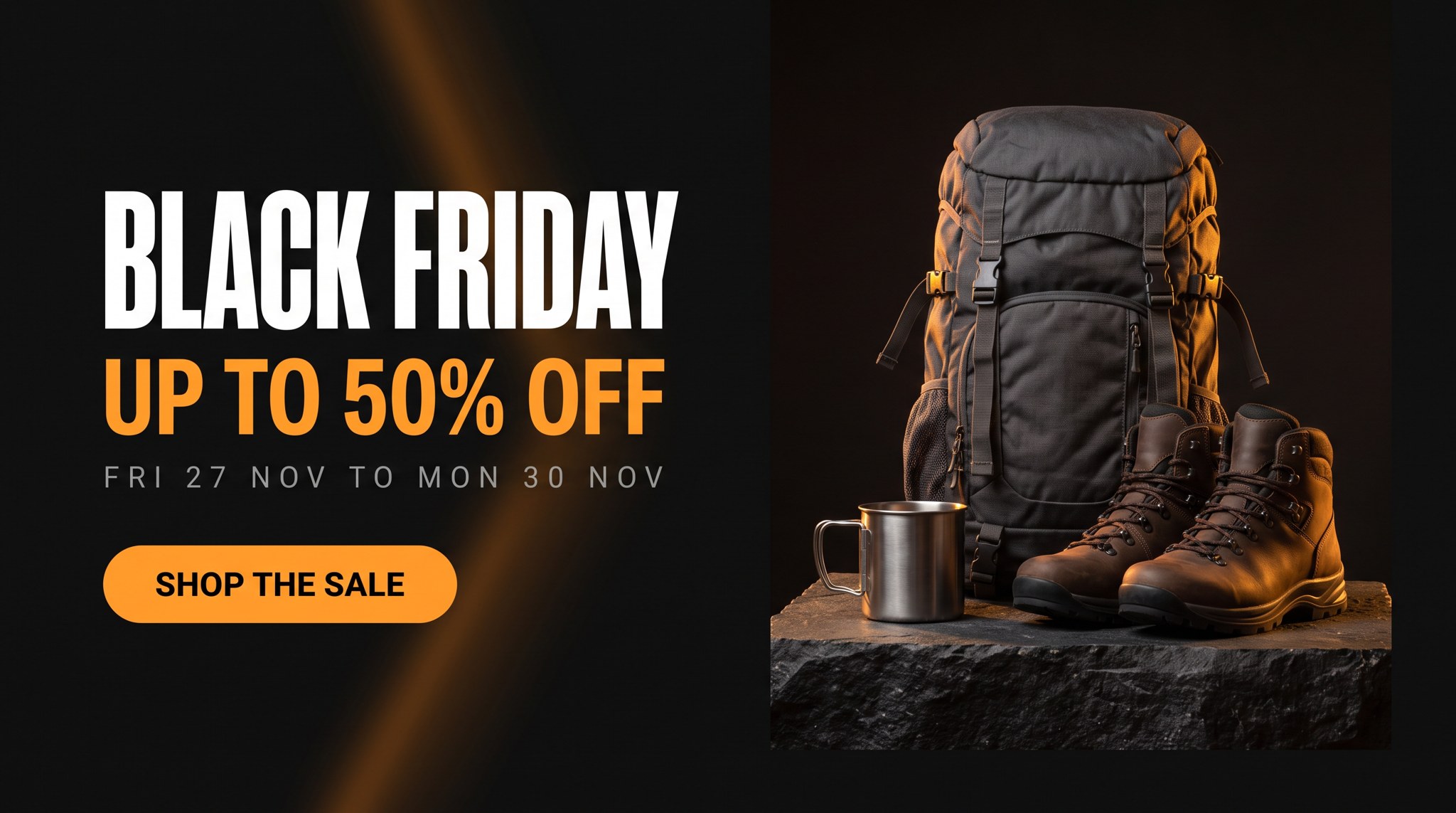
Same prompt, three models. All four text elements came back exactly as written on all three.
Text accuracy was a tie: "BLACK FRIDAY", "UP TO 50% OFF", "FRI 27 NOV TO MON 30 NOV" and "SHOP THE SALE" were exact on all three, including the percent sign. The differences were all in the design.
- Nano Banana 2.1 set the cleanest type and got the letterspaced grey date line right, but the product half reads as a separate photo dropped into a rectangle. You can see its edge.
- GPT Image 2.6 Flare made the most integrated composition, with the light streak and rim light tying both halves together. It was also the fastest at 11.8 seconds. Look closely at the boot tongues, though: there is a small embossed mountain mark that I did not ask for. My "no logos" clause did not stop a texture-level mark.
- Seedream 5.5 cost less than a third of the others and gave the richest background, but ignored "letterspaced" on the date line.
If I were shipping this today, I would take the Flare version and retouch the boot tongues. The point is that all three would survive a client review on copy, which was not true a year ago.
Use case 2: the Instagram story with safe zones
Stories are where layout instructions get tested, because the top and bottom of the frame are covered by the app's own interface. I asked for the text to stay inside the middle of the frame.
Parameters aspect: 9:16 | nano-banana-2.1 2K seed 271127 | gpt-image-2.6-flare 1152x2048 high | seedream-5.5 2K
Nano Banana 2.1
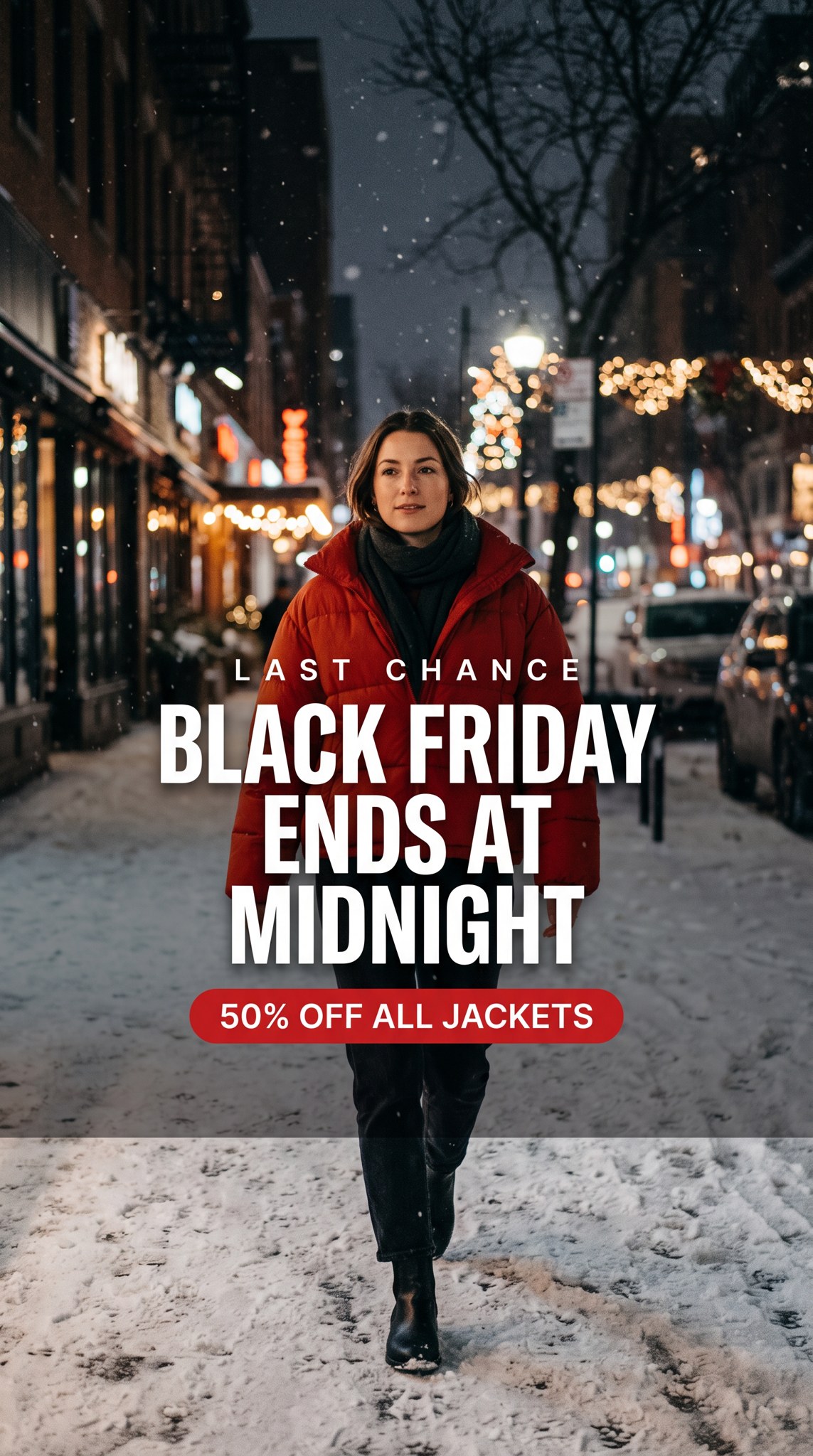
GPT Image 2.6 Flare
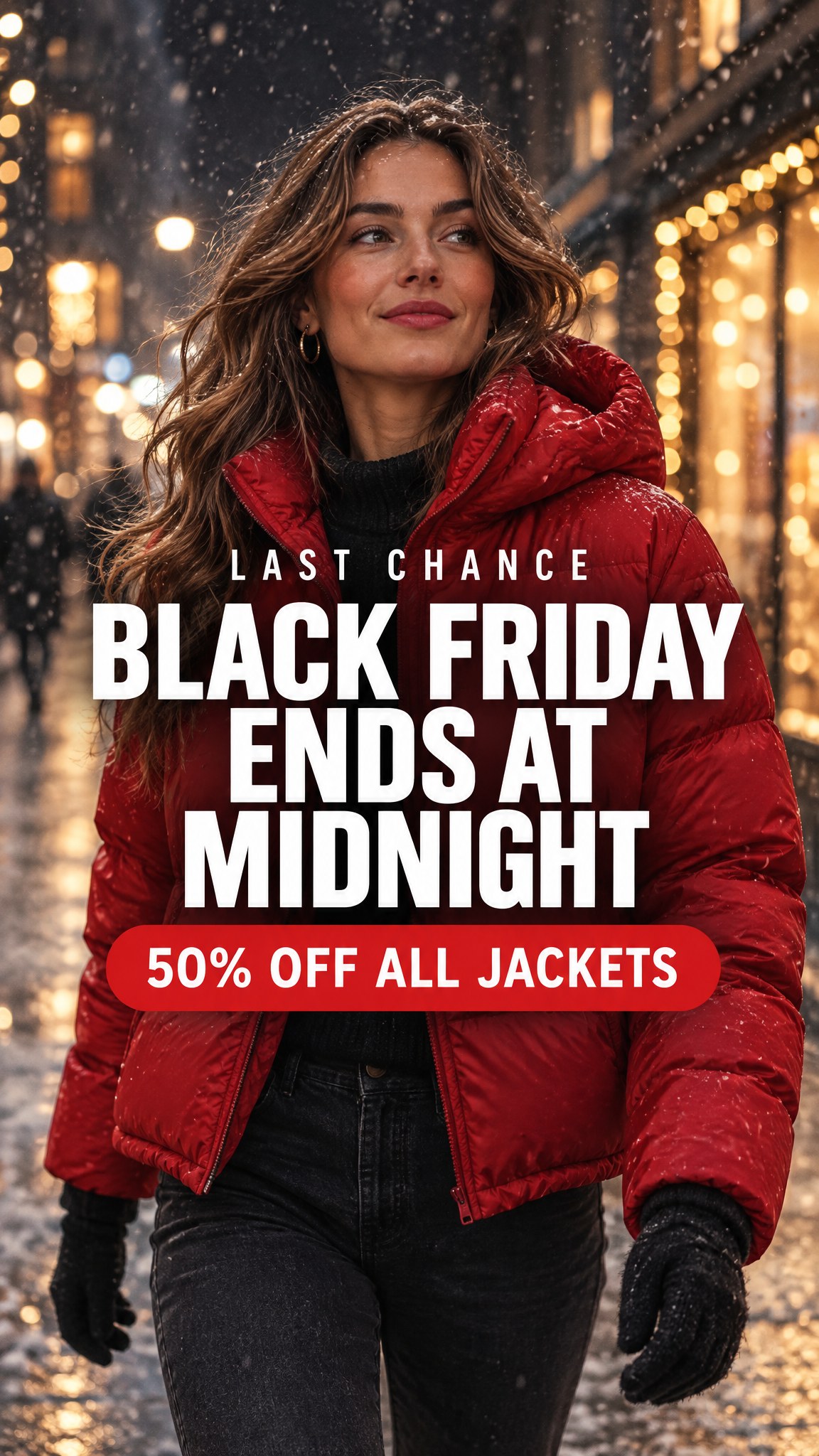
Seedream 5.5
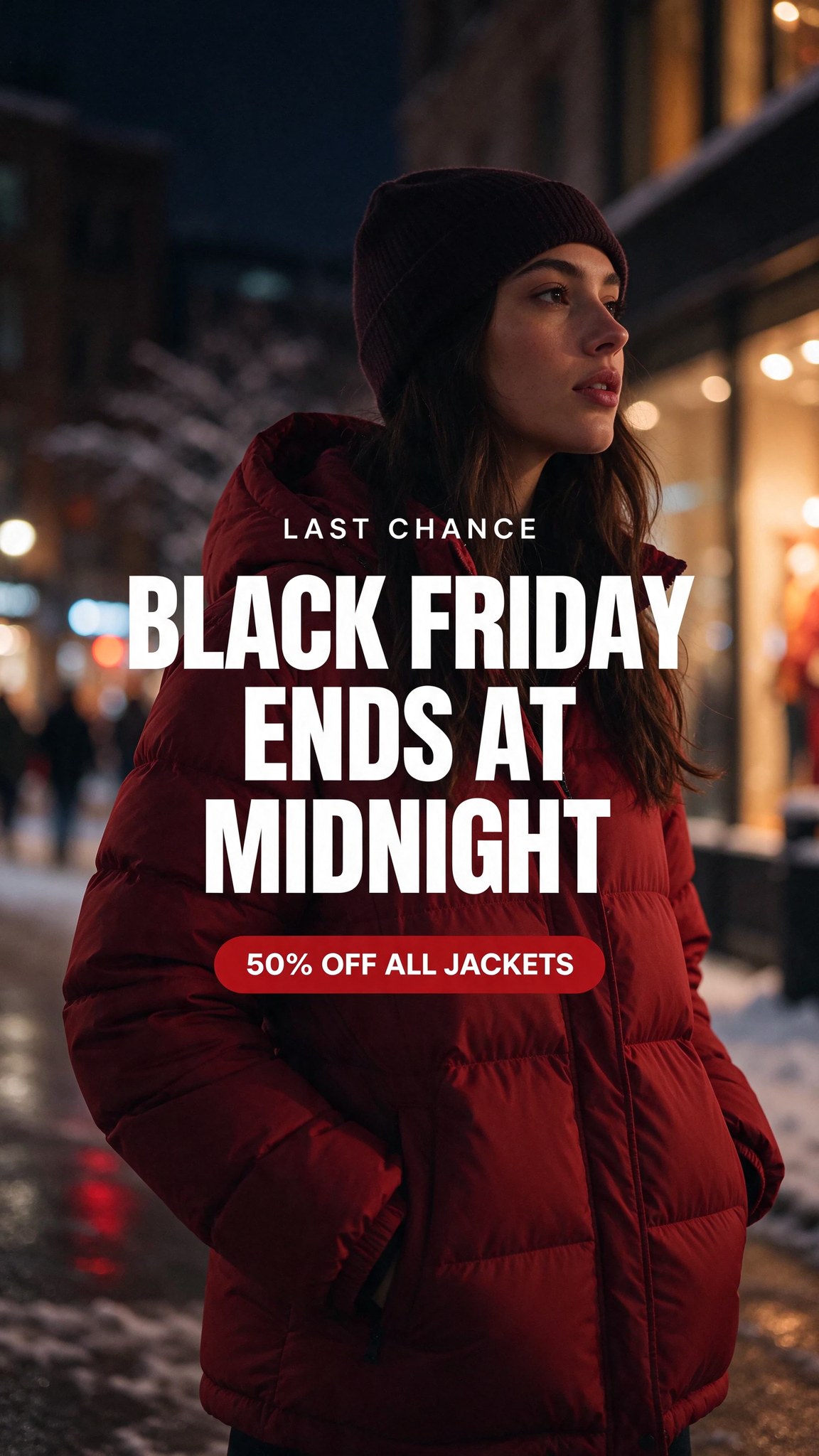
All three kept the top 14 percent and bottom 20 percent clear of text.
All three respected the safe zones and set the three-line headline exactly as stacked. Nano Banana 2.1 put a darkening scrim behind the text and ended it with a hard horizontal edge at about three quarters of the way down, which would need a retouch. Flare produced the most "ad agency" frame, with the woman lit like a campaign shoot. Seedream added a beanie I did not ask for, which is harmless here but a reminder that wardrobe is not part of the closed set unless you say so.
Use case 3: the email header at 4:1
Email headers are wide and short, and this is where the models stop being interchangeable. Nano Banana 2.1 is the only one of the three that generates native 4:1 and 8:1 frames. GPT Image 2.6 tops out at 16:9 and Seedream 5.5 at 21:9, so for those you generate wider than you need and crop, losing resolution and composition control.
Parameters model: nano-banana-2.1 | aspect_ratio: 4:1 | output_resolution: 2K | thinking_level: high | seed: 271127
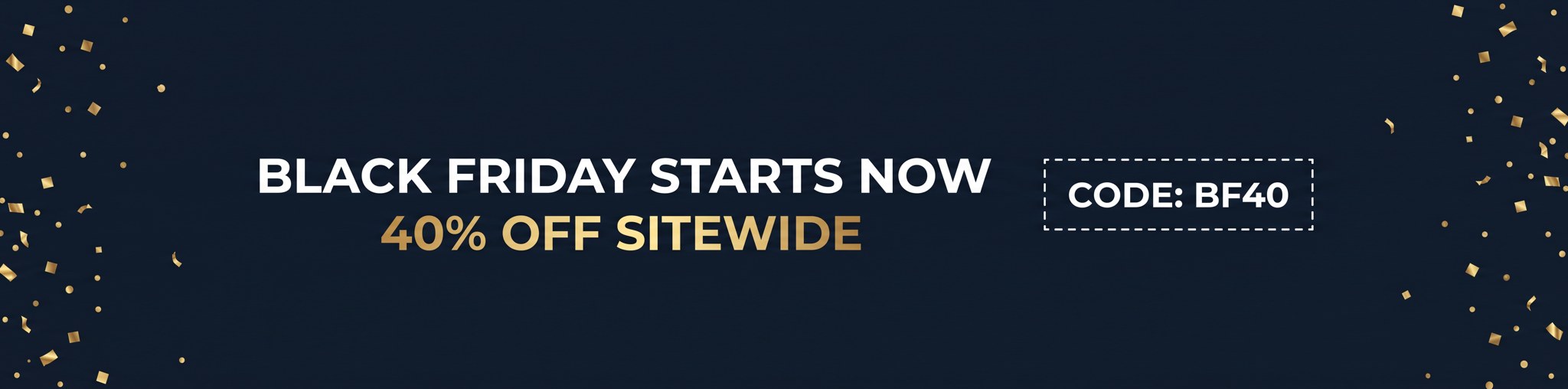
Native 4:1 at 4128x1024. The coupon code came back exactly as typed.
Coupon codes are the text I trust least in AI banners, because a single wrong character costs real money at checkout. "CODE: BF40" came back exact, with the colon and the dashed coupon outline as asked. Even so, the coupon code is the one line I would always check by eye before it goes out.
Use case 4: put your real product in the banner
A generic backpack is fine for a mood board. For an actual deal card, the product has to be yours. So I started from a clean white packshot and asked each model to build a "deal of the day" banner around it, with a struck-through old price. Strikethrough is a typographic detail that older models used to get badly wrong.
Reference image
image_urls[0] / reference_images[0]: the product
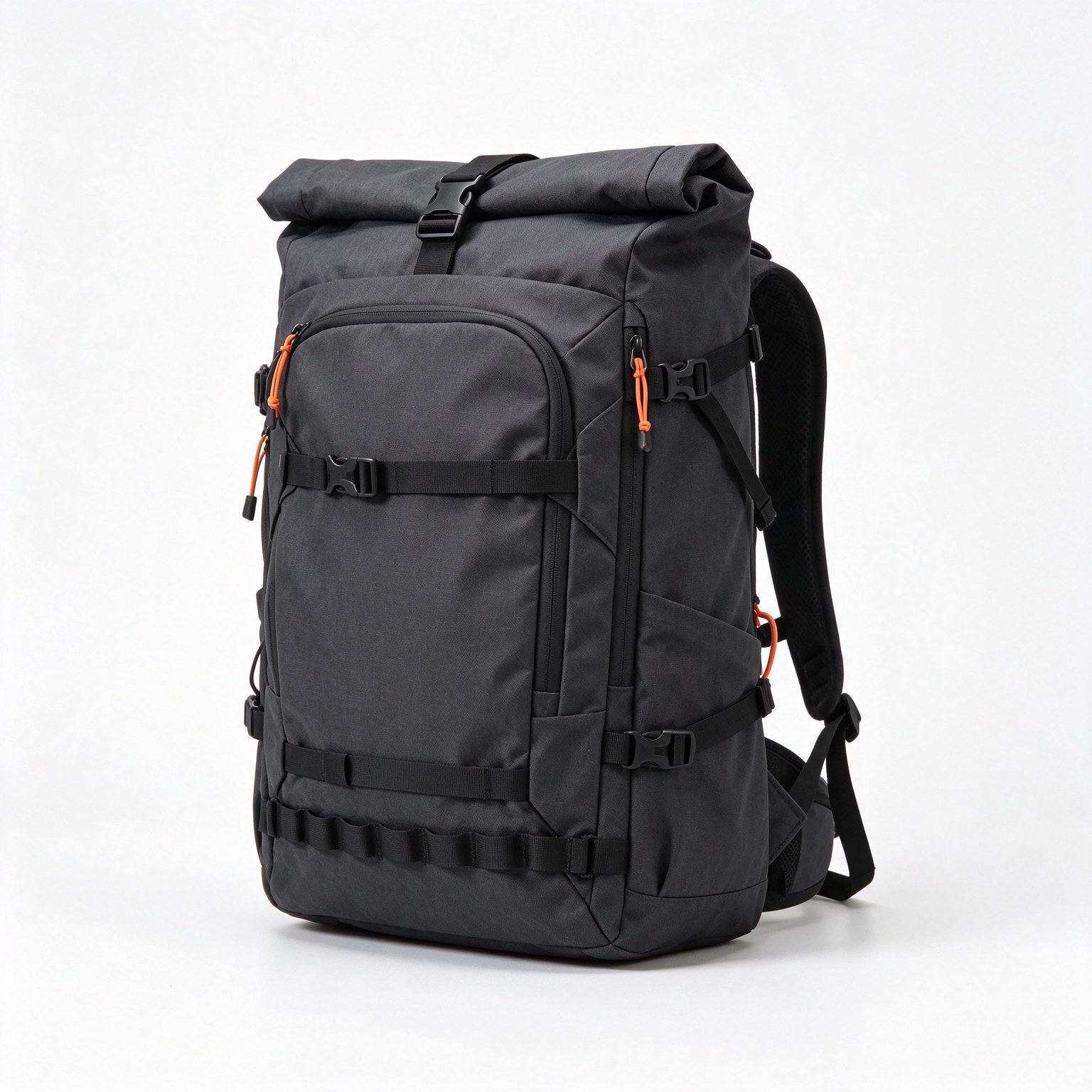
The input packshot, passed as the single reference image to every model.
Parameters aspect: 16:9 | 1 reference image | nano-banana-2.1 2K | gpt-image-2.6-flare 2048x1152 high | seedream-5.5 2K
Nano Banana 2.1 · $0.075
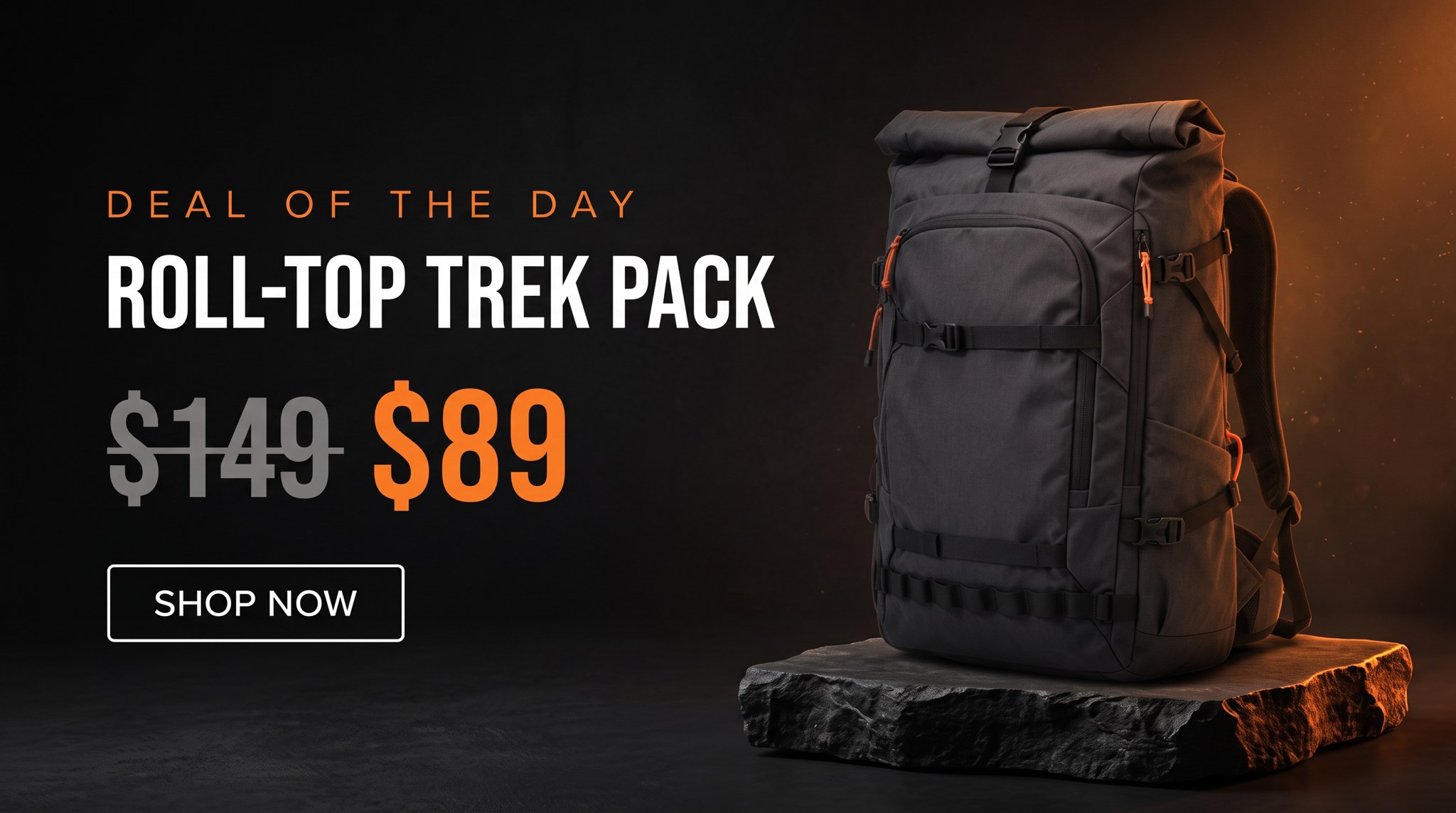
GPT Image 2.6 Flare · $0.058
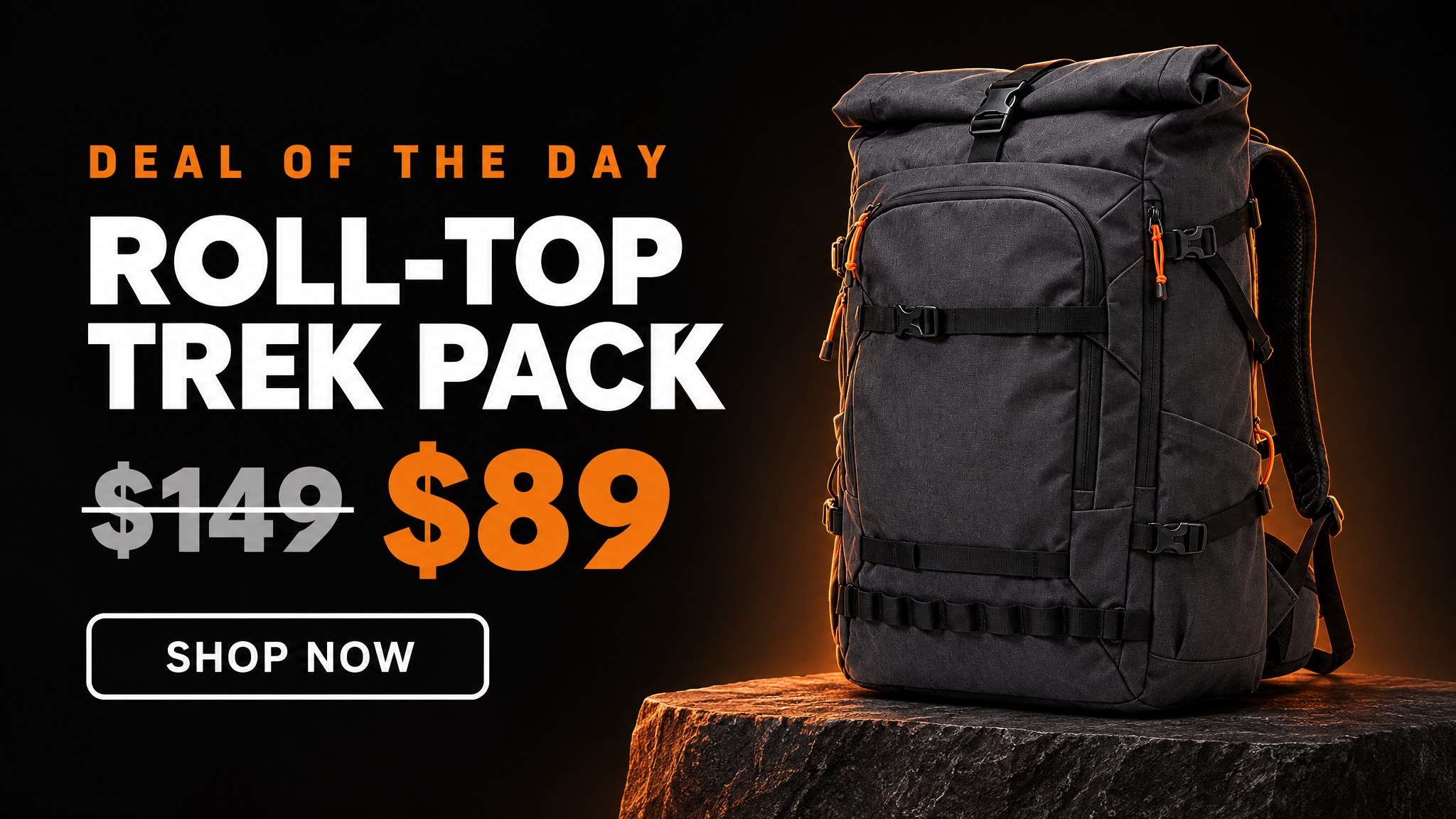
Seedream 5.5 · $0.027
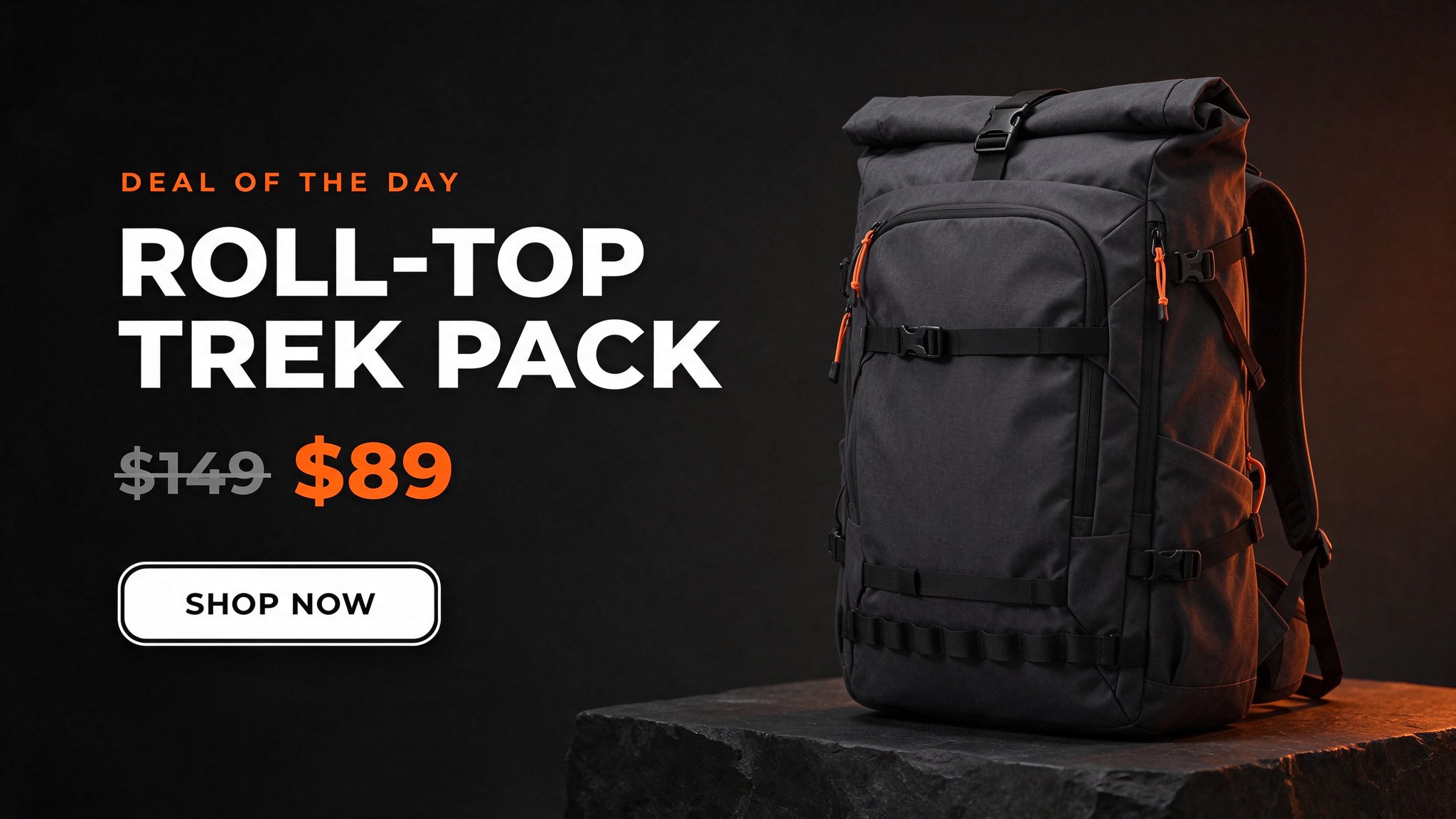
All three kept the pack recognisable and drew the strikethrough through $149.
All three kept the roll-top, the buckles and the orange zip pulls, and all three drew a proper line through "$149" with "$89" in orange beside it. Flare gave the price block the most weight, which is what a deal card needs. Seedream kept the price small, which undersells the discount. Nano Banana 2.1 set the product name on one line in a condensed face and left the most room. This is the use case where I would run all three and pick, because at these prices three options cost 16 cents.
Use case 5: translate the banner without redrawing it
Black Friday is no longer a US-only event, and the fastest way to localise is to edit the finished banner rather than regenerate it. I took the Flare hero from use case 1 and asked each model to swap only the four text elements, first into Spanish and then into Hindi, keeping everything else.
Parameters reference: the GPT Image 2.6 Flare hero above | aspect: 16:9 | same three models
Nano Banana 2.1
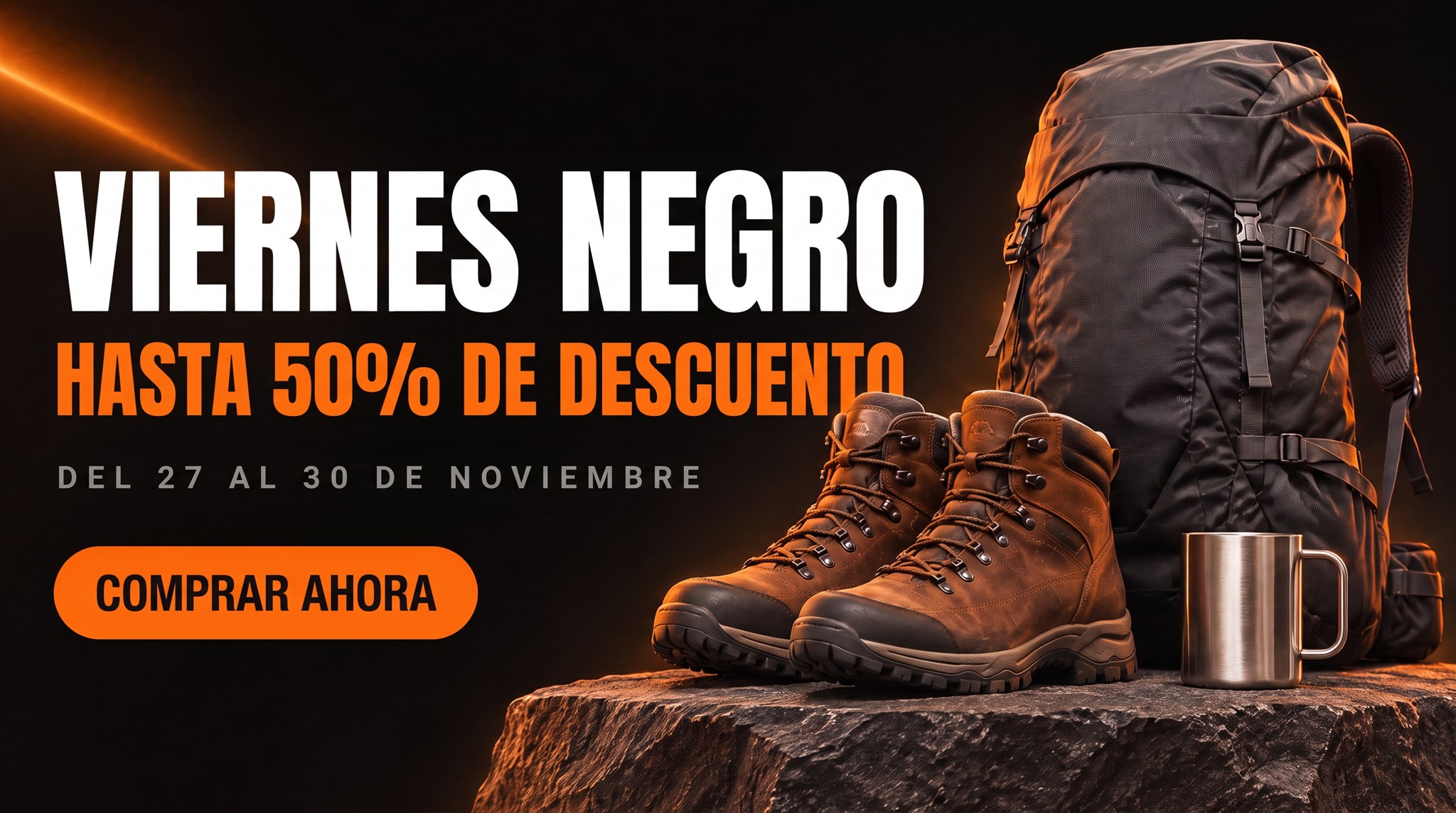
GPT Image 2.6 Flare
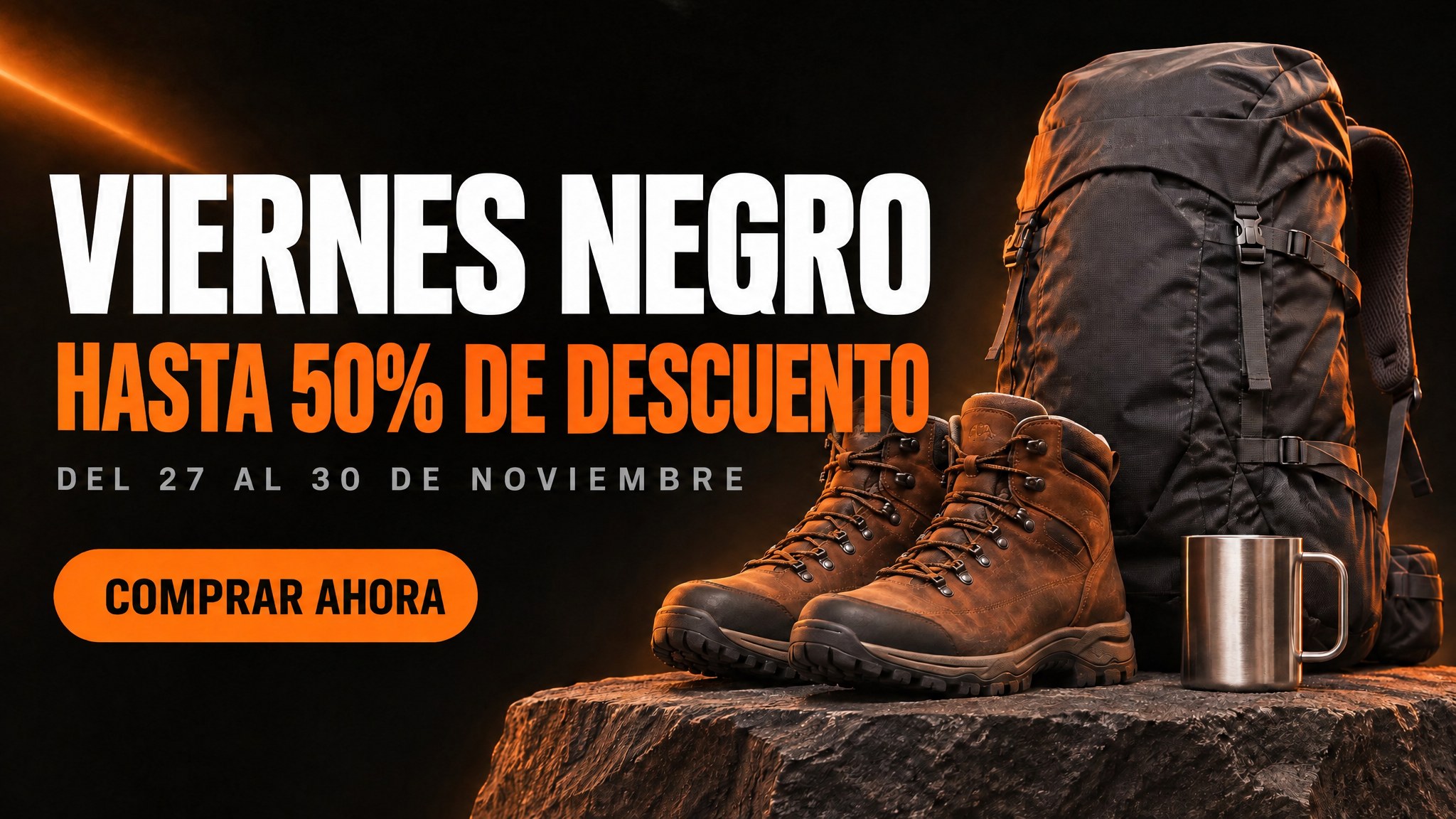
Seedream 5.5
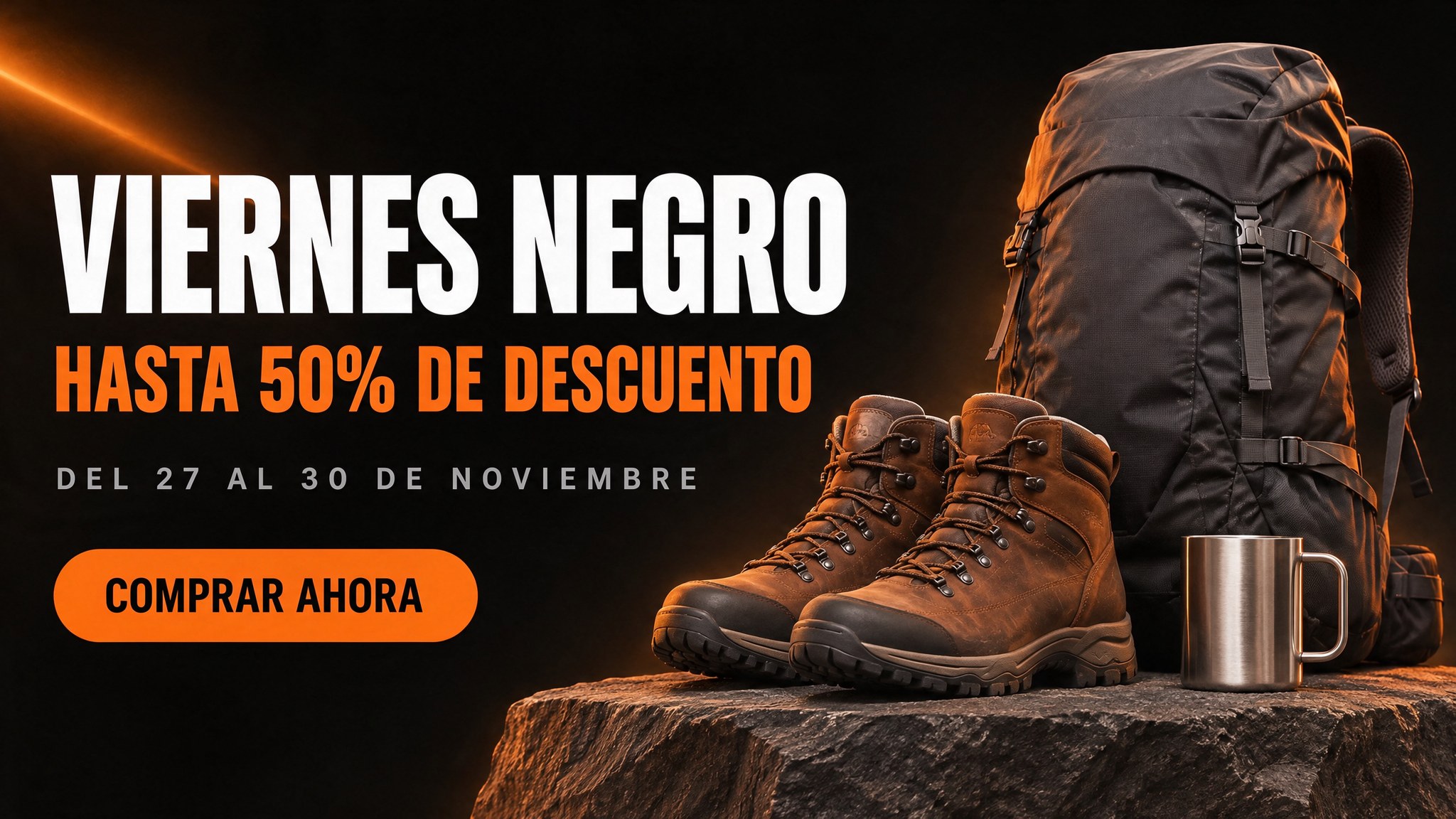
Spanish: every word correct on all three, but only Seedream made room for the longer line.
Spelling was perfect on all three. Layout was not. "HASTA 50% DE DESCUENTO" is 22 characters where "UP TO 50% OFF" was 13, and I told the models to keep each line's size. Nano Banana 2.1 and Flare obeyed literally and ran the last letters of "DESCUENTO" into the boots. Seedream quietly shrank the line to fit, which is what a designer would have done. It also changed the least of the untouched product side.
Parameters reference: the GPT Image 2.6 Flare hero above | aspect: 16:9 | same three models
Nano Banana 2.1
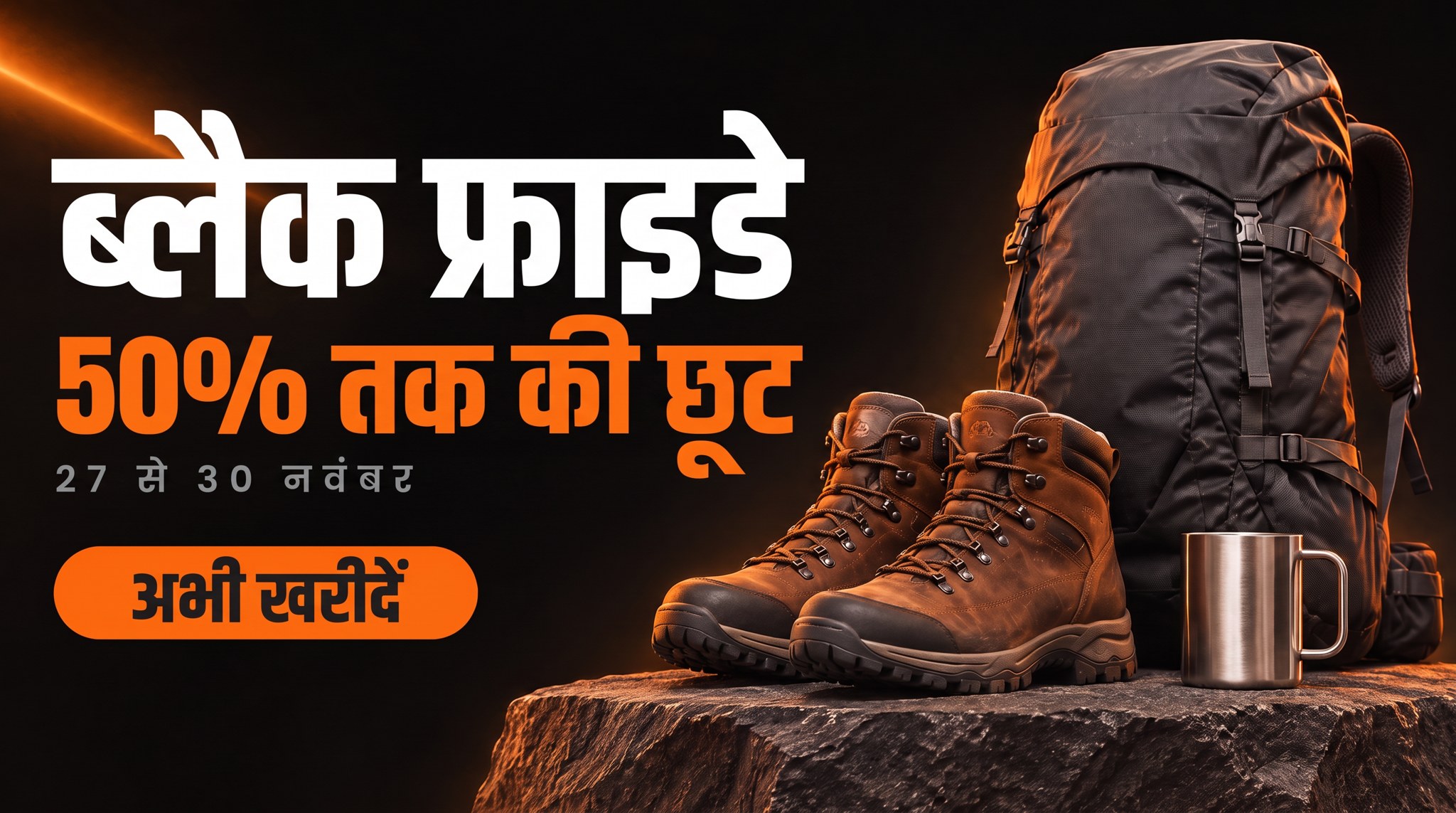
GPT Image 2.6 Flare
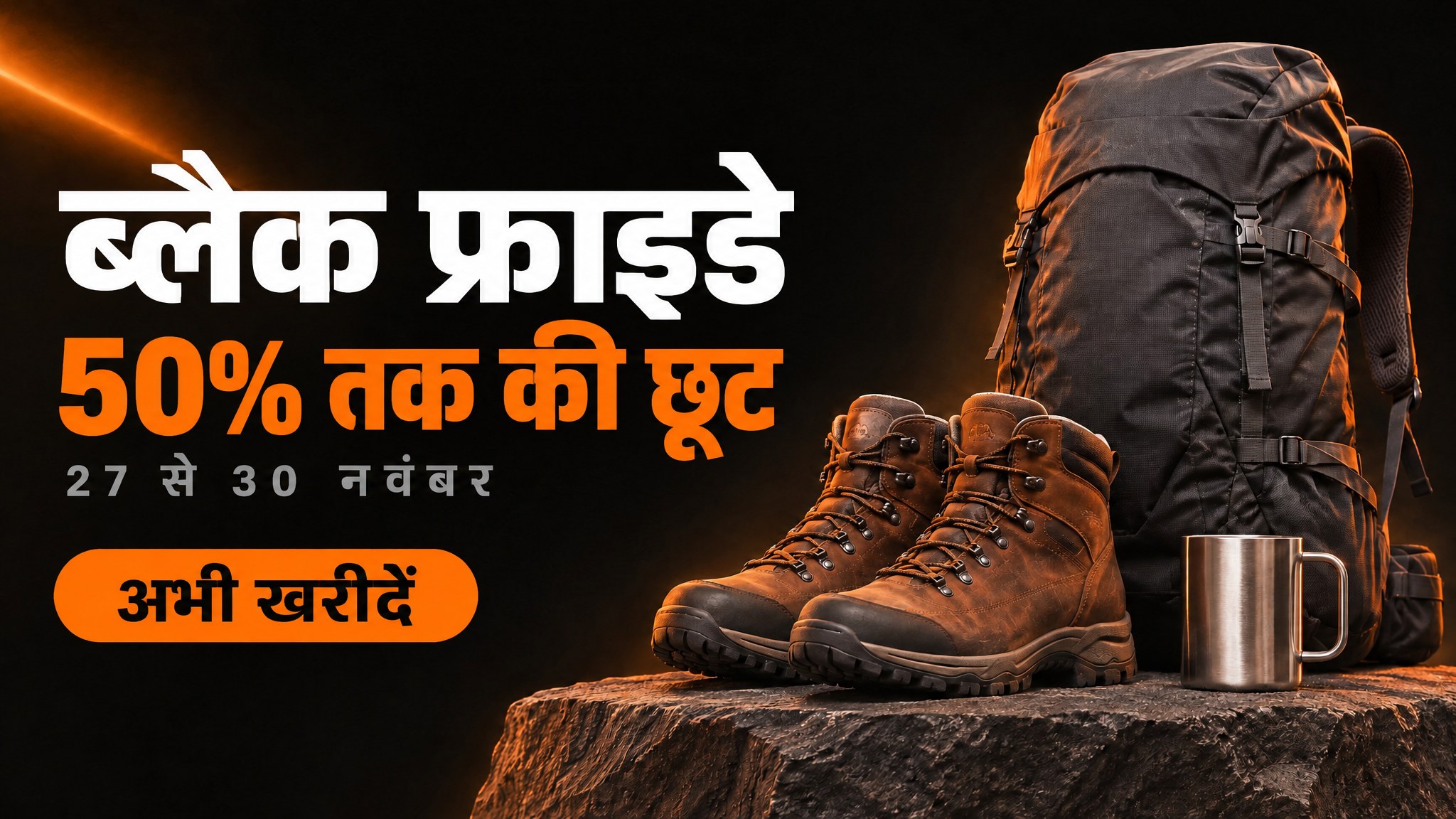
Seedream 5.5
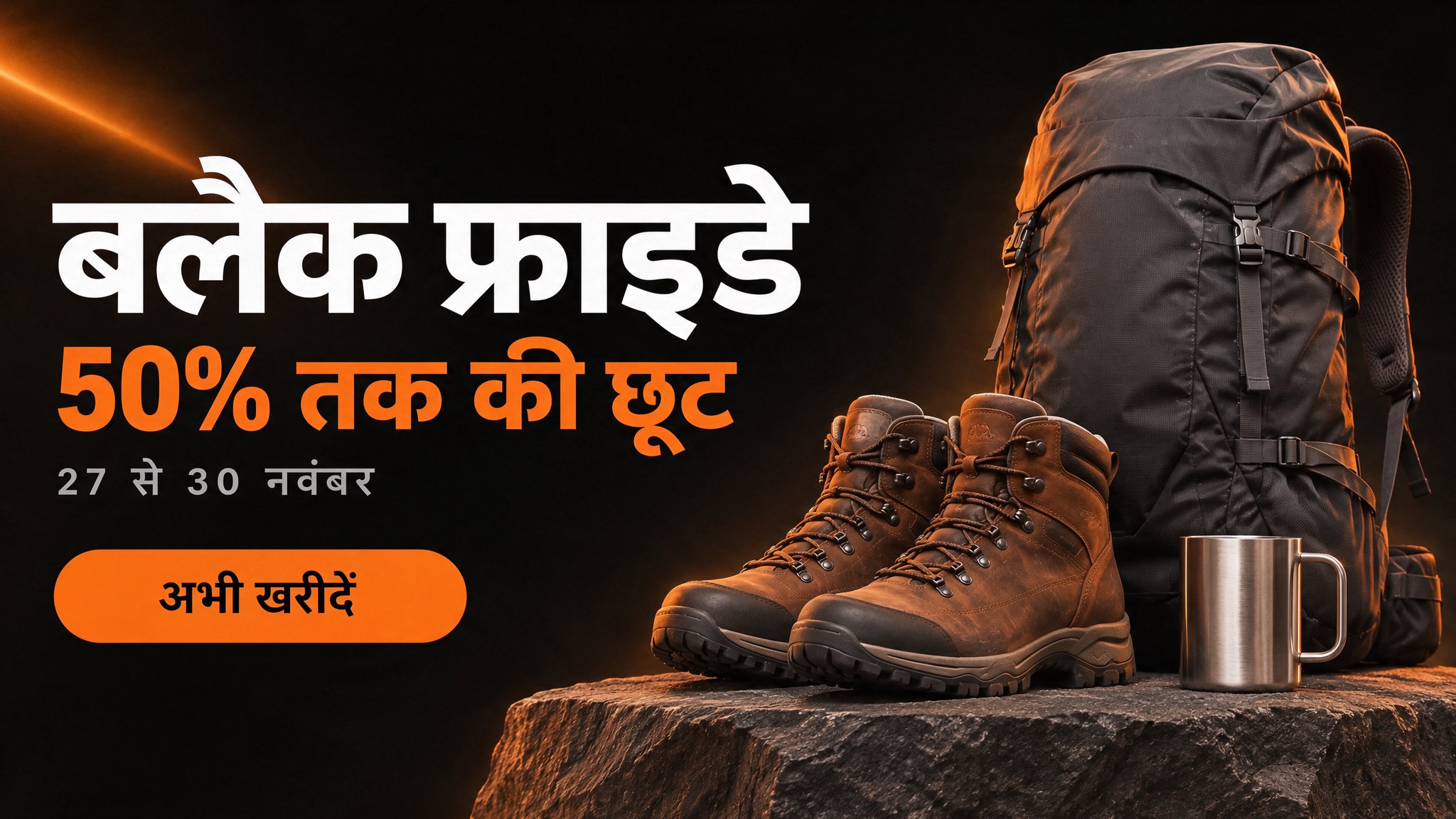
Hindi: Nano Banana 2.1 and Flare spelled the headline correctly. Seedream broke the first conjunct.
Hindi reversed the result. Nano Banana 2.1 and Flare both wrote "ब्लैक फ्राइडे" correctly. Seedream wrote "बलैक", dropping the joined ब्ल at the start of the headline, which is the biggest word on the banner. Both of the others also carried the letterspacing from the English date line into "नवंबर", spacing out the letters of a script that is meant to join up. It is still readable, but a native speaker would notice. So the rule for localised banners is simple: whichever model you use, a fluent reader looks at it before it ships.
Use case 6: an animated GIF banner
Animated banners still earn their place in email, where video support is patchy and a GIF just plays. GPT Image 2.6 Flare can return a looping GIF directly, so I asked for a flickering neon sign.
Parameters model: gpt-image-2.6-flare | output_format: gif | size: 1280x720 | frame_count: 9 | frame_duration_ms: 220 | quality: high
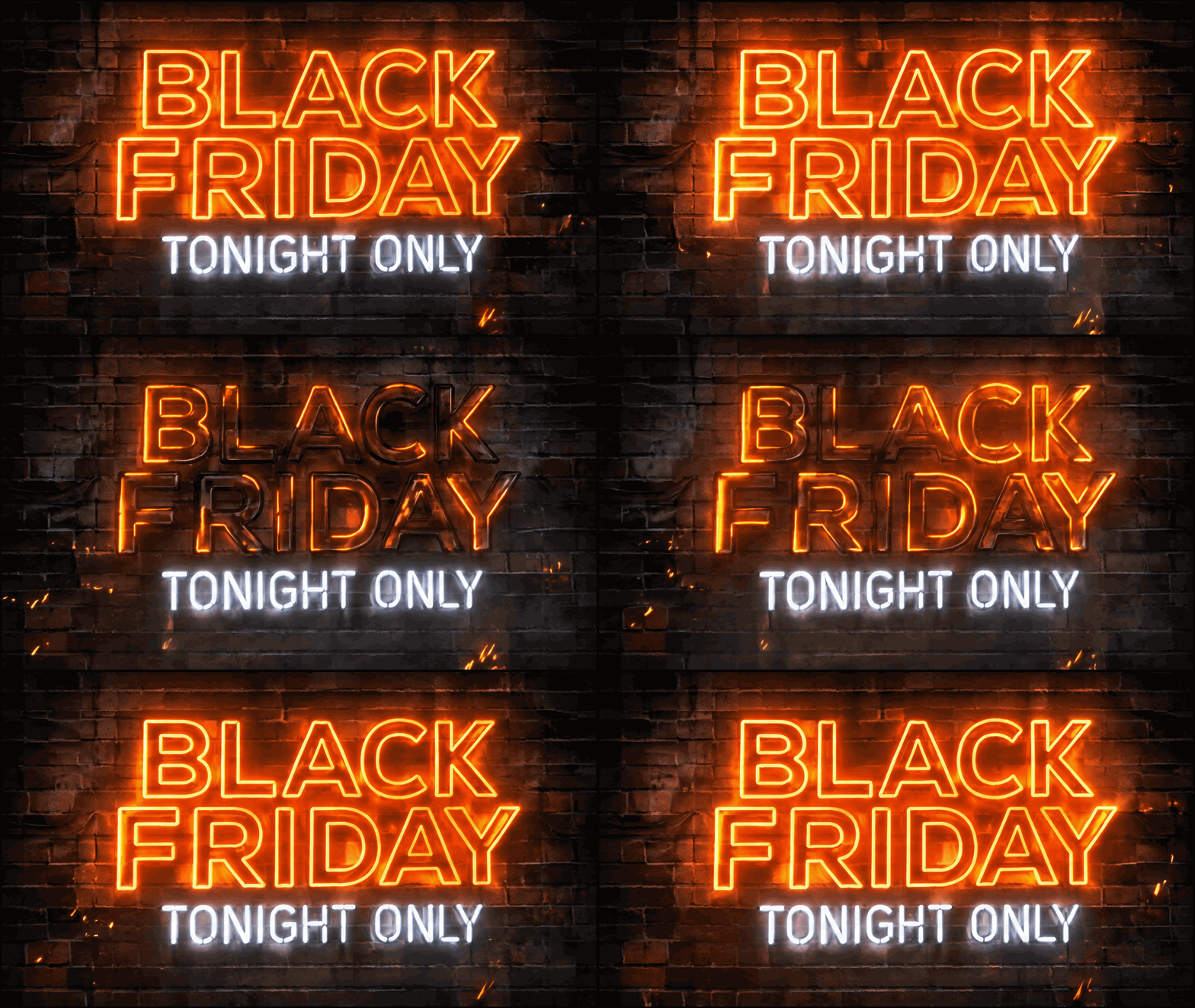
Nine frames at 220ms, looping. Billed $0.106.
The orange sign stutters off and back on mid-loop, sparks drift down, and both signs stayed spelled correctly across all nine frames, which is the part that usually fails when text is redrawn frame by frame. The catch is the file: 2.7 MB straight out of the model, which is heavier than I would send in an email. Run it through a GIF optimiser or cut the frame count before it goes in a campaign.
Use case 7: a transparent sale sticker
The last piece of any sale kit is the badge you drop on product tiles. That needs a real transparent background, not a white square. Seedream 5.5 has a background: transparent option, so I used it.
Parameters model: seedream-5.5 | size: 1K | aspect_ratio: 1:1 | background: transparent | output_format: png
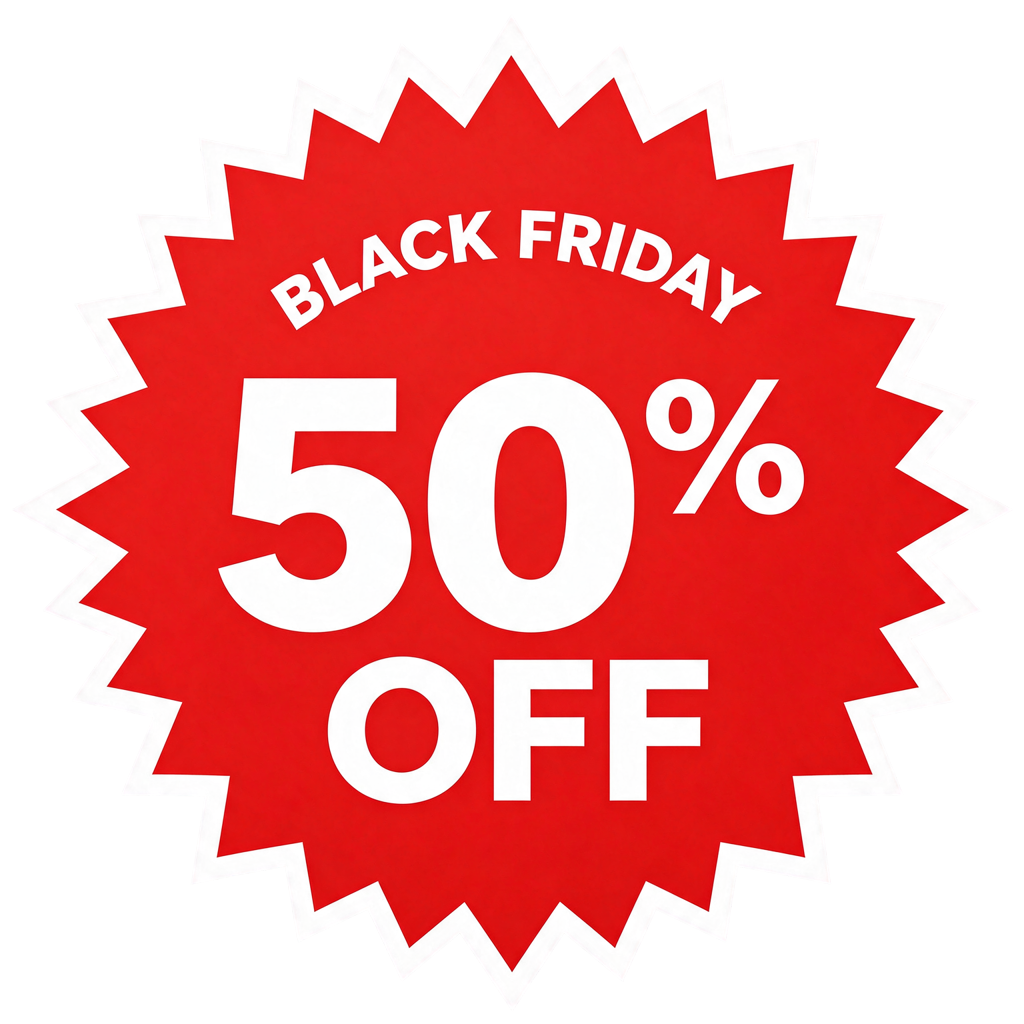
Shown on a dark panel so the transparent background is visible. Billed $0.013.
I checked the alpha channel: 99.4% of pixels are either fully transparent or fully opaque, with the soft pixels only along the edges where you want anti-aliasing. That means it drops onto any product photo without a halo. At just over a cent, you can make one for every discount level.
Which model for which banner
| Banner | My pick | Why |
|---|---|---|
| Homepage hero | GPT Image 2.6 Flare | Most integrated layout, fastest. Check products for stray marks. |
| Story ad | Flare or Seedream 5.5 | Both respected safe zones with no retouch needed. |
| Email header, leaderboard | Nano Banana 2.1 | Only one with native 4:1 and 8:1. |
| Product deal card | Run all three | All three keep the product. Pick on layout. |
| Spanish or other Latin-script versions | Seedream 5.5 | Resized longer copy to fit and changed the least. |
| Hindi or other Devanagari versions | Nano Banana 2.1 or Flare | Seedream broke a conjunct. |
| Animated email banner | GPT Image 2.6 Flare | Native looping GIF, text held across frames. |
| Transparent badges | Seedream 5.5 | Clean alpha for about a cent. |
Building the kit through the API
Clicking through a playground is fine for one banner. For a sale kit, I script it: one function per size, the copy as variables, and the closing clause baked in so nobody forgets it. Here is the email header call:
import requests

COPY = ["BLACK FRIDAY STARTS NOW", "40% OFF SITEWIDE", "CODE: BF40"]
prompt = (
    "A very wide email newsletter header banner for a Black Friday sale. "
    "Deep navy background with a few gold confetti pieces at the edges. "
    f"It contains exactly these three text elements: '{COPY[0]}' in large bold white capitals; "
    f"'{COPY[1]}' in metallic gold beneath it; a dashed coupon box reading '{COPY[2]}'; "
    "and no other text, letters, numbers, logos or symbols anywhere."
)
r = requests.post(
    "https://api.segmind.com/v1/nano-banana-2.1",
    headers={"x-api-key": "YOUR_SEGMIND_API_KEY"},
    json={"prompt": prompt, "aspect_ratio": "4:1", "output_resolution": "2K",
          "output_format": "png", "seed": 271127},
)
open("email-header.png", "wb").write(r.content)
When the discount changes from 40% to 50% on Wednesday night, you change one string and rerun the whole kit. With a fixed seed on Nano Banana 2.1, the layout stays close to the version the team already approved, though a seed fixes the starting noise rather than the composition, so changed copy can still move things.
What AI banners still get wrong
- Text you did not ask for. Without the closing clause, every model fills empty space with invented copy and brands. With it, a small mark can still appear on product surfaces.
- Layout when copy gets longer. "Keep the same size" plus longer text means collisions. Tell the model to fit the line in its space instead.
- Non-Latin scripts. One of three models misspelled the Hindi headline. Always have a fluent reader check.
- Retouch-level artefacts. A visible panel edge, a hard scrim line. Small, but somebody has to look.
- Brand fonts. None of these models will set your licensed brand typeface. If your guidelines are strict, generate the image with no text and set the type in your design tool.
FAQ
Can AI make Black Friday sale banners with correct text?
Yes, if you quote every line of copy and state that no other text is allowed. In my 20 renders, every quoted English line came out exactly right on Nano Banana 2.1, GPT Image 2.6 Flare and Seedream 5.5.
Which AI model is best for Black Friday banners?
It depends on the format. GPT Image 2.6 Flare made the best hero layouts, Nano Banana 2.1 is the only one with native 4:1 email headers, and Seedream 5.5 is cheapest and best at transparent badges.
How much does an AI sale banner cost?
In my tests, $0.022 for a 2K Seedream 5.5 banner, about $0.046 for a GPT Image 2.6 Flare hero and $0.075 for Nano Banana 2.1 at 2K. A full 20-image kit cost $1.05.
Can I use my own product photo in an AI banner?
Yes. Pass a clean packshot as a reference image and tell the model to keep the product exactly as it is. All three models kept my backpack recognisable down to the zip pulls.
Can AI translate a sale banner into another language?
Yes, by editing the finished banner and replacing only the text. Spanish came out perfectly spelled on all three models, but one model misspelled Hindi, so have a native speaker check.
Can AI make animated Black Friday GIFs?
GPT Image 2.6 Flare returns a looping GIF directly. My nine-frame neon banner cost $0.106 and kept its text correct in every frame, but it needed compressing for email.
The kit, in one afternoon
The models are no longer the bottleneck for sale creative. The text problem is solved for quoted English copy, and what is left is the boring stuff a good brief already covers: close the text set, say what happens when copy gets longer, and have someone read every banner before it ships. My full Black Friday kit, from hero to sticker, came to 20 renders and $1.05.
All three models are on Segmind with one API key: Nano Banana 2.1, GPT Image 2.6 Flare and Seedream 5.5. Take the prompts above, swap in your own copy and product, and you can have your sale kit done before the discount changes again.