
Seedream 5.5 Pricing and API: 40% Off on Segmind Until 12 Nov
Seedream 5.5 pricing on Segmind is 40% off until 12 Nov 2026. Every tier measured on real API calls, plus v1 and v2 API code and the post-promo rates.

Seedream 5.5 is 40% off on Segmind until 12 November 2026, and that changes the maths on a lot of image pipelines. The headline numbers: $0.0127 per image at 1K or 1.5K, $0.0222 per image at 2K, and $0.0051 per reference image. After the promo it goes back to $0.0212, $0.0370 and $0.0085.
I did not want to write a pricing post off a rate card alone, so I ran nine real API calls this morning: every size tier, an edit with one reference, a composite with two, a transparent PNG, a Layer Decomposition split and one call through the async v2 API. Every single one billed exactly the published rate, to the seventh decimal. Total spend: $0.18.
Below you will find the full price table (discounted and standard), what each call actually cost, which tier gives you the most pixels per dollar, and copy-paste API code for both the synchronous and async endpoints.
Seedream 5.5 pricing on Segmind
Seedream 5.5 is ByteDance's image generation and editing model. On Segmind it is billed per image, not per token or per second, which makes it one of the easiest models to budget for. Two things go on the bill: each output image, priced by its resolution tier, and each reference image you send in.
| Charge | Standard price | 40% off, until 12 Nov 2026 |
|---|---|---|
| Each output image, 1K or 1.5K (up to 2.61 MP) | $0.021164 | $0.0126984 |
| Each output image, 2K (over 2.61 MP) | $0.037037 | $0.0222222 |
| Each reference (input) image | $0.0084656 | $0.00507936 |
Source: Segmind's Seedream 5.5 pricing page, which states the discount runs until 12 Nov 2026 inclusive. The same rates apply to Seedream 5.5 Layer Decomposition.
A few things are free: aspect ratio, transparent backgrounds, PNG vs JPEG, and prompt length. None of them move the price. The only levers are output tier and how many references you attach.
If you are reading this after 12 November, the standard column is your price. Everything else in this post, including the per-pixel comparison and the API code, still holds; just divide the measured costs by 0.6.
What each call actually cost
Here is every billable call I made, with the cost Segmind returned in the x-cost response header (v1) or metrics.cost (v2), and the wall time.
| Call | Output | Billed | Time |
|---|---|---|---|
| Text to image, size 1K, 1:1 | 1024x1024 | $0.0126984 | 24.5s |
| Text to image, size 1.5K, 1:1 | 1536x1536 | $0.0126984 | 20.1s |
| Text to image, size 2K, 1:1 | 2048x2048 | $0.0222222 | 23.3s |
| Text to image, 1.5K, 16:9 (café scene) | 1920x1080 | $0.0126984 | 22.4s |
| Transparent PNG, 1K, 1:1 | 1024x1024 RGBA | $0.0126984 | 18.4s |
| Edit, 1 reference, 2K | 2048x2048 | $0.02730156 | 28.5s |
| Composite, 2 references, 1.5K, 16:9 | 1920x1080 | $0.02285712 | 17.5s |
| Layer Decomposition, 3 images at 1.5K | base + 2 layers | $0.04317456 | 23.8s |
| Async v2 call, transparent sticker, 1K | 1024x1024 RGBA | $0.0126984 | 24.5s |
| Total, 9 calls | $0.17905 | avg 22.6s |
The edit is the one worth reading closely: $0.0222222 for the 2K output plus $0.00507936 for the one reference equals $0.02730156, exactly what came back. The two-reference composite is $0.0126984 + 2 x $0.00507936 = $0.02285712. The Layer Decomposition split returned three images, all inside the 1.5K tier, plus one input: 3 x $0.0126984 + $0.00507936 = $0.04317456. There is no hidden per-call fee and no rounding up. You can compute your bill before you send the request.
1K vs 1.5K vs 2K: which tier is the best deal
This is the part most people miss. 1K and 1.5K cost the same. The cheaper rate covers anything up to 2.61 megapixels, so asking for 1K means paying the 1.5K price for less than half the pixels. I ran the same product prompt at all three sizes to show it.
Parameters size: 1K / 1.5K / 2K | aspect_ratio: 1:1 | output_format: png | reference_images: none
1K: 1024x1024, $0.0127
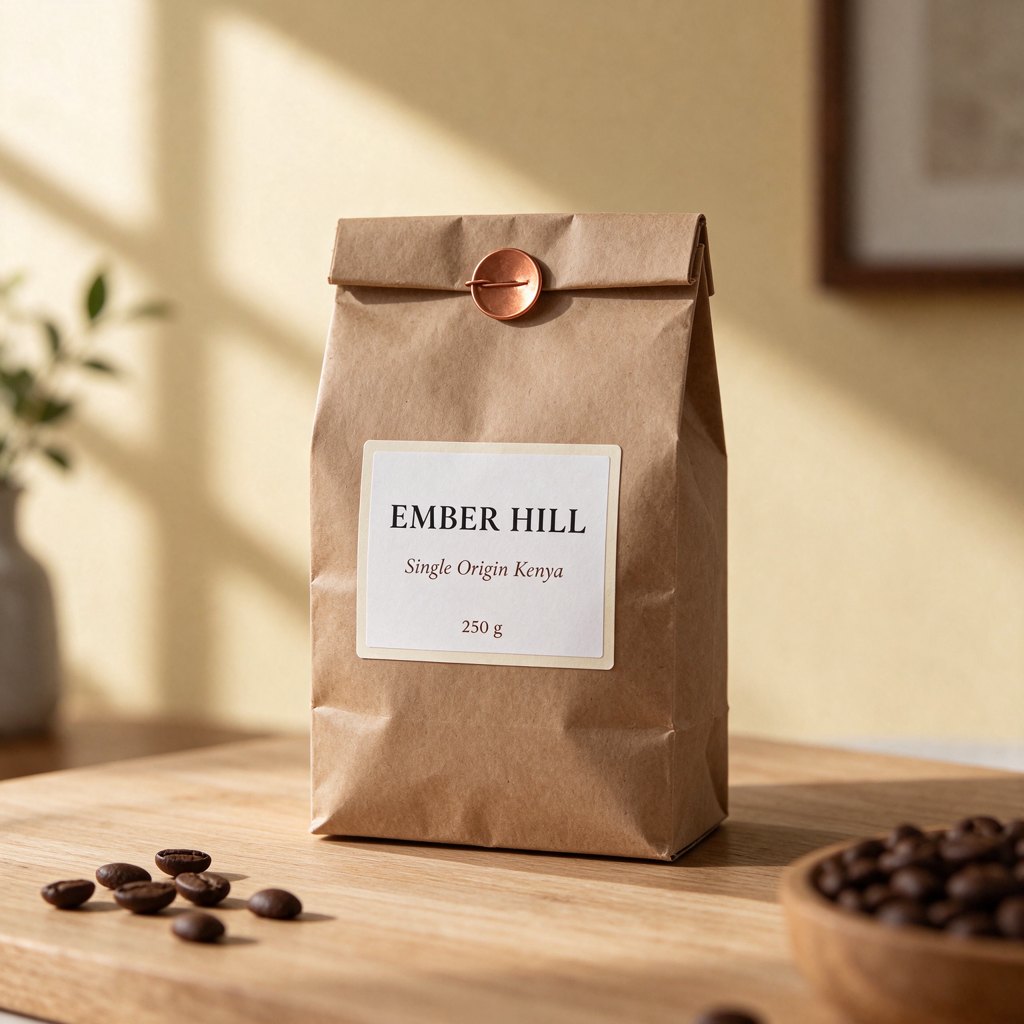
1.5K: 1536x1536, $0.0127
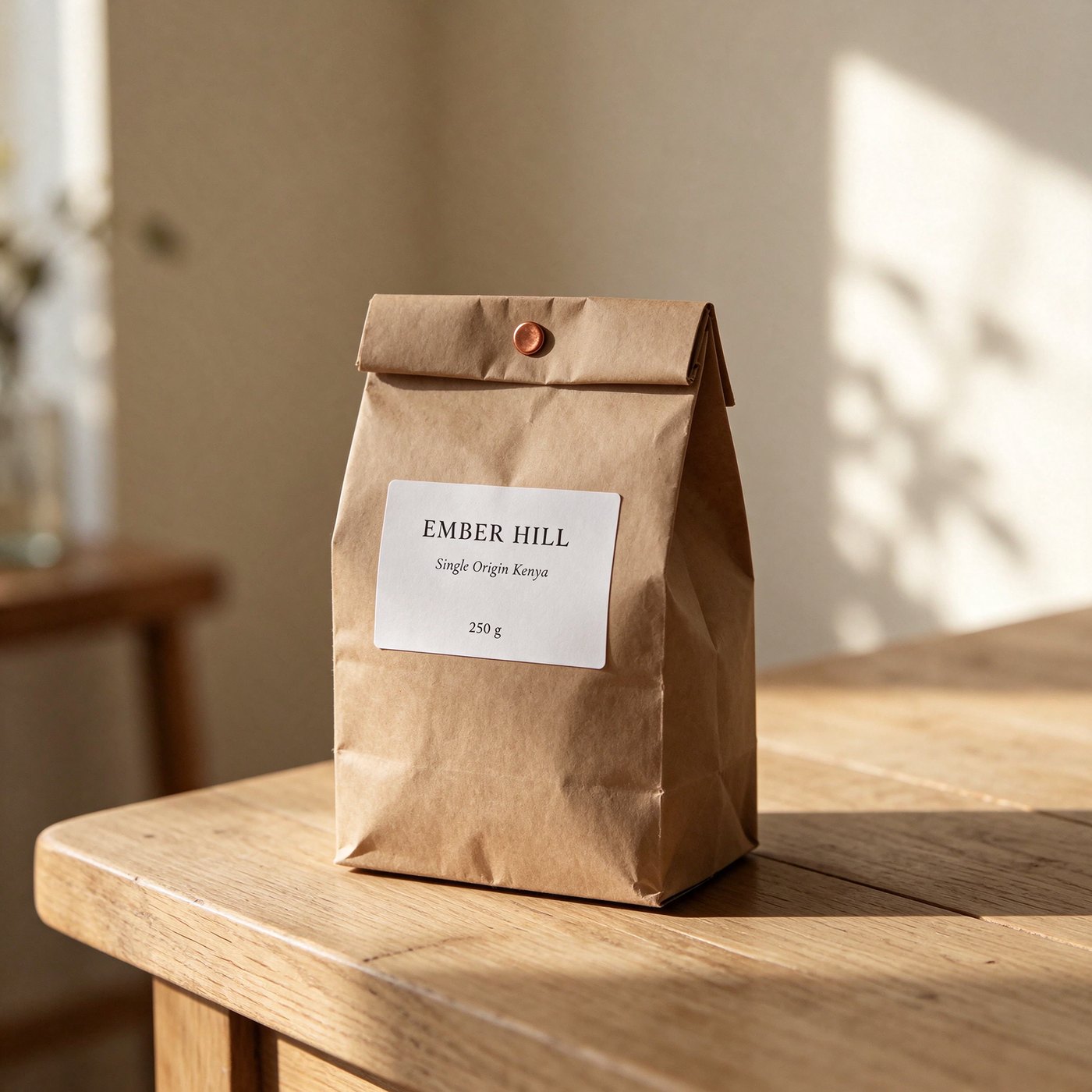
2K: 2048x2048, $0.0222
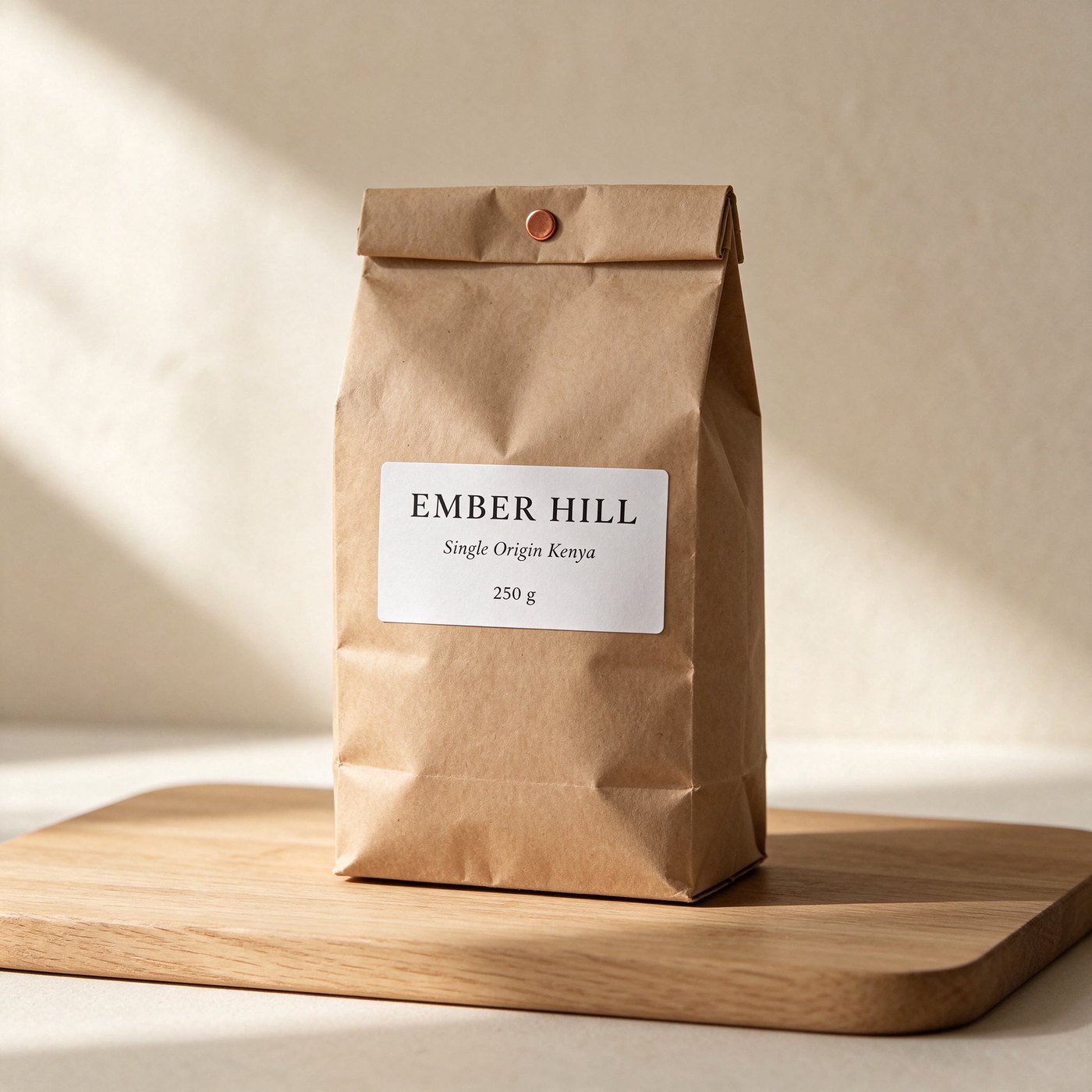
Same prompt, three tiers. All three labels read exactly "EMBER HILL / Single Origin Kenya / 250 g". There is no seed, so each tier is a fresh take on the scene.
All three got the label exactly right, including the italic middle line, and none of them invented extra text. The compositions differ because Seedream 5.5 has no seed parameter, so a different size is a different take. The 1K version added coffee beans and a plant I did not ask for; the 2K one stuck closest to "pale oak board against a cream wall".
Now the price per megapixel at the discounted rates:
| Tier (1:1) | Megapixels | Price per image | Price per megapixel |
|---|---|---|---|
| 1K (1024x1024) | 1.05 | $0.0127 | $0.0121 |
| 1.5K (1536x1536) | 2.36 | $0.0127 | $0.0054 |
| 2K (2048x2048) | 4.19 | $0.0222 | $0.0053 |
My rule after this: never request 1K. It costs the same as 1.5K and gives you 2.25 times fewer pixels. Between 1.5K and 2K the cost per pixel is a wash, so pick on what you need: 1.5K for social, web and drafts, 2K when the image will be cropped, printed or shown full screen. At 16:9, 1.5K returns 1920x1080, which is a full HD frame for $0.0127.
What the discount means at volume
A single image is fractions of a cent either way. The discount matters when you run a catalogue, a localisation batch or an A/B creative test. Here is the arithmetic for 1,000 outputs:
| Job, 1,000 images | Standard | 40% off | You save |
|---|---|---|---|
| Text to image at 1.5K | $21.16 | $12.70 | $8.46 |
| Text to image at 2K | $37.04 | $22.22 | $14.82 |
| Edits at 2K, 1 reference each | $45.50 | $27.30 | $18.20 |
| Composites at 1.5K, 2 references each | $38.10 | $22.86 | $15.24 |
Put the other way: $10 buys about 787 images at 1.5K right now, against 472 at the standard rate.
How it compares with other image models on Segmind
Even at the standard rate, Seedream 5.5 is the cheapest image model in this table. At 40% off the gap gets silly. Prices below are from each model's page today.
| Model | Lower tier | 2K | Notes |
|---|---|---|---|
| Seedream 5.5 (promo) | $0.0127 | $0.0222 | +$0.0051 per reference |
| Seedream 5.5 (standard) | $0.0212 | $0.0370 | +$0.0085 per reference |
| Seedream 5.0 Pro | $0.0534 | $0.1069 | first reference included, $0.0036 each after |
| Seedream 5.0 Lite | $0.035 flat | per generation | |
| Nano Banana 2.1 | $0.045 | $0.065 | minimal thinking, no web search |
| GPT Image 2.6 Flare | token billed | cost depends on size and quality | |
Prices from each model's page on segmind.com, 12 Nov 2026. "Lower tier" is 1K/1.5K for Seedream 5.5 and 1K for the others.
Cheapest is not the same as best for every brief. In our own head-to-head tests this week, GPT Image 2.6 Flare and Nano Banana 2.1 followed long, many-clause prompts more faithfully. Where Seedream 5.5 consistently wins is targeted editing, clean transparency and price. For a catalogue or a batch of edits, that is usually the trade you want.
What you get for the price: edits, composites and transparency
Price only matters if the output is usable, so I ran the three jobs that teams most often batch.
A targeted edit for $0.0273
The classic catalogue job: one product shot, many variants. I sent the 2K bag back as a reference and asked for a new colour and one changed label line.
Parameters reference_images: [2K bag] | size: 2K | aspect_ratio: auto | output_format: png
Input (reference)
Output, $0.0273
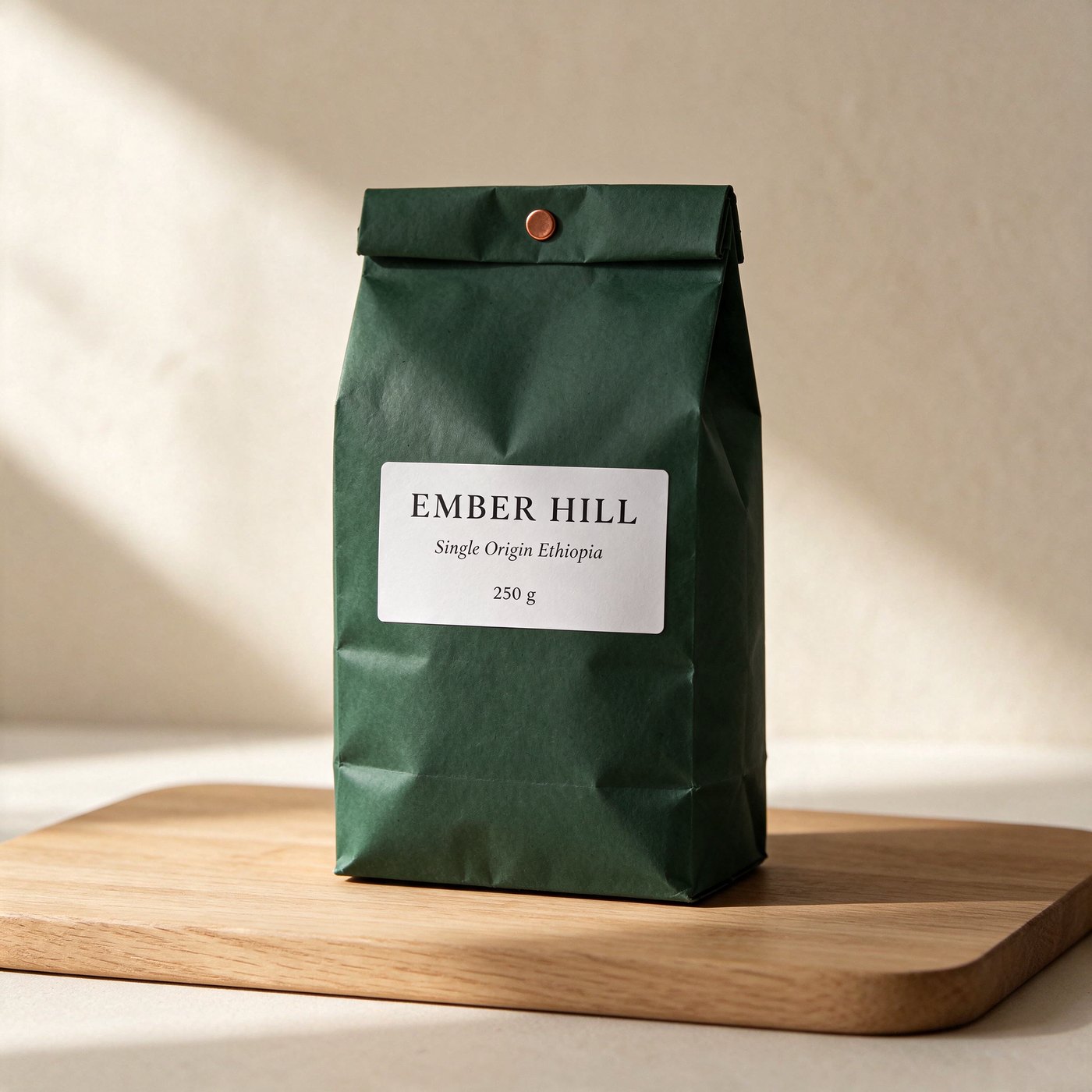
Bag recoloured, label line rewritten, everything else held. Returned at the same 2048x2048 size.
The new line reads "Single Origin Ethiopia" in the same italic, the other two lines are untouched, and the tin-tie, board and light are where they were. I diffed the two files: in the left, right and top strips of the frame, away from the bag, 0.00% of pixels moved by more than 16 levels. That is the property that makes cheap edits worth it. You are not paying to re-shoot the scene, only the change.
A two-reference composite for $0.0229
Next, the bag from the first test dropped into a café scene I generated separately at 1.5K, 16:9.
Reference Image 1
first reference: product
Reference Image 2
second reference: scene
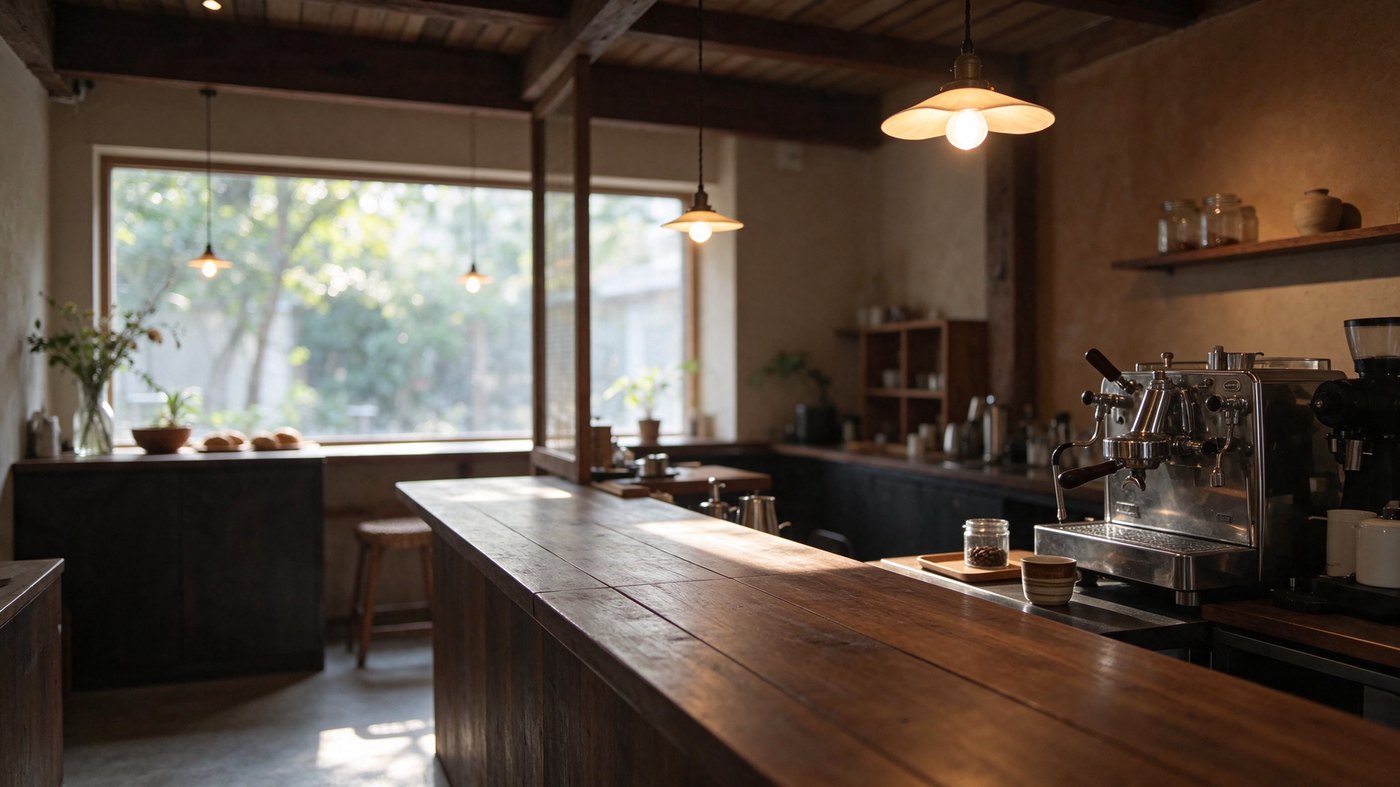
Both references passed in reference_images[], in the order the prompt names them. The café scene itself was a $0.0127 text-to-image call.
Parameters reference_images: [bag, café] | size: 1.5K | aspect_ratio: 16:9 | output_format: png
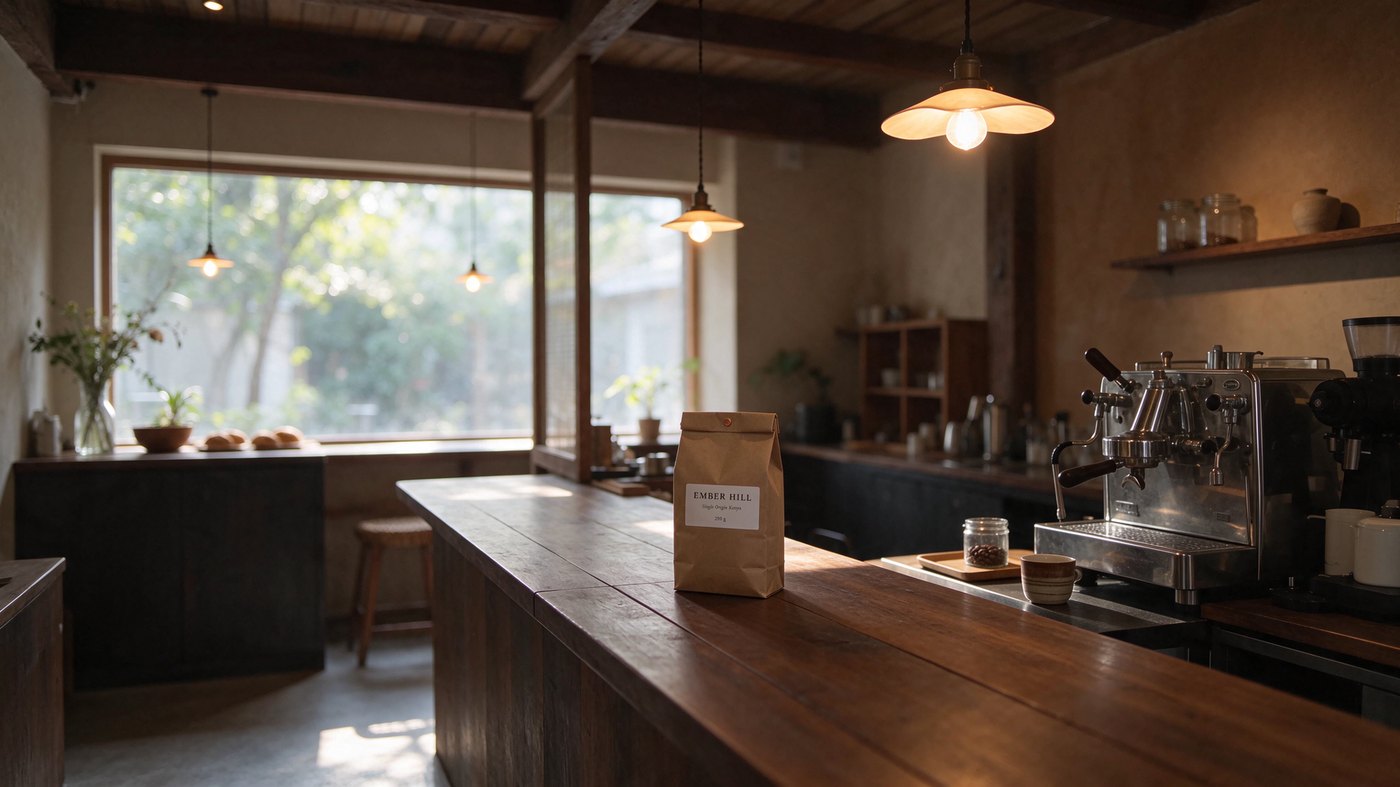
1920x1080, $0.02285712, 17.5 seconds. The fastest call of the run.
Scale, perspective and the warm light all match, and the shadow falls the right way. The café is unchanged. The honest caveat: at this size the bag is small in frame, so "EMBER HILL" stays crisp but the two smaller label lines soften into near-illegible type. If the label has to read, composite at 2K or frame the product larger. That costs you $0.0095 more, not a re-shoot.
Transparent PNGs at no extra cost
Setting background to transparent costs nothing extra. The 1K cup below billed the same $0.0126984 as an opaque 1K image.
Parameters size: 1K | aspect_ratio: 1:1 | background: transparent | output_format: png
v1 sync, photoreal cup

v2 async, flat sticker

Shown on a checkerboard so you can see the alpha. Both $0.0126984.
On the photoreal cup, 42.2% of the pixels are fully transparent, 57.2% fully opaque, and only 0.6% sit in between along the edge. That is a clean cut-out you can drop straight onto a product page, with no background-removal pass and no second bill.
Layer Decomposition, billed per layer
Seedream 5.5 Layer Decomposition is on the same discount. It splits one image into a clean base plus named transparent layers, and you pay for every image it returns plus the input. The max_images parameter (2 to 100, base included) is your cost ceiling, so set it. I ran the café composite with max_images: 3.
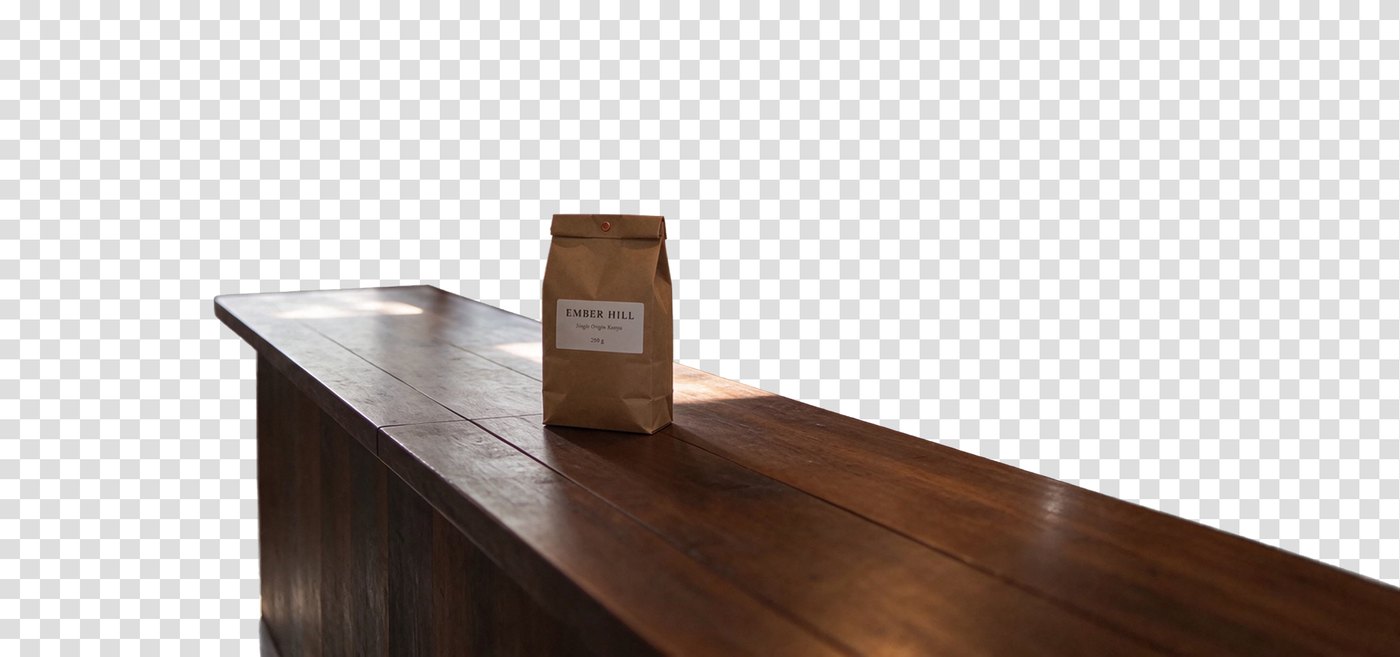
z_index 0: base
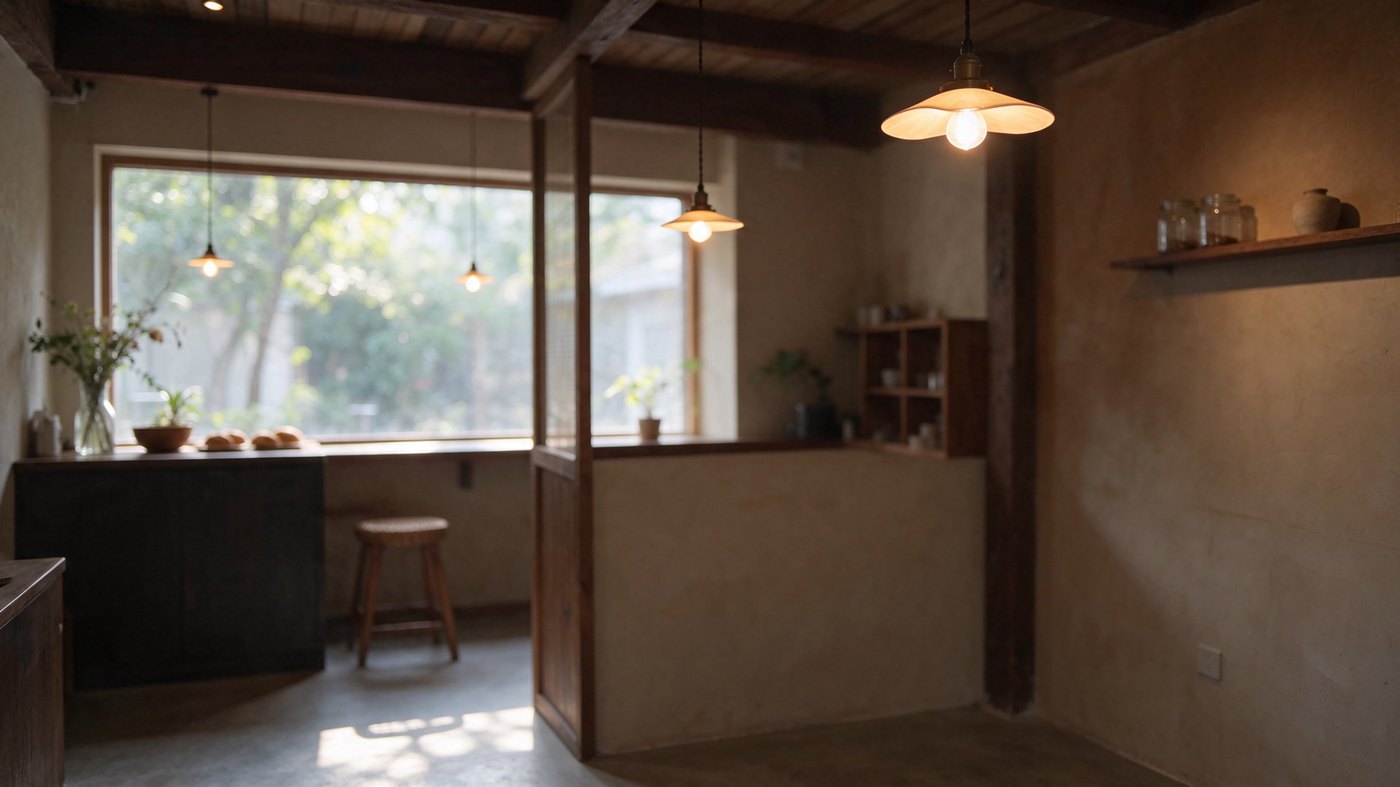
z_index 1: counter + bag
z_index 2: espresso set
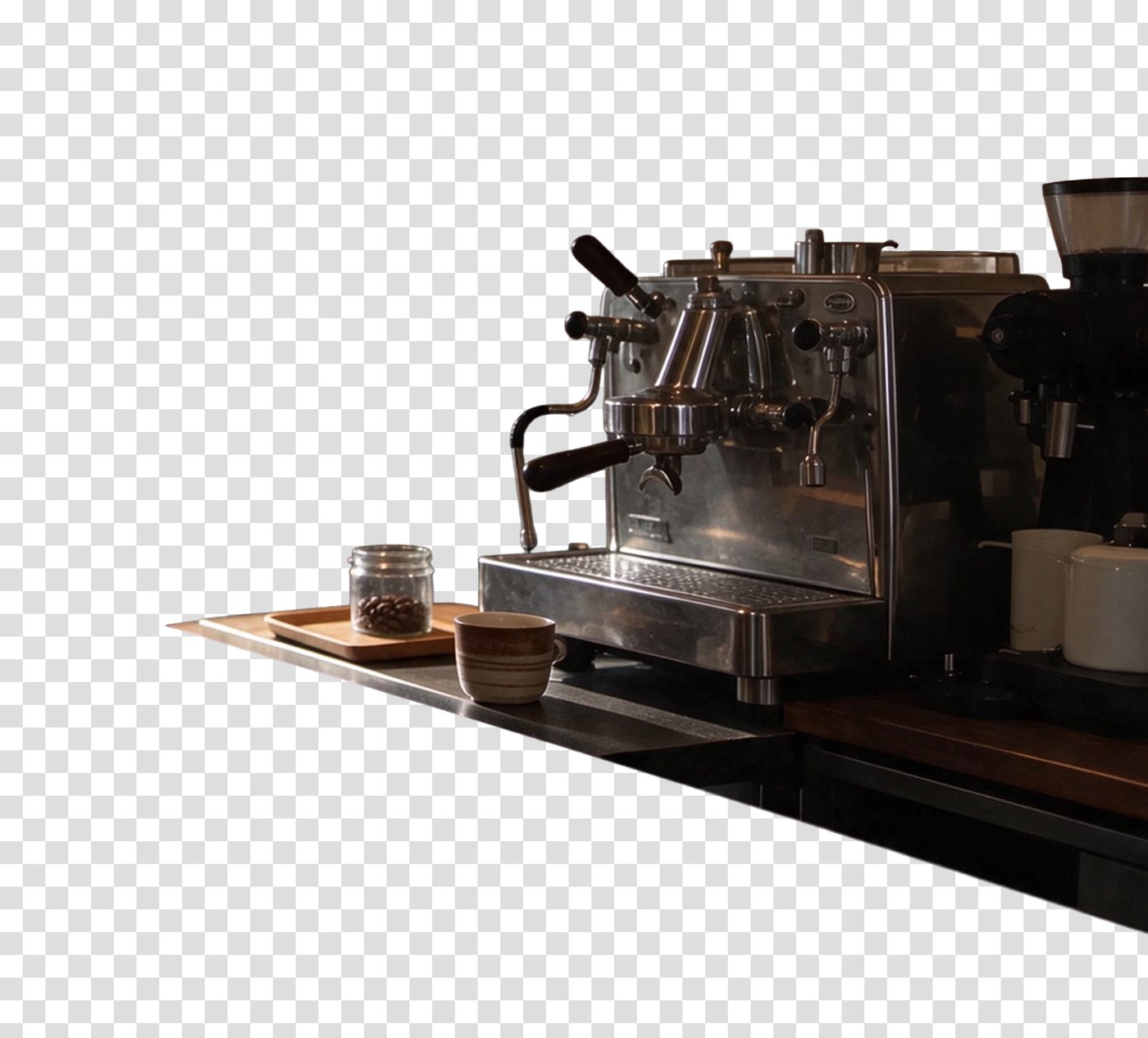
Three images at the 1.5K rate plus one input: $0.04317456. The base has the counter and machine removed and the room filled in behind them.
The base came back with the counter and espresso machine painted out cleanly. Because I capped it at three images, the model grouped the bag with the counter rather than giving it its own layer. If you need the product isolated, raise max_images: each extra layer is another $0.0127 at 1.5K, so a 6-image split is still under 9 cents.
Seedream 5.5 API: sync (v1) and async (v2)
The model ID is seedream-5.5. There are two ways to call it, and the choice is about how your code waits, not about price: both bill the same.
Parameters
| Parameter | Values | Affects price? |
|---|---|---|
prompt (required) | string; put text to render in quotes | No |
reference_images | up to 10 image URLs | Yes, each one billed |
size | 1K, 1.5K, 2K (default 2K) | Yes, 2K is the higher tier |
aspect_ratio | auto, 1:1, 4:3, 3:4, 16:9, 9:16, 3:2, 2:3, 21:9 | No |
background | auto, transparent, opaque | No |
output_format | png (default), jpeg | No |
watermark | true / false (default false) | No |
Two things to watch. The default size is 2K, so if you leave it out you pay the higher tier. And transparency needs PNG: JPEG cannot carry an alpha channel.
Synchronous v1 call (Python)
v1 holds the connection open and returns the image bytes directly. The billed amount comes back in the x-cost header, which is the simplest way to log spend per call.
import requests

resp = requests.post(
    "https://api.segmind.com/v1/seedream-5.5",
    headers={"x-api-key": "YOUR_API_KEY"},
    json={
        "prompt": 'Studio product photo of a kraft-paper coffee bag with a white label reading "EMBER HILL"',
        "size": "1.5K",          # same price as 1K, 2.25x the pixels
        "aspect_ratio": "1:1",
        "output_format": "png",
    },
    timeout=180,
)
resp.raise_for_status()
open("bag.png", "wb").write(resp.content)
print("billed:", resp.headers.get("x-cost"))   # e.g. 0.0126984
To edit, add "reference_images": ["https://.../your-image.png"] and describe the one change plus what must stay fixed. v1 returns the image itself, not a URL, so host the result somewhere before you pass it into the next round.
Async v2 call (cURL)
v2 queues the job and hands you a request ID. This is what I would use in production: no long-held connections, and the finished result carries a hosted URL you can feed straight back in as a reference for the next edit.
# 1. Submit
curl -s -X POST "https://api.segmind.com/v2/seedream-5.5" \
  -H "x-api-key: YOUR_API_KEY" -H "Content-Type: application/json" \
  -d '{"prompt":"Flat vector sticker of a steaming takeaway coffee cup with a copper lid, thick white outline, isolated on a fully transparent background.","size":"1K","aspect_ratio":"1:1","background":"transparent","output_format":"png"}'
# -> {"request_id":"...","status":"QUEUED","status_url":"...","response_url":"..."}

# 2. Poll until status is COMPLETED
curl -s "https://api.segmind.com/v2/requests/$REQUEST_ID/status" -H "x-api-key: YOUR_API_KEY"

# 3. Fetch the result
curl -s "https://api.segmind.com/v2/requests/$REQUEST_ID" -H "x-api-key: YOUR_API_KEY"
Here is the trimmed result from my real v2 call. Note metrics.cost: the exact amount billed, on the response itself.
{
  "status": "COMPLETED",
  "model": "seedream-5.5",
  "output": "https://images.segmind.com/generations/.../..._0.png",
  "images": [{ "content_type": "image/png", "file_size": "1090948", "url": "..." }],
  "metrics": {
    "cost": 0.0126984,
    "inference_time": 24.525237,
    "queue_time": 0.045786,
    "total_time": 24.571023
  }
}
The job sat in the queue for 0.05 seconds and rendered in 24.5. For a batch, submit everything, then poll: you are bounded by rendering time, not by how many connections you can hold open.
How to get the most out of the discount
- Default to 1.5K, not 1K. Same price, 2.25x the pixels.
- Always set
sizeexplicitly. The default is 2K, the expensive tier. - Count your references. Each is $0.0051 now and $0.0085 after the promo. Three references on a 1.5K output more than doubles its cost.
- Edit instead of regenerating. An edit holds the untouched parts of the frame, so one good master plus cheap variants beats ten fresh rolls.
- Cap
max_imageson Layer Decomposition. It is the only call here where one request can bill many outputs. - Log
x-costormetrics.cost. Billing is exact, so your logs become your invoice.
Honest assessment
The pricing is the cleanest I have seen on an image model: three numbers, no tokens, and every call I made billed to the seventh decimal. At 40% off, it is the cheapest way on Segmind to get a 2K photoreal image or a precise edit. Text in quotes came out exact in every test here.
The limits are real, though. There is no seed, so you cannot reproduce a take or keep a composition across sizes. Small text in a wide composite goes soft. It sometimes adds props you did not ask for, as the 1K bag showed. And the 40% is a promotion with a stated end date, so do not build a long-term cost model on it: budget at the standard rate, and treat the discount as a window to run the big batch now.
FAQ
What is Seedream 5.5 pricing on Segmind?
Until 12 November 2026: $0.0127 per image at 1K or 1.5K, $0.0222 at 2K, plus $0.0051 per reference image. After that the standard rates are $0.0212, $0.0370 and $0.0085.
How long does the 40% discount last?
Segmind's pricing page states the discount runs until 12 November 2026, inclusive. From the next day the standard rates apply automatically. No code or plan change is needed to get it.
Does a transparent background cost more?
No. A transparent 1K PNG billed $0.0126984, the same as an opaque 1K image. Only the size tier and the number of reference images change the price.
Is 1.5K cheaper than 2K per pixel?
Roughly equal: $0.0054 per megapixel at 1.5K and $0.0053 at 2K (1:1). The bad deal is 1K, which costs the same as 1.5K for less than half the pixels.
Is Layer Decomposition discounted too?
Yes, same rates. It bills each returned image by its own tier plus the input image. Three images at 1.5K plus one input cost $0.0432 in my test.
Should I use the v1 or v2 Seedream 5.5 API?
Both bill the same. Use v1 for quick scripts where you want the image bytes back directly. Use v2 for production and batches: it queues jobs, returns a hosted URL, and reports exact cost in metrics.cost.
Try it while the discount runs
If you have a catalogue to shoot, a set of ads to localise or a pile of product cut-outs to make, this is the week to run it. Open Seedream 5.5 on Segmind to try a prompt in the playground, check the live pricing page for the current rate, or read the Seedream 5.5 overview for what else the model can do. Grab an API key and the code above will run as written.