
How Higgsfield Soul Enhances AI Image Realism You Can Rely On in 2026
Discover how Higgsfield Soul produces super-realistic AI images with natural textures and cinematic lighting. Find out top use cases, sample prompts, and more.

You often generate AI images that look impressive at first glance, yet fall apart under closer inspection. Skin textures feel plastic, lighting looks staged, and small details break realism fast.
For creators, this means extra edits, reruns, and missed deadlines. For developers, it means unstable outputs, higher inference costs, and unreliable visuals across production workflows.
That is where Higgsfield Soul, the new, hyper-realistic AI photo model, is changing the game. Understanding how it improves image realism helps you reduce rework, preserve visual consistency, and ship assets that actually look production-ready.
What You Need to Know
- Higgsfield Soul solves the “looks good until you zoom in” problem. It delivers photorealistic skin, fabric, and lighting that avoid plastic textures and staged visuals common in AI images.
- Built around controlled realism, it uses curated presets and internal prompt enhancement to produce consistent, high-quality outputs without advanced prompt engineering.
- It performs well across fashion, fantasy, lifestyle, and conceptual imagery, while maintaining stable anatomy and recognizable aesthetics.
- The model fits both individual and team workflows. It supports creators, marketers, designers, and production teams who need fast visuals for validation, campaigns, or pre-production.
- Soul lets you scale AI image generation reliably with Segmind workflows. It runs with reproducible seeds, reference control, batch variations, and predictable pricing for production-scale use.
What Is Soul By Higgsfield?
You might be asking why so many creators and developers are paying attention to Higgsfield Soul right now. Well, it is a high-aesthetic text-to-image generation model built by Higgsfield, a San Francisco–based AI startup focused on creative tooling.
Released on June 25, 2025, the Soul By Higgsfield AI Image Generator is designed for producing highly realistic, detail-accurate images without complex setup or prompt engineering. Unlike generic image models, it focuses on controlled realism and strong visual identity. You choose from more than 50 curated styles, then generate consistent, production-ready visuals in just a few steps.
Key Features
Soul fits naturally into fast-moving creative and development workflows. You are not forced to tune dozens of parameters or install local dependencies. Key capabilities include:
- Preset-driven creation: You can choose from styles such as Y2K, Tokyo Streetstyle, Quiet Luxury, or Fisheye without manual style prompting.
- Browser-first experience: You work directly in the browser with no local installs, keeping setup simple and iteration fast.
- Advanced prompt enhancement: Your prompts are automatically refined to improve realism, lighting accuracy, and subject consistency.
- Workflow-friendly automation: You can connect real-time webhooks to automate image generation inside larger creative pipelines.
Also Read: The Ultimate Guide to Higgsfield AI Video Effects and Generators
To understand why so many teams trust it for realism-first work, it helps to compare Soul with traditional AI image generators.
Why Higgsfield Soul Feels More Real Than Traditional AI Images
Most AI image generation tools still struggle with the same problem. Outputs look polished yet contain unnatural textures. That breaks immersion fast, especially when you zoom in.
Higgsfield Soul approaches realism differently. Instead of chasing perfection, it focuses on believable imperfections. The result feels less like generated art and more like photography without a camera.
What Sets Soul Apart From Typical AI Image Generators
Traditional models often optimize for sharpness and contrast. Soul optimizes for authenticity. That shift changes everything. Here is how the Higgsfield Soul image model delivers realism that holds up under scrutiny:
- Natural textures over glossy surfaces: Soul’s realism shows up most clearly in edge cases where other models fail. Skin shows pores, subtle sheen, and uneven light falloff. Fabrics display folds, seams, stretch, wrinkles, stitching, and weight.
- Cinematic lighting behavior: Light reacts like it would in real environments, including neon reflections, shadows, and ambient glow.
- Stable facial anatomy and expressions: Expressive facial features remain consistent across ethnicities and genders, without flattening, distortion, or uncanny effects.
- Fashion-first visual DNA: Styles like Y2K cyber colors or deconstructed couture translate into instantly recognizable details.
This focus on lifelike quality is why many creators describe it as photography-grade output rather than illustration-grade imagery.
Pro Tip: Street signage may occasionally appear garbled. If your project does not require readable text, explicitly excluding signage instantly improves immersion. You can ensure this by adding “no text” to prompts or removing it using Higgsfield Soul inpaint tools.
The Technology Behind The Realism
Soul’s output quality is not accidental. It is driven by a hybrid architecture tuned for realism.
Core Technology | How It Works In Soul | Why It Improves Image Realism |
|---|---|---|
Latent diffusion models | Soul refines noise into images inside a compressed latent space, allowing faster generation without sacrificing fine detail. | You get high-resolution textures, stable anatomy, and fewer visual artifacts, even in complex scenes. |
Transformer-based prompt understanding | Transformer layers interpret prompts with stronger semantic awareness and contextual accuracy. | Your prompts translate into visuals that closely match intent, reducing mismatches in poses, styles, or environments. |
World model simulation | The model incorporates real-world physics, lighting behavior, and material interactions during generation. | Lighting, shadows, and textures behave naturally, making images feel photographed rather than rendered. |
Reinforcement learning optimization | Continuous feedback tuning improves consistency and controllability across generations. | Outputs stay aligned with your creative direction, reducing random distortions. |
Cross-modal texture and human structure mapping | Soul maps textures and human skeletal structure animations together to create realistic posture and surface detail. | Faces, fabrics, and body movement appear natural, even from simple sketches or short text prompts. |
This combination allows Soul Higgsfield AI outputs to feel human, textured, and emotionally grounded rather than sterile.
Why This Matters For Developers And Creators
When images feel fake, you rerun generations. That wastes time, increases cost, and slows iteration. But with Higgsfield Soul's authenticity, you spend less time fixing outputs and more time shipping assets that work as-is.
Key benefits:
- If you are a developer building a content platform, Soul lets you generate consistent hero images without rerunning models repeatedly.
- If you are a creator or marketer, you can produce realistic visuals that hold up across campaigns without heavy post-processing.
For example, you can generate a fashion product image in a “Quiet Luxury” style, then pass it downstream into animation or video tools inside the same ecosystem. That means fewer tools, fewer exports, and far less friction in production. You deliver assets that pass close inspection in production.
If you want realistic images without reruns, explore how Segmind lets you combine Soul with other models inside several PixelFlow workflows.
Also Read: Top AI Image Generators for High Quality Results
Apart from developers and creators, Soul also supports teams and individuals that rely on visual speed, cultural relevance, and consistent aesthetics across formats.
How Other Teams and Individuals Can Use Higgsfield Soul
Not every visual workflow starts with code or content calendars. Many teams need fast, believable visuals to communicate ideas, align stakeholders, or validate creative direction before production begins.
Soul supports these use cases by removing setup friction and replacing early-stage guesswork with visuals that already feel finished. Here's how:
User Type | How They Use Soul In Practice |
|---|---|
Marketers and UGC teams | Create campaign-ready visuals and ads using aesthetic presets that match the brand tone, without a photoshoot. |
Artists and designers | Explore hyper-realistic portraits, digital identities, and experimental styles for concept and visual design work. |
Photographers and directors | Produce early visual references and mood frames before shoots or production planning. |
Stylists and fashion teams | Build lookbooks and styling concepts using recognizable fashion aesthetics and textures. |
Small businesses and freelancers | Produce professional-quality visuals without camera gear, studios, or advanced editing skills. |
Also Read: Fastest AI Image Generation Models 2025 Guide
Many of these workflows come down to one thing: how well a model responds to real prompts, not just feature lists. Let's explore how Soul handles different creative intents.
Real-World Prompt Examples That Showcase Soul’s Range
Seeing Soul in action makes its strengths clear. These examples show how different presets translate abstract ideas into realistic, style-consistent visuals that hold up across creative and commercial use cases.
Each prompt demonstrates how you can move from a simple concept to a production-ready image without heavy post-processing.
Case 1: Preset Tokyo Streetstyle
Use case: Fashion creators, UGC teams, brand mood boards
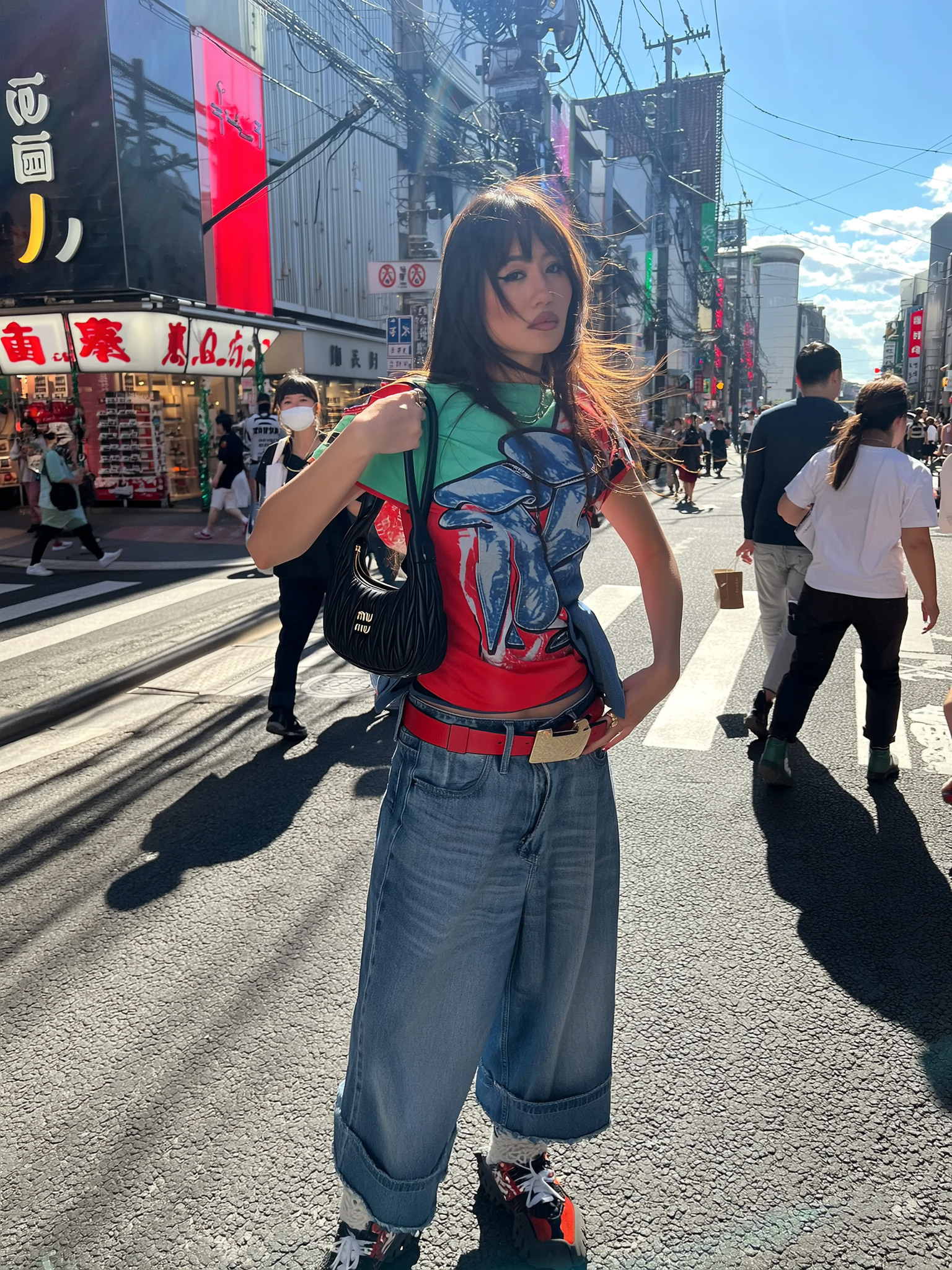
Prompt: Create a photorealistic street-style fashion photo of a woman in her mid-20s, inspired by contemporary Tokyo aesthetics. She wears bold Y2K-inspired styling and stands on a busy urban street during daylight. The scene feels candid, with motion-blurred pedestrians in the background, bright natural sunlight, and a strong editorial fashion look.
Case 2: Preset Creatures

Use case: Game studios, concept artists, fantasy branding
Prompt: Generate a cinematic fantasy character portrait of a dragonborn warrior standing on a rocky cliff. The character wears ancient battle armor etched with glowing runes and holds a heavy battle axe. The pose feels heroic and grounded, with dramatic lighting and a sense of scale and power.
Case 3: Preset Office Beach
Use case: Marketers, social creators, campaign visuals

Prompt: Create a surreal lifestyle image of a corporate professional working remotely from a tropical beach. She wears a structured office outfit, partially soaked as shallow waves reach her legs, with a laptop resting on her lap. The scene blends polished corporate styling with beach elements like palm trees, warm sunlight, and scattered work accessories, creating a playful contrast between work and escapism.
As powerful as Soul is on its own, its real impact shows when you stop using it in isolation. High-quality image generation is only one step in a larger production pipeline, especially when you are building products, campaigns, or automated workflows at scale. That is where Segmind comes in.
Using Segmind To Scale Higgsfield Soul Workflows
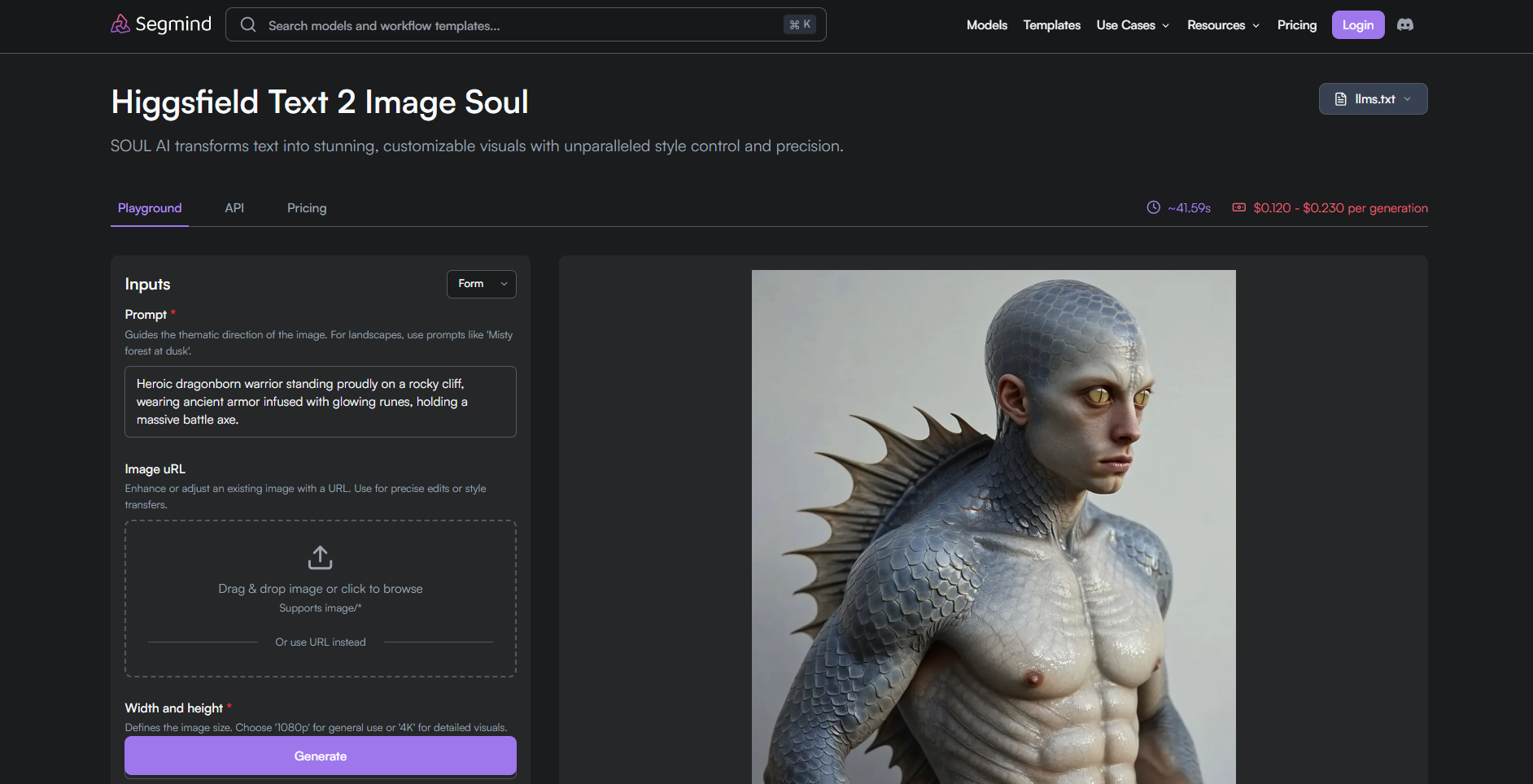
High-quality image generation often breaks down when scaled. Prompts drift, outputs lose consistency, and reruns inflate costs. Segmind closes that gap by giving you a structured way to run Higgsfield Soul within repeatable, production-ready workflows. It removes infrastructure overhead and replaces it with practical controls that matter when generating images at scale.
Here's why Soul works well with Segmind:
- Layout-aware resolution control: You can set
width_and_heightto match your delivery format:- 1536×2048 for portrait artwork
- 2048×1536 for landscape scenes
- 1536×1536 for square social media posts
- Reproducible results using seeds: Lock a
seedvalue to reproduce the same visual output across runs, reviews, or revisions. - Consistent identity and object control: Use
custom_reference_idwithcustom_reference_strengthto maintain character, product, or style consistency across multiple images. - Reference-driven generation: Upload a base image using
image_urland anchor its influence by settingcustom_reference_strengthbetween 0.6 and 1.0. - Batch exploration without drift: Hold the prompt and style constant, vary
seedand generate controlled variations for A/B testing or creative exploration. - Simple, transparent pricing: You pay only for what you use, with no commitments or hidden fees.
- 720p images cost $0.12
- 1080p images cost $0.23
With Segmind, Soul is no longer just an image generator. It becomes a building block inside a larger workflow.
Final Thoughts
Higgsfield Soul proves that realism in AI images is about control, consistency, and outputs that survive real-world use. When images feel believable on the first pass, you stop fighting the model and start building with it.
Treat Soul as a realism-first image engine rather than a one-off creative tool. Use it where visual credibility matters. For anything that needs scale, reliability, or repeatability, your workflow matters as much as the model.
This is where Segmind Cloud becomes essential. You can run Soul without managing GPUs, handle bursts of high-resolution generation, and scale usage without performance drops. More importantly, you can test, refine, and deploy image pipelines via PixelFlow that remain consistent over time and across teams.
FAQs
1. Can Higgsfield Soul be used reliably for commercial client work?
Yes, but reliability depends on workflow control. When paired with structured pipelines, fixed seeds, and reference handling, Soul can produce repeatable visuals suitable for commercial campaigns, internal presentations, and pre-production assets.
2. Does Higgsfield Soul require advanced prompt engineering skills?
No. Soul is designed to work with natural language prompts. You focus on describing intent and aesthetics, while the model handles composition, lighting, and texture interpretation internally, reducing the need for complex prompt syntax.
3. Is Higgsfield Soul suitable for non-fashion use cases like products or environments?
Yes. While it excels in fashion aesthetics, Soul performs for products, interiors, lifestyle scenes, and conceptual environments. It holds up well as long as realism and material accuracy matter more than stylized illustration.
4. Can Higgsfield Soul replace traditional photography for e-commerce?
Soul works best for concept validation, lifestyle visuals, and marketing imagery. For regulated product shots requiring exact measurements or compliance accuracy, it complements photography rather than entirely replacing it in the final production stages.
5. Is Higgsfield Soul suitable for long-term visual consistency in brand systems?
Yes, when used with controlled prompts, references, and reproducible settings. Without structure, natural variation increases over time, which is why Soul works best within defined workflows rather than ad hoc generation.