
AI Image Generation API: GPT Image 2 Review, Real-World Use Cases 2026
GPT Image 2 review on Segmind: I tested multilingual text rendering, ad creatives, film pre-vis, and concert posters across 5 real briefs.

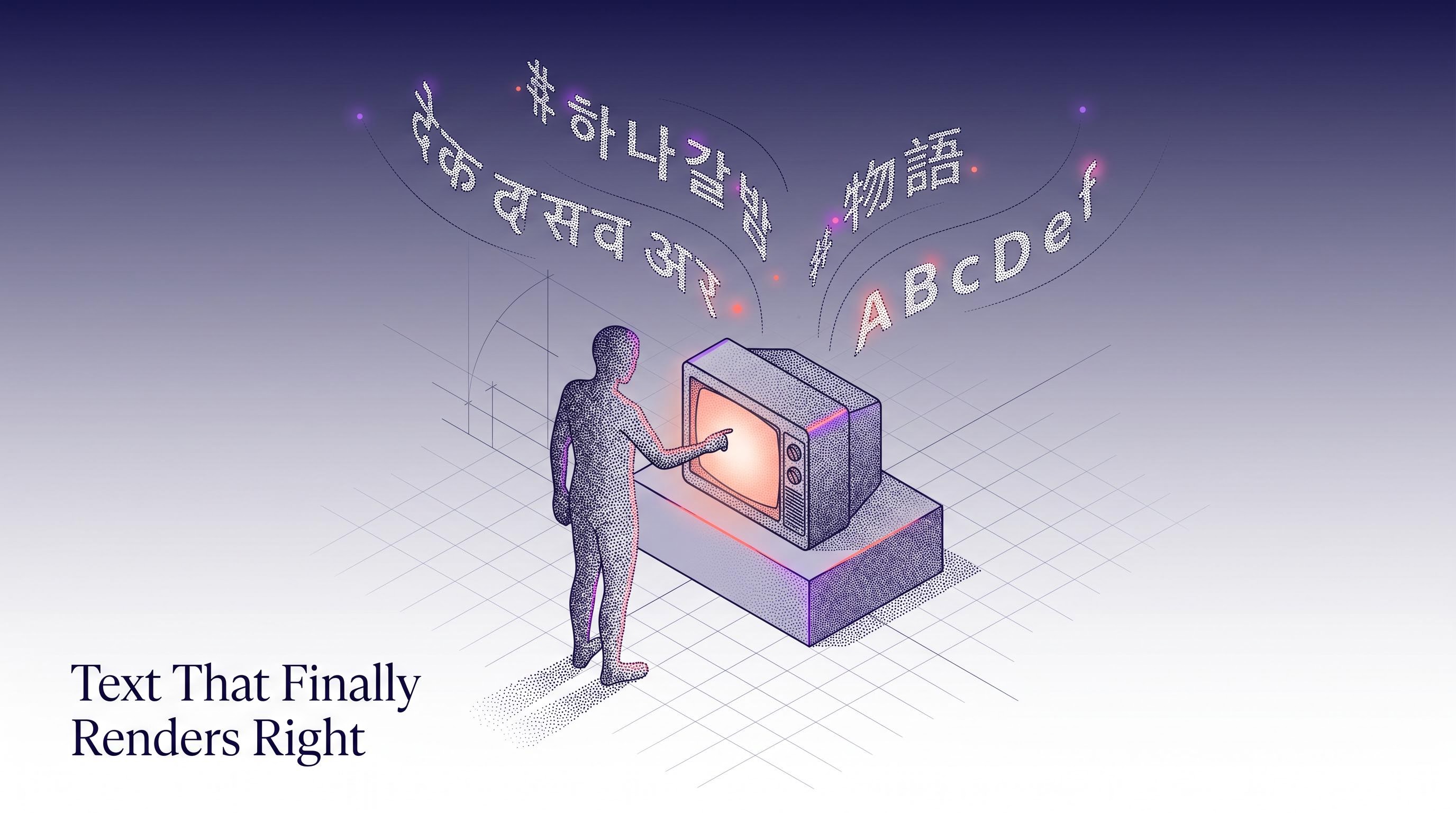
I have been running image models in production for long enough to know which tests to start with, and the first one is always text. For two years every mainstream image model I have used has failed in the same predictable way: ask it to render a line of Hindi, Chinese, or Korean and the output is a field of confident looking squiggles. The rest of the frame looks great, but the text is unusable, and that single weakness is why most marketing teams still pipe their "AI generated" assets back through Photoshop before anything ships. OpenAI's GPT Image 2 is the first model I have tested that properly clears that bar, and I spent a day putting it through the use cases that actually matter to the teams I work with: marketing agencies, film studios, and production houses. This post covers what GPT Image 2 is, how it performs on real creative briefs in five languages, and how to wire it into your stack through the Segmind API.
What is GPT Image 2?
GPT Image 2 is OpenAI's second generation photorealistic image model, released as a follow-up to the original GPT Image that shipped inside ChatGPT. It does text-to-image generation and single-image editing through the same endpoint, with an optional reference image for edits. Supported output sizes are 1024x1024, 1536x1024, and 1024x1536, with an "auto" option that lets the model pick based on prompt context. Quality is a first-class parameter with low, medium, high, and auto tiers, and output formats include PNG, JPEG, and WebP with configurable compression. Where it stands on the cost curve: output tokens are priced at $30 per million and input tokens at $8 per million, which works out to roughly 15 to 25 cents per high-quality image in my tests. Against alternatives, it sits in the same performance bracket as the best commercial models for photorealism, but it is clearly a tier ahead of everything else I have tried on typography and instruction following for long prompts. The moment you start asking for four lines of copy in two scripts, that gap becomes impossible to ignore.
Key capabilities
- Multilingual text rendering: Devanagari, Simplified Chinese, Japanese, Korean, Kannada, Tamil, and most other major scripts render as correctly formed characters. This is the headline capability and the one that broke my habits from the last generation of models.
- Long-prompt instruction fidelity: prompts with five or six discrete instructions (headline text, sub-headline text, CTA button text, brand palette, camera settings, lighting) hold together through a single pass. I stopped having to split prompts across "generate base image" then "edit in text".
- Photorealism with layout control: hero product shots, editorial photography, and stylised mockups all land in recognisably different looks. Magazine covers read as print-ready. Marketing comps read as shot-on-set.
- Native portrait and landscape outputs: 1024x1536 for Instagram Story and Reels formats is a first-class citizen rather than a post-generation crop.
- Image editing with a single reference: pass an image in the optional
imagefield and the model treats the prompt as an edit instruction against it. Useful for changing a headline in an existing ad or swapping a background while keeping the hero subject consistent.
Use case 1: marketing agencies
The rising query that caught my eye in Google Trends over the last ninety days was "AI image generation for ads" and its long-tail cousin "localised ad creatives". Every agency I have spoken with this quarter is under the same pressure: produce five to ten localised variants of each core creative, in a week, without hiring a second design team. The bottleneck has always been typography. You can generate an English hero creative quickly enough, but the moment the client asks for a Kannada or Hindi version, you are back in Figma editing text layers by hand.
To test this I wrote a prompt for a small Bengaluru specialty coffee brand that needed an Instagram Story ad. I asked for a photorealistic overhead hero in the top half, a clean typographic block in the bottom half with a large serif English headline, a Kannada sub-headline, a CTA button, and a specific brand palette. One pass, no post-production. The output below is exactly what came back.
Parameters size: 1024x1536 | quality: high | output_format: jpeg
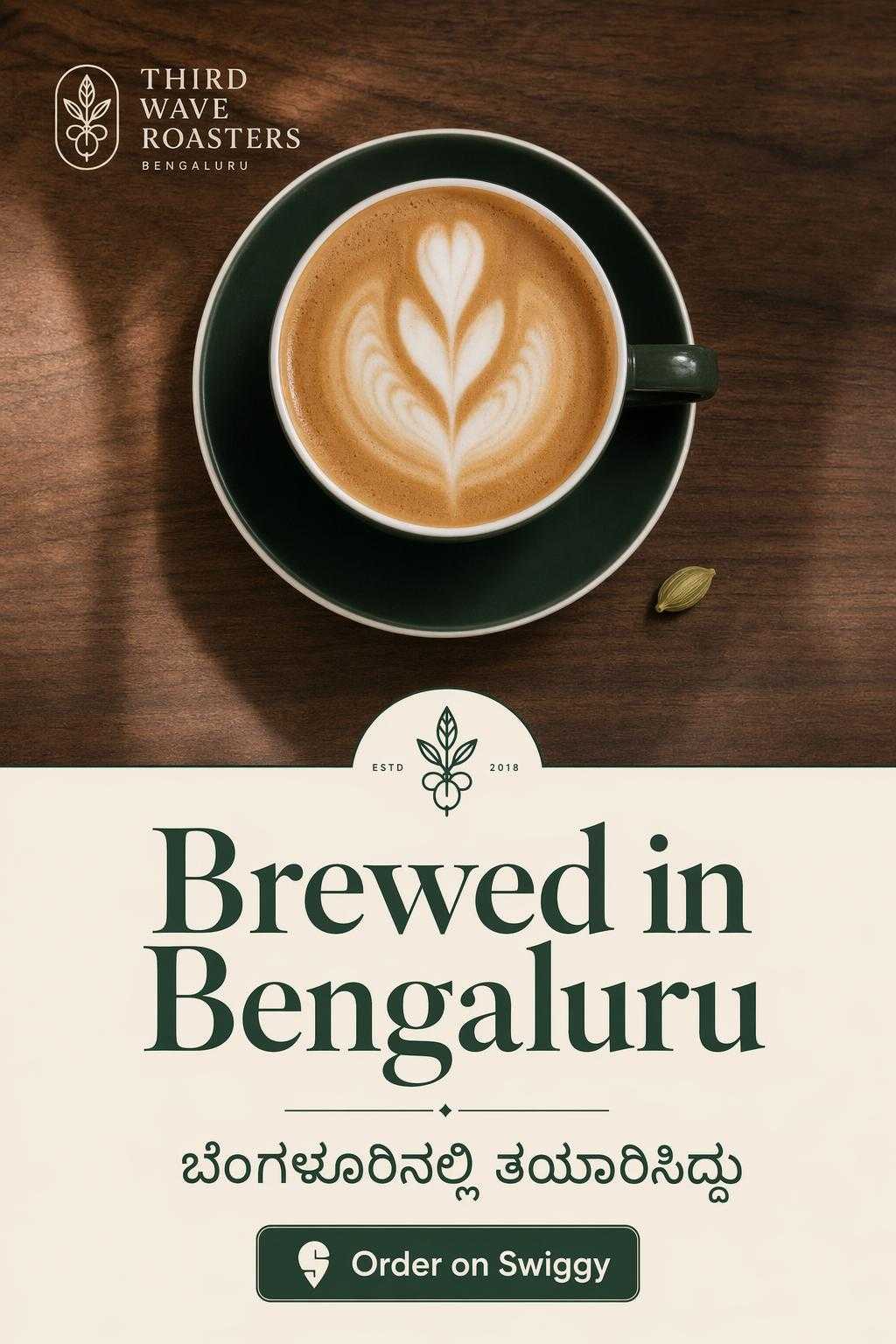
9:16 Instagram Story ad, single pass, no post-production in Figma or Photoshop.
For a minimal working call from a Python script:
import requests

response = requests.post(
    "https://api.segmind.com/v1/gpt-image-2",
    headers={"x-api-key": "YOUR_API_KEY"},
    json={
        "prompt": "Instagram Story ad for a Bengaluru coffee brand...",
        "size": "1024x1536",
        "quality": "high",
        "output_format": "jpeg"
    }
)
open("ad.jpeg", "wb").write(response.content)
What makes this better than the workflow I had last year is not just that the text is right. It is that the whole brief holds together. The typography, the colour palette, the photograph, the composition, all in one call. That is the first time I have been able to say that about any text-to-image model.
Use case 2: movie making and film studios
The trend that jumped out here was "AI for previsualization" and "concept art for film". Smaller studios and VFX houses have been experimenting with AI tools for pre-vis boards and location mockups, but the same typography problem blocks them from using those outputs in anything that has to survive a second look. A storyboard with a menu board in the background that reads as gibberish is a storyboard you cannot show the director.
I tested two scenarios. First, a fictional magazine cover that a film studio might need as a prop for a story set in the design world. Second, a cinematic location shot of a Shanghai noodle shop where the menu text needed to read as native Chinese. Both had to look production-usable, not placeholder.
Parameters size: 1024x1536 | quality: high | output_format: jpeg
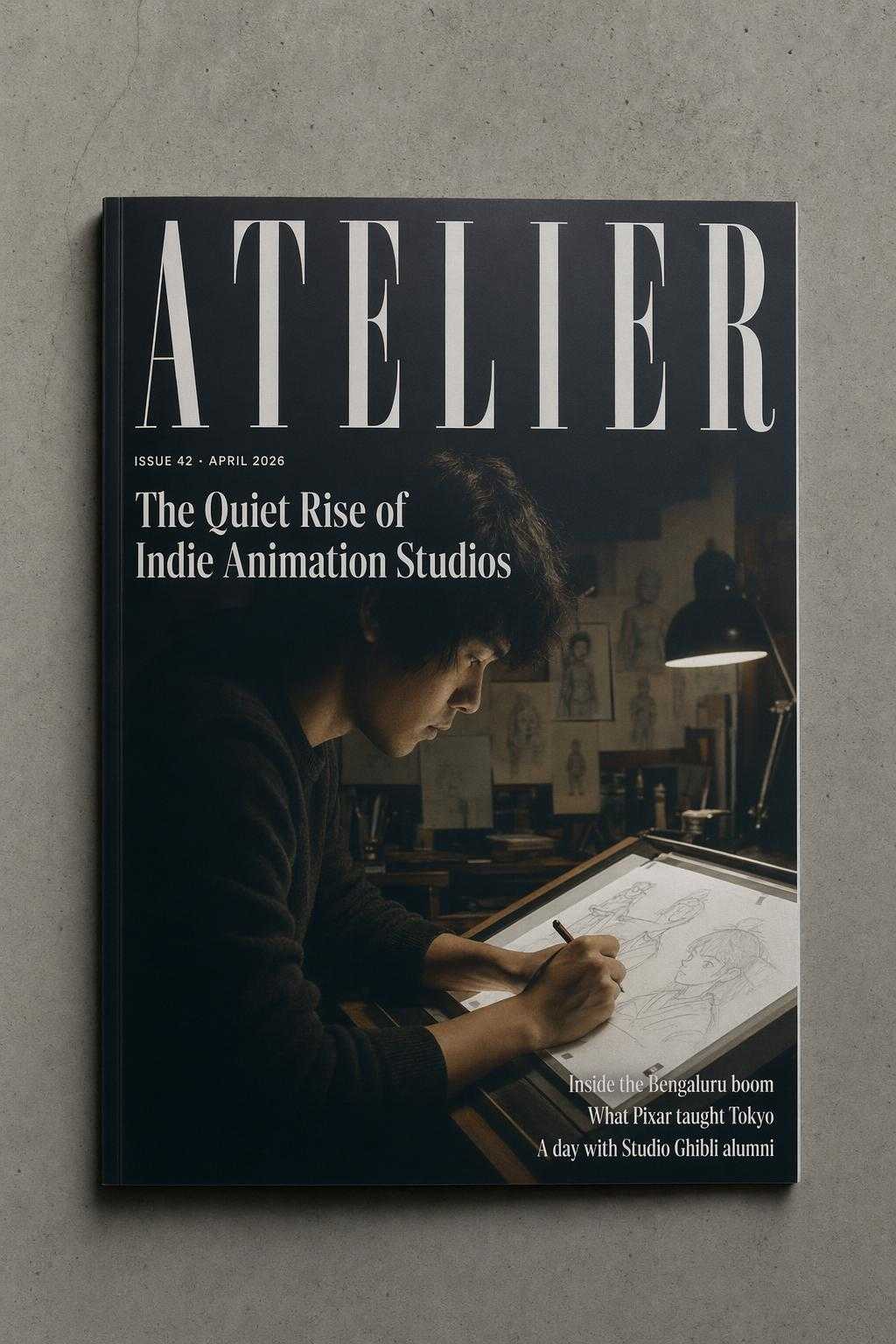
Prop-ready magazine cover. Masthead, kicker, cover story, and three dek lines all in frame.
The second test was the Shanghai noodle shop. I asked for a cinematic editorial photo with a visible wooden menu board behind the counter listing three dishes with prices in Simplified Chinese, plus a smaller "Chef's Special" chalkboard. This is exactly the kind of set dressing that would normally go back to a designer for a clean-up pass.
Parameters size: 1536x1024 | quality: high | output_format: jpeg
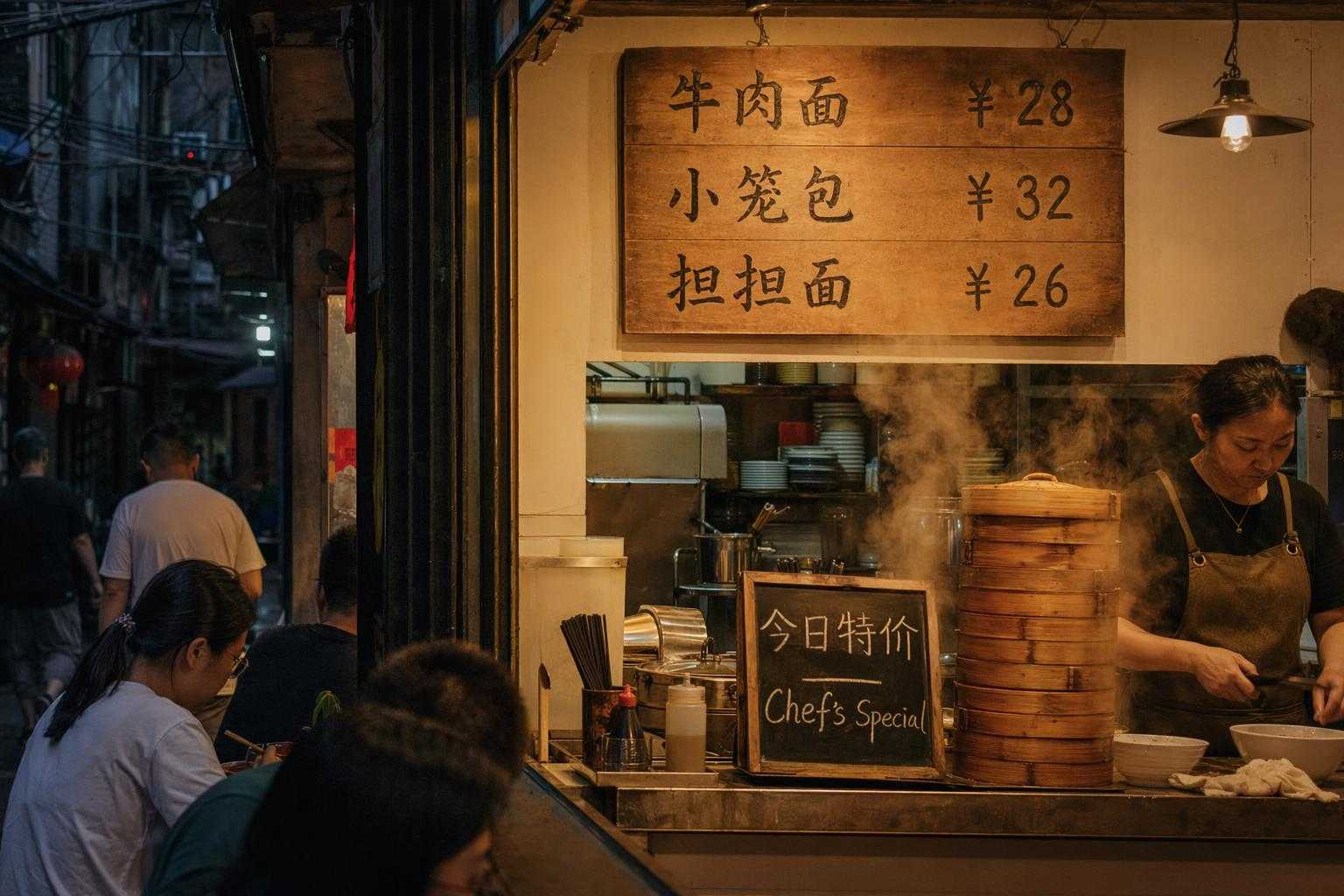
Menu reads correctly as '牛肉面 ¥28', '小笼包 ¥32', '担担面 ¥26'. Production-usable without clean-up.
For a pre-vis pipeline, this is the first time I have seen outputs I would actually hand to a director without apology. The quality bar for a film studio is not "pretty", it is "does not embarrass you when the DP looks at it on a large monitor". GPT Image 2 is the first model I have tested that clears that bar on multilingual set dressing.
Use case 3: production houses and MCNs
The rising query in content production was "concert poster generator" and more broadly "thumbnail ai for youtube". Production houses and MCNs operate at a volume where every asset has to be produced in hours, not days, and across dozens of regional creators. Seoul-based K-pop concert promotions are a good stress test for this because the asset has to carry a Hangul headline, an English headline, a venue line with mixed Hangul and numerals, and a ticketing callout, all inside a single poster that looks as if it came from an agency.
Parameters size: 1024x1536 | quality: high | output_format: jpeg
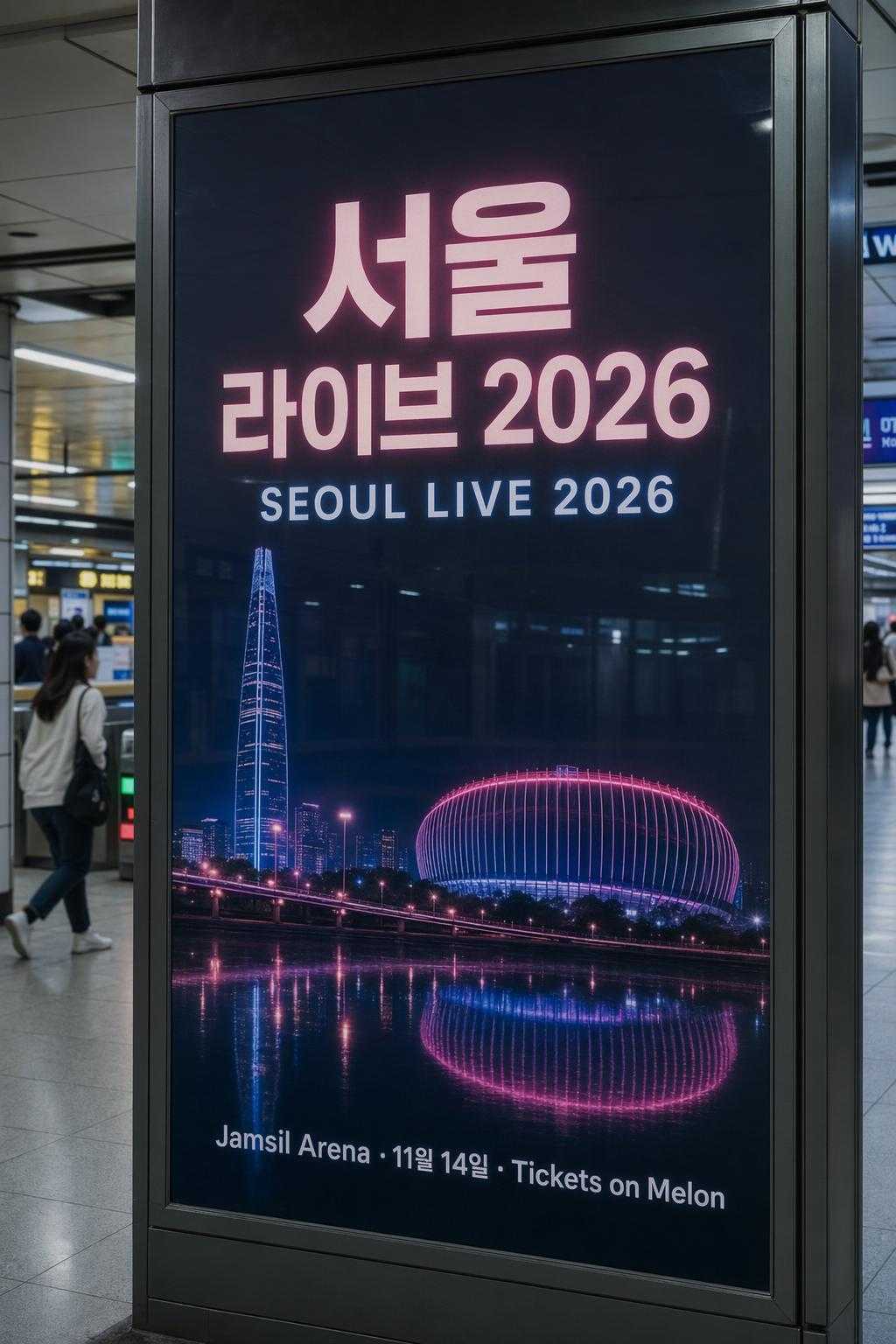
Hangul, English, and mixed-script venue line, all in-frame and legible.
The ROI framing for an MCN is straightforward. If one editor can produce ten regional variants of a thumbnail or poster in under an hour, you have replaced a three-person design sprint with a one-person prompt sprint. That is the first time I have been able to put actual numbers behind "AI content pipeline" for this segment, because the typography was always the gate that kept the rest of the asset from being usable.
Developer integration guide
GPT Image 2 on Segmind is a synchronous POST. The response body is the image binary. There is no job queue and no polling. Here is the full working call I have been using:
import requests

response = requests.post(
    "https://api.segmind.com/v1/gpt-image-2",
    headers={"x-api-key": "YOUR_API_KEY"},
    json={
        "prompt": "your full creative brief here",
        "size": "1536x1024",
        "quality": "high",
        "output_format": "jpeg",
        "output_compression": 95,
        "background": "opaque"
    },
    timeout=180
)

with open("output.jpeg", "wb") as f:
    f.write(response.content)
The three parameters that matter most in practice: size controls aspect ratio (1536x1024 for landscape, 1024x1536 for portrait, 1024x1024 for square), quality is the main cost lever (drop to "medium" when you are doing ideation passes), and output_format should be "jpeg" with compression around 90-95 if you are shipping assets to a CDN, "png" if you need an alpha channel and you have set background to "transparent". For batch runs, I run the calls in parallel with a thread pool rather than asyncio, since the API is a clean synchronous POST and thread-per-request is the simplest thing that works. Full docs and a live playground are at segmind.com/models/gpt-image-2.
Honest assessment
What GPT Image 2 does very well: multilingual text rendering is the strongest I have seen, and instruction fidelity over long prompts is a step-change from the previous generation. I stopped having to write two-stage prompts.
Where it has room to improve: very long blocks of body copy (think a full paragraph of flowing text inside a magazine spread) still get fuzzy past the first three or four lines. And extremely small text, the kind you would see at the bottom of a movie poster credit block, is still mostly decorative rather than readable. If your brief depends on small-point legal copy or full paragraphs, you will still need a designer to finish. If it depends on headlines, sub-headlines, menu items, CTAs, and signage, this model is ready to ship.
Best fit: localised marketing creatives, film pre-vis with multilingual set dressing, concert and event posters, magazine mockups, product hero shots with real brand typography. Not a fit: small-type legal blocks, long paragraph copy inside the image, or anything that requires precise pixel alignment of pre-existing brand assets.
FAQ
What is GPT Image 2 used for? GPT Image 2 is used for photorealistic image generation where the output has to include legible text in multiple languages, such as localised ad creatives, film pre-vis, concert posters, magazine covers, and any design-heavy marketing asset.
How do I use GPT Image 2 API? Send a POST request to https://api.segmind.com/v1/gpt-image-2 with your API key in the x-api-key header and a JSON body containing prompt, size, and quality. The response body is the image binary; save it directly to disk.
What languages can GPT Image 2 render as text in images? In my testing it handles Devanagari (Hindi), Kannada, Simplified Chinese, Japanese, Korean, Indonesian, and English reliably at headline and sub-headline sizes. Other Indic and Southeast Asian scripts also render correctly in most cases.
Is GPT Image 2 free to use? No. Pricing is token-based: input tokens at $8 per million and output tokens at $30 per million, which works out to roughly 15 to 25 cents per high-quality image in real workloads on Segmind.
How does GPT Image 2 compare to GPT Image 1? Instruction following on long prompts is noticeably stronger, and text rendering is a tier ahead, particularly for non-Latin scripts. If you had ruled out the first GPT Image model for multilingual work, this one is worth re-evaluating.
Can GPT Image 2 be used for Instagram Story ads? Yes. The 1024x1536 size is a native output, so you can generate Story-format ads in a single call without cropping a landscape output.
In summary
For marketing agencies, GPT Image 2 is the first model I would trust to ship a localised ad creative end-to-end without a designer cleaning up the typography. For film studios, it is the first model I would use in a pre-vis pipeline without worrying about gibberish signage. For production houses and MCNs, it turns a three-person design sprint into a one-person prompt sprint. Try GPT Image 2 on Segmind at segmind.com/models/gpt-image-2. It is available through a single synchronous API call, with no setup required.